
Python笔记 #09# Basic plots with matplotlib
源:DataCamp
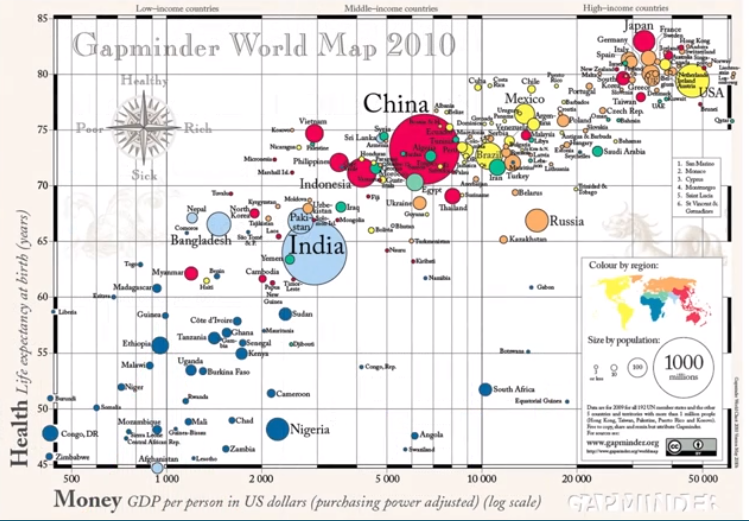
气泡的大小表示人口的多少,横坐标表示人均GDP(美元),纵坐标表示预期寿命。-- 作者:Hans Rosling
Python 中有许许多多用于可视化的包,而 matplotlib 是它们的源头。
我们需要用到的是它的子包 pyplot ,通常它被简写成 plt 导入
1、Line plot
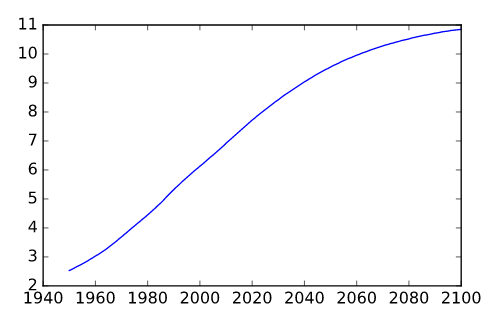
# Print the last item from year and pop

print(year[-1])

print(pop[-1])

# Import matplotlib.pyplot as plt

import matplotlib.pyplot as plt

# Make a line plot: year on the x-axis, pop on the y-axis

plt.plot(year, pop)

# Display the plot with plt.show()

plt.show()
\
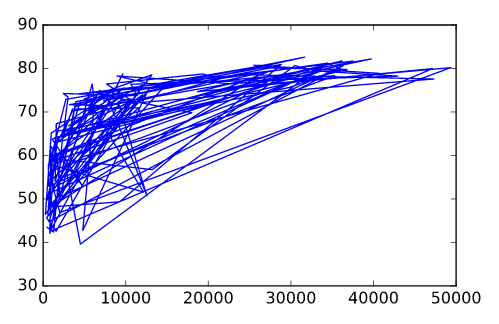
# Print the last item of gdp_cap and life_exp

print(gdp_cap[-1])

print(life_exp[-1])

# Make a line plot, gdp_cap on the x-axis, life_exp on the y-axis

plt.plot(gdp_cap, life_exp)

# Display the plot

plt.show()
2、Scatter Plot
When you have a time scale along the horizontal axis, the line plot is your friend. But in many other cases, when you're trying to assess if there's a correlation between two variables, for example, the scatter plot is the better choice. Below is an example of how to build a scatter plot.
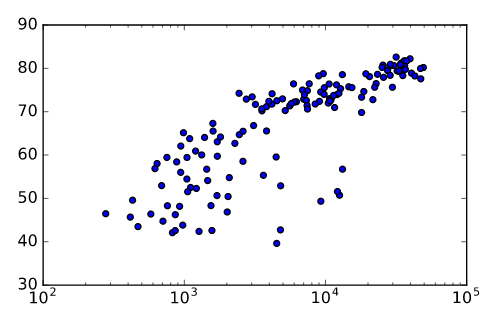
# Change the line plot below to a scatter plot

plt.scatter(gdp_cap, life_exp)

# Put the x-axis on a logarithmic scale

plt.xscale('log')

# Show plot

plt.show()
\
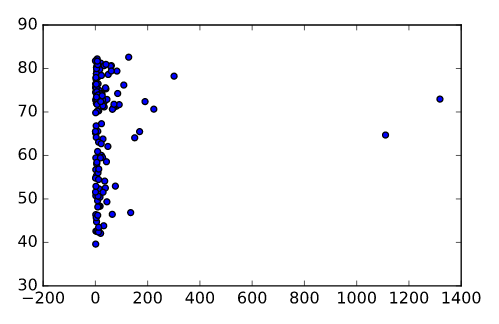
# Import package

import matplotlib.pyplot as plt

# Build Scatter plot

plt.scatter(pop, life_exp)

# Show plot

plt.show()
Python笔记 #09# Basic plots with matplotlib的更多相关文章
- Intermediate Python for Data Science learning 1 - Basic plots with matplotlib
Basic plots with matplotlib from:https://campus.datacamp.com/courses/intermediate-python-for-data-sc ...
- python笔记09
今日内容 三元运算 函数 内容详细 三元运算(三目运算) v = 前面 if 条件 else 后面 if 条件: v = '前面' else: v = '后面' # 让用户输入值,如果值是整数,则转换 ...
- 机器学习实战(Machine Learning in Action)学习笔记————09.利用PCA简化数据
机器学习实战(Machine Learning in Action)学习笔记————09.利用PCA简化数据 关键字:PCA.主成分分析.降维作者:米仓山下时间:2018-11-15机器学习实战(Ma ...
- python笔记之常用模块用法分析
python笔记之常用模块用法分析 内置模块(不用import就可以直接使用) 常用内置函数 help(obj) 在线帮助, obj可是任何类型 callable(obj) 查看一个obj是不是可以像 ...
- python笔记-1(import导入、time/datetime/random/os/sys模块)
python笔记-6(import导入.time/datetime/random/os/sys模块) 一.了解模块导入的基本知识 此部分此处不展开细说import导入,仅写几个点目前的认知即可.其 ...
- s21day25 python笔记
s21day25 python笔记 正则表达式 1.定义 定义:正则表达式是一种规则匹配字符串的规则 re模块本身只是用来操作正则表达式的,和正则本身没关系 为什么要有正则表达式? 匹配字符串 一个人 ...
- Python笔记之不可不练
如果您已经有了一定的Python编程基础,那么本文就是为您的编程能力锦上添花,如果您刚刚开始对Python有一点点兴趣,不怕,Python的重点基础知识已经总结在博文<Python笔记之不可不知 ...
- boost.python笔记
boost.python笔记 标签: boost.python,python, C++ 简介 Boost.python是什么? 它是boost库的一部分,随boost一起安装,用来实现C++和Pyth ...
- 20.Python笔记之SqlAlchemy使用
Date:2016-03-27 Title:20.Python笔记之SqlAlchemy使用 Tags:python Category:Python 作者:刘耀 博客:www.liuyao.me 一. ...
随机推荐
- php和mySQL结合使用
首先,我建立了一个名为class的表,里面有cid,cname,cnum,我想用php代码来实现这一效果,步骤如下: 1.链接数据库 mysqli_set_charset($coon,"ut ...
- Go基础---->go的基础学习(二)
这里记录的是go中函数的一些基础知识.道听途说终是浅,身临其境方知深. go的基础知识 一.go中函数的基础使用 package main import ( "fmt" " ...
- Docker源码分析(三):Docker Daemon启动
1 前言 Docker诞生以来,便引领了轻量级虚拟化容器领域的技术热潮.在这一潮流下,Google.IBM.Redhat等业界翘楚纷纷加入Docker阵营.虽然目前Docker仍然主要基于Linux平 ...
- HTTP/2探索第二篇——工具及应用
版权声明:本文由张浩然原创文章,转载请注明出处: 文章原文链接:https://www.qcloud.com/community/article/88 来源:腾云阁 https://www.qclou ...
- 【Android 7.1.1】 锁屏界面点击“空白处”响应事件
frameworks/base/packages/SystemUI/src/com/android/systemui/statusbar/stack/NotificationStackScrollLa ...
- eui.Button 上放置两张图片
有时按钮会有一个需求.放置一个按钮底图,按钮文字是特效字体,也是一张图. 1 1个普通按钮 <e:Button label="> <e:skinName> < ...
- 微信小程序 --- 登录页面
思路:在个人中心页面,首先判断全局的 app.js 里面的 globalData 里面的 is_login 状态,并且判断 缓存数据中的 is_login 状态,如果都为真,就正常显示,如果有一个为假 ...
- Python爬虫基础(二)urllib2库的get与post方法
urllib2默认只支持HTTP/HTTPS的GET和POST方法 一.Get方式 GET请求一般用于我们向服务器获取数据,比如说,我们用百度搜索,在百度搜索框中搜索“秦时明月”,拿到地址栏里有效ur ...
- Spongebob and Squares---cf599D(数学公式1 + (1+2) + (1+2+3) +....)
题目链接:http://codeforces.com/contest/599/problem/D 一个3×5(m×n)的长方形,里面包含15个边长为1的正方形,有8个边长为2的正方形,有3个边长为3的 ...
- Currency Exchange---poj1860 ( spfa, 回路,最长路)
题目链接:http://poj.org/problem?id=1860 题解: 两种情况YES,一种是存在正权回路: 一种是求最长路后,实现了增值,也是YES: 用spfa来判断是否存在正权回路,其实 ...