
python ConfigParser读取配置文件,及解决报错(去掉BOM)ConfigParser.MissingSectionHeaderError: File contains no section headers的方法
先说一下在读取配置文件时报错的问题--ConfigParser.MissingSectionHeaderError: File contains no section headers
问题描述:
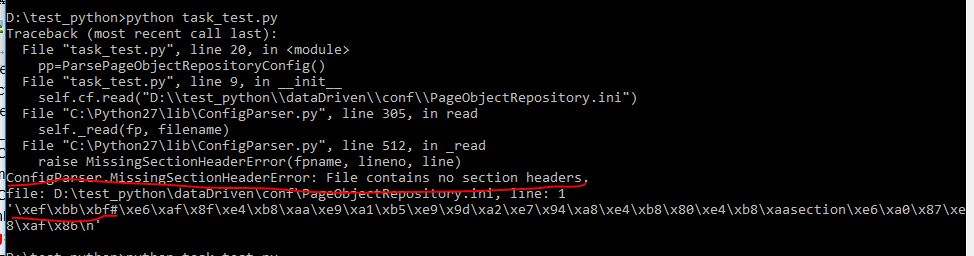
在练习ConfigParser读取配置文件时,cmd一直报一个错:ConfigParser.MissingSectionHeaderError: File contains no section headers.如图:
D:\test_python>python task_test.py
Traceback (most recent call last):
File "task_test.py", line 20, in <module>
pp=ParsePageObjectRepositoryConfig()
File "task_test.py", line 9, in __init__
self.cf.read("D:\\test_python\\dataDriven\\conf\\PageObjectRepository.ini")
File "C:\Python27\lib\ConfigParser.py", line 305, in read
self._read(fp, filename)
File "C:\Python27\lib\ConfigParser.py", line 512, in _read
raise MissingSectionHeaderError(fpname, lineno, line)
ConfigParser.MissingSectionHeaderError: File contains no section headers.
file: D:\test_python\dataDriven\conf\PageObjectRepository.ini, line: 1
'\xef\xbb\xbf#\xe6\xaf\x8f\xe4\xb8\xaa\xe9\xa1\xb5\xe9\x9d\xa2\xe7\x94\xa8\xe4\xb8\x80\xe4\xb8\xaasection\xe6\xa0\x87\xe8\xaf\x86\n'
百度了一下网上的解决方案,
报错是因为配置文件PageObjectRepository.ini在windows下经过notepad编辑后保存为UTF-8或者unicode格式的话,会在文件的开头加上两个字节“\xff\xfe”或者三个字节“\xef\xbb\xbf”。 就是--》BOM, BOM是什么?请看结尾
解决的办法就是在配置文件被读取前,把DOM字节个去掉。
网上也给了一个用正则去掉BOM字节的函数:就是把对应的字节替换成空字符串
remove_BOM()函数定义:
def remove_BOM(config_path):
content = open(config_path).read()
content = re.sub(r"\xfe\xff","", content)
content = re.sub(r"\xff\xfe","", content)
content = re.sub(r"\xef\xbb\xbf","", content)
open(config_path, 'w').write(content)
下面贴一下我的配置文件和读取配置文件的代码--:

代码:
#encoding=utf-8
from ConfigParser import ConfigParser
import re
def remove_BOM(config_path):#去掉配置文件开头的BOM字节
content = open(config_path).read()
content = re.sub(r"\xfe\xff","", content)
content = re.sub(r"\xff\xfe","", content)
content = re.sub(r"\xef\xbb\xbf","", content)
open(config_path, 'w').write(content)
class ParsePageObjectRepositoryConfig(object):
def __init__(self,config_path):
self.cf=ConfigParser()#生成解析器
self.cf.read(config_path)
print "-"*80
print "cf.read(config_path):\n", self.cf.read(config_path)
def getItemsFromSection(self,sectionName):
print self.cf.items(sectionName)
return dict(self.cf.items(sectionName))
def getOptionValue(self,sectionName,optionName):#返回一个字典
return self.cf.get(sectionName,optionName)
if __name__=='__main__':
remove_BOM("D:\\test_python\\PageObjectRepository.ini")
pp=ParsePageObjectRepositoryConfig("D:\\test_python\\PageObjectRepository.ini")
remove_BOM
print "-"*80
print "items of '126mail_login':\n",pp.getItemsFromSection("126mail_login")
print "-"*80
print "value of 'login_page.username' under section '126mail_login':\n",pp.getOptionValue("126mail_login","login_page.username")
结果:
D:\test_python>python task_test.py
--------------------------------------------------------------------------------
cf.read(config_path):
['D:\\test_python\\PageObjectRepository.ini']
--------------------------------------------------------------------------------
items of '126mail_login':
[('login_page.frame', 'id>x-URS-iframe'), ('login_page.username', "xpath>//input[@name='email']"), ('login_page.password', "xpath>//input[@name='password']"), ('login_page.loginbutton', 'id>dologin')]
{'login_page.loginbutton': 'id>dologin', 'login_page.username': "xpath>//input[@name='email']", 'login_page.frame': 'id>x-URS-iframe', 'login_page.password': "xpath>//input[@name='password']"}
--------------------------------------------------------------------------------
value of 'login_page.username' under section '126mail_login':
xpath>//input[@name='email']
BOM概念:
BOM(Byte Order Mark),字节顺序标记,出现在文本文件头部,Unicode编码标准中用于标识文件是采用哪种格式的编码。
UTF-8 不需要 BOM 来表明字节顺序,但可以用 BOM 来表明编码方式。字符 “Zero Width No-Break Space” 的
UTF-8 编码是 EF BB BF。所以如果接收者收到以 EF BB BF 开头的字节流,就知道这是 UTF-8编码了。Windows
就是使用 BOM
来标记文本文件的编码方式的。类似WINDOWS自带的记事本等软件,在保存一个以UTF-8编码的文件时,会在文件开始的地方插入三个不可见的字符(0xEF
0xBB 0xBF,即BOM)。它是一串隐藏的字符,用于让记事本等编辑器识别这个文件是否以UTF-8编码。
从堆栈信息中可以看到UTF8编码的字符有BOM的字符串前边有:\xef\xbb\xbf
'\xef\xbb\xbf#\xe6\xaf\x8f\xe4\xb8\xaa\xe9\xa1\xb5\xe9\x9d\xa2\xe7\x94\xa8\xe4\xb8\x80\xe4\xb8\xaasection\xe6\xa0\x87\xe8\xaf\x86\n'
python ConfigParser读取配置文件,及解决报错(去掉BOM)ConfigParser.MissingSectionHeaderError: File contains no section headers的方法的更多相关文章
- ConfigParser.MissingSectionHeaderError: File contains no section headers.
今天使用ConfigParser解析一个ini文件,报出如下错误: config.read(logFile) File "C:\Python26\lib\ConfigParser.py&qu ...
- python在读取配置文件存入列表中,去掉回车符号
self.receiver = map(lambda x: x.strip(), receiver_list) # 去掉list中的回车符号
- 记一次用python 的ConfigParser读取配置文件编码报错
记一次用python 的ConfigParser读取配置文件编码报错 ...... raise MissingSectionHeaderError(fpname, lineno, line)Confi ...
- ConfigParser读取配置文件时报错:ConfigParser.MissingSectionHeaderError
使用ConfigParser来读取配置文件,经常会发现经过记事本.notepad++修改后的配置文件读取时出现下面的问题: ConfigParser.MissingSectionHeaderError ...
- python之读取配置文件模块configparser(二)参数详解
configparser.ConfigParser参数详解 从configparser的__ini__中可以看到有如下参数: def __init__(self, defaults=None, dic ...
- Python读取CSV文件,报错:UnicodeDecodeError: 'gbk' codec can't decode byte 0xa7 in position 727: illegal multibyte sequence
Python读取CSV文件,报错:UnicodeDecodeError: 'gbk' codec can't decode byte 0xa7 in position 727: illegal mul ...
- python中引入包的时候报错AttributeError: module 'sys' has no attribute 'setdefaultencoding'解决方法?
python中引入包的时候报错:import unittestimport smtplibimport timeimport osimport sysimp.reload(sys)sys.setdef ...
- python中读取配置文件ConfigParser
在程序中使用配置文件来灵活的配置一些参数是一件很常见的事情,配置文件的解析并不复杂,在python里更是如此,在官方发布的库中就包含有做这件事情的库,那就是ConfigParser,这里简单的做一些介 ...
- DB2读取CLOB字段-was报错:操作无效:已关闭 Lob。 ERRORCODE=-4470, SQLSTATE=null
DB2读取CLOB字段-was报错:操作无效:已关闭 Lob. ERRORCODE=-4470, SQLSTATE=null 解决方法,在WAS中要用的数据源里面配置连个定制属性: progressi ...
随机推荐
- jquery 添加可操作,编辑不可操作
--jsp <td class="queryTitle" width="100">优惠券批次号</td> <td class=&q ...
- OpenGL超级宝典总结(二)2D/3D笛卡尔坐标、坐标裁剪、纹理坐标、MVP转换等概念
如果你想把图形渲染在正确的位置上,那么坐标的设置就很重要了.在OpenGL中,与坐标相关的主要有笛卡尔坐标.坐标裁剪.纹理坐标.MVP(Model View Projection)转换. 1.笛卡尔坐 ...
- C++异常 将对象用作异常类型
通常,引发异常的函数将传递一个对象.这样做的重要有点之一是,可以使用不同的异常类型来区分不同的函数在不同情况下引发的异常.另外,对象可以携带信息,程序员可以根据这些信息来确定引发异常的原因.同时,ca ...
- DAG 的最短路径算法
求图中节点的单源最短路径可以使用Dijkstra,BellmanFord, SPFA算法,而对于有向无环图DAG来说,可以通过简单的动态规划来进行求解. DAG的独特之处是所有节点可以线性化( ...
- LeetCode——Count Complete Tree Nodes
Description: Given a complete binary tree, count the number of nodes. In a complete binary tree ever ...
- Hibernate(1)——数据访问层的架构模式<转>
数据库的概念.逻辑.数据模型概念 应用程序的分层体系结构发展 MVC设计模式与四层结构的对应关系 持久层的设计目标 数据映射器架构模式 JDBC的缺点 Hibernate简介 迅速使用Hibernat ...
- JQuery操作Select标签
jQuery获取Select选择的Text和Value: 1. $("#select_id").change(function(){//code...}); //为Select添加 ...
- mysql字符串根据指定字符分割
1.分割函数:SUBSTRING_INDEX('浙江温州-中国电信','-','1') 2.用例(筛选'-'前至少4个汉字的数据) a.数据分布 b.筛选sql select t.mobile_num ...
- 宝塔面板快速开启https服务
最近在做小程序开发,急需要一个https的域名,首先我的域名是阿里云的,服务器是腾讯云的,操作都一样: 无论阿里云还是腾讯云,配置SSL是针对服务器的,所以首先是要去申请 腾讯/阿里云服务器的SSL( ...
- 170703、springboot编程之模板使用(thymeleaf、freemarker)
官方不推荐集成jsp,关于使用jsp模板我这里就不赘述,如果有需要的,请自行百度! thymeleaf的使用 1.在pom中增加thymeleaf支持 <dependency> <g ...