
JS 中屏幕、浏览器和文档的高度、宽度和距离
1、各种对象
window.screen - 屏幕,
window - 窗口,
document.documentElement & document.body.parentNode - 文档,
document.body - 文档的主体。
2、各种属性(单位为px)
屏幕
window.screen.availHeight 屏幕可用高度;
window.screen.availWidth 屏幕可用宽度;
window.screen.height 屏幕总高度 = availHeight + 下方任务栏;
window.screen.width 屏幕总宽度 = availWidth + 右方任务栏(如果存在)。
窗口(浏览器)
window.screenLeft & window.screenX 浏览器左边框到屏幕左侧的水平距离;
window.screenTop & window.screenY 浏览器上边框到屏幕上侧的垂直距离;
window.outerHeight / window.outerWidth 窗口外部大小,即整个浏览器的大小;
window.innerHeight / window.innerWidth 窗口内部大小,即视口viwport的大小,包括水平/垂直滚动条;
window.onresize 事件是在 window.innerHeight / window.innerWidth 改变时触发的;
window.pageXOffset & window.scrollX 文档当前在水平方向上被卷掉的像素数;
window.pageYOffset & window.scrollY 文档当前在垂直方向上被卷掉的像素数。
元素
document.documentElement, document.body.parentNode 和 document.body 这三个元素节点都继承了element对象的多个只读的和可写的高度和宽度属性(“=” 右边加‘CSS’的属性为CSS中的属性):
element.clientHeight = CSS height + CSS padding - height of horizontal scrollbar (if present) 不包括边框,边距和水平滚动条;
element.clientWidth = CSS width + CSS padding - width of vertical scrollbar (if present) 不包括边框,边距和垂直滚动条;
element.clientTop = CSS border-top-width;
element.clientLeft = CSS border-left-width 如果文本方向被设为rtl ,而且左边有垂直滚动条,那么clientLeft包含滚动条宽度,例如:
在CSS中设置文本方向为ltr默认情况:
#rtl{

    width: 100px;

    height: 100px;

    border: 1px solid;

    direction: ltr;

    overflow: auto;

}

在CSS中设置文本方向为 rtl :
#rtl{

    width: 100px;

    height: 100px;

    border: 1px solid;

    direction: rtl;

    overflow: auto;

}
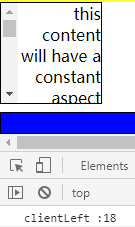
在HTML中设置文本方向:
<div id='rtl' dir="rtl">this content will have a constant aspect ratio that varies based on the width.this content will have a constant aspect ratio that varies based on the width.</div>
可以看到不管是通过CSS还是HTML设置文本方向为rtl,而且同时存在溢出形成滚动条,那么 clientLeft 都会加上滚动条宽度;
element.scrollHeight = clientHeight + 溢出不可见的内容 + 伪元素的高度;
MDN译文:
Element.scrollHeight只读属性是元素内容的高度的度量,包括由于溢出而在屏幕上不可见的内容。 scrollHeight值等于元素所需的最小高度,以便在不使用垂直滚动条的情况下适合视口中的所有内容。高度的测量方式与clientHeight相同:它包含元素的填充,但不包括元素的边框、边距或水平滚动条(如果存在)。它还可以包括伪元素的高度,例如::before和::after。如果元素的内容不需要垂直滚动条就能填满,则其滚动高度等于clientHeight
element.scrollWidth = clientWidth + 溢出不可见的内容 + 伪元素的宽度;
element.scrollTop 获取或设置元素内容向上滚动的像素数;
element.scrollLeft 获取或设置元素内容向左滚动的像素数;
element.offsetHeight = CSS height+ CSS padding + CSS border + 水平滚动条高度(如果存在),不包括伪元素的高度;
MDN:
For the document body object, the measurement includes total linear content height instead of the element's CSS height. Floated elements extending below other linear content are ignored.
element.offsetWidth = CSS width + CSS padding + CSS border + 垂直滚动条宽度(如果存在),不包括伪元素的宽度;
element.offsetTop 只读属性,返回当前元素的左上角相对于offsetParent 节点顶部的距离(可理解为CSS margin-top-width);
element.offsetLeft 只读属性,返回当前元素的左上角相对于offsetParent 节点左侧的距离(可理解为CSS margin-left-width)。
3、一些兼容写法
文档当前在水平方向上被卷掉的像素数,文档当前在垂直方向上被卷掉的像素数。
var y = (window.pageYOffset !== undefined) ? window.pageYOffset : (document.documentElement || document.body.parentNode || document.body).scrollTop,

    x = (window.pageXOffset !== undefined) ? window.pageXOffset : (document.documentElement || document.body.parentNode || document.body).scrollLeft;
4、应用
The following equivalence returns true if an element is at the end of its scroll, false if it isn't.

element.scrollHeight - element.scrollTop === element.clientHeight
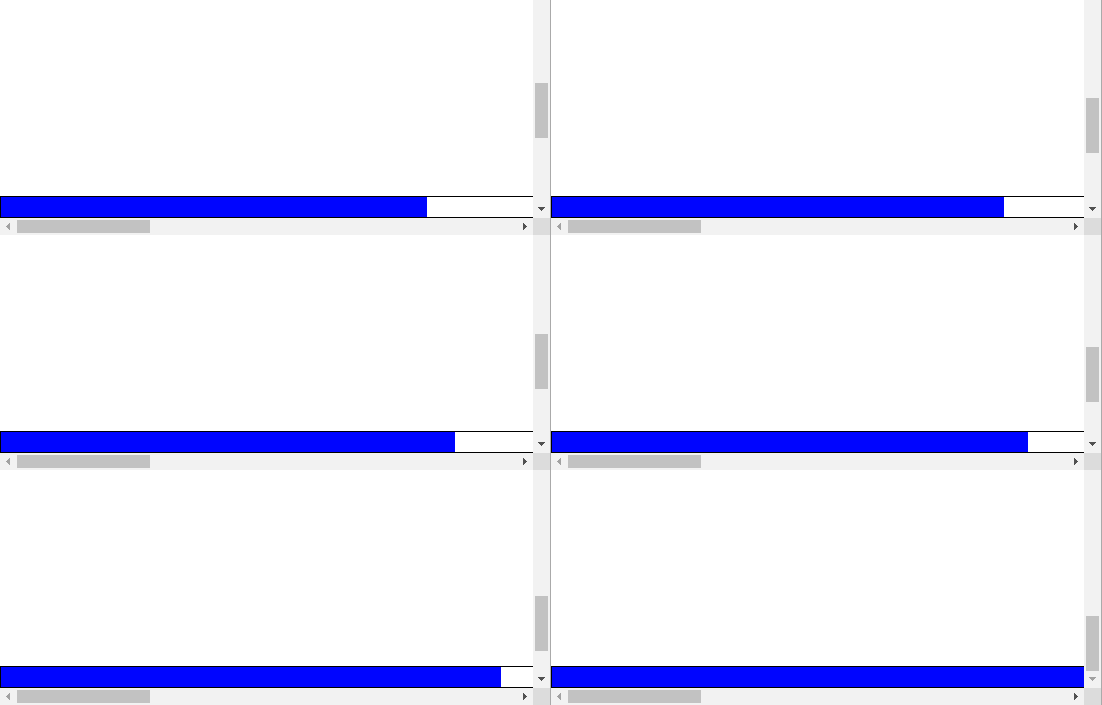
我们可以使用这个等式来判断元素是否滚动到底部。接下来我们尝试实现一个简单的底部进度条:
html:
<!DOCTYPE html>

<html>

<head>

    <meta charset="utf-8" />

    <title>页面底部进度条</title>

    <link type="text/css" rel='stylesheet' href="test.css"></link>

</head>

<body>

    <footer>

        <div id="proress"></div>

    </footer>

    <script src="test.js"></script>

</body>

</html>
css:
body{

    margin:;

    height: 2000px;

    width: 2000px;

}

footer{

    position: fixed;

    width: 100%;

    height: 20px;

    margin:;

    left:;

    bottom:;

    border: 1px solid;

}

#proress{

    background-color: blue;

    width:;

    height: 20px;

}
javaScript:
window.onload = window.onresize = window.onscroll = function(){

    var yScr = (window.pageYOffset !== undefined) ? window.pageYOffset : (document.documentElement || document.body.parentNode || document.body).scrollTop,

        yLkd = yScr + document.documentElement.clientHeight,

        num = yLkd / document.documentElement.scrollHeight * document.documentElement.clientWidth;

    document.getElementById('proress').style.width = num + 'px';

    /*var data = [{'1': yLkd, '2': document.documentElement.scrollHeight,'3': document.documentElement.clientWidth},

    {'1': document.documentElement.clientHeight, '2': document.documentElement.clientWidth},

    {'1': document.documentElement.scrollHeight, '2': document.documentElement.scrollWidth},

    {'1': document.documentElement.offsetHeight, '2': document.documentElement.offsetWidth}];

    console.table(data);

    */

};
(以上代码只在Chrome浏览器测试过)
注意各个属性代表的具体含义,认识它们的区别,然后正确地使用它们,不然最后的结果很可能会出现几十甚至几百像素的误差。
效果:
JS 中屏幕、浏览器和文档的高度、宽度和距离的更多相关文章
- js和jQuery获取各种屏幕或文档的高度和宽度
1.jQuery获取文档或屏幕的高度 console.log($(window).height());//浏览器页面当前屏幕可见区域的高度 console.log($(document).height ...
- JS获取屏幕,浏览器窗口大小,网页高度宽度(实现代码)_javascript技巧_
JS获取屏幕,浏览器窗口大小,网页高度宽度(实现代码)_javascript技巧_--HTML5中文学习网 http://www.html5cn.com.cn/shili/javascripts/79 ...
- HTML 获取屏幕、浏览器、页面的高度宽度
本篇主要介绍Web环境中屏幕.浏览器及页面的高度.宽度信息. 目录 1. 介绍:介绍页面的容器(屏幕.浏览器及页面).物理尺寸与分辨率.展示等内容. 2. 屏幕信息:介绍屏幕尺寸信息:如:屏幕.软件可 ...
- js基础--获取浏览器当前页面的滚动条高度的兼容写法
欢迎访问我的个人博客:http://www.xiaolongwu.cn 前言 在开发中,兼容性问题是最常见的,今天就来介绍一下关于获取滚动条高度的兼容性写法,宽度同理,我在这里就不一一解释了 各浏览器 ...
- js中获取浏览器和屏幕高度
Javascript: IE中: document.body.clientWidth ==> BODY对象宽度 document.body.clientHeight ==> BODY对象高 ...
- 关于JS中获取浏览器高度和宽度值的多种方法(多浏览器)
三种浏览器获取值方法 IE中: document.body.clientWidth ==> BODY对象宽度 document.body.clientHeight ==> BODY对象高度 ...
- js/jquery获取浏览器窗口可视区域高度和宽度以及滚动条高度实现代码
获取浏览器窗口的可视区域高度和宽度,滚动条高度有需要的朋友可参考一下.IE中,浏览器显示窗口大小只能以下获取: 代码如下复制代码 代码如下: document.body.offsetWidth doc ...
- [转] HTML 获取屏幕、浏览器、页面的高度宽度
本篇主要介绍Web环境中屏幕.浏览器及页面的高度.宽度信息. 目录 1. 介绍:介绍页面的容器(屏幕.浏览器及页面).物理尺寸与分辨率.展示等内容. 2. 屏幕信息:介绍屏幕尺寸信息:如:屏幕.软件可 ...
- js中,浏览器中不同元素位置属性解析
offset() 只对可见元素有效,获取匹配元素在当前视口的相对偏移,返回的对象有两个整型属性,top和left,像素计算: position() 相对父元素的偏移,position.left ...
随机推荐
- SpringMVC DELETE,PUT请求报错 添加支持Http的DELETE、PUT请求
SpringMVC删除与修改操作需要用DELETE,PUT请求方式提交. 但要知道浏览器form表单只支持GET与POST请求,而DELETE.PUT等method并不支持. spring3.0添加了 ...
- svn 提交报错post-commit hook failed (exit code 23) with output
svn 提交文件,hook同步更新报权限错误 排查后可能原因是被同步的服务器 selinux 已开启. 查看状态命令:/usr/sbin/sestatus -v #如果SELinux status参 ...
- Node.js 上传图片并保存
Node.js 上传图片并保存 依赖 package.json 文件 { "name": "demo", "version": " ...
- CentOS7.5最小化安装之后的配置
我是最小化安装的,安装了之后很多基本使用配置没有,接下来要做一些配置,如网络之类的,使系统可用. 1.使命令分页显示(1页显示不不下,又不能上翻页) xxx | more 2.查看系统安装了哪些软件包 ...
- Extjs6 编写自己的富文本组件(以ueditor为基础)
一.下载ueditor 地址:http://ueditor.baidu.com/website/ 二.将ueitor资源引入自己的项目 在index.html中引入ueditor.config.js. ...
- 浅谈spj
SPJ(special judge)是个好玩的东西,毕竟各类神奇的题目SPJ经常作为救火工具(比如说一不小心出成验证类的题目). 但SPJ是个坑,毕竟只让用个“testlib.h”,输入还特别奇怪.今 ...
- centos7开机不进入图形界面
centOS7开机不进入图形界面设置和centOS6系列不同的是,不再是直接改文件中的5就可以了. centOS7设置如下: systemctl get-default //获取当前的默认tar ...
- Linux之CentOS7.5安装及克隆
官网下载地址:https://www.centos.org/,点击Get CentOS Now,点击DVD ISO,选择本国资源Actual Country ,一般选择列表中第一行就可以下载. 这里我 ...
- 前端提交表单两种验证方式记录 jq或h5 required属性
JQuery: <form id="form"> <input type="text" name="aaa"> &l ...
- crontab基础笔记 思维导图版
直接上图吧----------------------------------------------------------------------------------------------- ...