
python file
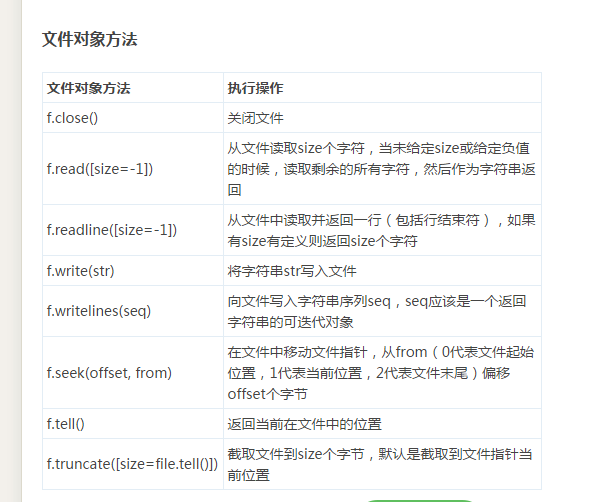
 >>> help(open)

 Help on built-in function open in module __builtin__:

 open(...)

     open(name[, mode[, buffering]]) -> file object

     Open a file using the file() type, returns a file object.  This is the

     preferred way to open a file.  See file.__doc__ for further information.

 >>> f=open('E:\\tmp.txt')

 >>> f

 <open file 'E:\\tmp.txt', mode 'r' at 0x0000000002F84540>

 >>> f.read()

 'nihao\nwozhidao\n\xc4\xb2\xb0\xd8\xd0\xf1\n'

 >>> list(f)

 []

 >>> f.read(5)

 ''

 >>> f.read()

 ''

 >>> f=open("E:\\tmp.txt")

 >>> f.read

 <built-in method read of file object at 0x0000000002F845D0>

 >>> f.read()

 'nihao\nwozhidao\n\xc4\xb2\xb0\xd8\xd0\xf1\n'

 >>> f.read()

 ''

 >>> f=open("E:\\tmp.txt")

 >>> f

 <open file 'E:\\tmp.txt', mode 'r' at 0x0000000002F84540>

 >>> f.read(5)

 'nihao'

 >>> f.seek()

 Traceback (most recent call last):

   File "<pyshell#14>", line 1, in <module>

     f.seek()

 TypeError: seek() takes at least 1 argument (0 given)

 >>> f.tell()

 5L

 >>> lines=list(f)

 >>> for eachLine in lines:

     print eachLine

 wozhidao

 牟柏旭

 >>> f

 <open file 'E:\\tmp.txt', mode 'r' at 0x0000000002F84540>

 >>> f.read()

 ''

 >>> f.seek(0,0)

 >>> f.readline()

 'nihao\n'

 >>> f.seek(0,0)

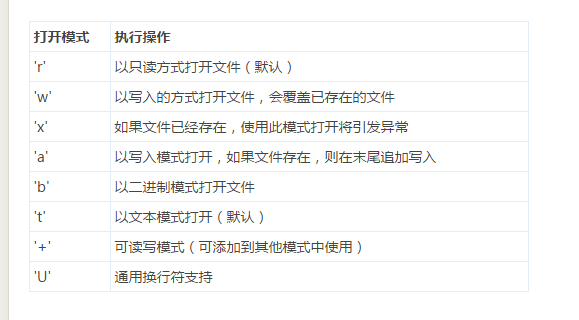
 >>> fw=open('E:\\tmp.txt','w')

 >>> fw.write('let's go')

 SyntaxError: invalid syntax

 >>> fr=open('E:\\tmp1.txt','w')

 >>> fr.write('nihao')

 >>> fr.close()
python file的更多相关文章
- Python File I/O
File is a named location on disk to store related information. It is used to permanently store data ...
- Python - File - 第十八天
Python File(文件) 方法 open() 方法 Python open() 方法用于打开一个文件,并返回文件对象,在对文件进行处理过程都需要使用到这个函数,如果该文件无法被打开,会抛出 OS ...
- [转]python file文件操作--内置对象open
python file文件操作--内置对象open 说明: 1. 函数功能打开一个文件,返回一个文件读写对象,然后可以对文件进行相应读写操作. 2. file参数表示的需要打开文件的相对路径(当前 ...
- Python & file operation mode
Python & file operation mode create/read/write/append mode https://docs.python.org/3/library/fun ...
- [python] File path and system path
1. get files in the current directory with the assum that the directory is like this: a .py |----dat ...
- python file operations
原文地址 总是记不住API.昨晚写的时候用到了这些,但是没记住,于是就索性整理一下吧: python中对文件.文件夹(文件操作函数)的操作需要涉及到os模块和shutil模块. 得到当前工作目录,即当 ...
- python file 文件读写
python 文本对象 继承自C的stdio包 打开 可以用内置的open()函数创建 with open("hello.txt") as f: for line in f: pr ...
- python file模块 替换输入内容脚本
root@python-10:/home/liujianzuo/python/test# ls passwd rc.local test1 root@python-10:/home/liujianzu ...
- python file operation
file.open(name[,mode[,buffering]]) 模式的类型有: r 默认只读 w 以写方式打开,如果文件不存在则会先创建,如果文件存在则先把文件内容清空(truncate ...
- python file文件操作--内置对象open
说明: 1. 函数功能打开一个文件,返回一个文件读写对象,然后可以对文件进行相应读写操作. 2. file参数表示的需要打开文件的相对路径(当前工作目录)或者一个绝对路径,当传入路径不存在此文件会报错 ...
随机推荐
- Spring.net使用说明
使用方法: 1.在配置文件设置Spring.net 节点 在配置节中,声明Spring.net,配置 context,objects 标签,来源(type) <!--配置节:主要用来 配置 a ...
- Linux内核模块开发基础【转】
本文转载自:http://blog.csdn.net/coding__madman/article/details/51298180 1. 什么是内核模块 内核模块具有以下两个特点:1. 模块本身并不 ...
- jquery 停止动画 stop的几种用法
<!DOCTYPE html PUBLIC "-//W3C//DTD XHTML 1.0 Transitional//EN" "http://www.w3.org/ ...
- 兼容firefox的 keyCode
<script language = "javascript"> document.onkeydown=inLogin function inLogin(e) { va ...
- 仿原生app,native特效
为解决手机端wap项目中页面跳转响应慢的问题,基于jquery开发了fr.routeApp.js,使得wap项目拥有原生app的流畅,跳转时亦有native的特效 html部分 <!--定义容器 ...
- [CareerCup] 1.1 Unique Characters of a String 字符串中不同的字符
1.1 Implement an algorithm to determine if a string has all unique characters. What if you cannot us ...
- IIS部署SSL,.crt .key 的证书,怎么部署到IIS,记录一下,以免忘记。
SSL连接作用不说,百度很多.因为最近想考虑重构一些功能,在登录这块有打算弄成HTTPS的,然后百度了,弄成了,就记录一下,以便以后万一部署的时候忘记掉. 做实验的时候,拿的我个人申请的已经备案的域名 ...
- Coding 及 git 的工程使用方法
在过去的两周,同学们除了在学习 C 语言之外,还在学习如何利用 git 将自己的代码上传到 coding 中.也有大量的同学,成功的上传了代码.但是,实际上大部分同学的用法都不合理.这里,以一 ...
- .Net Core Linux centos7行—安装nginx,运行静态网站
使用编译安装方式安装nginx Nginx下载地址:http://nginx.org/en/download.html.下载Stable version(稳定版就好).当前稳定版:http://ngi ...
- Zabbix监控nginx-rtmp status(html版)
nginx-rtmp开启stats # nginx(--add-module=nginx-rtmp-module-master) nginx.conf: server { listen ; locat ...