
Spring Cloud(九)高可用的分布式配置中心 Spring Cloud Config 集成 Eureka 服务
上一篇文章,讲了SpringCloudConfig 集成Git仓库,这一篇我们讲一下SpringCloudConfig 配和 Eureka 注册中心一起使用
在分布式系统中,由于服务数量巨多,为了方便服务配置文件统一管理,实时更新,所以需要分布式配置中心组件。在Spring Cloud中,有分布式配置中心组件spring cloud config ,它支持配置服务放在配置服务的内存中(即本地),也支持放在远程Git仓库中。在spring cloud config 组件中,分两个角色,一是config server,二是config client,业界也有些知名的同类开源产品,比如百度的disconf。
相比较同类产品,SpringCloudConfig最大的优势是和Spring无缝集成,支持Spring里面Environment和PropertySource的接口,对于已有的pring应用程序的迁移成本非常低,在配置获取的接口上是完全一致,结合SpringBoot可使你的项目有更加统一的标准(包括依赖版本和约束规范),避免了应为集成不同开软件源造成的依赖版本冲突。
准备工作
我们先拿之前的代码为基础,进行下面的操作
Spring Cloud(四) 服务提供者 Eureka + 服务消费者 Feign
http://www.ymq.io/2017/12/06/spring-cloud-feign/
Eureka Service
导入第四篇文章中的项目:作为服务注册中心
spring-cloud-eureka-service
Eureka Provider
导入第四篇文章中的项目:作为服务的提供者
spring-cloud-eureka-provider-1spring-cloud-eureka-provider-2spring-cloud-eureka-provider-3
Eureka Consumer
导入第四篇文章中的项目:作为服务的消费者
spring-cloud-feign-consumer
服务端配置
Config Server
复制上一篇的项目 spring-cloud-config-server,添加 eureka依赖
https://github.com/souyunku/spring-cloud-examples/tree/master/spring-cloud-config/
添加依赖
<dependency>

    <groupId>org.springframework.cloud</groupId>

    <artifactId>spring-cloud-starter-eureka</artifactId>

</dependency>
开启服务注册
在程序的启动类 ConfigServerApplication.java 通过 @EnableEurekaClient 开启 Eureka 提供者服务
package io.ymq.example.config.server;

import org.springframework.boot.SpringApplication;

import org.springframework.boot.autoconfigure.SpringBootApplication;

import org.springframework.cloud.config.server.EnableConfigServer;

import org.springframework.cloud.netflix.eureka.EnableEurekaClient;

@EnableConfigServer

@EnableEurekaClient

@SpringBootApplication

public class ConfigServerApplication {

    public static void main(String[] args) {

        SpringApplication.run(ConfigServerApplication.class, args);

    }

}
修改配置
修改配置文件 application.properties ,添加 eureka 注册中心地址 http://localhost:8761/eureka/
spring.application.name=config-server

server.port=8888

spring.cloud.config.label=master

spring.cloud.config.server.git.uri=https://github.com/souyunku/spring-cloud-config.git

spring.cloud.config.server.git.search-paths=spring-cloud-config

#spring.cloud.config.server.git.username=your username

#spring.cloud.config.server.git.password=your password

eureka.client.serviceUrl.defaultZone=http://localhost:8761/eureka/

spring.cloud.config.server.git.uri:配置git仓库地址

spring.cloud.config.server.git.searchPaths:配置仓库路径

spring.cloud.config.label:配置仓库的分支

spring.cloud.config.server.git.username:访问git仓库的用户名

spring.cloud.config.server.git.password:访问git仓库的用户密码

eureka.client.serviceUrl.defaultZone:eureka注册中心地址
Git仓库如果是私有仓库需要填写用户名密码,示例是公开仓库,所以不配置密码。
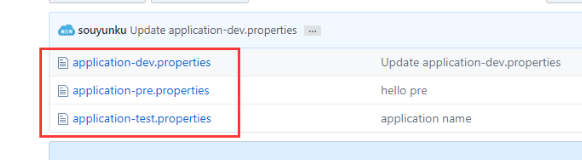
远程Git仓库
spring-cloud-config 文件夹下有 application-dev.properties,application-test.properties 三个文件,内容依次是:content=hello dev,content=hello test,content=hello pre
测试服务
启动程序 ConfigServerApplication 类
访问 Config Server 服务:http://localhost:8888/springCloudConfig/dev/master
{

    "name": "springCloudConfig",

    "profiles": [

        "dev"

    ],

    "label": "master",

    "version": "b6fbc2f77d1ead41d5668450e2601a03195eaf16",

    "state": null,

    "propertySources": [

        {

            "name": "https://github.com/souyunku/spring-cloud-config.git/application-dev.properties",

            "source": {

                "content": "hello dev"

            }

        }

    ]

}
证明配置服务中心可以从远程程序获取配置信息。
http请求地址和资源文件映射如下:
/{application}/{profile}[/{label}]

/{application}-{profile}.yml

/{label}/{application}-{profile}.yml

/{application}-{profile}.properties

/{label}/{application}-{profile}.properties
客户端端配置
config Client Eureka
修改已经导入的,第四篇文章中的项目:配置客户端的一些配置
spring-cloud-eureka-provider-1spring-cloud-eureka-provider-2spring-cloud-eureka-provider-3
添加依赖
<dependency>

    <groupId>org.springframework.cloud</groupId>

    <artifactId>spring-cloud-config-client</artifactId>

</dependency>
开启服务注册
在程序的启动类 EurekaProviderApplication ,通过 @Value 获取服务端的 content 值的内容
package io.ymq.example.eureka.provider;

import org.springframework.beans.factory.annotation.Value;

import org.springframework.boot.SpringApplication;

import org.springframework.boot.autoconfigure.SpringBootApplication;

import org.springframework.cloud.netflix.eureka.EnableEurekaClient;

import org.springframework.web.bind.annotation.RequestMapping;

import org.springframework.web.bind.annotation.RestController;

@SpringBootApplication

@EnableEurekaClient

@RestController

public class EurekaProviderApplication {

    @Value("${content}")

    String content;

    @Value("${server.port}")

    String port;

    @RequestMapping("/")

    public String home() {

        return "Hello world ,port:" + port+",content="+content;

    }

    public static void main(String[] args) {

        SpringApplication.run(EurekaProviderApplication.class, args);

    }

}
添加配置
修改配置文件 application.properties 添加 Eureka 注册中心,配置从springCloudConfig 配置中心读取配置,指定springCloudConfigService 服务名称
spring.application.name=eureka-provider

server.port=8081

spring.cloud.config.label=master

spring.cloud.config.profile=dev

#spring.cloud.config.uri=http://localhost:8888/

eureka.client.serviceUrl.defaultZone=http://localhost:8761/eureka/

spring.cloud.config.discovery.enabled=true

spring.cloud.config.discovery.serviceId=config-server
spring.cloud.config.label 指明远程仓库的分支

spring.cloud.config.profile

dev开发环境配置文件

test测试环境

pro正式环境

#spring.cloud.config.uri= http://localhost:8888/ 指明配置服务中心的网址(注释掉)

spring.cloud.config.discovery.enabled=true 是从配置中心读取文件。

spring.cloud.config.discovery.serviceId=config-server 配置中心的servieId,服务名称,通过服务名称去 Eureka注册中心找服务
测试服务
依次启动项目:
spring-cloud-eureka-servicespring-cloud-config-serverspring-cloud-eureka-provider-1spring-cloud-eureka-provider-2spring-cloud-eureka-provider-3spring-cloud-feign-consumer
启动该工程后,访问服务注册中心,查看服务是否都已注册成功:http://localhost:8761/
在浏览器访问http://127.0.0.1:9000/hello
修改了Git仓库的配置后,需要重启服务,才可以得到最新的配置,下一篇讲怎么解决配置的更新
Spring Cloud(九)高可用的分布式配置中心 Spring Cloud Config 集成 Eureka 服务的更多相关文章
- springCloud学习-高可用的分布式配置中心(Spring Cloud Config)
1.简介 高可用的分布式配置中心,即将配置中心做成一个微服务,将其集群化,从而达到高可用.config-server和config-client向eureka-server注册,且将config-se ...
- Spring Cloud(八)高可用的分布式配置中心 Spring Cloud Config
在分布式系统中,由于服务数量巨多,为了方便服务配置文件统一管理,实时更新,所以需要分布式配置中心组件.在Spring Cloud中,有分布式配置中心组件spring cloud config,它支持配 ...
- 【SpringCloud】第七篇: 高可用的分布式配置中心(Spring Cloud Config)
前言: 必需学会SpringBoot基础知识 简介: spring cloud 为开发人员提供了快速构建分布式系统的一些工具,包括配置管理.服务发现.断路器.路由.微代理.事件总线.全局锁.决策竞选. ...
- 史上最简单的SpringCloud教程 | 第七篇: 高可用的分布式配置中心(Spring Cloud Config)
上一篇文章讲述了一个服务如何从配置中心读取文件,配置中心如何从远程git读取配置文件,当服务实例很多时,都从配置中心读取文件,这时可以考虑将配置中心做成一个微服务,将其集群化,从而达到高可用,架构图如 ...
- SpringCloud教程 | 第七篇: 高可用的分布式配置中心(Spring Cloud Config)(Finchley版本)
上一篇文章讲述了一个服务如何从配置中心读取文件,配置中心如何从远程git读取配置文件,当服务实例很多时,都从配置中心读取文件,这时可以考虑将配置中心做成一个微服务,将其集群化,从而达到高可用,架构图如 ...
- SpringCloud教程 | 第七篇: 高可用的分布式配置中心(Spring Cloud Config)
版权声明:本文为博主原创文章,欢迎转载,转载请注明作者.原文超链接 ,博主地址:http://blog.csdn.net/forezp. http://blog.csdn.net/forezp/art ...
- Spring Cloud(十一)高可用的分布式配置中心 Spring Cloud Bus 消息总线集成(RabbitMQ)
详见:https://www.w3cschool.cn/spring_cloud/spring_cloud-jl8a2ixp.html 上一篇文章,留了一个悬念,Config Client 实现配置的 ...
- SpringCloud学习(七)高可用的分布式配置中心(Spring Cloud Config)(Finchley版本)
上一篇文章讲述了一个服务如何从配置中心读取文件,配置中心如何从远程git读取配置文件,当服务实例很多时,都从配置中心读取文件,这时可以考虑将配置中心做成一个微服务,将其集群化,从而达到高可用 准备工作 ...
- Spring Cloud(十)高可用的分布式配置中心 Spring Cloud Config 中使用 Refresh
上一篇文章讲了SpringCloudConfig 集成Git仓库,配和 Eureka 注册中心一起使用,但是我们会发现,修改了Git仓库的配置后,需要重启服务,才可以得到最新的配置,这一篇我们尝试使用 ...
随机推荐
- python封装和解构
封装 将多个值使用逗号分割,组合在一起 本质上,返回一个元组,只是省略了小括号 python的特有的语法,被很多语言学习借鉴 t1 = (1,2) #定义元组 t2 = 1,2 #将1和2封装成元组 ...
- js模块化编程之彻底弄懂CommonJS和AMD/CMD
转自 http://www.cnblogs.com/chenguangliang/p/5856701.html
- 在先电IAAS平台中,搭建先电bigdata平台
以两台节点为例来组件Hadoop分布式集群,这里采用的系统版本为Centos7,如下表所示: 主机名 内存 硬盘 IP地址 角色 master 8192MB 100G 192.168.200.131 ...
- gradle中 使用lombok
plugins { id 'java' id "io.franzbecker.gradle-lombok" version "3.1.0" ...
- poj2947(高斯消元法解同余方程组)
题目链接:https://vjudge.net/problem/POJ-2065 题意:题目看着较复杂,实际上就是给了n个同余方程,解n个未知数. 思路:套高斯消元法的模板即可. AC代码: #inc ...
- 配置了Ubuntu环境变量,系统启动不了
修改了etc/init.d/rcS文件后重启后Ubuntu起不来了, 开启按shift+e或者直接选择,进入恢复模式 进入root shell 执行这个命令 可以有写入权限,重新挂载 mount - ...
- oracle共享数据库操作
Hello,大家好,这个功能相信新手小白很需要,今天小编因为刚好遇到,所以写出来分享给大家,首先你电脑得有数据库,以及PLSQL工具包,这个相信大家都有了 1.打开NET Manger应用,win10 ...
- Mac命令行启动关闭Tomcat
在Tomcat目录的bin目录下执行sh startup.sh或./startup.sh命名启动Tomcat,执行sh shutdown.sh或./shutdown.sh命令关闭Tomcat 浏览器输 ...
- 二维状压DP经典题
炮兵阵地 题目链接 题目大意:在n*m的地图上放置炮兵,每个炮兵的攻击范围是上下左右两格内,有两种不同的地形,山地(用"H" 表示),平原(用"P"表示),只有 ...
- shell如果文件夹不存在则创建
#!/bin/bash build_dir="build" if [ ! -d "$build_dir" ]; then mkdir $build_dir fi ...