
SpringBoot开发
创建一个Spring Boot,可以直接使用构建工具(Maven或Gradle)创建,也可以使用spring.io网站创建,一般会选择使用spring.io创建
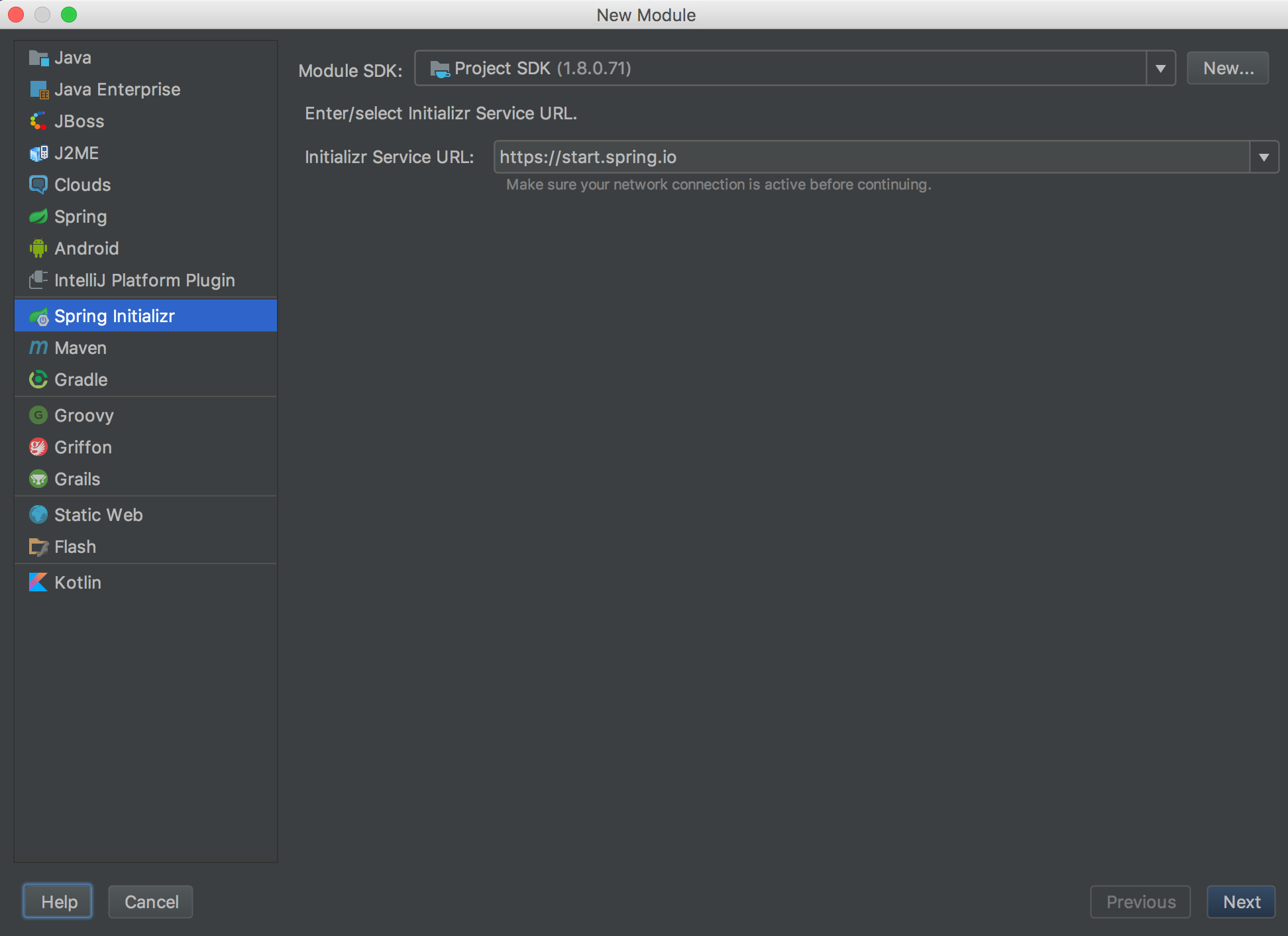
使用IDEA创建一个Spring Boot项目过程如下
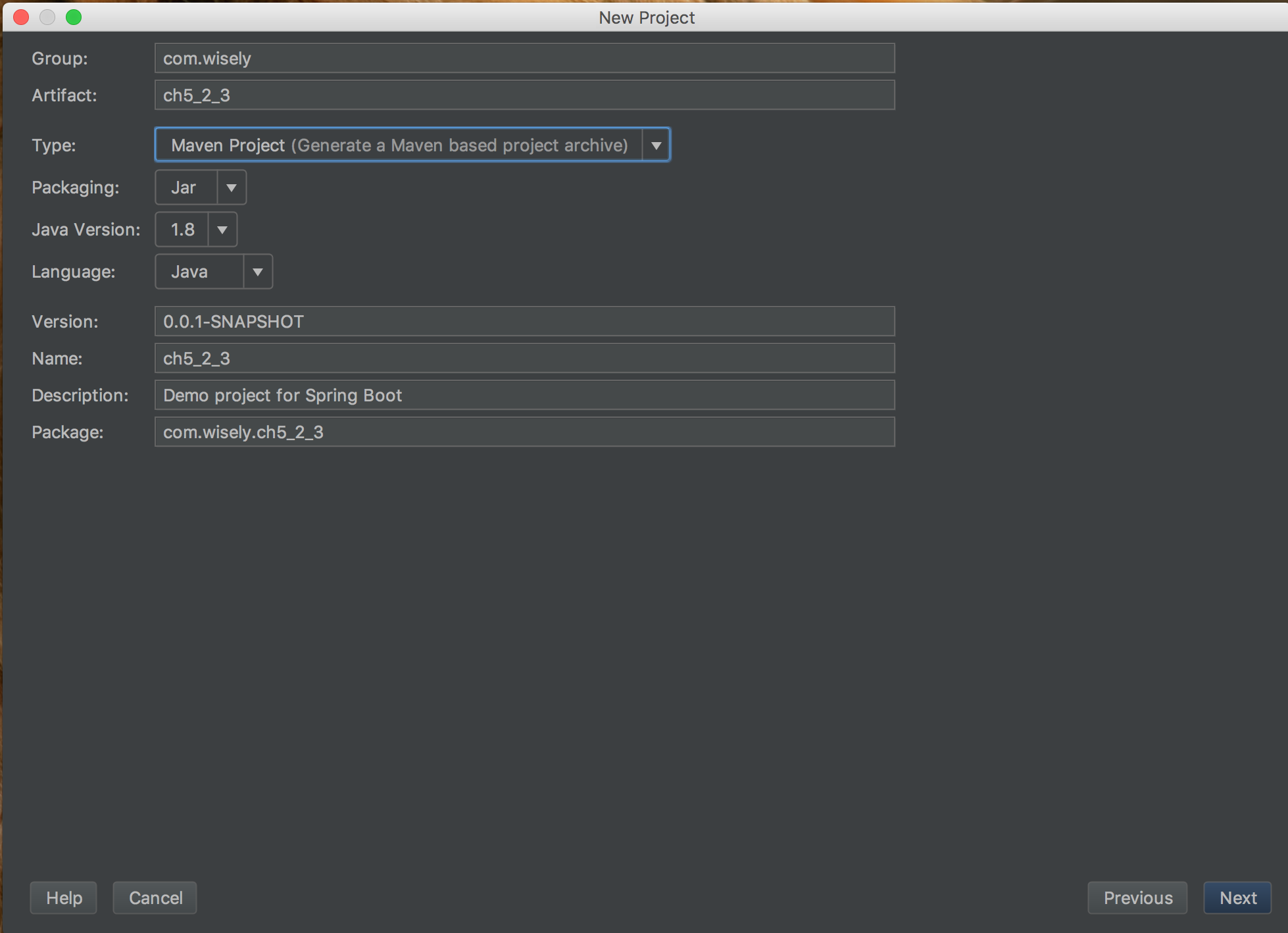
填写合适的项目信息
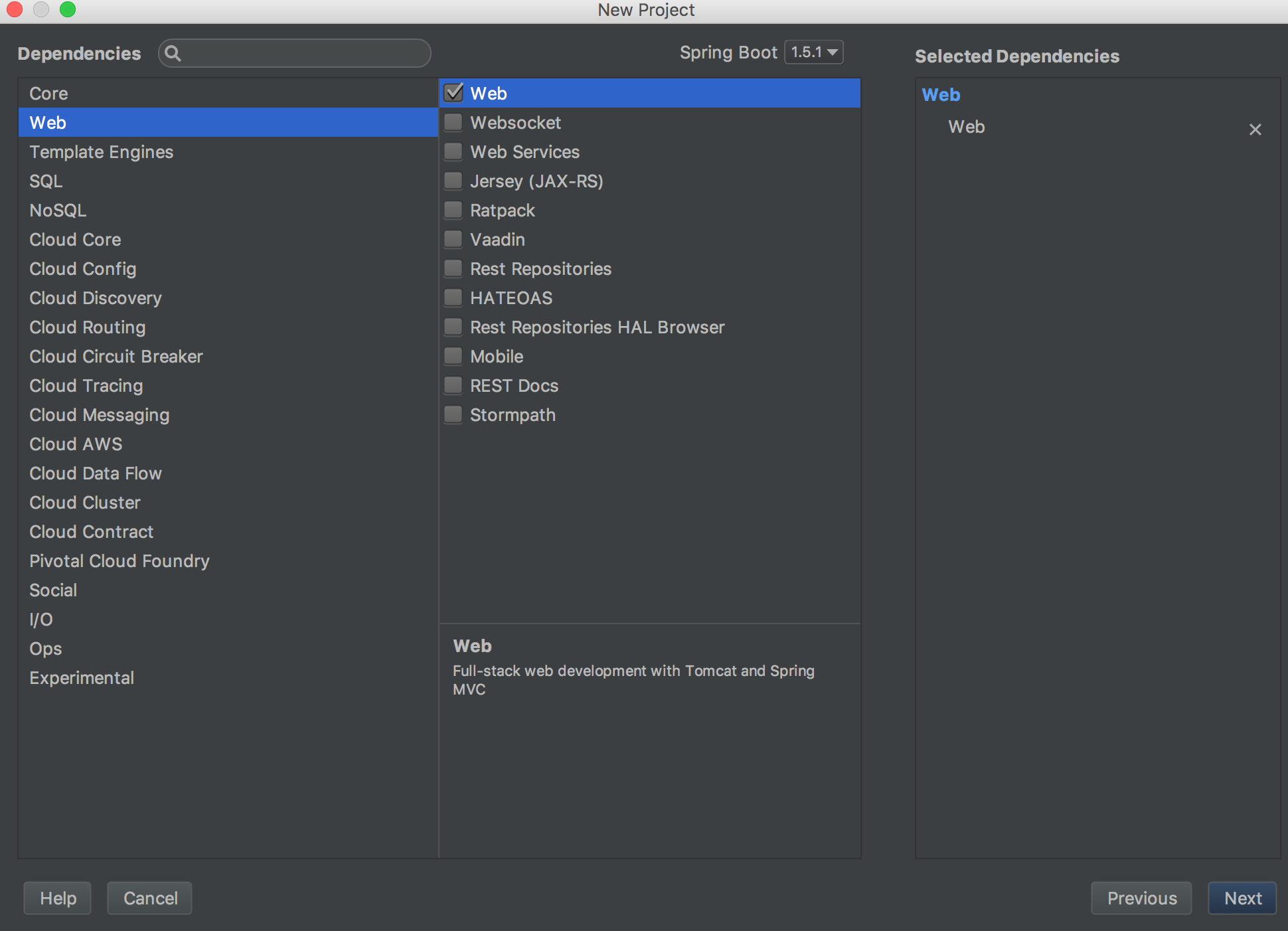
选择Spring Boot需要支持的模块
pom.xml
<?xml version="1.0" encoding="UTF-8"?>
<project xmlns="http://maven.apache.org/POM/4.0.0"
         xmlns:xsi="http://www.w3.org/2001/XMLSchema-instance"
         xsi:schemaLocation="http://maven.apache.org/POM/4.0.0 http://maven.apache.org/xsd/maven-4.0.0.xsd">
    <modelVersion>4.0.0</modelVersion>

    <groupId>com.zln.sb</groupId>
    <artifactId>sb-helloworld</artifactId>
    <version>1.0-SNAPSHOT</version>

    <parent>
        <groupId>org.springframework.boot</groupId>
        <artifactId>spring-boot-starter-parent</artifactId>
        <version>1.5.1.RELEASE</version>
        <relativePath/>
    </parent>

    <properties>
        <project.build.sourceEncoding>UTF-8</project.build.sourceEncoding>
        <project.reporting.outputEncoding>UTF-8</project.reporting.outputEncoding>
        <java.version>1.8</java.version>
    </properties>
    <dependencies>
        <dependency>
            <groupId>org.springframework.boot</groupId>
            <artifactId>spring-boot-starter-web</artifactId>
        </dependency>
        <dependency>
            <groupId>org.springframework.boot</groupId>
            <artifactId>spring-boot-starter-test</artifactId>
            <scope>test</scope>
        </dependency>
    </dependencies>
    <build>
        <plugins>
            <plugin>
                <groupId>org.springframework.boot</groupId>
                <artifactId>spring-boot-maven-plugin</artifactId>
                <configuration>
                    <fork>true</fork>
                </configuration>
            </plugin>
        </plugins>
    </build>

</project>

启动类
package com.zln.sb;

import org.springframework.boot.SpringApplication;
import org.springframework.boot.autoconfigure.SpringBootApplication;

/**
 * Created by sherry on 17/2/20.
 */

@SpringBootApplication
public class SbApplication {
    public static void main(String[] args) {
        SpringApplication.run(SbApplication.class, args);
    }
}

HelloWorld控制器
package com.zln.sb.c;

import org.slf4j.Logger;
import org.slf4j.LoggerFactory;
import org.springframework.web.bind.annotation.RequestMapping;
import org.springframework.web.bind.annotation.RestController;

/**
 * Created by sherry on 17/2/20.
 */
@RestController
public class HelloWorld {

    /**
     * 日志
     */
    private Logger logger = LoggerFactory.getLogger(HelloWorld.class);

    @RequestMapping("/")
    public String helloworld(){
        return "Hello World 呵呵";
    }

}

启动SbApplication后,直接在浏览器输入 http://localhost:8080,出现

HelloWorld创建完毕
详细教程请从以下地址下载,里面包含源码 https://w.url.cn/s/Azbqjkj
SpringBoot开发的更多相关文章
- 基于SpringBoot开发一个Restful服务,实现增删改查功能
前言 在去年的时候,在各种渠道中略微的了解了SpringBoot,在开发web项目的时候是如何的方便.快捷.但是当时并没有认真的去学习下,毕竟感觉自己在Struts和SpringMVC都用得不太熟练. ...
- SpringBoot开发案例之多任务并行+线程池处理
前言 前几篇文章着重介绍了后端服务数据库和多线程并行处理优化,并示例了改造前后的伪代码逻辑.当然了,优化是无止境的,前人栽树后人乘凉.作为我们开发者来说,既然站在了巨人的肩膀上,就要写出更加优化的程序 ...
- SpringBoot开发案例从0到1构建分布式秒杀系统
前言 最近,被推送了不少秒杀架构的文章,忙里偷闲自己也总结了一下互联网平台秒杀架构设计,当然也借鉴了不少同学的思路.俗话说,脱离案例讲架构都是耍流氓,最终使用SpringBoot模拟实现了部分秒杀场 ...
- 记一次SpringBoot 开发中所遇到的坑和解决方法
记一次SpringBoot 开发中所遇到的坑和解决方法 mybatis返回Integer为0,自动转型出现空指针异常 当我们使用Integer去接受数据库中表的数据,如果返回的数据中为0,那么Inte ...
- SpringBoot系列四:SpringBoot开发(改变环境属性、读取资源文件、Bean 配置、模版渲染、profile 配置)
声明:本文来源于MLDN培训视频的课堂笔记,写在这里只是为了方便查阅. 1.概念 SpringBoot 开发深入 2.具体内容 在之前已经基本上了解了整个 SpringBoot 运行机制,但是也需要清 ...
- SpringBoot开发(改变环境属性、读取资源文件、Bean 配置、模版渲染、profile 配置)
1.概念 SpringBoot 开发深入 2.具体内容 在之前已经基本上了解了整个 SpringBoot 运行机制,但是也需要清楚的认识到以下的问题,在实际的项目开发之中,尤其是 Java 的 MVC ...
- 我的spring-boot开发环境
我的spring-boot开发环境,目的方便我快速搭建开发环境,同时可以最佳实践.使用spring-boot 2.1.x. 代码地址:GitHub my-springboot-examples 目的是 ...
- springboot项目--传入参数校验-----SpringBoot开发详解(五)--Controller接收参数以及参数校验----https://blog.csdn.net/qq_31001665/article/details/71075743
https://blog.csdn.net/qq_31001665/article/details/71075743 springboot项目--传入参数校验-----SpringBoot开发详解(五 ...
- SpringBoot开发mockserver及生成swagger接口文档
通过springboot开发mock server,包含get及post接口,用于练习接口自动化及jmeter很方便 当然,也为后面jenkins持续集成做基础(开发push代码后 → jenkin ...
- (二)SpringBoot之springboot开发工具的使用以及springboot插件的功能
一.springboot开发工具的使用 1.1 在项目中添加springoot开发工具 1.2 功能 修改代码后点击保存自动重启 二.springboot插件的功能 2.1 maven配置 <p ...
随机推荐
- [GXOI/GZOI2019]特技飞行
题目链接 [https://www.luogu.org/problem/P5302] 思路:这道题可以说是两道题的合并.注意到\(c\)的分数与 \(a\)和\(b\)的分数 无关,也就是说可以分成两 ...
- 为什么深度(Ubuntu)Linux挂载NTFS分区只读不可写?
如前所述,经扩展,Dell Vostro 1520笔记本电脑拥有了两块硬盘. 本着旧物利用的心思,在其中一块256GiB固态盘上安装了深度linux,同时挂载另一块2TiB机械盘作为存储盘. 这块 ...
- 数据库学习之六--事务(Transaction)
一.定义 事务是指访问并可能更新数据库中各种数据项的一个程序执行单元(unit). 规则: 1. 用形如begin transaction和end transaction语句来界定 2. 由事务开始和 ...
- ROS参数服务器(Parameter Server)
操作演示,对参数服务器的理解:点击打开链接 rosparam使得我们能够存储并操作ROS 参数服务器(Parameter Server)上的数据.参数服务器能够存储整型.浮点.布尔.字符串.字典和列表 ...
- 解决Navicat无法连接到centos上的MySQL,但命令行可以,修改权限,MySQL密码权限受限:ERROR 1820 (HY000) ERROR 1819 (HY000)
问题分析 查看MySQL文档发现5.7版本后加入了对用户密码严格的管理规范,具体设置字段如下: validate_password_dictionary_file #插件用于验证密码强度的字典文件路径 ...
- Python的is和==
is是对比地址:==是对比值
- 数据结构Java版之排序算法(二)
排序按时间复杂度和空间复杂度可分为 低级排序 和 高级排序 算法两种.下面将对排序算法进行讲解,以及样例的展示. 低级排序:冒泡排序.选择排序.插入排序. 冒泡排序: 核心思想,小的数往前移.假设最小 ...
- Go by Example-Switch分支结构
上一节提到了Go语言中的if/else结构,但是条件过多的时候就不适合用if语句了,这个时候我们就可以使用switch语句了. 基本特性 switch 是一个条件语句,用于将一个表达式的求值结果与可能 ...
- CentOS定时运行脚本
1,新增脚本 如: vim /usr/local/crontab/clear_tomcat_log.sh 2, 修改权限 chomd 700 clear_tomcat_log.sh 3,调度任务: ...
- redis之为什么redis是单线程?
官方FAQ表示,因为Redis是基于内存的操作,CPU不是Redis的瓶颈,Redis的瓶颈最有可能是机器内存的大小或者网络带宽.既然单线程容易实现,而且CPU不会成为瓶颈,那就顺理成章地采用单线程的 ...