
Android MVC MVP MVVM (一)
示例效果
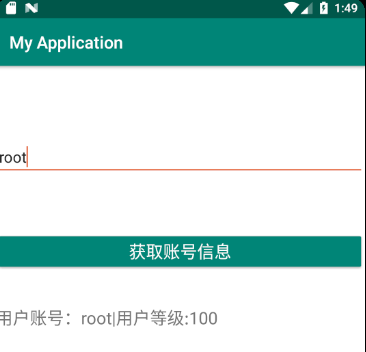
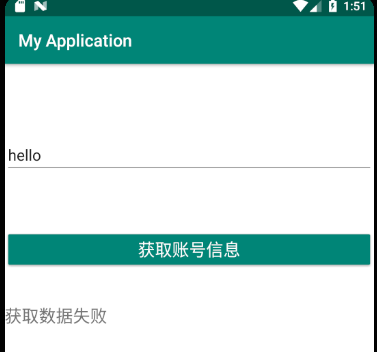
一共三个控件,EditText,Button,TextView
成功显示账号信息,查询失败显示错误信息。
<?xml version="1.0" encoding="utf-8"?>

<androidx.constraintlayout.widget.ConstraintLayout xmlns:android="http://schemas.android.com/apk/res/android"

    xmlns:app="http://schemas.android.com/apk/res-auto"

    xmlns:tools="http://schemas.android.com/tools"

    android:layout_width="match_parent"

    android:layout_height="match_parent"

    android:background="@color/pureWhite">

    <Button

        android:id="@+id/btnQuery"

        android:layout_width="0dp"

        android:layout_height="wrap_content"

        android:layout_marginTop="64dp"

        android:text="获取账号信息"

        android:textColor="@color/pureWhite"

        android:textSize="20dp"

        android:onClick="ButtonClick"

        android:theme="@style/GenericButtonStyle"

        app:layout_constraintEnd_toEndOf="parent"

        app:layout_constraintStart_toStartOf="parent"

        app:layout_constraintTop_toBottomOf="@+id/etAccount" />

    <EditText

        android:id="@+id/etAccount"

        android:layout_width="0dp"

        android:layout_height="wrap_content"

        android:layout_marginTop="84dp"

        android:ems="10"

        android:hint="输入账号"

        android:inputType="textPersonName"

        app:layout_constraintEnd_toEndOf="parent"

        app:layout_constraintHorizontal_bias="0.0"

        app:layout_constraintStart_toStartOf="parent"

        app:layout_constraintTop_toTopOf="parent"

        tools:text="Name" />

    <TextView

        android:id="@+id/tvResult"

        android:layout_width="0dp"

        android:layout_height="30dp"

        android:layout_marginTop="40dp"

        tools:text="查询结果"

        android:textSize="20sp"

        app:layout_constraintEnd_toEndOf="parent"

        app:layout_constraintStart_toStartOf="parent"

        app:layout_constraintTop_toBottomOf="@+id/btnQuery" />

</androidx.constraintlayout.widget.ConstraintLayout>
主界面代码
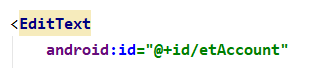
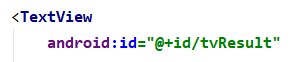
控件关键信息


注意:为了简化,这里查询数据库用的是模拟操作,随机成功或者失败。
不使用任何框架的传统做法
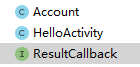
新建用户信息类Account和回调接口
public class Account {

    private String name;

    private  int level;
public interface ResultCallback {

    void onSuccess(Account account);

    void onFailure();

}
Activity中的代码
public class HelloActivity extends AppCompatActivity {

    private TextView tvResult;

    private EditText etAccount;

    @Override

    public void onCreate(Bundle savedInstanceState) {

        super.onCreate(savedInstanceState);

        setContentView(R.layout.test);

        tvResult = findViewById(R.id.tvResult);

        etAccount = findViewById(R.id.etAccount);

    }

    public void ButtonClick(View view) {

        String userInput=getUserInput();

        getAccountData(userInput, new ResultCallback() {

            @Override

            public void onSuccess(Account account) {

                showSuccessPage(account);

            }

            @Override

            public void onFailure() {

                showFailurePage();

            }

        });

    }

    private String getUserInput() {

        return etAccount.getText().toString();

    }

    private void showSuccessPage(Account account) {

        tvResult.setText("用户账号:"+account.getName()+"|"+

                "用户等级:"+account.getLevel());

    }

    private void showFailurePage() {

        tvResult.setText("获取数据失败");

    }

    private void getAccountData(String accountName, ResultCallback cb) {

        Random random=new Random();

        boolean isSuccess=random.nextBoolean();

        if (isSuccess) {

            Account account = new Account();

            account.setName(accountName);

            account.setLevel(100);

            cb.onSuccess(account);

        } else {

            cb.onFailure();

        }

    }

}
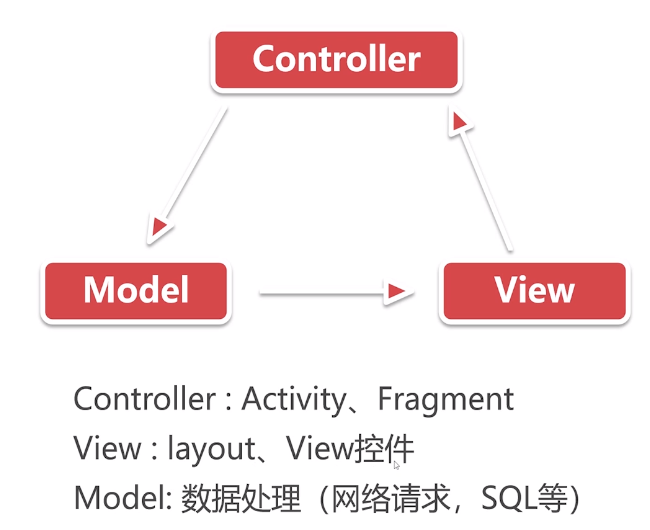
MVC


Account和ResultCallback同上
MVCModel代码
public class MVCModel {

    public void getAccountData(String accountName, ResultCallback cb) {

        Random random=new Random();

        boolean isSuccess=random.nextBoolean();

        if (isSuccess) {

            Account account = new Account();

            account.setName(accountName);

            account.setLevel(100);

            cb.onSuccess(account);

        } else {

            cb.onFailure();

        }

    }

}
MVCActivity代码
public class MVCActivity extends AppCompatActivity {

    private TextView tvResult;

    private EditText etAccount;

    private MVCModel model;

    @Override

    public void onCreate(Bundle savedInstanceState) {

        super.onCreate(savedInstanceState);

        setContentView(R.layout.test);

        tvResult = findViewById(R.id.tvResult);

        etAccount = findViewById(R.id.etAccount);

        model=new MVCModel();

    }

    public void ButtonClick(View view) {

        String userInput=getUserInput();

        model.getAccountData(userInput, new ResultCallback() {

            @Override

            public void onSuccess(Account account) {

                showSuccessPage(account);

            }

            @Override

            public void onFailure() {

                showFailurePage();

            }

        });

    }

    private String getUserInput() {

        return etAccount.getText().toString();

    }

    private void showSuccessPage(Account account) {

        tvResult.setText("用户账号:"+account.getName()+"|"+

                "用户等级:"+account.getLevel());

    }

    private void showFailurePage() {

        tvResult.setText("获取数据失败");

    }

}
MVC模式缺点
Controller View不能完全解耦。
Activity过于臃肿,需要承担部分业务代码。
Android MVC MVP MVVM (一)的更多相关文章
- android MVC && MVP && MVVM分析和对比
相关:http://www.cnblogs.com/wytiger/p/5305087.html 出处http://blog.csdn.net/self_study,对技术感兴趣的同鞋加群544645 ...
- Android MVC,MVP,MVVM模式入门——重构登陆注册功能
一 MVC模式: M:model,业务逻辑 V:view,对应布局文件 C:Controllor,对应Activity 项目框架: 代码部分: layout文件(适用于MVC和MVP两个Demo): ...
- Android MVC MVP MVVM (三)
MVVM Model-View-ViewModel的简写 在MVP基础上实现数据视图的DataBinding,数据变化,视图自动变化,反之也成立. DataBinding 启用DataBinding ...
- Android MVC MVP MVVM (二)
MVP模型 View主要是Activity,Fragment MVP和MVC的差别 1.Model和View不再直接通信,通过中间层Presenter来实现. 2.Activity的功能被简化,不再充 ...
- Android App的设计架构:MVC,MVP,MVVM与架构经验谈
相关:http://www.cnblogs.com/wytiger/p/5996876.html 和MVC框架模式一样,Model模型处理数据代码不变在Android的App开发中,很多人经常会头疼于 ...
- Android App的设计架构:MVC,MVP,MVVM与架构AAAAA
1. 架构设计的目的1.1 通过设计使程序模块化,做到模块内部的高聚合和模块之间的低耦合.1.2 这样做的好处是使得程序在开发的过程中,开发人员只需要专注于一点,提高程序开发的效率,并且更容易进行后续 ...
- 用户界面编程模式 MVC MVP MVVM
用户界面编程模式 MVC MVP MVVM 程序 = 数据 + 算法 数据:就是待处理的东西 算法:就是代码 涉及到人机交互的程序,不可避免涉及到界面和界面上显示的数据原始方式是界面代码和逻辑代码糅合 ...
- MVC, MVP, MVVM比较以及区别(上)
MVC, MVP和MVVM都是用来解决界面呈现和逻辑代码分离而出现的模式.以前只是对它们有部分的了解,没有深入的研究过,对于一些里面的概念和区别也是一知半解.现在一边查资料,并结合自己的理解,来谈一下 ...
- MVC, MVP, MVVM比较以及区别
MVC, MVP和MVVM都是用来解决界面呈现和逻辑代码分离而出现的模式.以前只是对它们有部分的了解,没有深入的研究过,对于一些里面的概念和区别也是一知半解.现在一边查资料,并结合自己的理解,来谈一下 ...
随机推荐
- Codeforces Round #590 (Div. 3) C. Pipes
链接: https://codeforces.com/contest/1234/problem/C 题意: You are given a system of pipes. It consists o ...
- offset([coordinates])
offset([coordinates]) 概述 获取匹配元素在当前视口的相对偏移. 返回的对象包含两个整型属性:top 和 left,以像素计.此方法只对可见元素有效.大理石平台价格表 参数 coo ...
- mobx是什么?有什么优点?
mobx是一个简单可扩展的状态管理库. mobx vs redux mobx是学习成本更低,性能更好的状态解决方案. mobx开发难度低: mobx代码量少: mobx渲染性能好: mobx参考
- Java基础语法n
BK 分段函数(SDUT 2257) import java.util.*; public class Main{ public static void main(String[] args ...
- Java 标准 IO 流编程一览笔录( 下 )
8.回推流:PushbackInputStream与PushbackReader PushbackInputStream/PushbackReader 用于解析InputStream/Reader内的 ...
- 第11组 Alpha冲刺(1/6)
队名 不知道叫什么团队 组长博客 组长博客 作业博客 https://edu.cnblogs.com/campus/fzu/SE_FZU_1917_K/homework/9938 项目情况 燃尽图 陈 ...
- Qt Delgate的使用 简单说明
(一) Qt Model/View 的简单说明 .预定义模型 (二)使用预定义模型 QstringListModel例子 (三)使用预定义模型QDirModel的例子 (四)Qt实现自定义模型基于QA ...
- mac 安装laravel
安装laravel之前先安装composer 使用 curl 指令下载: curl -sS https://getcomposer.org/installer | php 或是沒有安裝 curl ,也 ...
- Android7.0 API变更
Android N 除了提供诸多新特性和功能外,还对系统和 API 行为做出了各种变更. 本文重点介绍您应该了解并在开发应用时加以考虑的一些重要变更. 如果您之前发布过 Android 应用,请注意您 ...
- 图解Python 【第二篇】:Python基础2
本节内容一览图 一.数据类型 1.数字 2 是一个整数的例子.长整数 不过是大一些的整数.3.23和52.3E-4是浮点数的例子.E标记表示10的幂.在这里,52.3E-4表示52.3 * 10-4. ...