
[报错解决] 关于windows下 使用Anaconda3安装的python无法使用ssl模块问题.关联pip无法下载https
关联错误:
Retrying (Retry(total=4, connect=None, read=None, redirect=None, status=None)) after connection broken by 'SSLError("Can't connect to HTTPS URL because the SSL module is not available.")': /simple/pip/

Retrying (Retry(total=3, connect=None, read=None, redirect=None, status=None)) after connection broken by 'SSLError("Can't connect to HTTPS URL because the SSL module is not available.")': /simple/pip/

Retrying (Retry(total=2, connect=None, read=None, redirect=None, status=None)) after connection broken by 'SSLError("Can't connect to HTTPS URL because the SSL module is not available.")': /simple/pip/

Retrying (Retry(total=1, connect=None, read=None, redirect=None, status=None)) after connection broken by 'SSLError("Can't connect to HTTPS URL because the SSL module is not available.")': /simple/pip/

Retrying (Retry(total=0, connect=None, read=None, redirect=None, status=None)) after connection broken by 'SSLError("Can't connect to HTTPS URL because the SSL module is not available.")': /simple/pip/

Could not fetch URL https://pypi.org/simple/pip/: There was a problem confirming the ssl certificate: HTTPSConnectionPool(host='pypi.org', port=443): Max retries exceeded with url: /simple/pip/ (Caused by SSLError("Can't connect to HTTPS URL because the SSL module is not available.")) - skipping

Requirement already up-to-date: pip in d:\anaconda3\lib\site-packages (18.1)

pip is configured with locations that require TLS/SSL, however the ssl module in Python is not available.

Could not fetch URL https://pypi.org/simple/pip/: There was a problem confirming the ssl certificate: HTTPSConnectionPool(host='pypi.org', port=443): Max retries exceeded with url: /simple/pip/ (Caused by SSLError("Can't connect to HTTPS URL because the SSL module is not available.")) - skipping
关联错误2:
>>> import ssl

Traceback (most recent call last):

  File "<stdin>", line 1, in <module>

  File "C:\ProgramData\Anaconda3\lib\ssl.py", line 101, in <module>

    import _ssl             # if we can't import it, let the error propagate

ImportError: DLL load failed: The operating system cannot run %1.
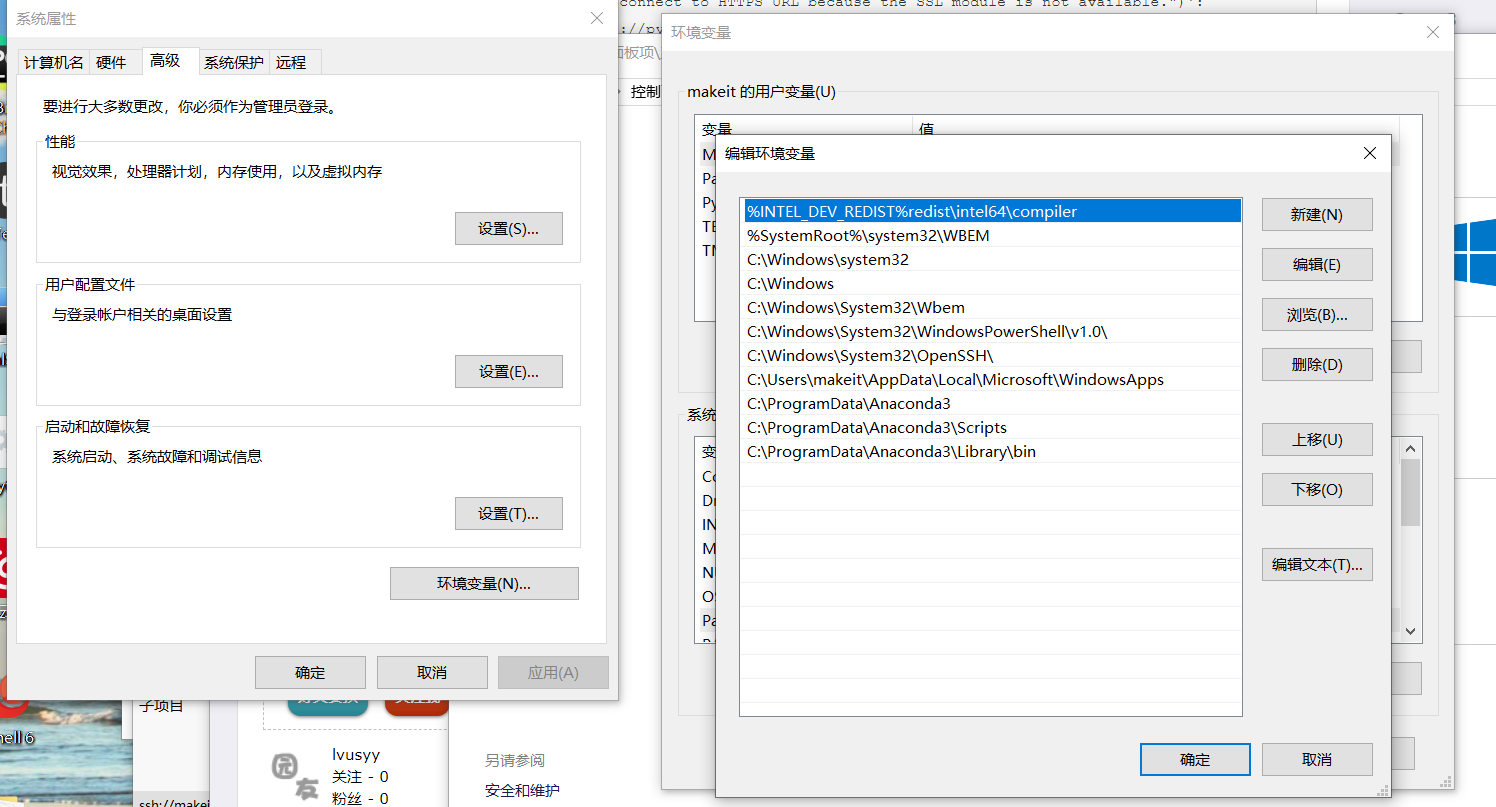
原因:找不到libeay32.dll.因为没有把anacoda3 dll库目录加到path中
想正常使用需要把类似以下路径加入PATH中
C:\Anaconda3;

C:\Anaconda3\Scripts;

C:\Anaconda3\Library\bin
大多数人只加了 C:\Anaconda3; 和 C:\Anaconda3\Scripts; 所以才导致这个问题.
[报错解决] 关于windows下 使用Anaconda3安装的python无法使用ssl模块问题.关联pip无法下载https的更多相关文章
- <linux报错解决>在Fedora21下安装vmware报错的解决办法
关于VMWARE WORKSTATION在Fedora21下的安装问题 (1)在Fedora21下安装vmware如果在终端下启动,提示你找不到内核头文件Kernel Headers的话使用命令: s ...
- sphinx :undefined reference to `libiconv' 报错解决办法
sphinx :undefined reference to `libiconv' 报错解决办法 2013-11-30 21:45:39 安装sphinx时不停报错...郁闷在make时报错,错误 ...
- windows下编译和安装boost库
boost是一个功能强大.构造精巧.跨平台.开源并且完全免费的C++程序库. 获取方式 boost提供源码形式的安装包,可以从boost官方网站下载,目前最新版本是1.59.0. 本机上正好有boos ...
- Windows系统安装最新版本RabbitMQ3.8.3及报错解决
今天想安装下RabbitMQ写几个用例看下,发现最新的安装包有些问题,不能直接安装使用,遇到一些问题,记录一下解决办法. 下载安装包 因为RabbitMQ是Erlang编写,安装时,需要先安装Erla ...
- linux下启动dbca或netmgr类的图形界面报错解决
linux下启动dbca或netmgr类的图形界面报错解决 Xlib: connection to ":0.0" refused by server Xlib: No pro ...
- OOS 预览报错解决思路
预览报错解决思路: 官方链接:https://docs.microsoft.com/zh-cn/officeonlineserver/office-online-server :> 查看服务器内 ...
- CentOS 6.5 Maven 编译 Apache Tez 0.8.3 踩坑/报错解决记录
最近准备学习使用Tez,因此从官网下载了最新的Tez 0.8.3源码,按照安装教程编译使用.平时使用的集群环境是离线的,本打算这一次也进行离线编译,无奈一编译就开始报缺少jar包的错,即使手动下载ja ...
- cmd命令中运行pytest命令导入模块报错解决方法
报错截图 ImportError while loading conftest 'E:\python\HuaFansApi\test_case\conftest.py'. test_case\conf ...
- hexo建站报错解决记录
安装某主题依赖 nodejieba 库,该库又依赖 windows-build-tools 和 node-gyp git bash shell 下 cnpm install -g windows-bu ...
随机推荐
- maftools | 从头开始绘制发表级oncoplot(瀑布图)
本文首发于微信公众号 **“ 生信补给站 ”** ,期待您的关注!!! 原文链接:https://mp.weixin.qq.com/s/G-0PtaoO6bYuhx_D_Rlrlw 对于组学数据的分析 ...
- (六)Activiti之实现学生请假流程
一.实现学生请假流程 1.1 用activiti插件生成bpmn和png文件 1.2 部署流程定义 package com.shyroke.activiti.firstActiviti; import ...
- (三)调用web服务
(二)发布第一个WebService服务与DSWL文档解析讲解了如何发布一个web服务,本章主要讲述如何调用一个web服务. 这里有三种方式: 使用代理模式调用,需要将服务端的接口类拷贝到客户端中.( ...
- 转:让PIP源使用国内镜像,提升下载速度和安装成功率
转载,自己记录使用,原文http://www.cnblogs.com/microman/p/6107879.html 对于Python开发用户来讲,PIP安装软件包是家常便饭.但国外的源下载速度实在太 ...
- Java 18套JAVA企业级大型项目实战分布式架构高并发高可用微服务电商项目实战架构
Java 开发环境:idea https://www.jianshu.com/p/7a824fea1ce7 从无到有构建大型电商微服务架构三个阶段SpringBoot+SpringCloud+Solr ...
- call、apply、bind一直是不求甚解!
一直感觉代码中有call和apply就很高大上(看不懂),但是都草草略过,今天非要弄明白!以前总是死记硬背:call.apply.bind 都是用来修改函数中的this,传参时,call是一个个传参, ...
- 编译 SharpNav 遇到的问题和解决过程
https://github.com/Robmaister/SharpNav 是github上基于recastnavtigation的一个C#项目. github上并没有详细的编译过程. 首先把项目c ...
- babel-plugin-transform-remove-strict-mode
场景:在VUE项目中,需要用到横向滚动条,在引入MUI相关的组件后,模板中的代码如下 在控制台中报错 报错内容说的是在严格模式下(strict mode)类型错误 经过推测,觉得可能是mui.js中用 ...
- JoinableQueue类与线程
生产者消费者的问题及其解决办法 问题 在之前的生产者消费者模型中,生产者和消费者只有一个, 那么生产者往队列里put几次,消费者就get几次,但是存在一个问题, 生产者不一定只有一个,消费者也不一定只 ...
- 2.原子变量 CAS算法
前面提到,使用volatile无法保证 变量状态的原子性操作,所谓原子性,就是不可再分 如:i++的原子性问题,i++ 的操作实际上分为三个步骤 "读-改-写" (1)保存i的值 ...