
[报错解决] 关于windows下 使用Anaconda3安装的python无法使用ssl模块问题.关联pip无法下载https
关联错误:
Retrying (Retry(total=4, connect=None, read=None, redirect=None, status=None)) after connection broken by 'SSLError("Can't connect to HTTPS URL because the SSL module is not available.")': /simple/pip/

Retrying (Retry(total=3, connect=None, read=None, redirect=None, status=None)) after connection broken by 'SSLError("Can't connect to HTTPS URL because the SSL module is not available.")': /simple/pip/

Retrying (Retry(total=2, connect=None, read=None, redirect=None, status=None)) after connection broken by 'SSLError("Can't connect to HTTPS URL because the SSL module is not available.")': /simple/pip/

Retrying (Retry(total=1, connect=None, read=None, redirect=None, status=None)) after connection broken by 'SSLError("Can't connect to HTTPS URL because the SSL module is not available.")': /simple/pip/

Retrying (Retry(total=0, connect=None, read=None, redirect=None, status=None)) after connection broken by 'SSLError("Can't connect to HTTPS URL because the SSL module is not available.")': /simple/pip/

Could not fetch URL https://pypi.org/simple/pip/: There was a problem confirming the ssl certificate: HTTPSConnectionPool(host='pypi.org', port=443): Max retries exceeded with url: /simple/pip/ (Caused by SSLError("Can't connect to HTTPS URL because the SSL module is not available.")) - skipping

Requirement already up-to-date: pip in d:\anaconda3\lib\site-packages (18.1)

pip is configured with locations that require TLS/SSL, however the ssl module in Python is not available.

Could not fetch URL https://pypi.org/simple/pip/: There was a problem confirming the ssl certificate: HTTPSConnectionPool(host='pypi.org', port=443): Max retries exceeded with url: /simple/pip/ (Caused by SSLError("Can't connect to HTTPS URL because the SSL module is not available.")) - skipping
关联错误2:
>>> import ssl

Traceback (most recent call last):

  File "<stdin>", line 1, in <module>

  File "C:\ProgramData\Anaconda3\lib\ssl.py", line 101, in <module>

    import _ssl             # if we can't import it, let the error propagate

ImportError: DLL load failed: The operating system cannot run %1.
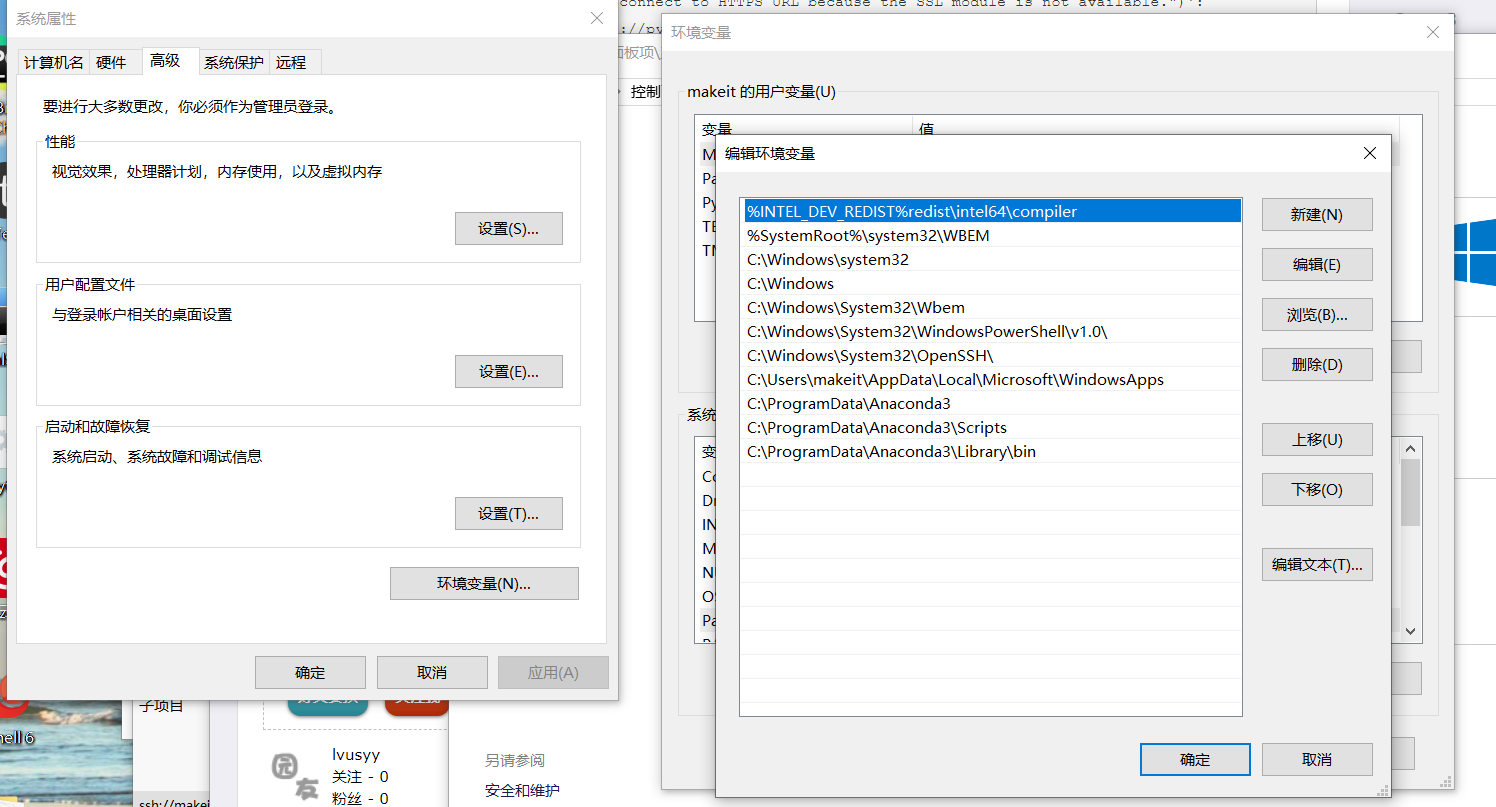
原因:找不到libeay32.dll.因为没有把anacoda3 dll库目录加到path中
想正常使用需要把类似以下路径加入PATH中
C:\Anaconda3;

C:\Anaconda3\Scripts;

C:\Anaconda3\Library\bin
大多数人只加了 C:\Anaconda3; 和 C:\Anaconda3\Scripts; 所以才导致这个问题.
[报错解决] 关于windows下 使用Anaconda3安装的python无法使用ssl模块问题.关联pip无法下载https的更多相关文章
- <linux报错解决>在Fedora21下安装vmware报错的解决办法
关于VMWARE WORKSTATION在Fedora21下的安装问题 (1)在Fedora21下安装vmware如果在终端下启动,提示你找不到内核头文件Kernel Headers的话使用命令: s ...
- sphinx :undefined reference to `libiconv' 报错解决办法
sphinx :undefined reference to `libiconv' 报错解决办法 2013-11-30 21:45:39 安装sphinx时不停报错...郁闷在make时报错,错误 ...
- windows下编译和安装boost库
boost是一个功能强大.构造精巧.跨平台.开源并且完全免费的C++程序库. 获取方式 boost提供源码形式的安装包,可以从boost官方网站下载,目前最新版本是1.59.0. 本机上正好有boos ...
- Windows系统安装最新版本RabbitMQ3.8.3及报错解决
今天想安装下RabbitMQ写几个用例看下,发现最新的安装包有些问题,不能直接安装使用,遇到一些问题,记录一下解决办法. 下载安装包 因为RabbitMQ是Erlang编写,安装时,需要先安装Erla ...
- linux下启动dbca或netmgr类的图形界面报错解决
linux下启动dbca或netmgr类的图形界面报错解决 Xlib: connection to ":0.0" refused by server Xlib: No pro ...
- OOS 预览报错解决思路
预览报错解决思路: 官方链接:https://docs.microsoft.com/zh-cn/officeonlineserver/office-online-server :> 查看服务器内 ...
- CentOS 6.5 Maven 编译 Apache Tez 0.8.3 踩坑/报错解决记录
最近准备学习使用Tez,因此从官网下载了最新的Tez 0.8.3源码,按照安装教程编译使用.平时使用的集群环境是离线的,本打算这一次也进行离线编译,无奈一编译就开始报缺少jar包的错,即使手动下载ja ...
- cmd命令中运行pytest命令导入模块报错解决方法
报错截图 ImportError while loading conftest 'E:\python\HuaFansApi\test_case\conftest.py'. test_case\conf ...
- hexo建站报错解决记录
安装某主题依赖 nodejieba 库,该库又依赖 windows-build-tools 和 node-gyp git bash shell 下 cnpm install -g windows-bu ...
随机推荐
- win8系统安装.net Framework3.5
Win8 离线安装 .Net Framework 3.5(工具+方法)(支持Win8.1) 微软在最新的 Win8 / Win8.1 系统中没有集成 .NET 3.5,如果安装的话,必须是在线安装,甚 ...
- 国际化(i18n)学习
一 软件的国际化:软件开发时,要使它能同时应对世界不同地区和国家的访问,并针对不同地区和国家的访问,提供相应的.符合来访者阅读习惯的页面或数据. 国际化(internationalization)又称 ...
- TensorType
- [Lua性能] 小试验一例
local s1 = os.clock() local list1 = {} , do list1[#list1 + ] = end local e1 = os.clock() print(" ...
- 转载一篇有关于diff的文章,方便以后复习
本文章是转载的,为了方便以后复习,特地记录一下.他人请去原地址观看!!! 文章原地址:http://www.ruanyifeng.com/blog/2012/08/how_to_read_diff.h ...
- JdbcTemplate批量插入数据
运行环境:SpringBoot,注入JdbcTemplate @Autowired private JdbcTemplate jdbcTemplate; 1.单表批量插入数据 @Test public ...
- Dell T30解决报Alert! Cover was previously removed.
DELL T30自检中卡在F1/F2/F5选项,需要F1手动启动时报:Alert! Cover was previously removed是指向机器盖问题 [解决方法]: 1.检查机箱盖是否有盖紧 ...
- Scyther 形式化分析工具资料整理(三)
1.作者Cas Cremers在做TLS1.3的时候我么发现并没有使用Scyther 形式化丰分析工具对其进行分析,而是使用了 The Tamarin .作者建立了TLS.13的模型. 那么我的目标是 ...
- 第一课 IP通信
我们的专业课:<IP通信>开课了. 在第一节课,我们初步了解了关于通信的知识,涨了知识,下面我就说一下第一节课所学所感. 在学习这门课的时候,需要我们认真预习,认真听课, ...
- 阿里云服务器搭建gitlab
参考这位大神的博客 https://blog.csdn.net/zhaoyanjun6/article/details/79144175 安装邮件通知服务系统时,报了如下错误:send-mail: f ...