
python之scrapy的debug、shell、settings、pipelines
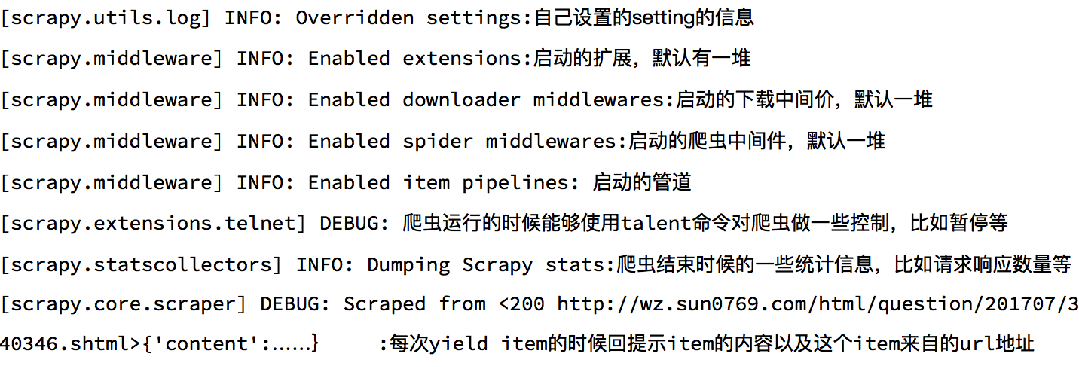
1、debug了解
2、scrapy shell了解
Scrapy shell是一个交互终端,我们可以在未启动spider的情况下尝试及调试代码,也可以用来测试XPath表达式

使用方法:

    scrapy shell https://gosuncn.zhiye.com/social/

response.url:当前响应的url地址

response.request.url:当前响应对应的请求的url地址

response.headers:响应头

response.body:响应体,也就是html代码,默认是byte类型

response.requests.headers:当前响应的请求头
3、settings.py
# -*- coding: utf-8 -*-

# Scrapy settings for gosuncn project

#

# For simplicity, this file contains only settings considered important or

# commonly used. You can find more settings consulting the documentation:

#

#     https://doc.scrapy.org/en/latest/topics/settings.html

#     https://doc.scrapy.org/en/latest/topics/downloader-middleware.html

#     https://doc.scrapy.org/en/latest/topics/spider-middleware.html

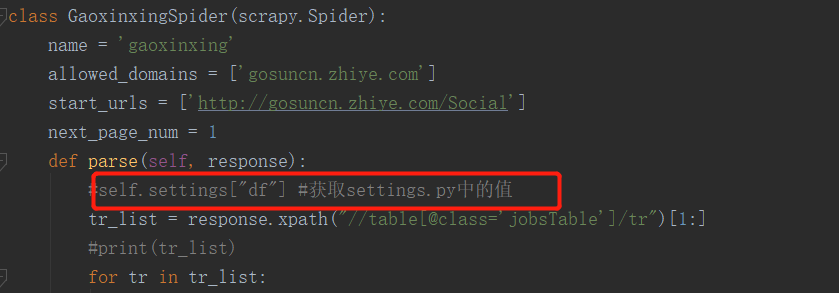
#settings文件一般存取全局变量,如数据库的账号,密码等###

BOT_NAME = 'gosuncn'

SPIDER_MODULES = ['gosuncn.spiders']

NEWSPIDER_MODULE = 'gosuncn.spiders'

LOG_LEVEL="WARNING"

# Crawl responsibly by identifying yourself (and your website) on the user-agent

#USER_AGENT = 'gosuncn (+http://www.yourdomain.com)'

# Obey robots.txt rules

#遵守ROBOT协议,也就是会先请求ROBOT协议

ROBOTSTXT_OBEY = True

# Configure maximum concurrent requests performed by Scrapy (default: 16)

#并发数

#CONCURRENT_REQUESTS = 32

# Configure a delay for requests for the same website (default: 0)

# See https://doc.scrapy.org/en/latest/topics/settings.html#download-delay

# See also autothrottle settings and docs

#下载延迟,每次请求前,先睡3秒

#DOWNLOAD_DELAY = 3

# The download delay setting will honor only one of:

#和DOWNLOAD_DELAY配合使用

#CONCURRENT_REQUESTS_PER_DOMAIN = 16

#CONCURRENT_REQUESTS_PER_IP = 16

# Disable cookies (enabled by default)

#设置COOKIES,默认携带COOKIES信息

#COOKIES_ENABLED = False

# Disable Telnet Console (enabled by default)

#TELNETCONSOLE_ENABLED = False

# Override the default request headers:

#默认请求头

#DEFAULT_REQUEST_HEADERS = {

#   'Accept': 'text/html,application/xhtml+xml,application/xml;q=0.9,*/*;q=0.8',

#   'Accept-Language': 'en',

#}

#中间件

# Enable or disable spider middlewares

# See https://doc.scrapy.org/en/latest/topics/spider-middleware.html

#SPIDER_MIDDLEWARES = {

#    'gosuncn.middlewares.GosuncnSpiderMiddleware': 543,

#}

# Enable or disable downloader middlewares

# See https://doc.scrapy.org/en/latest/topics/downloader-middleware.html

#DOWNLOADER_MIDDLEWARES = {

#    'gosuncn.middlewares.GosuncnDownloaderMiddleware': 543,

#}

# Enable or disable extensions

# See https://doc.scrapy.org/en/latest/topics/extensions.html

#EXTENSIONS = {

#    'scrapy.extensions.telnet.TelnetConsole': None,

#}

#配置pipelines,数字为权重值,越小越先执行

# Configure item pipelines

# See https://doc.scrapy.org/en/latest/topics/item-pipeline.html

ITEM_PIPELINES = {

   'gosuncn.pipelines.GosuncnPipeline': 300,

}

LOG_LEVEL ="WARNING"

LOG_FILE = "./log.log"

#对爬虫进行限速

# Enable and configure the AutoThrottle extension (disabled by default)

# See https://doc.scrapy.org/en/latest/topics/autothrottle.html

#AUTOTHROTTLE_ENABLED = True

# The initial download delay

#AUTOTHROTTLE_START_DELAY = 5

# The maximum download delay to be set in case of high latencies

#AUTOTHROTTLE_MAX_DELAY = 60

# The average number of requests Scrapy should be sending in parallel to

# each remote server

#AUTOTHROTTLE_TARGET_CONCURRENCY = 1.0

# Enable showing throttling stats for every response received:

#AUTOTHROTTLE_DEBUG = False

#HTTP缓存

# Enable and configure HTTP caching (disabled by default)

# See https://doc.scrapy.org/en/latest/topics/downloader-middleware.html#httpcache-middleware-settings

#HTTPCACHE_ENABLED = True

#HTTPCACHE_EXPIRATION_SECS = 0

#HTTPCACHE_DIR = 'httpcache'

#HTTPCACHE_IGNORE_HTTP_CODES = []

#HTTPCACHE_STORAGE = 'scrapy.extensions.httpcache.FilesystemCacheStorage'
4、pipelines的open_spider和close_spider函数
# -*- coding: utf-8 -*-

# Define your item pipelines here

#

# Don't forget to add your pipeline to the ITEM_PIPELINES setting

# See: https://doc.scrapy.org/en/latest/topics/item-pipeline.html

import  re

from gosuncn.items import GosuncnItem

class GosuncnPipeline(object):

    def open_spider(self,spider):

        """

        爬虫启动时执行,启动数据库连接

        :param spider:

        :return:

        """

        spider.hello = "open"

    def process_item(self, item, spider):

        if isinstance(item,GosuncnItem):

            item["content"] = self.process_content(item["content"])

            print(item)

        return item

    def process_content(self,content):

        content =[re.sub(r"\r\n|' '","",i) for i in content]

        content = [i for i in content if len(i)>0]

        return content

    def close_spider(self,spider):

        """

        爬虫结束时执行,关闭数据库连接

        :param spider:

        :return:

        """

        spider.hello = "close"

# class GosuncnPipeline1(object):

#     def process_item(self, item, spider):

#         if isinstance(item,GosuncnItem):

#             print(item)

#         return item
python之scrapy的debug、shell、settings、pipelines的更多相关文章
- python之scrapy入门教程
看这篇文章的人,我假设你们都已经学会了python(派森),然后下面的知识都是python的扩展(框架). 在这篇入门教程中,我们假定你已经安装了Scrapy.如果你还没有安装,那么请参考安装指南. ...
- python爬虫scrapy项目详解(关注、持续更新)
python爬虫scrapy项目(一) 爬取目标:腾讯招聘网站(起始url:https://hr.tencent.com/position.php?keywords=&tid=0&st ...
- python爬虫scrapy学习之篇二
继上篇<python之urllib2简单解析HTML页面>之后学习使用Python比较有名的爬虫scrapy.网上搜到两篇相应的文档,一篇是较早版本的中文文档Scrapy 0.24 文档, ...
- scrapy框架之shell
scrapy shell scrapy shell是一个交互式shell,您可以在其中快速调试 scrape 代码,而不必运行spider.它本来是用来测试数据提取代码的,但实际上您可以使用它来测试任 ...
- Python之Scrapy爬虫框架安装及简单使用
题记:早已听闻python爬虫框架的大名.近些天学习了下其中的Scrapy爬虫框架,将自己理解的跟大家分享.有表述不当之处,望大神们斧正. 一.初窥Scrapy Scrapy是一个为了爬取网站数据,提 ...
- [Python爬虫] scrapy爬虫系列 <一>.安装及入门介绍
前面介绍了很多Selenium基于自动测试的Python爬虫程序,主要利用它的xpath语句,通过分析网页DOM树结构进行爬取内容,同时可以结合Phantomjs模拟浏览器进行鼠标或键盘操作.但是,更 ...
- Python使用Scrapy框架爬取数据存入CSV文件(Python爬虫实战4)
1. Scrapy框架 Scrapy是python下实现爬虫功能的框架,能够将数据解析.数据处理.数据存储合为一体功能的爬虫框架. 2. Scrapy安装 1. 安装依赖包 yum install g ...
- python爬虫Scrapy(一)-我爬了boss数据
一.概述 学习python有一段时间了,最近了解了下Python的入门爬虫框架Scrapy,参考了文章Python爬虫框架Scrapy入门.本篇文章属于初学经验记录,比较简单,适合刚学习爬虫的小伙伴. ...
- windows下使用python的scrapy爬虫框架,爬取个人博客文章内容信息
scrapy作为流行的python爬虫框架,简单易用,这里简单介绍如何使用该爬虫框架爬取个人博客信息.关于python的安装和scrapy的安装配置请读者自行查阅相关资料,或者也可以关注我后续的内容. ...
随机推荐
- 循环遍历 文件夹 生成makefile
在处理 openssl的makefile的source code问题,由于不支持makefile中添加整个文件夹,需要每个 .c 文件都要一个一个添加,所以做一个简单的脚本: #! /bin/bash ...
- Linux的bg和fg命令
我们都知道,在 Windows 上面,我们要么让一个程序作为服务在后台一直运行,要么停止这个服务.而不能让程序在前台后台之间切换.而 Linux 提供了 fg 和 bg 命令,让我们轻松调度正在运行的 ...
- initramfs机制
1.什么是 Initramfs 在2.6版本的linux内核中,都包含一个压缩过的cpio格式的打包文件.当内核启动时,会从这个打包文件中导出文件到内核的rootfs文件系统,然后内核检查rootfs ...
- c++ 用eclipse建立一个类,并实例化并运行
新建项目 file->new->c/c++ project 项目结构 cpc.cpp //================================================= ...
- 一个restframework快速实例
首先在settings.py中引入 INSTALLED_APPS = [ ...... 'rest_framework', ......] 相关模型结构如下: class custume(models ...
- C# ado.net 操作存储过程(二)
调用存储过程 sql IF OBJECT_ID('RegionInsert') IS NULL EXEC (' -- -- Procedure which inserts a region recor ...
- Codeforces Round #590 (Div. 3) C. Pipes
链接: https://codeforces.com/contest/1234/problem/C 题意: You are given a system of pipes. It consists o ...
- nginx与php之间的交互方式
1. 2种方式 TCP的socket 跟 UNIX的socket 2.TCP的socket 首先进入容器然后修改nginx下的配置文件 3. 修改/usr/local/nginx/conf/ng ...
- Codeforces Round #346 (Div. 2) B题
B. Qualifying Contest Very soon Berland will hold a School Team Programming Olympiad. From each of t ...
- ttf-mscorefonts-installer 无法安装,解决办法
ttf-mscorefonts-installer 无法安装,解决办法 原 lieefu 发布于 2017/01/11 08:11 字数 163 阅读 1007 收藏 0 点赞 0 评论 0 面试:你 ...