
selenium爬虫后上传数据库。
一、准备工作
1.1安装软件
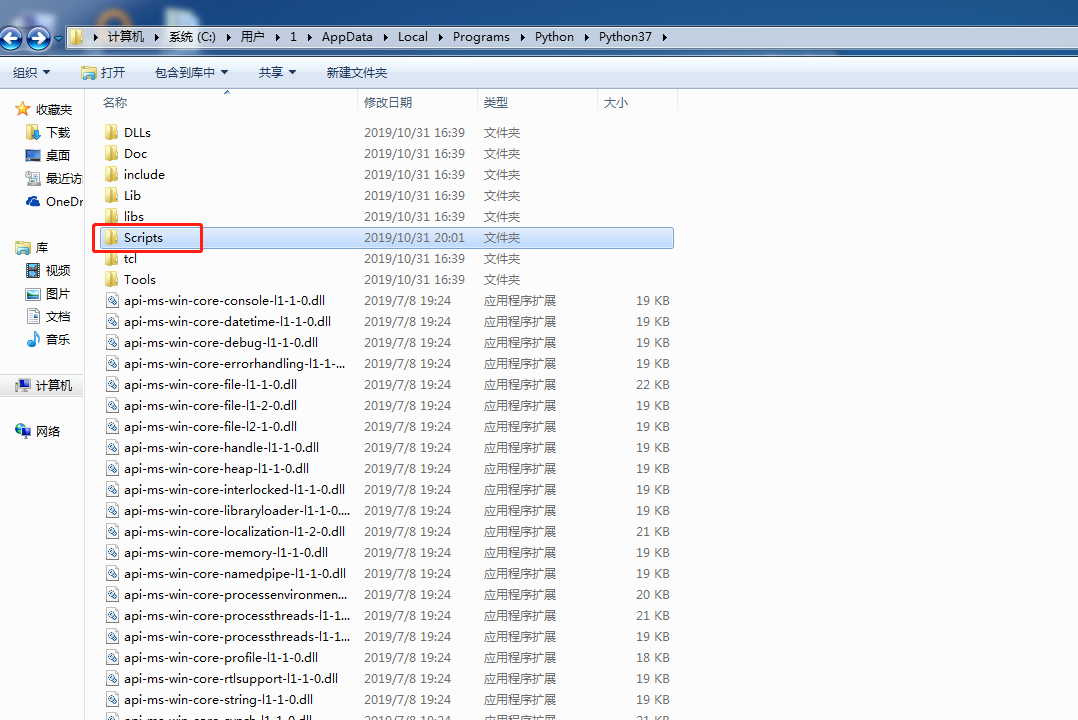
安装python、安装谷歌浏览器、将chromedriver.exe放到指定位置。
放到Scripts文件夹中。我这边的路径为:C:\Users\1\AppData\Local\Programs\Python\Python37\Scripts
1.2用到的python库。
用到的python的库有:time,datetiem,os,selenium,pandas,pymysql,logging,twisted
将pymysql进行处理。形成一个自己的包。
# encoding:utf-8

import pymysql.cursors

class MysqlOperation(object):

    def __init__(self, config):

        self.connection = pymysql.connect(host=config['mysql_host'],

                                          port=config['mysql_port'],

                                          user=config['mysql_user'],

                                          # pymysql直接连接是passwd,用连接池连接是password

                                          passwd=config['mysql_passwd'],

                                          db=config['mysql_db'],

                                          charset='utf8',

                                          cursorclass=pymysql.cursors.DictCursor

                                          )

    def read_sql(self, sql):

        with self.connection.cursor() as cursor:

            try:

                cursor.execute(sql)

                result = cursor.fetchall()

                return result

            except Exception as e:

                self.connection.rollback()  # 回滚

                print('事务失败', e)

    def insert_sql(self, sql):

        with self.connection.cursor() as cursor:

            try:

                cursor.execute(sql)

                self.connection.commit()

            except Exception as e:

                self.connection.rollback()

                print('事务失败', e)

    def update_sql(self, sql):

        # sql_update ="update user set username = '%s' where id = %d"

        with self.connection.cursor() as cursor:

            try:

                cursor.execute(sql)  # 像sql语句传递参数

                # 提交

                self.connection.commit()

            except Exception as e:

                # 错误回滚

                self.connection.rollback()

    def delect_sql(self, sql_delete):

        with self.connection.cursor() as cursor:

            try:

                cursor.execute(sql_delete)  # 像sql语句传递参数

                # 提交

                self.connection.commit()

            except Exception as e:

                # 错误回滚

                self.connection.rollback()

    def read_one(self, sql):

        with self.connection.cursor() as cursor:

            try:

                cursor.execute(sql)

                result = cursor.fetchone()

                return result

            except Exception as e:

                self.connection.rollback()  # 回滚

                print('事务失败', e)

    def reConnect(self):

        try:

            self.connection.ping()

        except:

            self.connection()
二、书写代码
2.1通用代码
from selenium import webdriver

from selenium.webdriver.chrome.options import Options

from selenium.webdriver.common.by import By

from selenium.webdriver.support import expected_conditions as EC

from selenium.webdriver.support.wait import WebDriverWait

from selenium.webdriver.common.keys import Keys

import time

import datetime

import os

import pandas as pd

from sqlConnect import MysqlOperation

import math

# 配置浏览器

options = Options()

download_path = r"E:\splider\pk"

options.add_experimental_option("prefs", {

    "download.default_directory": download_path,

    "download.prompt_for_download": False,

    "download.directory_upgrade": True,

    "safebrowsing.enabled": True

})

# 配置数据库

config = {'mysql_host': '',

          'mysql_port': ,

          'mysql_user': '',

          'mysql_passwd': '',

          'mysql_db': ''

          }

mysql=MysqlOperation(config=config)

# 防错清空

file_list = os.listdir(download_path)

for file in file_list:

    file_path = download_path + '\\' + file

    if os.path.exists(file_path):

        os.remove(file_path)

print('#Cleared')

# 将百分数转化为小数

def judge_percent(x):

    if isinstance(x, str):

        if '%' in x:

            return round(float(x[:-1]) / 100, 2)

        else:

            return x

    else:

        return x

def rename(download_path, start_time, end_time, province='all_country'):

    # 下载文件重命名

    number = 0

    original_file_path = 'old_name'

    rename_file_path = 'new_name'

    while not os.path.exists(original_file_path) and number < 5:

        time.sleep(10)

        number = number + 1

    os.rename(original_file_path, rename_file_path)

    print("完成重命名")
说明:
配置浏览器的目的是更改下载路径:download_path便是自定义的下载路径。
配置数据库的是为了连接数据库。
放错清空的目的是担心文件夹里面的数据对下载的数据形成干扰。我这是全部清空,也可以指定文件清空。
下载之后的文件进行重命名,是为了将汉字转化为英文。
2.2 selenium模拟下载。
我用的的定位是XPATH。
bro = webdriver.Chrome(options=options)

bro.implicitly_wait(10)   # 隐式等待10s

time.sleep(10)            # 等待10s
有时因为网速等原因,XPATH加载较慢。所以这时候就需要等待。
a = bro.find_element_by_xpath('')

a.click()

a.clear()

a.send_keys('输入文字')

a.send_keys(Keys.ENTER)  # 模拟按下enter键
爬虫的时候有时需要填入文字。但是填入文字之后又需要点击或者按enter。
这是需要用selenium模拟enter操作。
2.2重命名
下载之后用进行重名。
2.3操作数据库。
下载数据之后。需要将数据上传到数据库。
上传之前,记得删除。比如,下载的数据是1-5号的数据。需要先把数据库中1-5号的数据删除,在上传。
上传的时候如果数据量少,可以一次上传。
如果数据量比较大,可以分批次上传。
selenium爬虫后上传数据库。的更多相关文章
- 关于php加密库加密数据上传数据库或解密出错的问题
php加密拓展库随着php版本的更新,函数的使用方法有所改变,所以加密模式推荐使用ecb,其中加密算法19种,加密模式8种,通过这种方式加密后的数据上传数据库后提取出来进行解密会发现结果是乱码,我认为 ...
- web自动化之selenium(三)文件上传
1.上传标签为input #若上传文件的标签为<input>可以直接定位标签,然后send_keys(文件路径)可以直接上传 2.利用第三方软件Autoit上传 1.下载Autoit:ht ...
- 简单的 Android 拍照并显示以及获取路径后上传
简单的 Android 拍照并显示以及获取路径后上传 Activity 中的代码,我只贴出重要的事件部分代码 public void doPhoto(View view) { destoryBimap ...
- 使用ajax上传图片,支持图片即时浏览,支持js图片压缩后上传给服务器
使用ajax上传图片,支持图片即时浏览,支持js图片压缩后上传给服务器 ajax上传主要使用了 var reader = new FileReader() 此方法 js图片压缩主要是利用canvas进 ...
- C# 防止content-type修改后上传恶意文件
以图片为例子.在上传图片的时候,使用Fiddler抓取 通过js判断文件类型是不安全的,所以通过后台来判断,代码如下: ) { HttpPostedFile file0 = Request.Files ...
- 将IMAGE转为PDF后上传
using iTextSharp.text; using iTextSharp.text.pdf; /// <summary> /// 将IMAGE转为PDF后上传 /// </su ...
- mui开发app之cropper裁剪后上传头像的实现
在大多数app项目中,都需要对用户头像的上传,之前做web开发的时候,我主要是通过input type=file的标签实现的,上传后,使用php对图片进行裁剪,这种方式比较传统简单. 此次app开发中 ...
- selenium+python-autoit文件上传
前言 关于非input文件上传,点上传按钮后,这个弹出的windows的控件了,已经跳出三界之外了,不属于selenium的管辖范围(selenium不是万能的,只能操作web上元素).autoit工 ...
- selenium之 文件上传所有方法整理总结【转】
本文转自:https://blog.csdn.net/huilan_same/article/details/52439546 文件上传是所有UI自动化测试都要面对的一个头疼问题,今天博主在这里给大家 ...
随机推荐
- AtCoder Dwango Programming Contest V E
题目链接:https://dwacon5th-prelims.contest.atcoder.jp/tasks/dwacon5th_prelims_e 题目描述: 给定一个大小为\(N\)的数组\(A ...
- Linux之tomcat安装与配置
1.创建目录 [root@bogon tomcat]#mkdir /usr/local/java/tomcat 2.上传压缩包并解压 [root@bogon tomcat]# tar xvf apac ...
- nginx配置服务
在nginx中的conf的文件夹里面的nginx.conf文件中 server { listen 8888; server_name localhost; location / { root C:/P ...
- [CSP-S模拟测试]:装饰(数学)
题目传送门(内部题147) 输入格式 每个测试点第一行一个正整数$T$,表示该测试点内的数据组数. 接下来$T$行,每行三个非负整数$a,b,c$,含义如题目中所示. 输出格式 对每组数据输出一行一个 ...
- Gitee使用方法
原文链接:https://www.cnblogs.com/yiven/p/8465054.html 1.创建仓库: a.创建远程仓库 登入Gitee后,点击头像旁边的"+"加号-- ...
- 两台Linux服务器之间的文件传输
最近工作中有这样一个需求,需要将A服务器上的文件传到B服务器. 本来想用Java开发,但一想Java开发周期长,应对这样一个小需求没必要用Java,最后选择了Shell脚本,相关代码如下: #!/bi ...
- springboot的@EnableAutoConfiguration起作用的原理
通常我们启动一个springboot项目会在启动方法中增加@SpringBootApplicatoin注解,该注解中包含了@EnableAutoConfiguration @Target(Elemen ...
- OSI的七层模型和TCP/IP的五层模型
OSI七层模型: 应用层->表示层->会话层->传输层->网络层->数据链路层->物理层 TCP/IP五层模型: 应用层->传输层->网络层->数 ...
- 卸载阿里云盾(安骑士)监控&屏蔽云盾IP
卸载阿里云盾监控 wget http://update.aegis.aliyun.com/download/uninstall.sh chmod +x uninstall.sh ./uninstall ...
- oracle 导出关键字说明
关键字 说明(默认) ----------------------------------------- UserId 用户名/口令 Full 导出整个文件(N) Buff ...