
JsonCpp——json文件的解析
定义:
官网: http://json.org/
在线解析器:http://json.cn/ http://www.bejson.com/
JSON(JavaScript Object Notation) 是一种轻量级的数据交换格式。它使得人们很容易的进行阅读和编写。同时也方便了机器进行解析和生成。它是基于 JavaScript Programming Language , Standard ECMA-262 3rd Edition - December 1999 的一个子集。 JSON 采用完全独
立于程序语言的文本格式,但是也使用了类 C 语言的习惯(包括 C, C++, C#, Java, JavaScript,Perl, Python 等)。这些特性使 JSON 成为理想的数据交换语言。
解释格式:
一个json实例
{

  "animals": {

            "dog": [

                        {"name": "Rufus", "age": 15},

                        {"name": "Marty","age": null}

                      ],

            "cat": [

                        {"name": "bosi","age": 15},

                        {"name": "maowang","age": null}

                    ]

               }

}
文档结构分析:
json 简单说就是 javascript 中的对象和数组,所以这两种结构就是对象和数组两种结构,通过这两种结构可以表示各种复杂的结构。
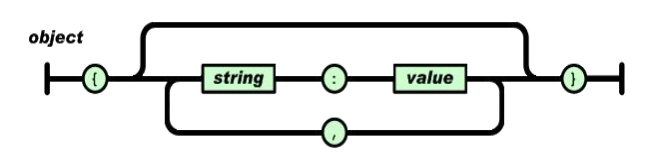
1)对象(Object)
对象在 js 中表示为“{}”括起来的内容, 数据结构为 {key: value,key: value,...}的键值对的结构, 在面向对象的语言中, key 为对象的属性, value 为对应的属性值, 所以很容易理解, 取值方法为 对象.key 获取属性值, 这个属性值的类型可以是 数字、字符串、 数组、 对象几种。
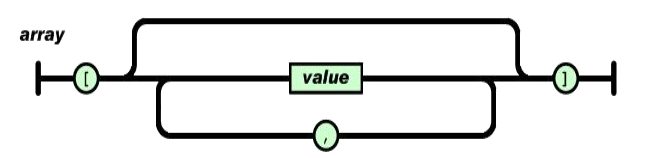
2)数组(Array)
数组在 js 中是中括号“[]”括起来的内容, 数据结构为 ["java","javascript","vb",...],取值方式和所有语言中一样, 使用索引获取, 字段值的类型可以是 数字、 字符串、数组、 对象几种。
3)数据类型
- 值(value)
值( value) 可以是双引号括起来的字符串( string) 、 数值(number)、 true、 false、null、 对象( object) 或者数组( array) 。 这些结构可以嵌套。
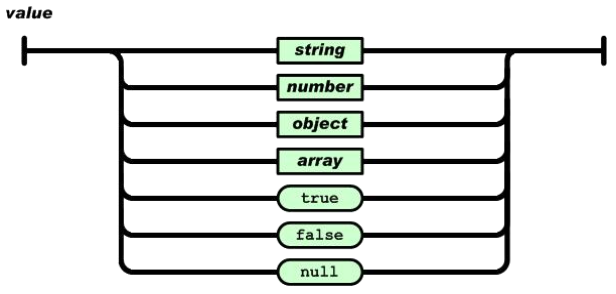
eg:“abc”, { “abc”:123} [1,2,3] true false null
- 字符串:
字符串( string) 是由双引号包围的任意数量 Unicode 字符的集合, 使用反斜线转义。 一个字符( character) 即一个单独的字符串( character string) 。 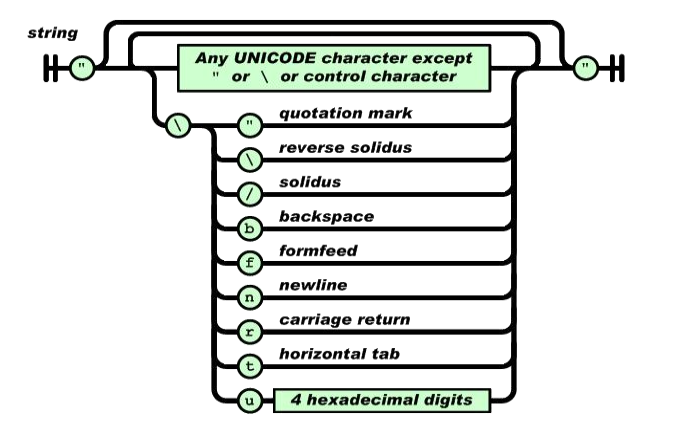
eg:“abc” “\r\n” “u00A9”
- 数值
数值( number) 也与 C 或者 Java 的数值非常相似。 只是 JSON 的数值没有使用八进制与十六进制格式。 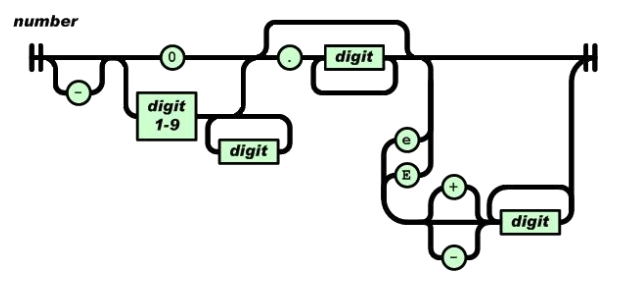
eg:123 -123 1.234e5
JsonCpp
简介
JSON is a lightweight data-interchange format. It can represent numbers,strings, ordered sequences of values, and collections of name/value pairs.JsonCpp is a C++ library that allows manipulating JSON values, including serialization and deserialization to and from strings. It can also preserve existingstore user input files.
JsonCpp环境搭建:
下载地址:
https://github.com/open-source-parsers/jsoncpp#generating-amalgamated-source-and-header
Qt 中 JsonCpp 安装
① 解压 jsoncpp-master.zip 包
② 在根目录下, 运行 python amalgamate.py
③ 在根目录中生成 dist 文件夹包含三个文件 dist/json/json-forwards.h
dist/json/json.h dist/json.cpp
④ 在 Qt 工程目录下, 生成 json 文件夹, 并拷贝 json 目录下。
⑤ 在 Qt 工程中添加现有文件即可。
JSon 框架
Json::Value 是 jsoncpp 中最基本、最重要的类,用于表示各种类型的对象。
Json::Reader 用来将内存或文件中的 json 数据转换成 Json::Value 类型。
Json::Writer 用来将 Json::Value 类型转换成内存或文件中的 json 数据。
读写 Json
1)写:
#include <iostream>

#include <fstream>

#include "json/json.h"

using namespace Json;

using namespace std;

#if 0
{

  "animals": {

            "dog": [

                        {"name": "Rufus", "age": 15},

                        {"name": "Marty","age": null}

                      ],

            "cat": [

                        {"name": "bosi","age": 15},

                        {"name": "maowang","age": null}

                    ]

               }

}

#endif
void writeTestJson()

{

  //对象的创建

  Value map;

  map["key1"] = ;

  map["key2"] = "";

  map["key3"] ;

  //数组的创建

  Value arr;

  Value item;

  for(int i=; i<; i++)

  {

    item["key"] = ;

    item["key2"] = ;

    arr.append(item);

  }
  string str = arr.toStyledString();

  cout<<str;

}

void writeJson()

{

  Value dogArr;

  Value Item;

  Item["name"] = "Rufus";Item["age"] = ;

  dogArr.append(Item);

  Item["name"] = "Marty";Item["age"];

  dogArr.append(Item);

  Value catArr;

  Item["name"] = "bosi";Item["age"] = ;

  catArr.append(Item);

  Item["name"] = "maowang";Item["age"];

  catArr.append(Item);

  Value rootValue;

  rootValue["dog"] = dogArr;

  rootValue["cat"] = catArr;

  Value root;

  root["anmials"] = rootValue;

  string str = root.toStyledString();

  cout<<str;

  ofstream ofs("animal.json");

  ofs<<str;

  ofs.close();

}

int main()

{

  writeJson();

  return ;

}
2)读
void readJson()

{

  ifstream ifs("animal.json");

  if(!ifs)

  cout<<"open error"<<endl;

  Value root;

  Reader reader;

  if(reader.parse(ifs,root))

  {

    cout<<root.toStyledString()<<endl;

    Value &arr = root["animals"]["dog"];

    for(int i=; i<arr.size(); i++)

    {

      cout<<"name"<<arr[i]["name"]<<endl;

      cout<<"age "<<arr[i]["age"]<<endl;

    }
    arr = root["animals"]["cat"];

    for(int i=; i<arr.size(); i++)

    {

      cout<<"name"<<arr[i]["name"]<<endl;

      cout<<"age "<<arr[i]["age"]<<endl;

    }

  }

}
3)改
void readWriteJson()

{

  ifstream ifs("animal.json");

  if(!ifs)

  cout<<"open error"<<endl;

  Value root;

  Reader reader;

  if(reader.parse(ifs,root))

  {

    cout<<root.toStyledString()<<endl;

    Value &arr = root["animals"]["dog"];

    root["person"];

    root["animals"]["tiger"];

    root["animals"].removeMember("dog");

    cout<<root.toStyledString()<<endl;

    root.removeMember("animals");

    cout<<root.toStyledString()<<endl;

  }

}

int main()

{

  readWriteJson();

  return ;

}
JsonCpp——json文件的解析的更多相关文章
- Json文件/网址解析
// // main.m // OC8-Json文件解析 // // Created by qianfeng on 15/6/23. // Copyright (c) 2015年 qianfeng. ...
- iOS开发网络篇-JSON文件的解析
一.什么是JSON数据 1.JSON的简单介绍 JSON:是一种轻量级的传输数据的格式,用于数据的交互 JSON是javascript语言的一个子集.javascript是个脚本语言(不需要编译),用 ...
- 在Unity中json文件的解析方式
using System.Collections; using System.Collections.Generic; using UnityEngine; using LitJson; using ...
- java读取json文件进行解析,String转json对象
String jsonFilePath = "C:/a.json"; File file = new File(jsonFilePath ); String input = Fil ...
- python读取json文件并解析
# -*- coding: utf-8 -*- import os import json import sys reload(sys) sys.setdefaultencoding('utf-8') ...
- IIS7.5支持解析读取.json文件数据
在站点中添加 MIME类型去支持Json文件的解析 添加mime类型 文件扩展名:.json MIME类型:application/json 添加成功后即可. 如果不能直接操作iis也可以直接在web ...
- java实现服务端守护进程来监听客户端通过上传json文件写数据到hbase中
1.项目介绍: 由于大数据部门涉及到其他部门将数据传到数据中心,大部分公司采用的方式是用json文件的方式传输,因此就需要编写服务端和客户端的小程序了.而我主要实现服务端的代码,也有相应的客户端的测试 ...
- 如何在Hadoop的MapReduce程序中处理JSON文件
简介: 最近在写MapReduce程序处理日志时,需要解析JSON配置文件,简化Java程序和处理逻辑.但是Hadoop本身似乎没有内置对JSON文件的解析功能,我们不得不求助于第三方JSON工具包. ...
- iOS 如何用JSONKit读写JSON文件
如何用JSONKit读写JSON文件 分类: ios2013-04-20 12:46 510人阅读 评论(0) 收藏 举报 JSON文件格式简单,使用方便,值得一用. 目前已经有多个库支持Json文 ...
随机推荐
- 如何将mysql的路径加入环境变量
1.打开终端,输入: cd ~ 会进入~文件夹 2.然后输入:touch .bash_profile 回车执行后, 2.再输入:open -e .bash_profile 会在TextEdit中打开这 ...
- Linux 系统编程中环境变量的使用
前言 在 UNIX Like 系统中,存有各类系统/应用程序的环境变量,可通过修改之改变系统/应用程序的执行效果:除此之外,用户还可以定义自己的环境变量,供自己写的程序使用.本文将说明如何在程序中设置 ...
- 一个经典的比喻( 关于TCP连接API )
前言 编程是对现实世界的模拟,网络通信自然也是对现实世界通信的模拟.可以将网络通信中使用的各种API和对现实世界中的各种通信设备进行通讯的操作进行对比以加深理解. 对比 socket() 函数 vs ...
- “懒”也要有境地---大部分程序猿都在的地方,再不来就out了。
别人在玩.你也在玩,为什么别人天天进步,职业晋升. 而你则原地踏步. 事实上你和他的距离仅仅有一个微信公众号的距离. 假设你说.我根本没有时间学习,不想看书,我仅仅想睡觉.我想你要接着往下看,由于.谁 ...
- android开发——自己定义相机(Camera)开发总结
近期这段时间我一直在开发自己定义相机.谷歌了些网上的demo.发现有非常多各种各样的问题.终于还是从API的camera类開始学习,进行改进. 以下对之前的实现进行一些总结. 官方camera API ...
- Chisel辅助iOS 应用程序调试,MusicApp模仿酷狗4.0 UI框架
本文转载至 http://www.cocoachina.com/ios/20140825/9446.html Chisel Chisel集合了大量的LLDB 命令来辅助iOS 应用程序调试,并支持添 ...
- EasyDarwin开源音频解码项目EasyAudioDecoder:EasyPlayer Android音频解码库(第二部分,封装解码器接口)
上一节我们讲了如何基于ffmpeg-Android工程编译安卓上的支持音频的ffmpeg静态库:http://blog.csdn.net/xiejiashu/article/details/52524 ...
- EasyDarwin开源流媒体服务器提供的RTMP直播推送库
EasyRTMP EasyRTMP是什么? EasyRTMP是一个EasyDarwin配套使用,也可以单独使用的RTMP推送库,通过EasyRTMP我们就可以避免接触到稍显复杂的RTMP推送流程,只需 ...
- launchMode之的几种取值
Activity的launchMode launchMode之standard ·标准模式.每次激活Activity时均在当前任务栈中创建新的实例. 在配置文件里把activity节点的属性配置为 ...
- R in Action(1) 基本数据结构
一数据类型 R的数据类型包括数值型.字符型.逻辑型(布尔).复数型和原生型,同时R有好多存储数据的对象类型,包括标量.向量.矩阵.数组.数据框和列表,如下图所示下图(图的版权神马的归原作者跟原出版社所 ...