
JsonCpp——json文件的解析
定义:
官网: http://json.org/
在线解析器:http://json.cn/ http://www.bejson.com/
JSON(JavaScript Object Notation) 是一种轻量级的数据交换格式。它使得人们很容易的进行阅读和编写。同时也方便了机器进行解析和生成。它是基于 JavaScript Programming Language , Standard ECMA-262 3rd Edition - December 1999 的一个子集。 JSON 采用完全独
立于程序语言的文本格式,但是也使用了类 C 语言的习惯(包括 C, C++, C#, Java, JavaScript,Perl, Python 等)。这些特性使 JSON 成为理想的数据交换语言。
解释格式:
一个json实例
{

  "animals": {

            "dog": [

                        {"name": "Rufus", "age": 15},

                        {"name": "Marty","age": null}

                      ],

            "cat": [

                        {"name": "bosi","age": 15},

                        {"name": "maowang","age": null}

                    ]

               }

}
文档结构分析:
json 简单说就是 javascript 中的对象和数组,所以这两种结构就是对象和数组两种结构,通过这两种结构可以表示各种复杂的结构。
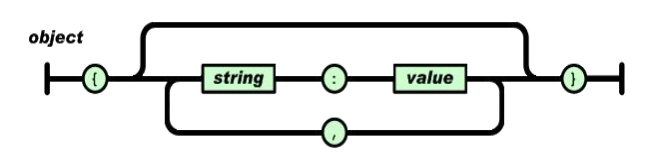
1)对象(Object)
对象在 js 中表示为“{}”括起来的内容, 数据结构为 {key: value,key: value,...}的键值对的结构, 在面向对象的语言中, key 为对象的属性, value 为对应的属性值, 所以很容易理解, 取值方法为 对象.key 获取属性值, 这个属性值的类型可以是 数字、字符串、 数组、 对象几种。
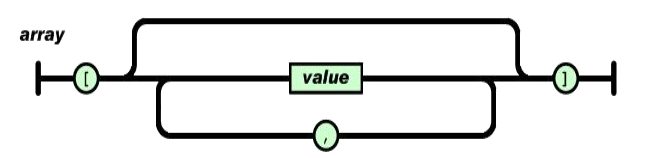
2)数组(Array)
数组在 js 中是中括号“[]”括起来的内容, 数据结构为 ["java","javascript","vb",...],取值方式和所有语言中一样, 使用索引获取, 字段值的类型可以是 数字、 字符串、数组、 对象几种。
3)数据类型
- 值(value)
值( value) 可以是双引号括起来的字符串( string) 、 数值(number)、 true、 false、null、 对象( object) 或者数组( array) 。 这些结构可以嵌套。
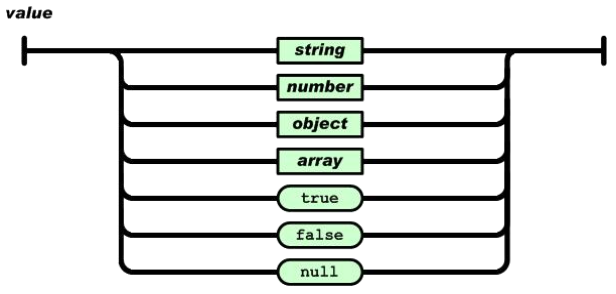
eg:“abc”, { “abc”:123} [1,2,3] true false null
- 字符串:
字符串( string) 是由双引号包围的任意数量 Unicode 字符的集合, 使用反斜线转义。 一个字符( character) 即一个单独的字符串( character string) 。 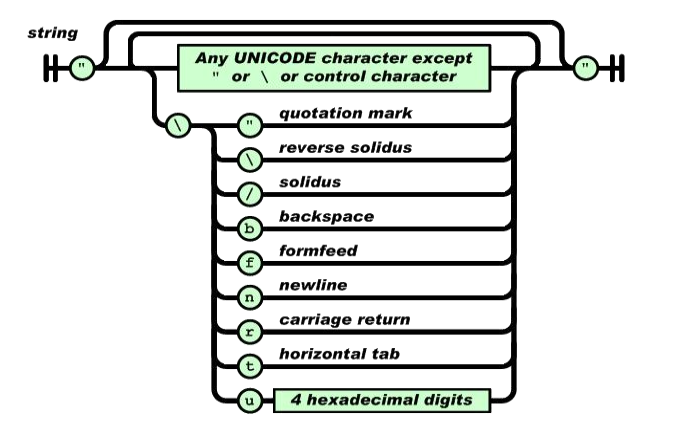
eg:“abc” “\r\n” “u00A9”
- 数值
数值( number) 也与 C 或者 Java 的数值非常相似。 只是 JSON 的数值没有使用八进制与十六进制格式。 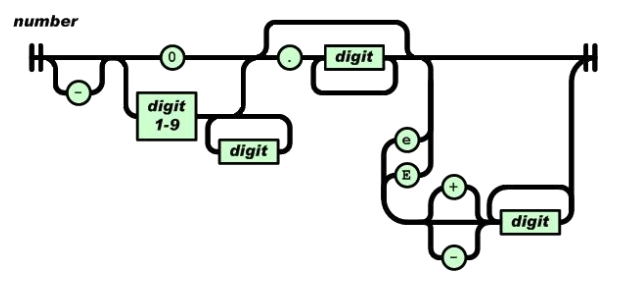
eg:123 -123 1.234e5
JsonCpp
简介
JSON is a lightweight data-interchange format. It can represent numbers,strings, ordered sequences of values, and collections of name/value pairs.JsonCpp is a C++ library that allows manipulating JSON values, including serialization and deserialization to and from strings. It can also preserve existingstore user input files.
JsonCpp环境搭建:
下载地址:
https://github.com/open-source-parsers/jsoncpp#generating-amalgamated-source-and-header
Qt 中 JsonCpp 安装
① 解压 jsoncpp-master.zip 包
② 在根目录下, 运行 python amalgamate.py
③ 在根目录中生成 dist 文件夹包含三个文件 dist/json/json-forwards.h
dist/json/json.h dist/json.cpp
④ 在 Qt 工程目录下, 生成 json 文件夹, 并拷贝 json 目录下。
⑤ 在 Qt 工程中添加现有文件即可。
JSon 框架
Json::Value 是 jsoncpp 中最基本、最重要的类,用于表示各种类型的对象。
Json::Reader 用来将内存或文件中的 json 数据转换成 Json::Value 类型。
Json::Writer 用来将 Json::Value 类型转换成内存或文件中的 json 数据。
读写 Json
1)写:
#include <iostream>

#include <fstream>

#include "json/json.h"

using namespace Json;

using namespace std;

#if 0
{

  "animals": {

            "dog": [

                        {"name": "Rufus", "age": 15},

                        {"name": "Marty","age": null}

                      ],

            "cat": [

                        {"name": "bosi","age": 15},

                        {"name": "maowang","age": null}

                    ]

               }

}

#endif
void writeTestJson()

{

  //对象的创建

  Value map;

  map["key1"] = ;

  map["key2"] = "";

  map["key3"] ;

  //数组的创建

  Value arr;

  Value item;

  for(int i=; i<; i++)

  {

    item["key"] = ;

    item["key2"] = ;

    arr.append(item);

  }
  string str = arr.toStyledString();

  cout<<str;

}

void writeJson()

{

  Value dogArr;

  Value Item;

  Item["name"] = "Rufus";Item["age"] = ;

  dogArr.append(Item);

  Item["name"] = "Marty";Item["age"];

  dogArr.append(Item);

  Value catArr;

  Item["name"] = "bosi";Item["age"] = ;

  catArr.append(Item);

  Item["name"] = "maowang";Item["age"];

  catArr.append(Item);

  Value rootValue;

  rootValue["dog"] = dogArr;

  rootValue["cat"] = catArr;

  Value root;

  root["anmials"] = rootValue;

  string str = root.toStyledString();

  cout<<str;

  ofstream ofs("animal.json");

  ofs<<str;

  ofs.close();

}

int main()

{

  writeJson();

  return ;

}
2)读
void readJson()

{

  ifstream ifs("animal.json");

  if(!ifs)

  cout<<"open error"<<endl;

  Value root;

  Reader reader;

  if(reader.parse(ifs,root))

  {

    cout<<root.toStyledString()<<endl;

    Value &arr = root["animals"]["dog"];

    for(int i=; i<arr.size(); i++)

    {

      cout<<"name"<<arr[i]["name"]<<endl;

      cout<<"age "<<arr[i]["age"]<<endl;

    }
    arr = root["animals"]["cat"];

    for(int i=; i<arr.size(); i++)

    {

      cout<<"name"<<arr[i]["name"]<<endl;

      cout<<"age "<<arr[i]["age"]<<endl;

    }

  }

}
3)改
void readWriteJson()

{

  ifstream ifs("animal.json");

  if(!ifs)

  cout<<"open error"<<endl;

  Value root;

  Reader reader;

  if(reader.parse(ifs,root))

  {

    cout<<root.toStyledString()<<endl;

    Value &arr = root["animals"]["dog"];

    root["person"];

    root["animals"]["tiger"];

    root["animals"].removeMember("dog");

    cout<<root.toStyledString()<<endl;

    root.removeMember("animals");

    cout<<root.toStyledString()<<endl;

  }

}

int main()

{

  readWriteJson();

  return ;

}
JsonCpp——json文件的解析的更多相关文章
- Json文件/网址解析
// // main.m // OC8-Json文件解析 // // Created by qianfeng on 15/6/23. // Copyright (c) 2015年 qianfeng. ...
- iOS开发网络篇-JSON文件的解析
一.什么是JSON数据 1.JSON的简单介绍 JSON:是一种轻量级的传输数据的格式,用于数据的交互 JSON是javascript语言的一个子集.javascript是个脚本语言(不需要编译),用 ...
- 在Unity中json文件的解析方式
using System.Collections; using System.Collections.Generic; using UnityEngine; using LitJson; using ...
- java读取json文件进行解析,String转json对象
String jsonFilePath = "C:/a.json"; File file = new File(jsonFilePath ); String input = Fil ...
- python读取json文件并解析
# -*- coding: utf-8 -*- import os import json import sys reload(sys) sys.setdefaultencoding('utf-8') ...
- IIS7.5支持解析读取.json文件数据
在站点中添加 MIME类型去支持Json文件的解析 添加mime类型 文件扩展名:.json MIME类型:application/json 添加成功后即可. 如果不能直接操作iis也可以直接在web ...
- java实现服务端守护进程来监听客户端通过上传json文件写数据到hbase中
1.项目介绍: 由于大数据部门涉及到其他部门将数据传到数据中心,大部分公司采用的方式是用json文件的方式传输,因此就需要编写服务端和客户端的小程序了.而我主要实现服务端的代码,也有相应的客户端的测试 ...
- 如何在Hadoop的MapReduce程序中处理JSON文件
简介: 最近在写MapReduce程序处理日志时,需要解析JSON配置文件,简化Java程序和处理逻辑.但是Hadoop本身似乎没有内置对JSON文件的解析功能,我们不得不求助于第三方JSON工具包. ...
- iOS 如何用JSONKit读写JSON文件
如何用JSONKit读写JSON文件 分类: ios2013-04-20 12:46 510人阅读 评论(0) 收藏 举报 JSON文件格式简单,使用方便,值得一用. 目前已经有多个库支持Json文 ...
随机推荐
- canvas 橡皮擦效果制作
擦除一定数量后全部消失的有用 imageData 方法的 我把代码贴在最下面 <!DOCTYPE html> <html> <head> <meta char ...
- BZOJ 2818 Gcd 线性欧拉
题意:链接 方法:线性欧拉 解析: 首先列一下表达式 gcd(x,y)=z(z是素数而且x,y<=n). 然后我们能够得到什么呢? gcd(x/z,y/z)=1; 最好还是令y>=x 则能 ...
- 官网下载kettle
首先什么是kettle,引用下百度百科 Kettle是一款国外开源的ETL工具,纯java编写,可以在Window.Linux.Unix上运行,数据抽取高效稳定. Kettle 中文名称叫水壶,该项目 ...
- unity3d从零開始(五):了解摄像机
1.简单介绍 Unity的摄像机是用来将游戏世界呈现给玩家的,游戏场景中至少有一台摄像机.也能够有多台. 2.类型 Unity中支持两种类型的摄像机,各自是Perspe ...
- s1考试 图书管理系统 结构体版
#include <iostream> #include <string> #include <cstdio> #include <cstdlib> # ...
- RobotFramework教程使用笔记——requests和requestslibrary库
Robotframework也可以进行接口测试,只要导入相应的库就可以做到. 一.准备工作 1.导入requests,使用pip,或者手动下载 pip install requests 2.导入req ...
- Chapter 3 Shared Assemblies and Strongly Named Assemblies
As time marches on,MS developers and control developer modify their code:they fix bugs,patch securit ...
- ffplay 一些好玩的filter
添加字幕:ffplay -vf drawtext="fontfile=arial.ttf: text='Test Text': x=100: y=300: \ fontsize=48: fo ...
- 【应用】图片翻转js
图片翻转:图片随着鼠标指针划过进行替换 <img src="example.gif" onmouseover="this.src='exampleTwo.gif'& ...
- Css的使用细谈
Css的使用细谈 Css可以通过简单的更改CSS文件,改变网页的整体表现形式,可以减少我们的工作量,所以她是每一个网页设计人员的必修课. Css简介 (1) CSS是用于布局 ...