
eclipse中mybatis generator插件的安装与使用,实现自动生成代码
git地址:https://github.com/mybatis/generator
下载后解压:

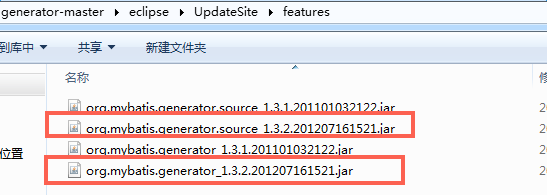
选择任意一个版本的jar放到eclipse的features目录下即可
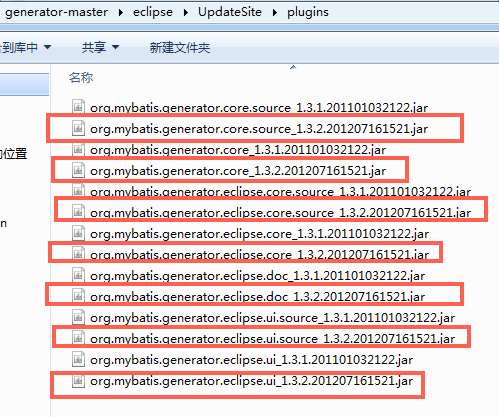
选择任意一个版本的jar放到eclipse的plugins目录下即可
重启eclispe
需要mybatis-generator-core.jar
<dependency>
<groupId>org.mybatis.generator</groupId>
<artifactId>mybatis-generator-core</artifactId>
<version>1.3.2</version>
<scope>test</scope>
</dependency>
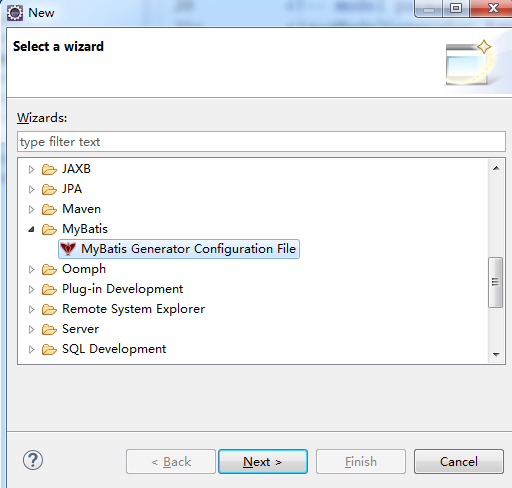
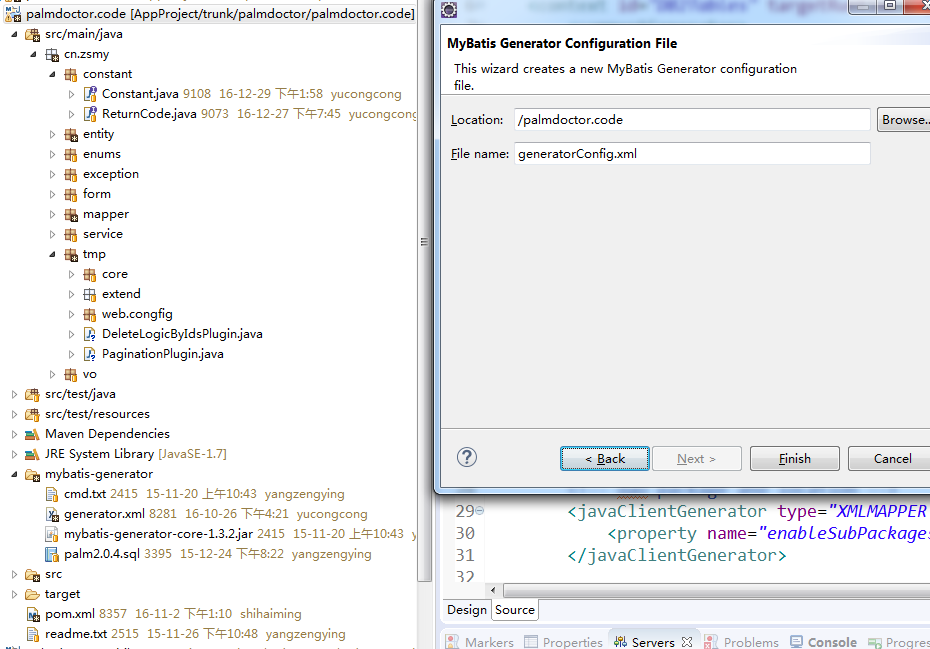
右键-new,会有MyBatis,在指定项目目录下生成generatorConfig.xml
以下是我配置的
<?xml version="1.0" encoding="UTF-8"?>

<!DOCTYPE generatorConfiguration PUBLIC "-//mybatis.org//DTD MyBatis Generator Configuration 1.0//EN" "http://mybatis.org/dtd/mybatis-generator-config_1_0.dtd">

<generatorConfiguration>

    <!-- oracle lib location -->

    <classPathEntry location="E:\backup\repository\mysql\mysql-connector-java\5.1.40\mysql-connector-java-5.1.40.jar" />

    <context id="DB2Tables" targetRuntime="MyBatis3">

        <commentGenerator>

            <property name="suppressAllComments" value="true" />

        </commentGenerator>

        <jdbcConnection driverClass="com.mysql.jdbc.Driver"

            connectionURL="jdbc:mysql://192.168.1.2:3306/palm_2_0_16" userId="root"

            password="sqj888">

        </jdbcConnection>

        <javaTypeResolver>

            <property name="forceBigDecimals" value="false" />

        </javaTypeResolver>

        <!-- model package and location -->

        <javaModelGenerator targetPackage="cn.zsmy.entity" targetProject="palmdoctor.code\src\main\java">

            <property name="enableSubPackages" value="true" />

            <property name="trimStrings" value="true" />

        </javaModelGenerator>

        <!-- mapping package and location -->

        <sqlMapGenerator targetPackage="cn.zsmy.mapper" targetProject="palmdoctor.code\src\main\java">

            <property name="enableSubPackages" value="true" />

        </sqlMapGenerator>

        <!-- dao package and location -->

        <javaClientGenerator type="XMLMAPPER" targetPackage="cn.zsmy.mapper" targetProject="palmdoctor.code\src\main\java">

            <property name="enableSubPackages" value="true" />

        </javaClientGenerator>

        <table tableName="tb_hello" domainObjectName="Hello"

            enableCountByExample="false" enableUpdateByExample="false"

            enableDeleteByExample="false" enableSelectByExample="false"

            selectByExampleQueryId="false" />

    </context>

</generatorConfiguration>
已存在generatorConfig.xml就不需要新建了,也可以直接copy的。
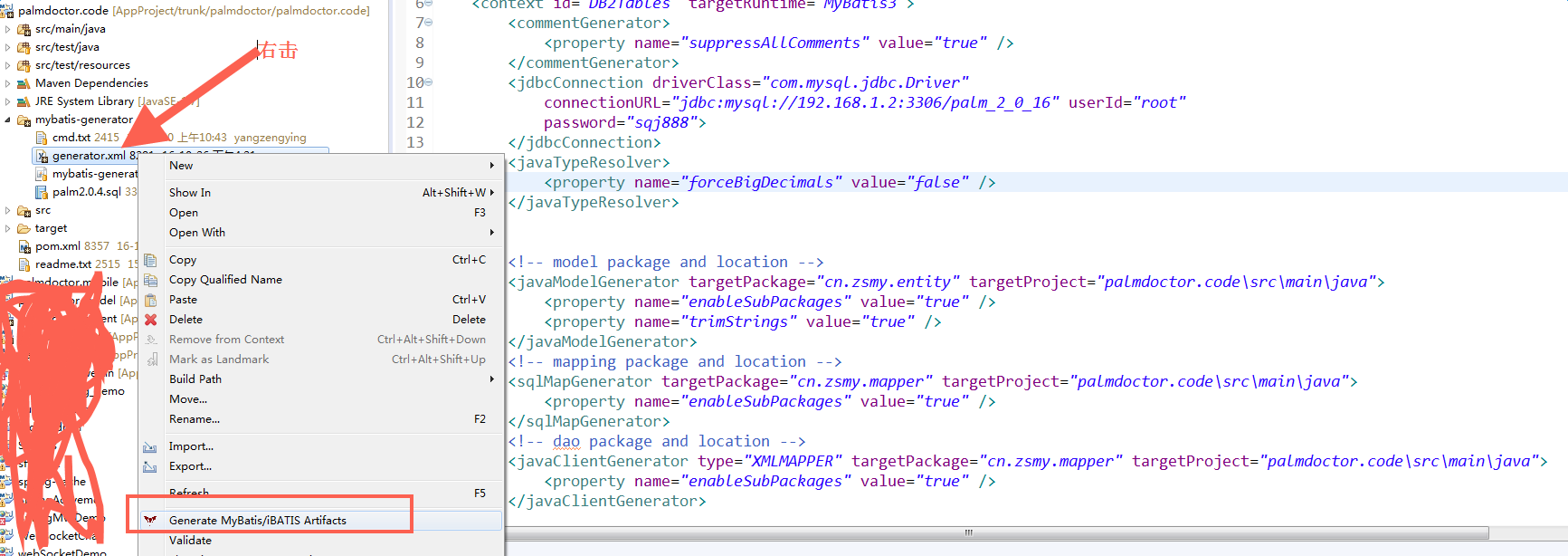
没报错就是成功了
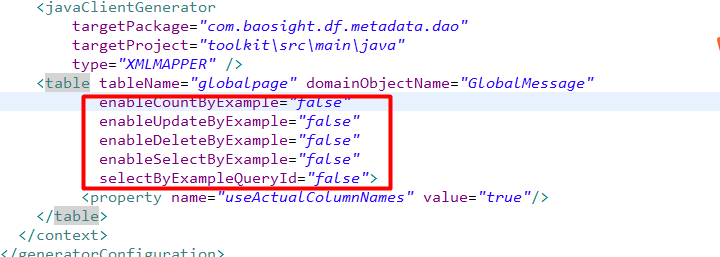
去掉Mybatis Generator生成的一堆 example
原文:http://www.cnblogs.com/lyh421/p/5672569.html
<table schema="general" tableName="tb_table_name" domainObjectName="EntityName"

    enableCountByExample="false" enableUpdateByExample="false" enableDeleteByExample="false"

    enableSelectByExample="false" selectByExampleQueryId="false" >

    <property name="useActualColumnNames" value="true"/>

</table>
我的修改:
eclipse中mybatis generator插件的安装与使用,实现自动生成代码的更多相关文章
- 2016.7.12 eclipse和IDEA中mybatis generator插件的安装与使用
Eclipse中的安装 http://jingyan.baidu.com/article/9faa7231506ed8473c28cbee.html 1.下载插件 2.将插件generator的fea ...
- Eclipse 使用mybatis generator插件自动生成代码
Eclipse 使用mybatis generator插件自动生成代码 标签: mybatis 2016-12-07 15:10 5247人阅读 评论(0) 收藏 举报 .embody{ paddin ...
- eclipse中的aptana插件的安装
先下载 aptana插件包 我安装的eclipse版本是 indido版本号的. 三步骤: 1.将aptana解压到eclipse的目录下 2.打开eclipse目录下的dropins文件,新建一 ...
- IDEA结合mybatis插件自动生成代码
pom文件 添加插件 <plugin> <groupId>org.mybatis.generator</groupId> <artifactId>myb ...
- Eclipse MyBatis Generator插件安装
目录 Eclipse MyBatis Generator插件安装 Eclipse MyBatis Generator插件安装 1.进入Eclipse Marketplace [Help] -> ...
- mybatis generator 插件安装及使用
现在Mybatis特别火,但是在开发中却要经常写实体类和配置文件,会不会特别烦人,所以可以利用Mybatis的代码生成插件来生成这部分代码: 1,打开eclipse,点击Help>Softwar ...
- Windows下安装Python及Eclipse中配置PyDev插件
最近开始接触Python,鉴于之前安装Java的教训,决定这次边安装Python,边写下历程,供日后反复使用. 在Python官网http://www.python.org/下载Python版本,鉴于 ...
- Myeclipse2014添加mybatis generator插件
Myeclipse2014把mybatis generator插件直接放在dropins文件夹下,重启后不能成功安装mybatis插件. 既然离线安装不成功,可以选择在线安装 1.选择 Help-&g ...
- 通过eclipse mybatis generater代码生成插件自动生成代码
Mybatis属于半自动ORM,在使用这个框架中,工作量最大的就是书写Mapping的映射文件,由于手动书写很容易出错,我们可以利用Mybatis-Generator来帮我们自动生成文件.通过在Ecl ...
随机推荐
- 云容器和安全性仍然是困扰IT人士的头号问题
[TechTarget中国原创] 容器和云安全仍然是IT领域中最热门的两个话题.下面就让我们来详细探讨一下吧. 云容器风靡一时是事出有因的.如Docker这样的容器能够提高应用的可移植性,并让企业用户 ...
- socketCluster 使用
<html> <head> <title>test</title> <script src="https://cdn.bootcss.c ...
- leetcode 【 Container With Most Water 】python 实现
题目: Given n non-negative integers a1, a2, ..., an, where each represents a point at coordinate (i, a ...
- leetcode 【 Copy List with Random Pointer 】 python 实现
题目: A linked list is given such that each node contains an additional random pointer which could poi ...
- Monkey官方帮助翻译&介绍
都说想学好就看原文,英文不好为了翻译这个可费了大劲了.表格从GOOGLE官网复制到WORD里编辑,结果贴上来格式全乱了,只得不弄表格了.表格中官网的事件不是最新的,比最新的少2个,具体我会另发一篇文章 ...
- 练习题 - js函数
代码贴出来 1 function Cat() { 2 getColor = function(){ console.log(1);} 3 return this; 4 } 5 Cat.getColor ...
- java替换富文本标签等
(转自:http://www.cnblogs.com/1246447850qqcom/p/5439366.html) package q;import java.util.regex.Matcher; ...
- 理解点击屏幕的事件响应--->对UIView的hitTest: withEvent: 方法的理解
要理解这两个方法.先了解一下用户触摸屏幕后的事件传递过程. 当用户点击屏幕后,UIApplication 先响应事件,然后传递给UIWindow.如果window可以响应.就开始遍历window的su ...
- C#中找不到MouseWheel事件的解决办法
在.....Designer.cs中加入 this.pictureBox1.MouseWheel += new System.Windows.Forms.MouseEventHandler(this. ...
- MyBatis输出sql需要log4j.properties配置
# Global logging configuration log4j.rootLogger=info,stdout,console,logfile # MyBatis logging config ...