
vue2.0 自定义 提示框(Toast)组件
1.自定义 提示框 组件
src / components / Toast / index.js
/**

 * 自定义 提示框( Toast )组件

 */

var Toast = {};

var showToast = false, // 存储toast显示状态

  showLoad = false, // 存储loading显示状态

  toastVM = null, // 存储toast vm

  loadNode = null; // 存储loading节点元素

Toast.install = function (Vue, options) {

  // 参数

  var opt = {

    defaultType: 'bottom',

    duration: '2500',

    wordWrap: false

  };

  for (var property in options) {

    opt[property] = options[property];

  }

  Vue.prototype.$toast = function (tips, type) {

    var curType = type ? type : opt.defaultType;

    var wordWrap = opt.wordWrap ? 'lx-word-wrap' : '';

    var style = opt.width ? 'style="width: ' + opt.width + '"' : '';

    var tmp = '<div v-show="show" :class="type" class="lx-toast ' + wordWrap + '" ' + style + '>{{tip}}</div>';

    if (showToast) {

      // 如果toast还在,则不再执行

      return;

    }

    if (!toastVM) {

      var toastTpl = Vue.extend({

        data: function () {

          return {

            show: showToast,

            tip: tips,

            type: 'lx-toast-' + curType

          }

        },

        template: tmp

      });

      toastVM = new toastTpl()

      var tpl = toastVM.$mount().$el;

      document.body.appendChild(tpl);

    }

    toastVM.type = 'lx-toast-' + curType;

    toastVM.tip = tips;

    toastVM.show = showToast = true;

    setTimeout(function () {

      toastVM.show = showToast = false;

    }, opt.duration)

  };

  ['bottom', 'center', 'top'].forEach(function (type) {

    Vue.prototype.$toast[type] = function (tips) {

      return Vue.prototype.$toast(tips, type)

    }

  });

  Vue.prototype.$loading = function (tips, type) {

    if (type == 'close') {

      loadNode.show = showLoad = false;

    } else {

      if (showLoad) {

        // 如果loading还在,则不再执行

        return;

      }

      var loadTpl = Vue.extend({

        data: function () {

          return {

            show: showLoad

          }

        },

        template: '<div v-show="show" class="lx-load-mark"><div class="lx-load-box"><div class="lx-loading"><div class="loading_leaf loading_leaf_0"></div><div class="loading_leaf loading_leaf_1"></div><div class="loading_leaf loading_leaf_2"></div><div class="loading_leaf loading_leaf_3"></div><div class="loading_leaf loading_leaf_4"></div><div class="loading_leaf loading_leaf_5"></div><div class="loading_leaf loading_leaf_6"></div><div class="loading_leaf loading_leaf_7"></div><div class="loading_leaf loading_leaf_8"></div><div class="loading_leaf loading_leaf_9"></div><div class="loading_leaf loading_leaf_10"></div><div class="loading_leaf loading_leaf_11"></div></div><div class="lx-load-content">' + tips + '</div></div></div>'

      });

      loadNode = new loadTpl();

      var tpl = loadNode.$mount().$el;

      document.body.appendChild(tpl);

      loadNode.show = showLoad = true;

    }

  };

  ['open', 'close'].forEach(function (type) {

    Vue.prototype.$loading[type] = function (tips) {

      return Vue.prototype.$loading(tips, type)

    }

  });

}

// 向外暴露接口

module.exports = Toast;
src / components / Toast / toast.css
/**

 * Toast 样式

 */

.lx-toast {

  position: fixed;

  bottom: 100px;

  left: 50%;

  box-sizing: border-box;

  max-width: 80%;

  height: 40px;

  line-height: 20px;

  padding: 10px 20px;

  transform: translateX(-50%);

  -webkit-transform: translateX(-50%);

  text-align: center;

  z-index: 9999;

  font-size: 14px;

  color: #fff;

  border-radius: 5px;

  background: rgba(0, 0, 0, 0.7);

  animation: show-toast .5s;

  -webkit-animation: show-toast .5s;

  overflow: hidden;

  text-overflow: ellipsis;

  white-space: nowrap;

}

.lx-toast.lx-word-wrap {

  width: 80%;

  white-space: inherit;

  height: auto;

}

.lx-toast.lx-toast-top {

  top: 50px;

  bottom: inherit;

}

.lx-toast.lx-toast-center {

  top: 50%;

  margin-top: -20px;

  bottom: inherit;

}

@keyframes show-toast {

  from {

    opacity: 0;

    transform: translate(-50%, -10px);

    -webkit-transform: translate(-50%, -10px);

  }

  to {

    opacity: 1;

    transform: translate(-50%, 0);

    -webkit-transform: translate(-50%, 0);

  }

}

.lx-load-mark {

  position: fixed;

  left: 0;

  top: 0;

  width: 100%;

  height: 100%;

  z-index: 9999;

}

.lx-load-box {

  position: fixed;

  z-index: 3;

  width: 7.6em;

  min-height: 7.6em;

  top: 180px;

  left: 50%;

  margin-left: -3.8em;

  background: rgba(0, 0, 0, 0.7);

  text-align: center;

  border-radius: 5px;

  color: #FFFFFF;

}

.lx-load-content {

  margin-top: 64%;

  font-size: 14px;

}

.lx-loading {

  position: absolute;

  width: 0px;

  left: 50%;

  top: 38%;

}

.loading_leaf {

  position: absolute;

  top: -1px;

  opacity: 0.25;

}

.loading_leaf:before {

  content: " ";

  position: absolute;

  width: 9.14px;

  height: 3.08px;

  background: #d1d1d5;

  box-shadow: rgba(0, 0, 0, 0.0980392) 0px 0px 1px;

  border-radius: 1px;

  -webkit-transform-origin: left 50% 0px;

  transform-origin: left 50% 0px;

}

.loading_leaf_0 {

  -webkit-animation: opacity-0 1.25s linear infinite;

  animation: opacity-0 1.25s linear infinite;

}

.loading_leaf_0:before {

  -webkit-transform: rotate(0deg) translate(7.92px, 0px);

  transform: rotate(0deg) translate(7.92px, 0px);

}

.loading_leaf_1 {

  -webkit-animation: opacity-1 1.25s linear infinite;

  animation: opacity-1 1.25s linear infinite;

}

.loading_leaf_1:before {

  -webkit-transform: rotate(30deg) translate(7.92px, 0px);

  transform: rotate(30deg) translate(7.92px, 0px);

}

.loading_leaf_2 {

  -webkit-animation: opacity-2 1.25s linear infinite;

  animation: opacity-2 1.25s linear infinite;

}

.loading_leaf_2:before {

  -webkit-transform: rotate(60deg) translate(7.92px, 0px);

  transform: rotate(60deg) translate(7.92px, 0px);

}

.loading_leaf_3 {

  -webkit-animation: opacity-3 1.25s linear infinite;

  animation: opacity-3 1.25s linear infinite;

}

.loading_leaf_3:before {

  -webkit-transform: rotate(90deg) translate(7.92px, 0px);

  transform: rotate(90deg) translate(7.92px, 0px);

}

.loading_leaf_4 {

  -webkit-animation: opacity-4 1.25s linear infinite;

  animation: opacity-4 1.25s linear infinite;

}

.loading_leaf_4:before {

  -webkit-transform: rotate(120deg) translate(7.92px, 0px);

  transform: rotate(120deg) translate(7.92px, 0px);

}

.loading_leaf_5 {

  -webkit-animation: opacity-5 1.25s linear infinite;

  animation: opacity-5 1.25s linear infinite;

}

.loading_leaf_5:before {

  -webkit-transform: rotate(150deg) translate(7.92px, 0px);

  transform: rotate(150deg) translate(7.92px, 0px);

}

.loading_leaf_6 {

  -webkit-animation: opacity-6 1.25s linear infinite;

  animation: opacity-6 1.25s linear infinite;

}

.loading_leaf_6:before {

  -webkit-transform: rotate(180deg) translate(7.92px, 0px);

  transform: rotate(180deg) translate(7.92px, 0px);

}

.loading_leaf_7 {

  -webkit-animation: opacity-7 1.25s linear infinite;

  animation: opacity-7 1.25s linear infinite;

}

.loading_leaf_7:before {

  -webkit-transform: rotate(210deg) translate(7.92px, 0px);

  transform: rotate(210deg) translate(7.92px, 0px);

}

.loading_leaf_8 {

  -webkit-animation: opacity-8 1.25s linear infinite;

  animation: opacity-8 1.25s linear infinite;

}

.loading_leaf_8:before {

  -webkit-transform: rotate(240deg) translate(7.92px, 0px);

  transform: rotate(240deg) translate(7.92px, 0px);

}

.loading_leaf_9 {

  -webkit-animation: opacity-9 1.25s linear infinite;

  animation: opacity-9 1.25s linear infinite;

}

.loading_leaf_9:before {

  -webkit-transform: rotate(270deg) translate(7.92px, 0px);

  transform: rotate(270deg) translate(7.92px, 0px);

}

.loading_leaf_10 {

  -webkit-animation: opacity-10 1.25s linear infinite;

  animation: opacity-10 1.25s linear infinite;

}

.loading_leaf_10:before {

  -webkit-transform: rotate(300deg) translate(7.92px, 0px);

  transform: rotate(300deg) translate(7.92px, 0px);

}

.loading_leaf_11 {

  -webkit-animation: opacity-11 1.25s linear infinite;

  animation: opacity-11 1.25s linear infinite;

}

.loading_leaf_11:before {

  -webkit-transform: rotate(330deg) translate(7.92px, 0px);

  transform: rotate(330deg) translate(7.92px, 0px);

}

@-webkit-keyframes opacity-0 {

  0% {

    opacity: 0.25;

  }

  0.01% {

    opacity: 0.25;

  }

  0.02% {

    opacity: 1;

  }

  60.01% {

    opacity: 0.25;

  }

  100% {

    opacity: 0.25;

  }

}

@-webkit-keyframes opacity-1 {

  0% {

    opacity: 0.25;

  }

  8.34333% {

    opacity: 0.25;

  }

  8.35333% {

    opacity: 1;

  }

  68.3433% {

    opacity: 0.25;

  }

  100% {

    opacity: 0.25;

  }

}

@-webkit-keyframes opacity-2 {

  0% {

    opacity: 0.25;

  }

  16.6767% {

    opacity: 0.25;

  }

  16.6867% {

    opacity: 1;

  }

  76.6767% {

    opacity: 0.25;

  }

  100% {

    opacity: 0.25;

  }

}

@-webkit-keyframes opacity-3 {

  0% {

    opacity: 0.25;

  }

  25.01% {

    opacity: 0.25;

  }

  25.02% {

    opacity: 1;

  }

  85.01% {

    opacity: 0.25;

  }

  100% {

    opacity: 0.25;

  }

}

@-webkit-keyframes opacity-4 {

  0% {

    opacity: 0.25;

  }

  33.3433% {

    opacity: 0.25;

  }

  33.3533% {

    opacity: 1;

  }

  93.3433% {

    opacity: 0.25;

  }

  100% {

    opacity: 0.25;

  }

}

@-webkit-keyframes opacity-5 {

  0% {

    opacity: 0.270958333333333;

  }

  41.6767% {

    opacity: 0.25;

  }

  41.6867% {

    opacity: 1;

  }

  1.67667% {

    opacity: 0.25;

  }

  100% {

    opacity: 0.270958333333333;

  }

}

@-webkit-keyframes opacity-6 {

  0% {

    opacity: 0.375125;

  }

  50.01% {

    opacity: 0.25;

  }

  50.02% {

    opacity: 1;

  }

  10.01% {

    opacity: 0.25;

  }

  100% {

    opacity: 0.375125;

  }

}

@-webkit-keyframes opacity-7 {

  0% {

    opacity: 0.479291666666667;

  }

  58.3433% {

    opacity: 0.25;

  }

  58.3533% {

    opacity: 1;

  }

  18.3433% {

    opacity: 0.25;

  }

  100% {

    opacity: 0.479291666666667;

  }

}

@-webkit-keyframes opacity-8 {

  0% {

    opacity: 0.583458333333333;

  }

  66.6767% {

    opacity: 0.25;

  }

  66.6867% {

    opacity: 1;

  }

  26.6767% {

    opacity: 0.25;

  }

  100% {

    opacity: 0.583458333333333;

  }

}

@-webkit-keyframes opacity-9 {

  0% {

    opacity: 0.687625;

  }

  75.01% {

    opacity: 0.25;

  }

  75.02% {

    opacity: 1;

  }

  35.01% {

    opacity: 0.25;

  }

  100% {

    opacity: 0.687625;

  }

}

@-webkit-keyframes opacity-10 {

  0% {

    opacity: 0.791791666666667;

  }

  83.3433% {

    opacity: 0.25;

  }

  83.3533% {

    opacity: 1;

  }

  43.3433% {

    opacity: 0.25;

  }

  100% {

    opacity: 0.791791666666667;

  }

}

@-webkit-keyframes opacity-11 {

  0% {

    opacity: 0.895958333333333;

  }

  91.6767% {

    opacity: 0.25;

  }

  91.6867% {

    opacity: 1;

  }

  51.6767% {

    opacity: 0.25;

  }

  100% {

    opacity: 0.895958333333333;

  }

}
2.全局引入
main.js
// 全局引入Toast

import './components/Toast/toast.css';

import Toast from './components/Toast/index';

Vue.use(Toast);
3.页面调用
Toast.vue
<!-- 提示框 -->

<template>

  <div>

    <!-- 标题栏 -->

    <mt-header title="提示框">

      <router-link to="/" slot="left">

        <mt-button icon="back">返回</mt-button>

      </router-link>

    </mt-header>

    <!-- 内容 -->

    <button @click="openTop()">top</button>

    <button @click="openCenter()">center</button>

    <button @click="openBottom()">bottom</button>

    <button @click="openLoading()">loading</button>

  </div>

</template>

<script>

  export default {

    name: 'Toast',

    data(){

      return {

        //

      }

    },

    methods:{

      openTop(){

        this.$toast.top('top');

      },

      openCenter(){

        this.$toast.center('center');

      },

      openBottom(){

        this.$toast('bottom');  // or this.$toast.bottom('bottom');

      },

      openLoading(){

        this.$loading('loading...');

        let self = this;

        setTimeout(function () {

          self.closeLoading()

        }, 2000)

      },

      closeLoading(){

        this.$loading.close();

      }

    }

  }

</script>

<style lang="less" scoped>

  //

</style>
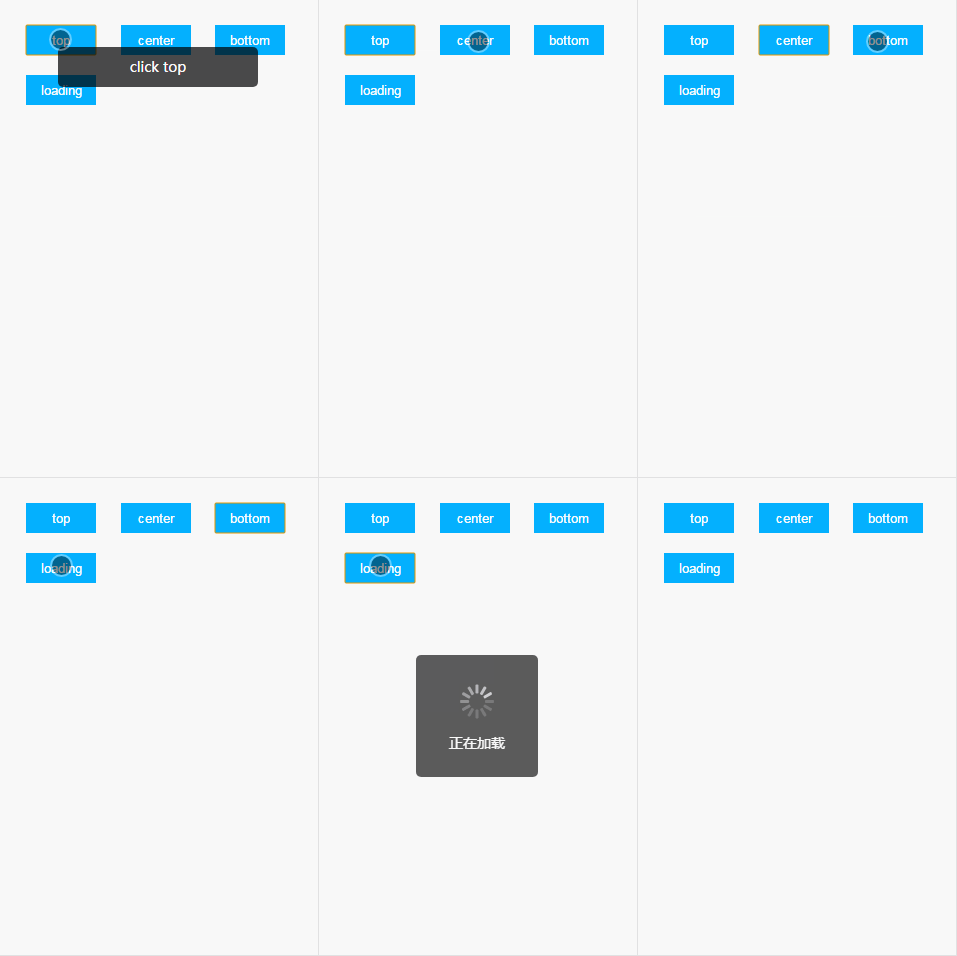
4.效果图
vue2.0 自定义 提示框(Toast)组件的更多相关文章
- vue 自定义 提示框(Toast)组件
1.自定义 提示框 组件 src / components / Toast / index.js /** * 自定义 提示框( Toast )组件 */ var Toast = {}; var sho ...
- vue3系列:vue3.0自定义弹框组件V3Popup|vue3.x手机端弹框组件
基于Vue3.0开发的轻量级手机端弹框组件V3Popup. 之前有分享一个vue2.x移动端弹框组件,今天给大家带来的是Vue3实现自定义弹框组件. V3Popup 基于vue3.x实现的移动端弹出框 ...
- Android消息提示框Toast
Android消息提示框Toast Toast是Android中一种简易的消息提示框.和Dialog不一样的是,Toast是没有焦点的,toast提示框不能被用户点击,而且Toast显示的时间有限,t ...
- 使提示框居中显示&自定义提示框
ToastActivity.java文件: 1 public class ToastActivity extends AppCompatActivity { 2 private Button mbtn ...
- 在ASP.NET中引用自定义提示框
在html网页中自定义提示框 正文: 在一般的B/S架构中项目,与用户的交互信息是非常重要的.在一般的情况下,设计人员都在把用户信息呈现在html中,用div和span去弹出相关信息.对于一般的情况而 ...
- vue2.0 自定义 饼状图 (Echarts)组件
1.自定义 图表 组件 Echarts.vue <!-- 自定义 echart 组件 --> <template> <div> <!-- echart表格 ...
- vue2.0 自定义 下拉刷新和上拉加载更多(Scroller) 组件
1.下拉刷新和上拉加载更多组件 Scroller.vue <!-- 下拉刷新 上拉加载更多 组件 --> <template> <div :style="mar ...
- CKEditor5 + vue2.0 自定义图片上传、highlight、字体等用法
因业务需求,要在 vue2.0 的项目里使用富文本编辑器,经过调研多个编辑器,CKEditor5 支持 vue,遂采用.因 CKEditor5 文档比较少,此处记录下引用和一些基本用法. CKEdit ...
- [js高手之路]Vue2.0基于vue-cli+webpack父子组件通信教程
在git命令行下,执行以下命令完成环境的搭建: 1,npm install --global vue-cli 安装vue命令行工具 2,vue init webpack vue-demo 使用v ...
随机推荐
- 微信小程序开发 -- 设置屏幕亮度
wx.setScreenBrightness(OBJECT) 设置屏幕亮度. OBJECT参数说明: 参数 类型 必填 说明 value Number 是 屏幕亮度值,范围 0~1,0 最暗,1 最亮 ...
- python装饰器实现用户密码认证(简单初形)
import timecurrent_user={'user':None}def auth(engine = 'file'): def deco(func): #func=最初始的index和最初始的 ...
- 什么是WSDL
WSDL定义 WSDL(Web Service Description Language) 指网络服务描述语言:是一种用来描述Web服务和说明Web服务通信的XML.WSDL用于描述WebServic ...
- javascript图片放大镜效果展示
javascript图片放大镜效果展示 <!DOCTYPE html> <html> <head lang="en"> <meta cha ...
- kb-07线段树--11--区间多重该值多种查询
/* lazy思想的运用,因为查询多种,如果全记录就太繁了,lazy就是如果该区间的每一个叶子的状态都相同就不用深入下去该值,只要暂时标记下,查询的时候也不用下去,直接计算: */ #include& ...
- [HDNOIP2017提高组]题解
(送给外省的同学们:HD = 海淀) [HDNOIP201701]小鱼干 试题描述 小喵喵有 n 个小鱼干排成一列,其中第 i 个小鱼干有两种属性,美味度 ai 和特殊度 bi. 现在小喵喵要吃掉一些 ...
- Java Socket IO(BIO、NIO)
总结下Java socket IO.首先是各种IO的定义,这个定义似乎也是众说纷纭.我按照stackoverflow上面的解释: IO有两种分法:按照阻塞或者按照同步.按照阻塞,有阻塞IO和非阻塞IO ...
- 数据库操作之——key与index的区别
mysql的key和index多少有点令人迷惑,这实际上考察对数据库体系结构的了解的. 1 key 是数据库的物理结构,它包含两层意义,一是约束(偏重于约束和规范数据库的结构完整性),二是索引(辅助查 ...
- 2018.8.7 Noip2018模拟测试赛(二十)
日期: 八月七号 总分: 300分 难度: 提高 ~ 省选 得分: 100分(呵呵一笑) 题目列表: T1:SS T2:Tree Game T3:二元运算 赛后反思: Emmmmmm…… 开 ...
- 应用css3制作loading效果
参考秒味课堂 代码发出来备忘 html <!DOCTYPE html> <html lang="en"> <head> <meta cha ...