
asp.net mvc4连接mysql
环境:vs2013+mysql5.6+mysql connector for .net 6.8.3+MySQL for Visual Studio 1.1.3
参考:http://dev.mysql.com/doc/connector-net/en/connector-net-entityframework60.html
mvc4连接mysql的资料很少,百度了一圈也没找到。一开始用的vs2013怎么也连接不上mysql,连ado.net不显示,用mysql.data的直接连接倒是能成功,但是到mvc的时候就需要各种配置了。
最后在mysql的官网上找到了资料:
1.首先要先安装MySQL for Visual Studio ,你可能会说我安装了啊,怎么还是不显示呢看官网说的:
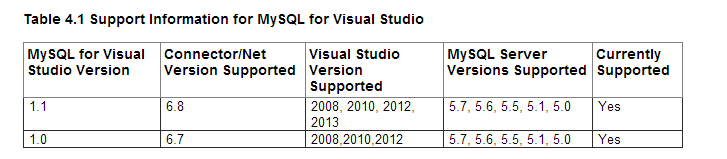
所以你需要安装1.1版本以上的才可以,除此之外,mysql官网还说了:
Visual Studio 2013 (Professional edition and up only) is supported by MySQL Connector/Net 6.8 and up with the MySQL for Visual Studio product.
必须是vs2013 professional版本以上才可以!!
等等,mysql的官网还有条:
Always install the MySQL for Visual Studio before installing MySQL Connector/Net.
安装MySQL Connector/Net之前要先安装MySQL for Visual Studio,不知道聪明的你是不是安装反了
安装MySQL Connector/Net,可以通过NuGet工具获得,比较轻松愉快,当然你也可以自己下载,自己引用
2.
配置环境:
修改web.config
<connectionStrings>

    <add name="MyContext" providerName="MySql.Data.MySqlClient" connectionString="server=localhost;

      port=3306;database=mycontext;uid=root;password=********"/>

  </connectionStrings>

  <entityFramework  codeConfigurationType="MySql.Data.Entity.MySqlEFConfiguration, MySql.Data.Entity.EF6">

    <defaultConnectionFactory type="System.Data.Entity.Infrastructure.SqlConnectionFactory, EntityFramework" />

    <providers>

      <provider invariantName="MySql.Data.MySqlClient" type="MySql.Data.MySqlClient.MySqlProviderServices,

        MySql.Data.Entity.EF6" />

      <provider invariantName="System.Data.SqlClient" type="System.Data.Entity.SqlServer.SqlProviderServices,

        EntityFramework.SqlServer" />

    </providers>

  </entityFramework>
添加mysql.data,mysql.data.entity.EF6到引用
下面mysql官方还温馨的建议了:
(1)在context class顶部添加:[DbConfigurationType(typeof(MySqlEFConfiguration))]
(2)添加 codeConfigurationType="MySql.Data.Entity.MySqlEFConfiguration, MySql.Data.Entity.EF6" 到<entityFramework> 上面的字节里我已经添加了
(3)程序开始的时候添加 DbConfiguration.SetConfiguration(new MySqlEFConfiguration());
实例代码:
[DbConfigurationType(typeof(MySqlEFConfiguration))]

  class JourneyContext : DbContext

  {

    public DbSet<MyPlace> MyPlaces { get; set; }

    public JourneyContext()

      : base()

    {

    }

    public JourneyContext(DbConnection existingConnection, bool contextOwnsConnection)

      : base(existingConnection, contextOwnsConnection)

    {

    }

  }

  using (MySqlConnection conn = new MySqlConnection("<connectionString>"))

  {

    conn.Open();

    ...

    using (var context = new JourneyContext(conn, false))

    {

      ...

    }

  }
mysql官网有一个例子,参考引用中就是,如果你设了密码会给有InnerException = {"Authentication to host 'localhost' for user 'root' using method 'mysql_native_password' failed with message: Access denied for user 'root'@'localhost' (using password: NO)"}" 的提示,你需要在连接字符串中增加
Persist Security Info=True;
我实现的效果:
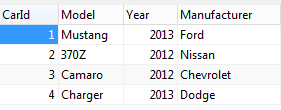
刚开始学习mvc,感觉比webform好用一些,要是连上了过来道个喜吧
asp.net mvc4连接mysql的更多相关文章
- ASP.Net MVC连接MySQL和Code First的使用
首先要准备一下的工具作为环境 MySQL Community Server 5.7.x My Workbench 6.3 VS2017 新建一个项目,NetMySQLCodeFirst 选择MVC,再 ...
- 处理asp.net core连接mysql的一个异常Sequence contains more than one matching element
晚上在那里调程序,把mysql.data组件的nuget包进行了更新,前几天好好的程序,开始抛错,跟踪断点发现以下的异常: Unable to connect to any of the specif ...
- Asp.Net Core 连接Mysql
上一篇文章里最后在VS里测试是没有问题的,但是在Windows命令行模式下会报错. 首先用dotnet restore命令的时候会出现error: 然后用dotnet run会出现警告,但是依旧会成功 ...
- ASP.NET MVC4 with MySQL: Configuration Error (MySql.Web.v20)
今天在浏览ASP.NET项目时,提示如下错误: Could not load file or assembly ‘MySql.Web.v20, Version=6.9.4.0, Culture=neu ...
- ASP.NET 连接MySQL数据库 详细步骤
ASP.NET默认的数据库是MS SQL Server,微软的数据库产品.事实上,如果不计成本因素的话,Windows Server + IIS + MS SQL Server + ASP.NET是网 ...
- ASP 连接 MySQL 数据库两种方法
一般都是用myodbc来连接.首先,在系统中安装 Mysql 的ODBC数据库驱动.如安装稳定版本是3.51.下载地址是:http://dev.mysql.com/downloads/connecto ...
- Asp.Net连接Mysql报错Out of sync with server
Asp.Net连接Mysql报错Out of sync with server 原因:程序引用的MySql.Data.dll版本高于服务器版本 解决:下载一个低版本的MySql.Data.dll,项目 ...
- 搭建连接MySql的三层架构的ASP.NetCore2.0的WebApi
里我们用三层架构搭建一个连接MySql的ASP.netCore模板的WebApi项目 首先添加WebApi项目(ASP.NetCore版本) 右键解决方案>新建项目> 选择Web>A ...
- asp.net core2.0 连接mysql和mssql
转自:https://www.jianshu.com/p/15a557ac43d9 1.连接mysql 第一步,新建asp.net core项目 新建项目 本例程作简单演示两种数据库的连接,为简便 ...
随机推荐
- ubuntu挂载3T新硬盘并更换home分区
ubuntu添加一块新的硬盘,并更换home分区 1.将硬盘接入机箱,开机,查看是否现有的硬盘信息 从这里可以看出,共有两块硬盘,分别是sda和sdb 2.执行fdisk -l,确保我们要添加的就是s ...
- Android apktool反编译资源文件为空解决办法(测试天猫、淘宝等apk成功)
1 Exception in thread main brut.androlib.androlibexception multiple resources 解决办法:下载最新的apktool,在goo ...
- .net Lock用法(转)
lock就是把一段代码定义为临界区,所谓临界区就是同一时刻只能有一个线程来操作临界区的代码,当一个线程位于代码的临界区时,另一个线程不能进入临界区,如果试图进入临界区,则只能一直等待(即被阻止),直到 ...
- 转-Cannot refer to an instance field arg while explicitly invoking a constructor
编译失败: Cannot refer to an instance field arg while explicitly invoking a constructor 调用方法时不能引用一个实例变量 ...
- std::copy ( myvector.begin(), myvector.end(), out_it )
在实际生产环境中,不能进行调试,所以程序通常需要编译一个DEBUG版本来辅助我们找出问题所在,编译这样的DEBUG版本最常用的手段就是在关键处输出我们关心一些变量的值到屏幕. 如果输出的简单的变量值, ...
- UITabelViewCell自定义(zhuan)
很多时候,我们需要自定义UITableView来满足我们的特殊要求.这时候,关于UITableView和cell的自定义和技巧太多了,就需要不断的总结和归纳. 1.添加自定义的Cell. 这个 ...
- Debian 为nginx增加第三方模块
为nginx增加第三方模块需要重新编译nginx的,但是debian在安装nginx的时候做了很多事情,比如systemd,/etc/nginx/里的各种文件,所以我们最好在debian源代码包的基础 ...
- HDU 5073 Galaxy 2014 Asia AnShan Regional Contest 规律题
推公式 #include <cstdio> #include <cmath> #include <iomanip> #include <iostream> ...
- VMware虚拟机 Ubuntu 实用技巧 (1) -- 安装VMware Tool
1.用VM安装Ubuntu后屏幕太小? 2.Ubuntu中的文本与window中的文本不能互相复制黏贴? 如果你遇到以上问题,可以通过在VMware里安装“VMware Tool”插件解决!! 安装步 ...
- HTML— 弹出遮盖层
<!DOCTYPE html> <html> <head> <meta charset="utf-8" /> <title&g ...