
Android系统--Binder系统具体框架分析(一)
Binder系统具体框架分析(一)
一、Binder系统核心框架
1. IPC:Inter-Process Communication, 进程间通信
A进程将数据原原本本发送B进程,主要负责进程间数据传输
源地址
目的地址
进程B向ServiceManager注册服务
进程A向ServiceManager查询服务,得到一个handle,handle指向B进程,即目的地址
数据包
2. RPC:Remote Procedure Call, 远程过程调用,主要用于调用服务中函数
A进程想操作硬件(LED为例),ledopen/ledctrl,实质A->B,B来操作硬件
封装构造数据
发送数据包给B进程
B进程收到之后发送数据
调用本地ledopen/ledctrl函数
Server的函数编号
通过IPC的buf传输
3. 具体Binder驱动调用关系
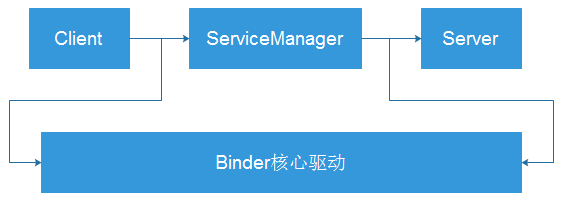
3.1 首先需要向ServiceManager注册一个服务,故先运行的为ServiceManager
open Binder驱动--binder_open();
告诉驱动程序,自身是ServiceManager--binder_become_context_manager();
while(1)--binder_loop(bs, svcmgr_handler);
读取驱动信息,获取数据--res = ioctl(bs->fd, BINDER_WRITE_READ, &bwr);
解析处理数据--binder_parse
调用两个函数(1. 注册服务; 2. 获取服务,返回handle)
// 解析

// 处理  : svcmgr_handler

             SVC_MGR_GET_SERVICE/SVC_MGR_CHECK_SERVICE : 获取服务

             SVC_MGR_ADD_SERVICE : 注册服务

// 回复
3.2 Server如何调用函数并执行
open Binder驱动程序--binder_open();
注册服务(向ServiceManager发送服务名字)--binder_call(bs, &msg, &reply, 0, SVC_MGR_ADD_SERVICE);
    // bs:驱动信息

    // &msg:含有服务的名字

    // &reply:它会含有servicemanager回复的数据

    // 0:表示servicemanager

    // SVC_MGR_ADD_SERVICE:code,表示要调用servicemanager中的"addservice函数"
while(1)
读取驱动信息,获取数据
解析数据
调用对应函数
3.3 Client如何进行数据传输
open Binder驱动程序--binder_open();
获取服务(向ServiceManager查询服务,获得一个handle)-- binder_call(bs, &msg, &reply, 0, SVC_MGR_CHECK_SERVICE)
    // bs:驱动信息

    // &msg:含有服务的名字

    // &reply:它会含有servicemanager回复的数据, 表示提供服务的进程

    // 0,表示servicemanager

    // SVC_MGR_CHECK_SERVICE:code,表示要调用servicemanager中的"getservice函数"
向handle发送数据
3.4 binder_call具体分析:实现远程调用RPC
3.4.1 函数作用:
向谁发送数据
调用哪个函数
提供什么参数
返回值
binder_call函数
int binder_call(struct binder_state *bs, struct binder_io *msg, struct binder_io *reply, uint32_t target, uint32_t code)
3.4.2 如何使用binder_call函数
- 构造参数:存放在buf中,用binder_io结构体描述
    struct binder_io

    {

        char *data;            /* pointer to read/write from */

        binder_size_t *offs;   /* array of offsets */

        size_t data_avail;     /* bytes available in data buffer */

        size_t offs_avail;     /* entries available in offsets array */

        char *data0;           /* start of data buffer */

        binder_size_t *offs0;  /* start of offsets buffer */

        uint32_t flags;

        uint32_t unused;

    };

    unsigned iodata[512/4];

    struct binder_io msg, reply;

    bio_init(&msg, iodata, sizeof(iodata), 4);

    bio_put_uint32(&msg, 0);                    // strict mode header

    bio_put_string16_x(&msg, SVC_MGR_NAME);

    bio_put_string16_x(&msg, name);

    bio_put_obj(&msg, ptr);
- binder_io,target,code->binder_write_read
    struct {

        uint32_t cmd;

        struct binder_transaction_data txn;

    } __attribute__((packed)) writebuf;

    writebuf.cmd = BC_TRANSACTION;

    writebuf.txn.target.handle = target;

    writebuf.txn.code = code;

    writebuf.txn.flags = 0;

    writebuf.txn.data_size = msg->data - msg->data0;

    writebuf.txn.offsets_size = ((char*) msg->offs) - ((char*) msg->offs0);

    writebuf.txn.data.ptr.buffer = (uintptr_t)msg->data0;

    writebuf.txn.data.ptr.offsets = (uintptr_t)msg->offs0;
调用ioctl发送数据--ioctl(bs->fd, BINDER_WRITE_READ, &bwr);
- struct binder_write_read bwr;
struct binder_write_read {

 binder_size_t write_size;

 binder_size_t write_consumed;

 binder_uintptr_t write_buffer;

/* WARNING: DO NOT EDIT, AUTO-GENERATED CODE - SEE TOP FOR INSTRUCTIONS */

 binder_size_t read_size;

 binder_size_t read_consumed;

 binder_uintptr_t read_buffer;

};
使用例子:
    bwr.write_size = sizeof(writebuf);

    bwr.write_consumed = 0;

    bwr.write_buffer = (uintptr_t) &writebuf;
- ioctl也会接收数据,收到binder_write_read,转化binder_io
如何使用binder_call函数:构建binder_io结构体->使用binder_call(内部将实现转化等操作)
二、如何编写Binder系统APP
(1) Client 实现
binder_open
获得服务:handle
构造参数:binder_io
调用binder_call(参数:handle,code,...)
分析返回的binder_io,取出返回值
/* Copyright 2008 The Android Open Source Project

*/

#include <stdio.h>

#include <stdlib.h>

#include <errno.h>

#include <linux/types.h>

#include<stdbool.h>

#include <string.h>

#include <private/android_filesystem_config.h>

#include "binder.h"

#include "test_server.h"

uint32_t svcmgr_lookup(struct binder_state *bs, uint32_t target, const char *name)

{

    uint32_t handle;

    unsigned iodata[512/4];

    struct binder_io msg, reply;

    bio_init(&msg, iodata, sizeof(iodata), 4);

    bio_put_uint32(&msg, 0);  // strict mode header

    bio_put_string16_x(&msg, SVC_MGR_NAME);

    bio_put_string16_x(&msg, name);

    if (binder_call(bs, &msg, &reply, target, SVC_MGR_CHECK_SERVICE))

        return 0;

    handle = bio_get_ref(&reply);

    if (handle)

        binder_acquire(bs, handle);

    binder_done(bs, &msg, &reply);

    return handle;

}

struct binder_state *g_bs;

uint32_t g_handle;

void sayhello(void)

{

    unsigned iodata[512/4];

    struct binder_io msg, reply;

	/* 构造binder_io */

    bio_init(&msg, iodata, sizeof(iodata), 4);

    bio_put_uint32(&msg, 0);  // strict mode header

	/* 放入参数 */

	/* 调用binder_call */

    if (binder_call(g_bs, &msg, &reply, g_handle, HELLO_SVR_CMD_SAYHELLO))

        return ;

	/* 从reply中解析出返回值 */

    binder_done(g_bs, &msg, &reply);

}

int sayhello_to(char *name)

{

	unsigned iodata[512/4];

	struct binder_io msg, reply;

	int ret;

	/* 构造binder_io */

	bio_init(&msg, iodata, sizeof(iodata), 4);

	bio_put_uint32(&msg, 0);  // strict mode header

	/* 放入参数 */

    bio_put_string16_x(&msg, name);

	/* 调用binder_call */

	if (binder_call(g_bs, &msg, &reply, g_handle, HELLO_SVR_CMD_SAYHELLO_TO))

		return 0;

	/* 从reply中解析出返回值 */

	ret = bio_get_uint32(&reply);

	binder_done(g_bs, &msg, &reply);

	return ret;

}

/* ./test_client hello

 * ./test_client hello <name>

 */

int main(int argc, char **argv)

{

    int fd;

    struct binder_state *bs;

    uint32_t svcmgr = BINDER_SERVICE_MANAGER;

    uint32_t handle;

	int ret;

	if (argc < 2){

        fprintf(stderr, "Usage:\n");

        fprintf(stderr, "%s hello\n", argv[0]);

        fprintf(stderr, "%s hello <name>\n", argv[0]);

        return -1;

	}

    bs = binder_open(128*1024);

    if (!bs) {

        fprintf(stderr, "failed to open binder driver\n");

        return -1;

    }

	g_bs = bs;

	/* get service */

	handle = svcmgr_lookup(bs, svcmgr, "hello");

	if (!handle) {

        fprintf(stderr, "failed to get hello service\n");

        return -1;

	}

	g_handle = handle;

	/* send data to server */

	if (argc == 2) {

		sayhello();

	} else if (argc == 3) {

		ret = sayhello_to(argv[2]);

        fprintf(stderr, "get ret of sayhello_to = %d\n", ret);

	}

	binder_release(bs, handle);

    return 0;

}
(2) Server 实现
binder_open
注册服务
ioctl()读取数据
解析数据--binder_write_read()
根据code决定调用哪个函数,从binder_io中取出参数
把返回值转化为binder_io后返回
/* Copyright 2008 The Android Open Source Project

 */

#include <stdio.h>

#include <stdlib.h>

#include <errno.h>

#include <linux/types.h>

#include<stdbool.h>

#include <string.h>

#include <private/android_filesystem_config.h>

#include "binder.h"

#include "test_server.h"

int svcmgr_publish(struct binder_state *bs, uint32_t target, const char *name, void *ptr)

{

    int status;

    unsigned iodata[512/4];

    struct binder_io msg, reply;

    bio_init(&msg, iodata, sizeof(iodata), 4);

    bio_put_uint32(&msg, 0);  // strict mode header

    bio_put_string16_x(&msg, SVC_MGR_NAME);

    bio_put_string16_x(&msg, name);

    bio_put_obj(&msg, ptr);

    if (binder_call(bs, &msg, &reply, target, SVC_MGR_ADD_SERVICE))

        return -1;

    status = bio_get_uint32(&reply);

    binder_done(bs, &msg, &reply);

    return status;

}

void sayhello(void)

{

	static int cnt = 0;

	fprintf(stderr, "say hello : %d\n", cnt++);

}

int sayhello_to(char *name)

{

	static int cnt = 0;

	fprintf(stderr, "say hello to %s : %d\n", name, cnt++);

	return cnt;

}

int hello_service_handler(struct binder_state *bs,

                   struct binder_transaction_data *txn,

                   struct binder_io *msg,

                   struct binder_io *reply)

{

	/* 根据txn->code知道要调用哪一个函数

	 * 如果需要参数, 可以从msg取出

	 * 如果要返回结果, 可以把结果放入reply

	 */

	/* sayhello

	 * sayhello_to

	 */

    uint16_t *s;

	char name[512];

    size_t len;

    uint32_t handle;

    uint32_t strict_policy;

	int i;

    // Equivalent to Parcel::enforceInterface(), reading the RPC

    // header with the strict mode policy mask and the interface name.

    // Note that we ignore the strict_policy and don't propagate it

    // further (since we do no outbound RPCs anyway).

    strict_policy = bio_get_uint32(msg);

    switch(txn->code) {

    case HELLO_SVR_CMD_SAYHELLO:

		sayhello();

        return 0;

    case HELLO_SVR_CMD_SAYHELLO_TO:

		/* 从msg里取出字符串 */

		s = bio_get_string16(msg, &len);

		if (s == NULL) {

			return -1;

		}

		for (i = 0; i < len; i++)

			name[i] = s[i];

		name[i] = '\0';

		/* 处理 */

		i = sayhello_to(name);

		/* 把结果放入reply */

		bio_put_uint32(reply, i);

        break;

    default:

        fprintf(stderr, "unknown code %d\n", txn->code);

        return -1;

    }

    return 0;

}

int main(int argc, char **argv)

{

    int fd;

    struct binder_state *bs;

    uint32_t svcmgr = BINDER_SERVICE_MANAGER;

    uint32_t handle;

	int ret;

    bs = binder_open(128*1024);

    if (!bs) {

        fprintf(stderr, "failed to open binder driver\n");

        return -1;

    }

	/* add service */

	ret = svcmgr_publish(bs, svcmgr, "hello", (void *)123);

    if (ret) {

        fprintf(stderr, "failed to publish hello service\n");

        return -1;

    }

	ret = svcmgr_publish(bs, svcmgr, "goodbye", (void *)124);

    if (ret) {

        fprintf(stderr, "failed to publish goodbye service\n");

    }

#if 0

	while (1)

	{

		/* read data */

		/* parse data, and process */

		/* reply */

	}

#endif

    binder_loop(bs, hello_service_handler);

    return 0;

}
Android系统--Binder系统具体框架分析(一)的更多相关文章
- Android系统--Binder系统具体框架分析(二)Binder驱动情景分析
Android系统--Binder系统具体框架分析(二)Binder驱动情景分析 1. Binder驱动情景分析 1.1 进程间通信三要素 源 目的:handle表示"服务",即向 ...
- Android系统--Binder系统具体框架分析(一)补充
Android系统--Binder系统具体框架分析(一)补充 补充:对Binder驱动分析一的代码补充,添加saygoobye和saygoodbye_to服务 test_server.h #ifnde ...
- 深入浅出 - Android系统移植与平台开发(十一) - Sensor HAL框架分析之一
作者:唐老师,华清远见嵌入式学院讲师. 1. Sensor的概念 Sensor即传感器,在当前智能手机上大量存在:G-Sensor.LightsSensor. ProximitySensor.Temp ...
- 深入浅出 - Android系统移植与平台开发(八)- HAL Stub框架分析
作者:唐老师,华清远见嵌入式学院讲师. 1. HAL Stub框架分析 HAL stub的框架比较简单,三个结构体.两个常量.一个函数,简称321架构,它的定义在:@hardware/libhardw ...
- Android Binder 系统学习笔记(一)Binder系统的基本使用方法
1.什么是RPC(远程过程调用) Binder系统的目的是实现远程过程调用(RPC),即进程A去调用进程B的某个函数,它是在进程间通信(IPC)的基础上实现的.RPC的一个应用场景如下: A进程想去打 ...
- 9.2 Binder系统_驱动情景分析_服务注册过程
1. 几个重要结构体的引入给test_server添加一个goodbye服务, 由此引入以下概念: 进程间通信其实质也是需要三要素:源.目的.数据,源是自己,目的用handle表示:通讯的过程是源向实 ...
- Android系统--输入系统(五)输入系统框架
Android系统--输入系统(五)输入系统框架 1. Android设备使用场景: 假设一个Android平板,APP功能.系统功能(开机关机.调节音量).外接设备功能(键盘.触摸屏.USB外接键盘 ...
- Android 核心分析 之六 IPC框架分析 Binder,Service,Service manager
IPC框架分析 Binder,Service,Service manager 我首先从宏观的角度观察Binder,Service,Service Manager,并阐述各自的概念.从Linux的概念空 ...
- Android系统--输入系统(七)Reader_Dispatcher线程启动分析
Android系统--输入系统(七)Reader_Dispatcher线程启动分析 1. Reader/Dispatcher的引入 对于输入系统来说,将会创建两个线程: Reader线程(读取事件) ...
随机推荐
- java SAXReader
使用SAXReader需要导入dom4j-full.jar包. dom4j是一个Java的XML API,类似于jdom,用来读写XML文件的.dom4j是一个非常非常优秀的JavaXML API,具 ...
- 可以将化学结构NMR图谱这样导入Word
在化学各个领域中,大家常常会用到ChemDraw化学绘图软件来绘制各种图形,ChemDraw因其出色的功能在全球范围内深受欢迎,但是一些用户朋友对于一些功能还不是很了解,需要通过一些教程来了解如何操作 ...
- day21 os random 序列json
一.random模块 import random # print(random.random()) #0到1之间数 # print(random.uniform(10,20)) #范围内小数 ...
- 普通摄像机也能做互联网HLS(m3u8)、RTMP、HTTP-FLV直播?是的,采用基于GBT28181协议的EasyGBS流媒体服务
在之前的一篇博客<EasyNVR和EasyDSS云平台联手都不能解决的事情,只有国标GB28181能解决了>我们介绍了很多应用场景里面,RTSP和RTMP直播协议都无法满足应用需求时,国标 ...
- Hystrix参数说明
参数配置 参数说明 值 备注 groupKey productStockOpLog group标识,一个group使用一个线程池 commandKey addProductStockOpLog com ...
- PHP heredoc 用法2
参考网上的一个heredoc php模板实现的简单代码:index.php文件: <?php function template($template,$EXT ='htm') { $path = ...
- vue禁止复制的方式
普通网页禁止复制的功能这里不再叙述,自行学习 https://blog.csdn.net/qq_32963841/article/details/84656752 这里简单写一下vue中怎么禁止使用复 ...
- MySQL中InnoDB全文检索
InnoDB存储引擎从1.2.x开始支持全文索引技术,其采用full inverted index的方式.在InnoDB存储引擎中,将(DocumentID,Postition)视为一个ilist.因 ...
- ./bin/console server:run Surprise! There are no commands defined in the "server" namespace.
Let's start the built-in web server: ./bin/console server:run Surprise! There are no commands defi ...
- JavaWeb—Servlet
1.什么是Servlet 用来扩展web服务器功能的组件——早期的web服务器只能处理静态资源的请求,即需要事先将html文件准备好,并存放到web服务器上面.不能够处理动态资源的请求(需要计算,动态 ...