
Requests 库
Requests 库的两个重要的对象:(Request , Response)
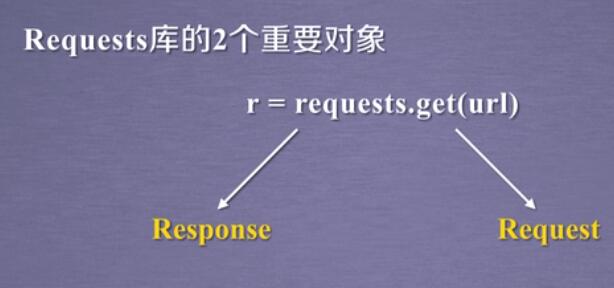
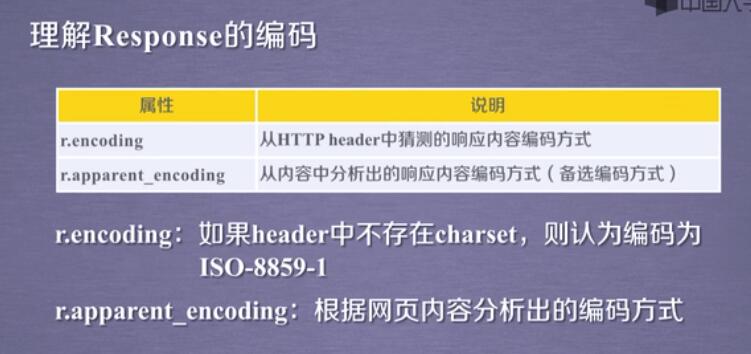
Response对象的属性:
import requests

r =requests.get('http://www.bilibili.com')   response 对象   <Response [200]>

print(r.status_code)     # 200状态码-----404错误

print(r.headers)         # 请求码

print(r.text)            # 字符串形式

print(r.encoding)        # 网页的编码方式-根据headers猜测

print(r.apparent_encoding)      # 根据内容响应的编码方式(r.encoding=r.apparent_encoding)

print(r.content)                # 二进制形式
requests 库的7个重要的方法:
                 ===============  requests 库的7个重要的方法 ==============

---1  requests.request(method,url,**kwargs)

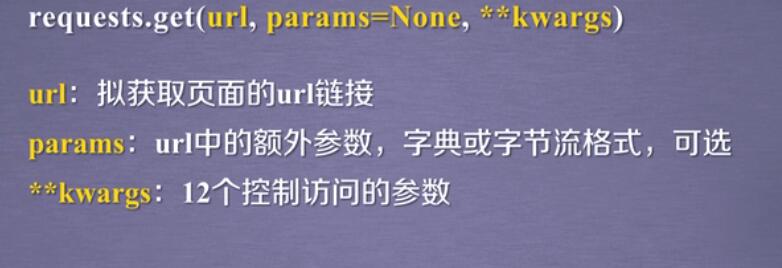
---2 requests.get(url,params=None,**kwargs)
---3 requests.head(url,**kwargs)

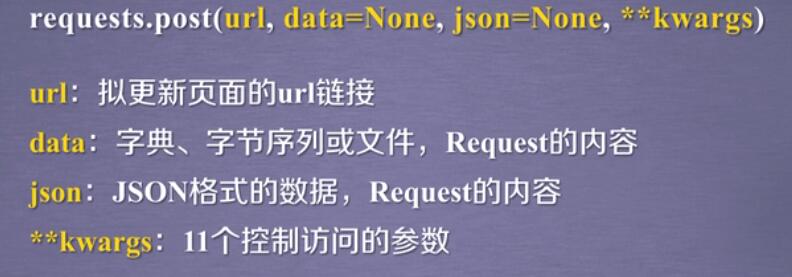
---4 requests.post(url,data=None,json=None,**kwargs)
---5 requests.put(url,data=None,**kwargs)
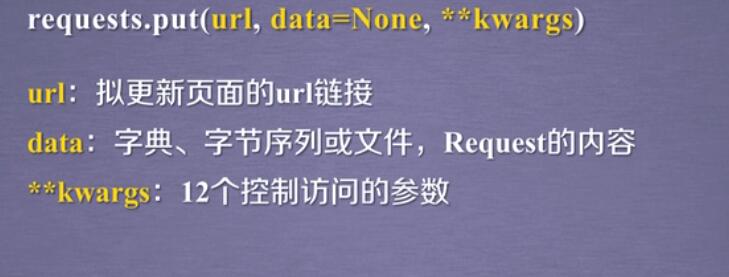
---6 requests.patch(url,data=None,**kwargs)

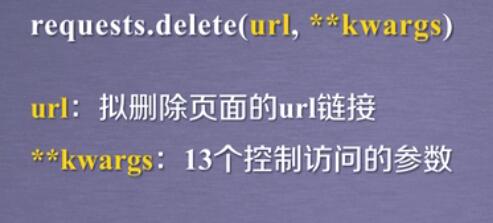
---7 requests.delete(url,**kwargs)
Requests 请求的通用代码框架:
                               === 通用框架 ===

import requests

def getHTMLText(url):

    try:

        r=requests.get(url,timeout=30)   # <Response [200]>

        r.raise_for_status()            # 如果状态码不是200,引发HTTPError异常

        r.encoding=r.apparent_encoding

        return r.text

    except:

        return 'Error!'

if __name__=='__main__':

    url='http://www.baidu.com'

    print(getHTMLText(url))
伪装浏览器请求:
常用请求头:

Mozilla/5.0 (Windows; U; MSIE 9.0; Windows NT 9.0; en-US)

#opera浏览器

Opera/9.80 (X11; Linux i686; U; ru) Presto/2.8.131 Version/11.11

#chrome浏览器

Mozilla/5.0 (Windows NT 6.1) AppleWebKit/537.2 (KHTML, like Gecko) Chrome/22.0.1216.0 Safari/537.2


#firefox浏览器

Mozilla/5.0 (Windows NT 6.2; Win64; x64; rv:16.0.1) Gecko/20121011 Firefox/16.0.1


#safri浏览器

Mozilla/5.0 (iPad; CPU OS 6_0 like Mac OS X) AppleWebKit/536.26 (KHTML, like Gecko) Version/6.0 Mobile/10A5355d Safari/8536.25
例子 1  跟换请求头

亚马逊通会过来源审查 阻止访问-----需要更改请求头

import requests

url='https://www.amazon.cn/dp/B07473FZXY?_encoding=UTF8&ref_=pc_cxrd_658390051_recTab_335775071_t_3&pf_rd_p=7e00fee6-4e12-48f0-b4af-b99068b52067&pf_rd_s=merchandised-search-4&pf_rd_t=101&pf_rd_i=658390051&pf_rd_m=A1AJ19PSB66TGU&pf_rd_r=1SV7P98M8XX2E5N2PBW5&pf_rd_r=1SV7P98M8XX2E5N2PBW5&pf_rd_p=7e00fee6-4e12-48f0-b4af-b99068b52067'

try:

    header={'User-Agent':'Mozilla/5.0'}     # 'Mozilla/5.0'---浏览器身份标识

    r=requests.get(url,headers=header)

    r.raise_for_status()

    r.encoding=r.apparent_encoding

    print(r.text[1000:2000])

except Exception:

    print('Error!')

print(r.request.url)     #当前请求的网页   https://www.amazon.cn/%E5%9B%BE%E4%B9%A6/dp/B07473FZXY

print(r.request.headers) # 当前的请求头    {'User-Agent': 'python-requests/2.18.2', 'Accept-Encoding': 'gzip, deflate', 'Accept': '*/*', 'Connection': 'keep-alive'}
例子 2  关键字搜索--百度

import requests

keyword={'wd':'Python'}

url='https://www.baidu.com/s'

try:

    r=requests.get(url,params=keyword)

    r.raise_for_status()

    r.encoding=r.apparent_encoding

    print(r.request.url)

    # print(len(r.text))

    print(r.text)

except Exception:

    print('Error!')
例子 3      图片 爬取 与 保存

import requests

import os

url='http://pic1.16pic.com/00/14/32/16pic_1432548_b.jpg'

root=r'C:\Users\Administrator\Desktop'

path=root+'\\'+url.split('/')[-1]

try:

    if not os.path.exists(root):       # 根目录是否存在

        os.mkdir(root)

    elif not os.path.exists(path):     # 文件是否存在

        r=requests.get(url) # <Response [200]>

        # print(r.status_code)

        # print(r.content)  # 二进制

        with open(path,'wb') as f:

            f.write( r.content )    # 二进制写入

            print('文件操作成功!')

    else:

        print('文件已经存在!')

except:

    print('Error!')
例子 5  ip  地址的归属地查询----ip138.com

import requests

url='http://www.ip138.com/ips138.asp?ip='

ip='202.204.80.112'

url=url+ip

try:

    r=requests.get(url)

    # print(r)              # ===回应====  <Response [200]>

    # print(r.request.url)  # ===请求==== http://www.ip138.com/ips138.asp?ip=202.204.80.112

    r.raise_for_status()

    r.encoding=r.apparent_encoding

    print(r.text[-500:])

except:

    print('Error!')
Requests 库的更多相关文章
- Python爬虫小白入门(二)requests库
一.前言 为什么要先说Requests库呢,因为这是个功能很强大的网络请求库,可以实现跟浏览器一样发送各种HTTP请求来获取网站的数据.网络上的模块.库.包指的都是同一种东西,所以后文中可能会在不同地 ...
- Requests库上传文件时UnicodeDecodeError: 'ascii' codec can't decode byte错误解析
在使用Request上传文件的时候碰到如下错误提示: 2013-12-20 20:51:09,235 __main__ ERROR 'ascii' codec can't decode byte 0x ...
- Requests库的几种请求 - 通过API操作Github
本文内容来源:https://www.dataquest.io/mission/117/working-with-apis 本文的数据来源:https://en.wikipedia.org/wiki/ ...
- python脚本实例002- 利用requests库实现应用登录
#! /usr/bin/python # coding:utf-8 #导入requests库 import requests #获取会话 s = requests.session() #创建登录数据 ...
- 大概看了一天python request源码。写下python requests库发送 get,post请求大概过程。
python requests库发送请求时,比如get请求,大概过程. 一.发起get请求过程:调用requests.get(url,**kwargs)-->request('get', url ...
- python WEB接口自动化测试之requests库详解
由于web接口自动化测试需要用到python的第三方库--requests库,运用requests库可以模拟发送http请求,再结合unittest测试框架,就能完成web接口自动化测试. 所以笔者今 ...
- python爬虫从入门到放弃(四)之 Requests库的基本使用
什么是Requests Requests是用python语言基于urllib编写的,采用的是Apache2 Licensed开源协议的HTTP库如果你看过上篇文章关于urllib库的使用,你会发现,其 ...
- (转)Python爬虫利器一之Requests库的用法
官方文档 以下内容大多来自于官方文档,本文进行了一些修改和总结.要了解更多可以参考 官方文档 安装 利用 pip 安装 $ pip install requests 或者利用 easy_install ...
- python requests库学习笔记(上)
尊重博客园原创精神,请勿转载! requests库官方使用手册地址:http://www.python-requests.org/en/master/:中文使用手册地址:http://cn.pytho ...
- 使用Python的requests库进行接口测试——session对象的妙用
from:http://blog.csdn.net/liuchunming033/article/details/48131051 在进行接口测试的时候,我们会调用多个接口发出多个请求,在这些请求中有 ...
随机推荐
- spring tiles界面为空白
Caused by: org.apache.jasper.JasperException: /WEB-INF/views/admin_template.jsp(3,62) Unable to read ...
- 2.5 使用ARDUINO做主控,手机发送短信控制开关LED
需要准备的硬件 MC20开发板 1个 https://item.taobao.com/item.htm?id=562661881042 GSM/GPRS天线 1根 https://item.taoba ...
- 3.6中的range()
在python3中range()是这样的: >>> range(4) range(0, 4) #额,列表跑哪去了 在之前的python2中是这样的: >>> ran ...
- Python基础(9)_生成器(yield表达式形式)、面向过程编程
一.yield表达式形式 1 #装饰器,初始化含yield表达式的生成器 def init(func): def wrapper(*args,**kwargs): g=func(*args,**kwa ...
- Android Integer.parseInt java.lang.NumberFormatException: Invalid int解决方法
解决方法: http获取的字符串minutes去空字符串处理minutes.replaceAll("\\D+","").replaceAll("\r& ...
- Loadrunder之脚本篇——参数化在场景中的运用
Action() { lr_eval_string("{NewParam}"); lr_eval_string("{NewParam}"); return 0; ...
- OpenGL学习进程(2)OpenGL开发环境的搭建
通过本节,我们来学习一下在Win10 64.VS1013环境下搭建OpenGL的开发环境. (1)选择一个编译环境: 现在在windows中OpenGL的主流编译工具有Visual S ...
- Qt移植对USB鼠标键盘、触摸屏的支持
.USB键盘 经过一番搜索,发现对Qt键盘的支持主要关系到两个方面: 1. 键盘类型确定: 4.7以前的Qt版本,如果是PS2圆孔键盘,Qt编译时需加上选项:-qt-kbd-vr41xx(未测试):如 ...
- 内核模块编译时怎样绕过insmod时的版本检查
1.Uboot:每个arm芯片或者海斯芯片都有各自的uboot. 2.但他们的内核版本可以是一样的,主要是跟各自内核的进行的编译选项有关, 31的内核版本里加了版本检查选项“Kernel type-& ...
- 2018-2019-2 20165114《网络对抗技术》Exp6 信息收集与漏洞扫描
Exp6 信息收集与漏洞扫描 目录 一.实验目标与内容 二.实验后问题回答 三.实验过程记录 3.1 各种搜索技巧的应用 3.2 DNS IP注册信息的查询 3.3 基本的扫描技术 [主机发现] [端 ...