
解决pytesseract.pytesseract.TesseractNotFoundError: tesseract is not installed or it's not in your path问题
解决方案:
- 找到python的安装路径下的pytesseract: 例如我的是 C:\develop\Python\Lib\site-packages\pytesseract
- .用文本编辑器打开,查找tesseract_cmd
- 将原来的 tesseract_cmd = 'tesseract' 改为: tesseract_cmd = 'OCR的安装路径下的tessract.exe'
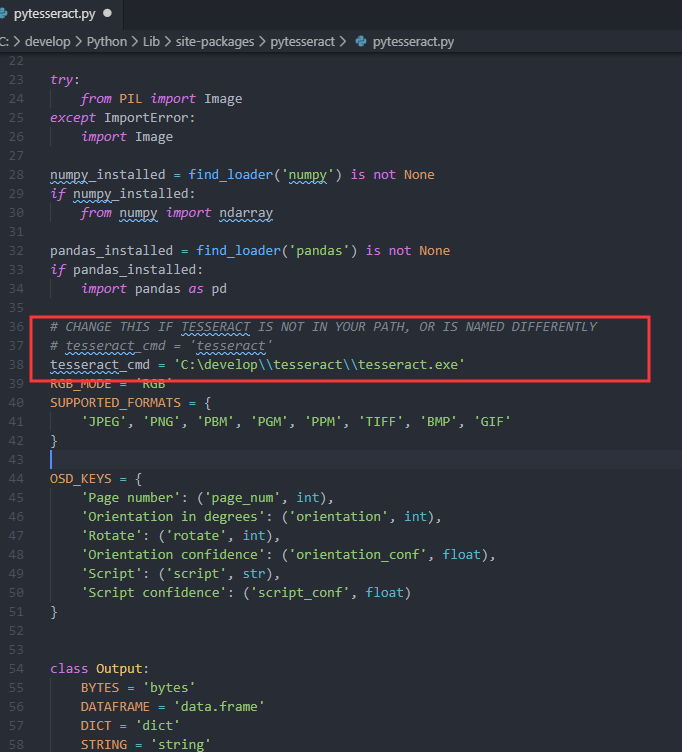
注意:有的地方需要转义 ,重新进入项目,运行即可
解决pytesseract.pytesseract.TesseractNotFoundError: tesseract is not installed or it's not in your path问题的更多相关文章
- pytesseract.pytesseract.TesseractNotFoundError: tesseract is not installed or it's not in your path && FileNotFoundError: [WinError 2] 系统找不到指定的文件。
C:\Users\k\Desktop\test>python test.py Traceback (most recent call last): File , in run_tesseract ...
- pytesseract.pytesseract.TesseractNotFoundError: tesseract is not installed or it's not in your path
使用pytesseract识别验证码中遇到异常如下: pytesseract.pytesseract.TesseractNotFoundError: tesseract is not installe ...
- pytesseract.pytesseract.TesseractError: (1, 'Error opening data file /usr/local/share/tessdata/chi_sim.traineddata Please make sure the TESSDATA_PREFIX environment variable is set to your "tessdata"
pytesseract.pytesseract.TesseractError: (1, 'Error opening data file /usr/local/share/tessdata/chi_s ...
- 报错解决——pytesseract.pytesseract.TesseractError: (1,’Error opening data file /usr/local/share/tessdata/eng.traineddata’)
解决方法:(原文地址http://stackoverflow.com/questions/14800730/tesseract-running-error) $ wget https://tesser ...
- tesseract-ocr和tesseract.exe is not installed or it's not in your path问题解决
一.解决方案: 1.http://www.ddooo.com/softdown/94968.htm 打开下载的压缩包,找到"tesseract-ocr-setup-3.02.02.exe ...
- 解决tomcat开始出现in production environments was not found on the java.library.path:xxx
如图所看到的,Eclipse中启动tomcat时出现not found on the java.library.path等信息.能够通过下载tomcat-native-1.1.32-win32-bin ...
- 如何解决"The superclass "javax.servlet.http.HttpServlet" was not found on the Java Build Path"
今天我在eclipse上搭建新项目时,莫名其妙的出现这个错误,如下: The superclass "javax.servlet.http.HttpServlet" was not ...
- 解决spark运行中failed to locate the winutils binary in the hadoop binary path的问题
1.下载hadoop-common-2.2.0-bin并解压到某个目录 https://github.com/srccodes/hadoop-common-2.2.0-bin 2.设置hadoop.h ...
- 解决PHP curl https时error 77(Problem with reading the SSL CA cert (path? access rights?))
服务器环境为CentOS,php-fpm,使用curl一个https站时失败,打开curl_error,捕获错误:Problem with reading the SSL CA cert (path? ...
随机推荐
- Python装饰器与闭包
闭包是Python装饰器的基础.要理解闭包,先要了解Python中的变量作用域规则. 变量作用域规则 首先,在函数中是能访问全局变量的: >>> a = 'global var' & ...
- Linux程序在Windows下编译运行_MinGW和Cygwin
linux要在windows下编译运行,需要win下的gcc编译器,一般有两种:MinGW和Cygwin. 但某些函数在windows没有,即使使用两种工具也编译不过,需要查询windows函数并使用 ...
- 利用 Docker 搭建 IPFS 私有网络
利用 Docker 搭建 IPFS 私有网络 本文原始地址:https://sitoi.cn/posts/40630.html 下载项目 项目地址:https://github.com/Sitoi/p ...
- css 宽高等比
1.利用js 2.容器里添加图片,让图片的等比缩放撑大容器,图片z-index=负数,
- 【坑】【数组的坑】1、对象assign复制的假深度,2、数组slice复制的坑,3、还有数组map复制的坑
1.对象复制的坑 Object.assign() Object.assign() //浅复制 基本没用 跟直接用= 一样 Object.assign(true,{}) // 以为是深拷贝,其实只是一级 ...
- 74HC595 8位移位寄存器的使用小结
请查看我的博客园文章,比较详细. https://www.cnblogs.com/CodeWorkerLiMing/p/11964258.html
- Codechef August Challenge 2019 Chef and Gordon Ramsay
[传送门] 题目即求所有的三元组,相对大小关系同 $p_1,p_2,p_3$. 题解说都很清楚,这里写一下过程整理一下思路. 如果我们枚举中间这个元素,那么就是统计子树内外有多少个大于这个数和小于这个 ...
- C# Chart 曲线(多曲线展示)
//绑定显示曲线数据(Chart控件名:) //X轴标题 this.CurveChart.ChartAreas["ChartArea1"].AxisX.Title = " ...
- python函数 | 三元运算
三元运算符就是在赋值变量的时候,可以直接加判断,然后赋值 格式: [on_true] if [expression] else [on_false] 三元运算只适用于简单的if else判断,再多一层 ...
- 了解Vuex状态管理模式的理解强化指南
1 Vuex是什么呢?它是Vue的状态管理模式,在使用vue的时候,需要在vue中各个组件之间传递值是很痛苦的,在vue中我们可以使用vuex来保存我们需要管理的状态值,值一旦被改变,所有引用该值的地 ...