
GTID主从与传统主从复制
GTID主从与传统主从复制
1.主从复制
- 普通主从复制:
普通主从复制主要是基于二进制日志文件位置的复制,因此主必须启动二进制日志记录并建立唯一的服务器ID,复制组中的每个服务器都必须配置唯一的服务器ID。如果您省略server-id(或者明确地将其设置为其默认值0),则主设备将拒绝来自从设备的任何连接。
- GTID 主从:
MySQL 5.6 的新特性之一,全局事务标识符(GTID)是创建的唯一标识符,并与在源(主)服务器上提交的每个事务相关联。此标识符不但是唯一的,而且在给定复制设置中的所有服务器上都是唯一的。所有交易和所有GTID之间都有一对一的映射关系 。它由服务器ID以及事务ID组合而成。这个全局事务ID不仅仅在原始服务器上唯一,在所有存在主从关系 的mysql服务器上也是唯一的。正是因为这样一个特性使得mysql的主从复制变得更加简单,以及数据库一致性更可靠。一个GTID在一个服务器上只执行一次,避免重复执行导致数据混乱或者主从不一致。
2.靠什么同步
主从复制,默认是通过pos复制(postion),就是说在日志文档里,将用户进行的每一项操作都进行编号(pos),每一个event都有一个起始编号,一个终止编号,我们在配置主从复制时从节点时,要输入master的log_pos值就是这个原因,要求它从哪个pos开始同步数据库里的数据,这也是传统复制技术.
MySQL5.6之后增加了GTID复制,GTID就是类似于pos的一个作用,不过它是整个mysql复制架构全局通用的,就是说在这整个mysql冗余架构中,它们的日志文件里事件的GTID值是一致的.
3.pos与GTID的什么区别
两者都是日志文件里事件的一个标志,如果将整个mysql集群看作一个整体,pos就是局部的,GTID就是全局的.
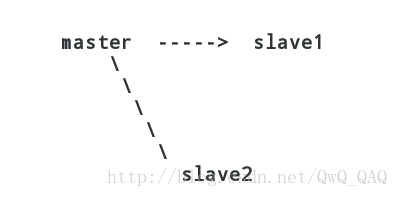
上图就是一个mysql节点的集群,一主两从,在master,slave1,slave2日志文件里的pos,都各不相同,就是一个event,在master的日志里,pos可能是700,而在slave1,slave2里,pos可能就是300,400了,因为众多slave也可能不是同时加入集群的,不是从同一个位置进行同步.
而GTID,在master,slave1,slave2各自的日志文件里,同一个event的GTID值都是一样的.
大家都知道,这整个集群架构的节点,通常情况下,是master在工作,其他两个结点做备份,而且,各个节点的机器,性能不可能完全一致,所以,在做备份时,备份的速度就不一样,当master突然crash掉之后,马上会启用从节点机器,接管master的工作,当有多个从节点时,选择备份日志文件最接近master的那个节点
现在就出现情况了,当salve1变成主节点,那slave2就应该从slave1去获取日志文件,进行同步
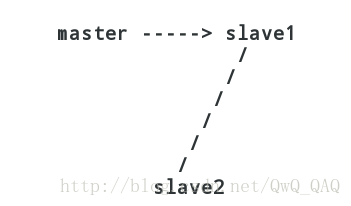
如果使用的是pos,三者的pos不一致,slave2怎么去获取它当前要同步的事件在slave1里的pos呢,很难.
所以就有了GTID,全局的,将所有节点对于同一个event的标记完全一致,当master crash掉之后,slave2根据同一个GTID直接去读取slave1的日志文件,继续同步.
4.GTID的工作原理
1、当一个事务在主库端执行并提交时,产生GTID,一同记录到binlog日志中。

2、binlog传输到slave,并存储到slave的relaylog后,读取这个GTID的这个值设置gtid_next变量,即告诉Slave,下一个要执行的GTID值。

3、sql线程从relay log中获取GTID,然后对比slave端的binlog是否有该GTID。

4、如果有记录,说明该GTID的事务已经执行,slave会忽略。

5、如果没有记录,slave就会执行该GTID事务,并记录该GTID到自身的binlog,

   在读取执行事务前会先检查其他session持有该GTID,确保不被重复执行。

6、在解析过程中会判断是否有主键,如果有就用二级索引,如果没有就用全部扫描。
5.GTID参数配置
master:192.168.112.174
slave:192.168.112.175
服务端需要关闭防火墙和selinux
5.1 在主数据库里创建一个同步账号授权给从数据库使用
[root@localhost ~]# mysql -uroot -pcwh123!

mysql: [Warning] Using a password on the command line interface can be insecure.

Welcome to the MySQL monitor.  Commands end with ; or \g.

Your MySQL connection id is 3

Server version: 5.7.22 MySQL Community Server (GPL)

Copyright (c) 2000, 2018, Oracle and/or its affiliates. All rights reserved.

Oracle is a registered trademark of Oracle Corporation and/or its

affiliates. Other names may be trademarks of their respective

owners.

Type 'help;' or '\h' for help. Type '\c' to clear the current input statement.

mysql> GRANT REPLICATION SLAVE ON *.* TO 'repl'@'192.168.112.175' identified by 'repl123';

Query OK, 0 rows affected, 1 warning (0.00 sec)

mysql> flush privileges;

Query OK, 0 rows affected (0.00 sec)
5.2 配置主数据库
//写配置文件

[root@localhost ~]# vim /etc/my.cnf

[mysqld]

basedir = /usr/local/mysql

datadir = /opt/data

socket = /tmp/mysql.sock

port = 3306

pid-file = /opt/data/mysql.pid

user = mysql

skip-name-resolve

log-bin = mysql-bin   //开启log-bin日志

server-id = 1         //定义server-id

gtid-mode = on        //开启gtid复制

enforce-gtid-consistency = on  //强制gtid一致

//重启mysql

[root@localhost ~]# /etc/init.d/mysqld restart

Shutting down MySQL.. SUCCESS!

Starting MySQL. SUCCESS!

//查看master状态

[root@localhost ~]# mysql -uroot -pcwh123!

mysql: [Warning] Using a password on the command line interface can be insecure.

Welcome to the MySQL monitor.  Commands end with ; or \g.

Your MySQL connection id is 2

Server version: 5.7.22-log MySQL Community Server (GPL)

Copyright (c) 2000, 2018, Oracle and/or its affiliates. All rights reserved.

Oracle is a registered trademark of Oracle Corporation and/or its

affiliates. Other names may be trademarks of their respective

owners.

Type 'help;' or '\h' for help. Type '\c' to clear the current input statement.

mysql> show master status;

+------------------+----------+--------------+------------------+-------------------+

| File             | Position | Binlog_Do_DB | Binlog_Ignore_DB | Executed_Gtid_Set |

+------------------+----------+--------------+------------------+-------------------+

| mysql-bin.000002 |      154 |              |                  |                   |

+------------------+----------+--------------+------------------+-------------------+

1 row in set (0.00 sec)
5.3配置从数据库
//写配置文件

[root@localhost ~]# vim /etc/my.cnf

[mysqld]

basedir = /usr/local/mysql

datadir = /opt/data

socket = /tmp/mysql.sock

port = 3306

pid-file = /opt/data/mysql.pid

user = mysql

skip-name-resolve

server-id = 6

gtid-mode = on

enforce-gtid-consistency = on

log-bin = mysql-bin

//重启服务

[root@localhost ~]# /etc/init.d/mysqld restart

Shutting down MySQL.. SUCCESS!

Starting MySQL. SUCCESS!

//配置并启动gtid主从复制

[root@localhost ~]# mysql -uroot -pcwh123!

mysql: [Warning] Using a password on the command line interface can be insecure.

Welcome to the MySQL monitor.  Commands end with ; or \g.

Your MySQL connection id is 2

Server version: 5.7.22-log MySQL Community Server (GPL)

Copyright (c) 2000, 2018, Oracle and/or its affiliates. All rights reserved.

Oracle is a registered trademark of Oracle Corporation and/or its

affiliates. Other names may be trademarks of their respective

owners.

Type 'help;' or '\h' for help. Type '\c' to clear the current input statement.

mysql> change master to master_host='192.168.112.174',master_user='repl',master_password='repl123',master_auto_position=1;

Query OK, 0 rows affected, 2 warnings (0.01 sec)

mysql> start slave;

Query OK, 0 rows affected (0.00 sec)

//查看从服务器状态

mysql> start slave;

Query OK, 0 rows affected (0.00 sec)

mysql> show slave status\G;

*************************** 1. row ***************************

               Slave_IO_State: Waiting for master to send event

                  Master_Host: 192.168.112.174

                  Master_User: repl

                  Master_Port: 3306

                Connect_Retry: 60

              Master_Log_File: mysql-bin.000002

          Read_Master_Log_Pos: 154

               Relay_Log_File: localhost-relay-bin.000002

                Relay_Log_Pos: 367

        Relay_Master_Log_File: mysql-bin.000002

             Slave_IO_Running: Yes

            Slave_SQL_Running: Yes
5.4测试验证
//在主服务器中加入数据库cwh

[root@localhost ~]# mysql -uroot -pcwh123!

mysql: [Warning] Using a password on the command line interface can be insecure.

Welcome to the MySQL monitor.  Commands end with ; or \g.

Your MySQL connection id is 4

Server version: 5.7.22-log MySQL Community Server (GPL)

Copyright (c) 2000, 2018, Oracle and/or its affiliates. All rights reserved.

Oracle is a registered trademark of Oracle Corporation and/or its

affiliates. Other names may be trademarks of their respective

owners.

Type 'help;' or '\h' for help. Type '\c' to clear the current input statement.

mysql> create database cwh;

Query OK, 1 row affected (0.00 sec)

mysql> quit

mysql> show databases;

+--------------------+

| Database           |

+--------------------+

| information_schema |

| cwh                |

| mysql              |

| performance_schema |

| sys                |

+--------------------+

5 rows in set (0.00 sec)

//在从服务器上查看是否同步

mysql> show databases;

+--------------------+

| Database           |

+--------------------+

| information_schema |

| cwh                |

| mysql              |

| performance_schema |

| sys                |

+--------------------+

5 rows in set (0.00 sec)

//可以看出来成功了
GTID主从与传统主从复制的更多相关文章
- GTID主从 与 传统主从复制
一.主从复制 1.)普通主从复制: 普通主从复制主要是基于二进制日志文件位置的复制,因此主必须启动二进制日志记录并建立唯一的服务器ID,复制组中的每个服务器都必须配置唯一的服务器ID.如果您省略ser ...
- GTID复制模式切换与传统主从复制间切换
GTID复制模式切换到传统主从复制主从复制环境:主库:10.18.10.11从库:10.18.10.12MySQL5.7.22 切换之前查看下主从gitd_mode参数值主服务器:gtid_mode值 ...
- MySQL的GTID复制与传统复制的相互切换
MySQL的GTID复制与传统复制的相互转换 1. GTID复制转换成传统复制 1.1 环境准备 1.2 停止slave 1.3 查看当前主从状态 1.4 change master 1.5 启动主从 ...
- GTID主从和lamp架构运行原理
目录 GTID主从 GTID概念介绍 GTID工作原理 GTID主从配置 lamp lamp简介 web服务器工作流程 cgi与fastcgi http协议 是什么? lamp架构运行的原理 Apac ...
- Mysql5.7的gtid主从半同步复制和组复制
(一)gtid主从半同步复制 一.半同步复制原理 mysql默认的复制是异步的,主库在执行完客户端提交的事务后会立即将结果返回给客户端,并不关心从库是否已经接收并处理,这样就会有一个问题,主库如果cr ...
- GTID主从
GTID主从 目录 GTID主从 GTID概念介绍 GTID工作原理 GTID主从配置 GTID概念介绍 GTID即全局事务ID (global transaction identifier), 其保 ...
- 解决mysql开启GTID主从同步出现1236错误问题【转】
最近遇到mysql开启gtid做复制时,从库出现1236错误,导致同步无法进行,本文就这问题记录下处理步骤,有关gtid知识在这里不做介绍,mysql版本为5.7.16. 一.错误原因分析 错误信息如 ...
- 解决mysql开启GTID主从同步出现1236错误问题
解决mysql开启GTID主从同步出现1236错误问题 最近遇到mysql开启gtid做复制时,从库出现1236错误,导致同步无法进行,本文就这问题记录下处理步骤,有关gtid知识在这里不做介 ...
- MySQL的GTID复制与传统复制的相互转换
主库:192.168.225.128:3307从库1:192.168.225.129:3307 Gtid作为5.6版本以来的杀手级特性,却因为不支持拓扑结构内开关而饱受诟病.如果你需要从未开启GTID ...
随机推荐
- docker 启动mysql 闪退 无法启动问题
docker 安装mysql [获取容器] docker pull mysql:5.6 [启动容器] docker run -p 3306:3306 --name mymysql -v $PWD/co ...
- 在 Python 中使用定时器
今天看到一个比较人性化的定时模块 schedule,目前 star 数为 6432,还是非常的受欢迎,这个模块也是秉承这 For Humans 的原则,这里推荐给大家.地址 https://githu ...
- 批量删除sql语句
SET @I = 148;SELECT CONCAT("DELETE FROM supplier_change_log WHERE old_supplier_id=4194 AND id&g ...
- phpspreadsheet 中文文档(六)读写文件+读取文件
2019年10月11日14:05:58 读写文件 从体系结构您已经知道,使用基本PhpSpreadsheet类无法对持久性存储进行读写.为此,PhpSpreadsheet提供读者和作家,这是实现\Ph ...
- c++动态链接问题
https://blog.csdn.net/liu0808/article/details/81169173 https://blog.csdn.net/f110300641/article/deta ...
- spring boot 实现定时任务
定时任务或者说定时调度,是系统中比较普遍的一个功能,例如数据归档.清理,数据定时同步(非实时),定时收发等等都需要用到定时任务,常见的定时调度框架有Quartz.TBSchedule等. 如何在Spr ...
- linux解压xz文件
本来要下一个 tar.gz 文件的,但是下了一个 xz的,以为不能用了,但是万能的百度.. 解决方法: 首先打包成tar文件 xz -d demo.tar.xz j接着用 tar -xvf demo. ...
- Centos 7.6 部署 Jumpserver 1.5.0
1.基础设置 # 版本说明 操作系统:centos7. jumpserver: # 升级所有包同时也升级软件和系统内核 yum update -y # selinux配置 setenforce sed ...
- 图片懒加载--lazyload.js的用法
这几天公司的项目已经完成的差不多了,只剩下各种优化问题.今天着重于图片加载的优化.当一个页面需要下拉很长而且又有过多的图片要加载时,就会发生很多http请求,就会拉慢网页加载速度,用户体验不友好.怎么 ...
- 开灯问题—C语言
开灯问题 有n盏灯,编号为1~n.第1个人把所有灯打开,第2个人按下所有编号为2的倍数开关(这些灯将被关掉),第3个人按下所有编号为3的倍数的开关,以此类推.一共有k个人,问最后哪些灯是开着?输入n和 ...