
[RN] React Native 好用的时间线 组件
React Native 好用的时间线 组件
效果如下:
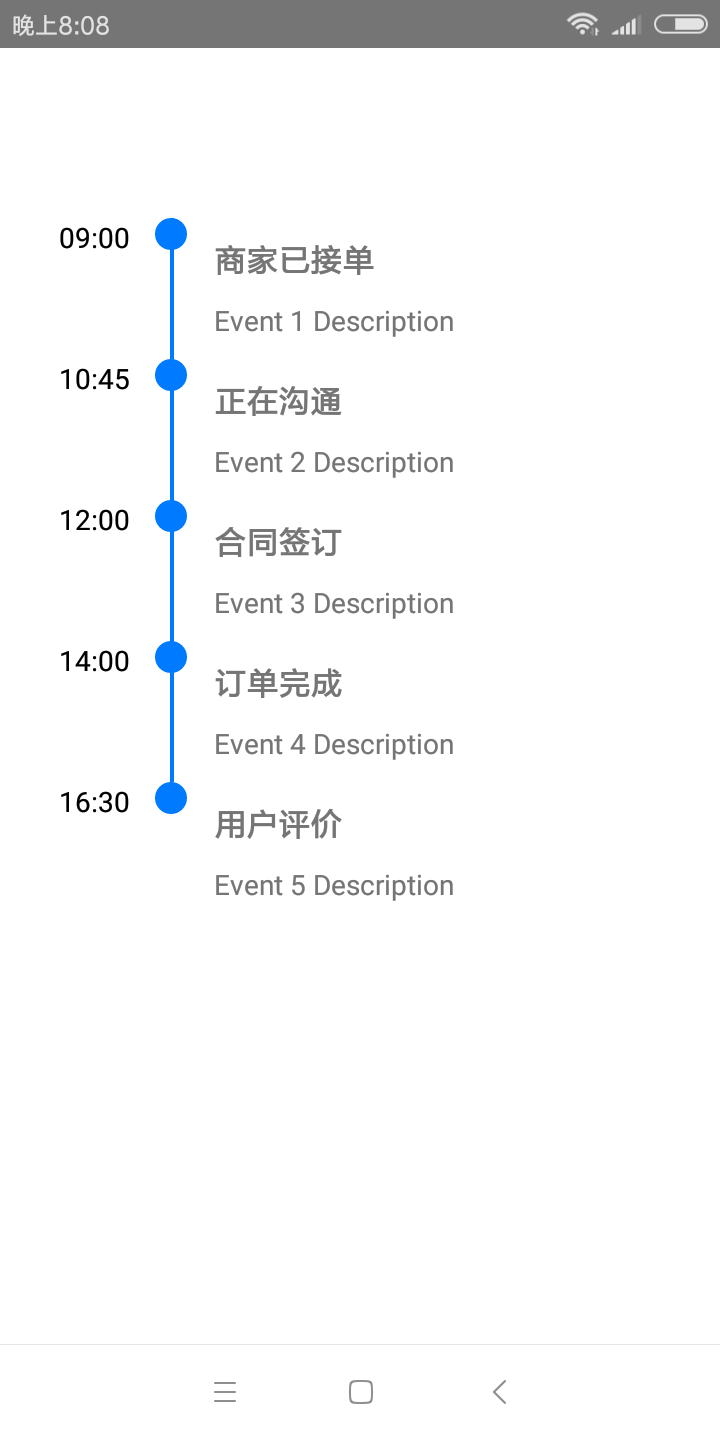
实现方法:
一、组件封装
CustomTimeLine.js
"use strict";
import React, {Component} from "react";
import {
StyleSheet,
ListView,
Image,
View,
Text,
TouchableOpacity
} from "react-native";
const ds = new ListView.DataSource({
rowHasChanged: (r1, r2) => r1 !== r2,
sectionHeaderHasChanged: (s1, s2) => s1 !== s2
});
const defaultCircleSize = ;
const defaultCircleColor = "#007AFF";
const defaultLineWidth = ;
const defaultLineColor = "#007AFF";
const defaultTimeTextColor = "black";
const defaultDotColor = "white";
const defaultInnerCircle = "none";
export default class CustomTimeLine extends Component {
static defaultProps = {
circleSize: defaultCircleSize,
circleColor: defaultCircleColor,
lineWidth: defaultLineWidth,
lineColor: defaultLineColor,
innerCircle: defaultInnerCircle,
columnFormat: "single-column-left",
separator: false,
showTime: true
};
constructor(props, context) {
super(props, context);
this._renderRow = this._renderRow.bind(this);
this.renderTime = (this.props.renderTime
? this.props.renderTime
: this._renderTime
).bind(this);
this.renderDetail = (this.props.renderDetail
? this.props.renderDetail
: this._renderDetail
).bind(this);
this.renderCircle = (this.props.renderCircle
? this.props.renderCircle
: this._renderCircle
).bind(this);
this.renderEvent = this._renderEvent.bind(this);
this.state = {
data: this.props.data,
dataSource: ds.cloneWithRows(this.props.data),
x: ,
width:
};
}
componentWillReceiveProps(nextProps) {
this.setState({
data: nextProps.data,
dataSource: ds.cloneWithRows(nextProps.data)
});
}
render() {
return (
<View style={[styles.container, this.props.style]}>
<ListView
ref="listView"
style={[styles.listview, this.props.listViewStyle]}
dataSource={this.state.dataSource}
renderRow={this._renderRow}
automaticallyAdjustContentInsets={false}
{...this.props.options}
/>
</View>
);
}
_renderRow(rowData, sectionID, rowID) {
let content = null;
switch (this.props.columnFormat) {
case "single-column-left":
content = (
<View style={[styles.rowContainer, this.props.rowContainerStyle]}>
{this.renderTime(rowData, sectionID, rowID)}
{this.renderEvent(rowData, sectionID, rowID)}
{this.renderCircle(rowData, sectionID, rowID)}
</View>
);
break;
case "single-column-right":
content = (
<View style={[styles.rowContainer, this.props.rowContainerStyle]}>
{this.renderEvent(rowData, sectionID, rowID)}
{this.renderTime(rowData, sectionID, rowID)}
{this.renderCircle(rowData, sectionID, rowID)}
</View>
);
break;
case "two-column":
content =
rowID % === ? (
<View style={[styles.rowContainer, this.props.rowContainerStyle]}>
{this.renderTime(rowData, sectionID, rowID)}
{this.renderEvent(rowData, sectionID, rowID)}
{this.renderCircle(rowData, sectionID, rowID)}
</View>
) : (
<View style={[styles.rowContainer, this.props.rowContainerStyle]}>
{this.renderEvent(rowData, sectionID, rowID)}
{this.renderTime(rowData, sectionID, rowID)}
{this.renderCircle(rowData, sectionID, rowID)}
</View>
);
break;
}
return <View key={rowID}>{content}</View>;
}
_renderTime(rowData, sectionID, rowID) {
if (!this.props.showTime) {
return null;
}
var timeWrapper = null;
switch (this.props.columnFormat) {
case "single-column-left":
timeWrapper = {
alignItems: "flex-end"
};
break;
case "single-column-right":
timeWrapper = {
alignItems: "flex-start"
};
break;
case "two-column":
timeWrapper = {
flex: ,
alignItems: rowID % === ? "flex-end" : "flex-start"
};
break;
}
return (
<View style={timeWrapper}>
<View style={[styles.timeContainer, this.props.timeContainerStyle]}>
<Text style={[styles.time, this.props.timeStyle]}>
{rowData.time}
</Text>
</View>
</View>
);
}
_renderEvent(rowData, sectionID, rowID) {
const lineWidth = rowData.lineWidth
? rowData.lineWidth
: this.props.lineWidth;
const isLast = this.props.renderFullLine
? !this.props.renderFullLine
: this.state.data.slice(-)[] === rowData;
const lineColor = isLast
? "rgba(0,0,0,0)"
: rowData.lineColor ? rowData.lineColor : this.props.lineColor;
let opStyle = null;
switch (this.props.columnFormat) {
case "single-column-left":
opStyle = {
borderColor: lineColor,
borderLeftWidth: lineWidth,
borderRightWidth: ,
marginLeft: ,
paddingLeft:
};
break;
case "single-column-right":
opStyle = {
borderColor: lineColor,
borderLeftWidth: ,
borderRightWidth: lineWidth,
marginRight: ,
paddingRight:
};
break;
case "two-column":
opStyle =
rowID % ==
? {
borderColor: lineColor,
borderLeftWidth: lineWidth,
borderRightWidth: ,
marginLeft: ,
paddingLeft:
}
: {
borderColor: lineColor,
borderLeftWidth: ,
borderRightWidth: lineWidth,
marginRight: ,
paddingRight:
};
break;
}
return (
<View
style={[styles.details, opStyle]}
onLayout={evt => {
if (!this.state.x && !this.state.width) {
const {x, width} = evt.nativeEvent.layout;
this.setState({x, width});
}
}}
>
<TouchableOpacity
disabled={this.props.onEventPress == null}
style={[this.props.detailContainerStyle]}
onPress={() =>
this.props.onEventPress ? this.props.onEventPress(rowData) : null
}
>
<View style={styles.detail}>
{this.renderDetail(rowData, sectionID, rowID)}
</View>
{this._renderSeparator()}
</TouchableOpacity>
</View>
);
}
_renderDetail(rowData, sectionID, rowID) {
let title = rowData.description ? (
<View>
<Text style={[styles.title, this.props.titleStyle]}>
{rowData.title}
</Text>
<Text style={[styles.description, this.props.descriptionStyle]}>
{rowData.description}
</Text>
</View>
) : (
<Text style={[styles.title, this.props.titleStyle]}>{rowData.title}</Text>
);
return <View style={styles.container}>{title}</View>;
}
_renderCircle(rowData, sectionID, rowID) {
var circleSize = rowData.circleSize
? rowData.circleSize
: this.props.circleSize ? this.props.circleSize : defaultCircleSize;
var circleColor = rowData.circleColor
? rowData.circleColor
: this.props.circleColor ? this.props.circleColor : defaultCircleColor;
var lineWidth = rowData.lineWidth
? rowData.lineWidth
: this.props.lineWidth ? this.props.lineWidth : defaultLineWidth;
var circleStyle = null;
switch (this.props.columnFormat) {
case "single-column-left":
circleStyle = {
width: this.state.x ? circleSize : ,
height: this.state.x ? circleSize : ,
borderRadius: circleSize / ,
backgroundColor: circleColor,
left: this.state.x - circleSize / + (lineWidth - ) /
};
break;
case "single-column-right":
circleStyle = {
width: this.state.width ? circleSize : ,
height: this.state.width ? circleSize : ,
borderRadius: circleSize / ,
backgroundColor: circleColor,
left: this.state.width - circleSize / - (lineWidth - ) /
};
break;
case "two-column":
circleStyle = {
width: this.state.width ? circleSize : ,
height: this.state.width ? circleSize : ,
borderRadius: circleSize / ,
backgroundColor: circleColor,
left: this.state.width - circleSize / - (lineWidth - ) /
};
break;
}
var innerCircle = null;
switch (this.props.innerCircle) {
case "icon":
let iconSource = rowData.icon ? rowData.icon : this.props.icon;
let iconStyle = {
height: circleSize,
width: circleSize
};
innerCircle = (
<Image
source={iconSource}
style={[iconStyle, this.props.iconStyle]}
/>
);
break;
case "dot":
let dotStyle = {
height: circleSize / ,
width: circleSize / ,
borderRadius: circleSize / ,
backgroundColor: rowData.dotColor
? rowData.dotColor
: this.props.dotColor ? this.props.dotColor : defaultDotColor
};
innerCircle = <View style={[styles.dot, dotStyle]}/>;
break;
}
return (
<View style={[styles.circle, circleStyle, this.props.circleStyle]}>
{innerCircle}
</View>
);
}
_renderSeparator() {
if (!this.props.separator) {
return null;
}
return <View style={[styles.separator, this.props.separatorStyle]}/>;
}
}
const styles = StyleSheet.create({
container: {
flex:
},
listview: {
flex:
},
sectionHeader: {
marginBottom: ,
backgroundColor: "#007AFF",
height: ,
justifyContent: "center"
},
sectionHeaderText: {
color: "#FFF",
fontSize: ,
alignSelf: "center"
},
rowContainer: {
flexDirection: "row",
flex: ,
//alignItems: 'stretch',
justifyContent: "center"
},
timeContainer: {
minWidth:
},
time: {
textAlign: "right",
color: defaultTimeTextColor
},
circle: {
width: ,
height: ,
borderRadius: ,
position: "absolute",
left: -,
alignItems: "center",
justifyContent: "center"
},
dot: {
width: ,
height: ,
borderRadius: ,
backgroundColor: defaultDotColor
},
title: {
fontSize: ,
fontWeight: "bold"
},
details: {
borderLeftWidth: defaultLineWidth,
flexDirection: "column",
flex:
},
detail: {paddingTop: , paddingBottom: },
description: {
marginTop:
},
separator: {
height: ,
backgroundColor: "#aaa",
marginTop: ,
marginBottom:
}
});
代码调用:
import React, {Component} from 'react';

import {StyleSheet, View} from 'react-native';

import Timeline from './CustomTimeLine';

export default class TestTimeLine extends Component {

    constructor() {

        super()

        this.data = [

            {time: '09:00', title: '商家已接单', description: 'Event 1 Description'},

            {time: '10:45', title: '正在沟通', description: 'Event 2 Description'},

            {time: '12:00', title: '合同签订', description: 'Event 3 Description'},

            {time: '14:00', title: '订单完成', description: 'Event 4 Description'},

            {time: '16:30', title: '用户评价', description: 'Event 5 Description'}

        ]

    }

    render() {

        return (

            <View style={styles.container}>

                <Timeline

                    style={styles.list}

                    data={this.data}

                    showTime={true}

                />

            </View>

        );

    }

}

const styles = StyleSheet.create({

    container: {

        flex: ,

        padding: ,

        paddingTop: ,

        backgroundColor: 'white'

    },

    list: {

        flex: ,

        marginTop: ,

    },

});
更多使用方法,参考:
https://github.com/thegamenicorus/react-native-timeline-listview
本博客地址: wukong1688
本文原文地址:https://www.cnblogs.com/wukong1688/p/11049014.html
转载请著名出处!谢谢~~
[RN] React Native 好用的时间线 组件的更多相关文章
- [RN] React Native 幻灯片效果 Banner
[RN] React Native 幻灯片效果 Banner 1.定义Banner import React, {Component} from 'react'; import {Image, Scr ...
- [RN] React Native 实现图片预览
[RN] React Native 实现图片预览 效果预览: 代码如下: 'use strict'; import React, {Component} from 'react'; import {I ...
- [RN] React Native 常见基本问题归纳总结
[RN] React Native 常见基本问题归纳总结 本问题总结涉及到版本为: "react": "16.8.3","react-native& ...
- [RN] React Native 关闭所有黄色警告
[RN] React Native 关闭所有黄色警告 console.ignoredYellowBox = ['Warning: BackAndroid is deprecated. Please u ...
- [RN] React Native 下实现底部标签(支持滑动切换)
上一篇文章 [RN] React Native 下实现底部标签(不支持滑动切换) 总结了不支持滑动切换的方法,此篇文章总结出 支持滑动 的方法 准备工作之类的,跟上文类似,大家可点击上文查看相关内容. ...
- [RN] React Native 常用命令行
[RN] React Native 常用命令行 1.查看当前版本 react-native --version 或 react-native -v 2.创建指定版本的React Native项目 1) ...
- [RN] React Native 实现 类似QQ 登陆页面
[RN] React Native 实现 类似QQ 登陆页面 一.主页index.js 项目目录下index.js /** * @format */ import {AppRegistry} from ...
- 基于React Native的Material Design风格的组件库 MRN
基于React Native的Material Design风格的组件库.(为了平台统一体验,目前只打算支持安卓) 官方网站 http://mrn.js.org/ Github https://git ...
- [RN] React Native 打包时 减少 Apk 的大小
React Native 打包时 减少 Apk 的大小 主要有两个方法: 在打包前设置 android\app\build.gradle 文件中 1) def enableProguardInRele ...
随机推荐
- PCA:主成分分析
PCA的概念: 主要思想是将n维特征映射到k维上,这k维是全新的正交特征,这k维特征被称为主成分,在原数据的基础上重新构造出来k维.就是从原始的空间顺序的找出一组相互正交的坐标轴,新坐标轴的选择和数据 ...
- Mysql系列(十二)—— 索引下推优化
索引条件下推(ICP)是对MySQL使用索引从表中检索行的情况的优化.如果没有ICP,存储引擎会遍历索引以查找基表中的行,并将它们返回给MySQL服务器,该服务器会评估WHERE行的条件.启用ICP后 ...
- SpringBoot整合PageHelper做多条件分页查询
https://yq.aliyun.com/articles/619586 本篇博客讲述如何在SpringBoot中整合PageHelper,如何实现带多个条件,以及PageInfo中的属性的中文解释 ...
- Delphi - 鼠标上下滚动基础消息事件
Delphi实现对鼠标上下滚动基础消息的截获并处理 前几天有客户提出需求:由于个人PC界面限制,有时候电子图档显示不全,希望通过鼠标上下滚动用来控制电子图档的放大和缩小. 下面通过一个测试Demo来说 ...
- Python基础13
<玩1>中关于病假.事假的问题,说得不完全正确. 实际为哑变量. 有关看待问题的维度.出发点(即屁股在哪里) 转哑变量后可以提高模型精度. 机器学习不怕字段过多. 转哑变量是在增维.
- 自定义组件实现双向绑定v-model
自定义组件实现 v-model 双向绑定,首先要先明白 v-model,这个指令到底实现了什么? v-model实际做的事情就是:传入一个value属性值,然后监听input事件返回一个值,用该返回值 ...
- proxychains4配置使用
一丶安装 sudo apt-get install proxychains4 二丶修改配置文件 sudo vim /etc/proxychains.conf 在文本最后加上你的代理服务器地址,如果有用 ...
- 互联网企业级监控系统 OpenFalcon
Open-Falcon 人性化的互联网企业级监控系统,Open-Falcon 整体可以分为两部分,即绘图组件.告警组件.其中: 安装绘图组件 负责数据的采集.收集.存储.归档.采样.查询.展示(Das ...
- Jpa的简介
Jpa:是用于数据持久化的一组标准接口. 1.HelloWorld的编写 创建EntityManagerFactory 创建EntityManager 开启事务 数据持久化 提交事务 关闭Entity ...
- 虚拟机配置静态ip
参考地址 https://www.cnblogs.com/maowenqiang/articles/7727910.html TYPE=EthernetBOOTPROTO="static& ...