
ASP.NET Core四大部件
四大部件
(WebHost,Startup,launchSettings,wwwroot)
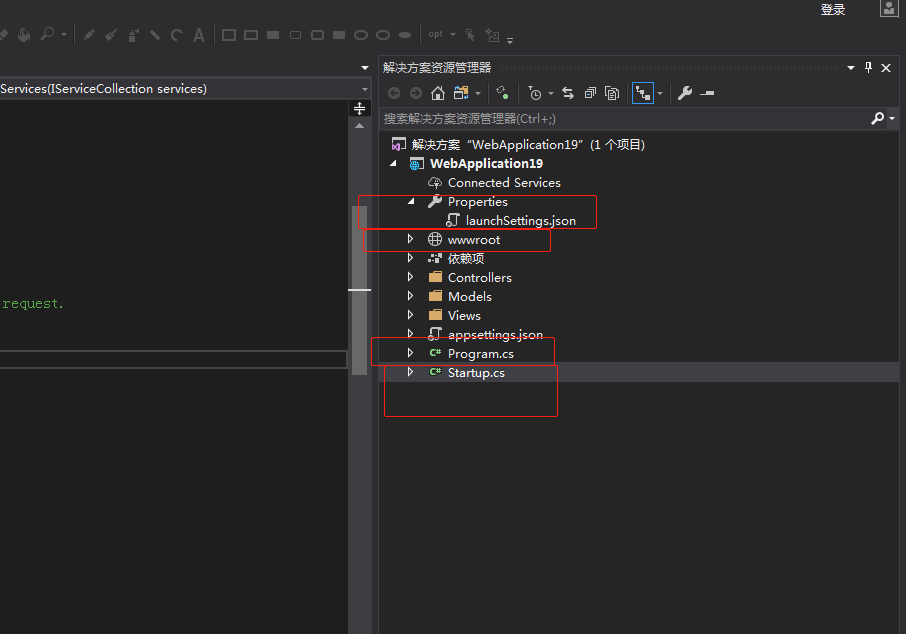
WebHost
简单理解是一个socket,
https://www.cnblogs.com/neverc/p/7988226.html (好)
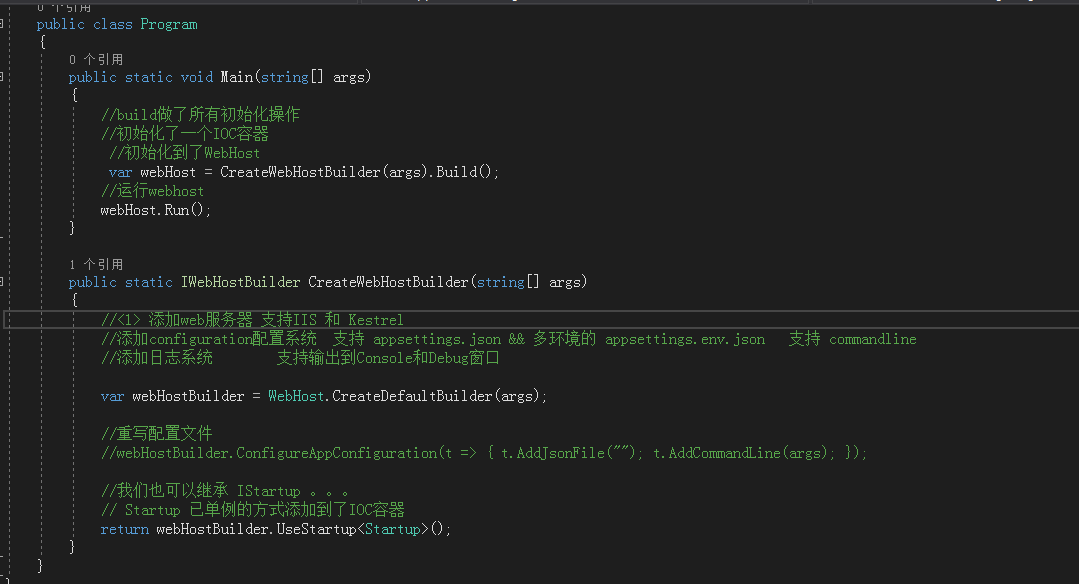
Startup
Startup.cs文件是ASP.NET Core的启动入口文件,想必尝试过OWIN开发的一定不会陌生。项目运行时,编译器会在程序集中自动查找Startup.cs文件读取启动配置。除了构造函数外,它可以定义Configure和ConfigureServices方法。
ConfigureServices
给程序员添加一些服务的代码区
比如AddMvc查看mvc源码
        internal static void AddViewServices(IServiceCollection services)

        {

            DataProtectionServiceCollectionExtensions.AddDataProtection(services);

            AntiforgeryServiceCollectionExtensions.AddAntiforgery(services);

            EncoderServiceCollectionExtensions.AddWebEncoders(services);

            ServiceCollectionDescriptorExtensions.TryAddEnumerable(services, ServiceDescriptor.Transient<IConfigureOptions<MvcViewOptions>, MvcViewOptionsSetup>());

            ServiceCollectionDescriptorExtensions.TryAddEnumerable(services, ServiceDescriptor.Transient<IPostConfigureOptions<MvcViewOptions>, MvcViewOptionsConfigureCompatibilityOptions>());

            ServiceCollectionDescriptorExtensions.TryAddEnumerable(services, ServiceDescriptor.Transient<IConfigureOptions<MvcOptions>, TempDataMvcOptionsSetup>());

            ServiceCollectionDescriptorExtensions.TryAddSingleton<ICompositeViewEngine, CompositeViewEngine>(services);

            ServiceCollectionDescriptorExtensions.TryAddSingleton<IActionResultExecutor<ViewResult>, ViewResultExecutor>(services);

            ServiceCollectionDescriptorExtensions.TryAddSingleton<IActionResultExecutor<PartialViewResult>, PartialViewResultExecutor>(services);

            ServiceCollectionDescriptorExtensions.TryAddEnumerable(services, ServiceDescriptor.Transient<IControllerPropertyActivator, ViewDataDictionaryControllerPropertyActivator>());

            ServiceCollectionDescriptorExtensions.TryAddTransient<IHtmlHelper, HtmlHelper>(services);

            ServiceCollectionDescriptorExtensions.TryAddTransient(services, typeof(IHtmlHelper<>), typeof(HtmlHelper<>));

            ServiceCollectionDescriptorExtensions.TryAddSingleton<IHtmlGenerator, DefaultHtmlGenerator>(services);

            ServiceCollectionDescriptorExtensions.TryAddSingleton<ExpressionTextCache>(services);

            ServiceCollectionDescriptorExtensions.TryAddSingleton<IModelExpressionProvider, ModelExpressionProvider>(services);

            ServiceCollectionDescriptorExtensions.TryAddSingleton<ValidationHtmlAttributeProvider, DefaultValidationHtmlAttributeProvider>(services);

            ServiceCollectionDescriptorExtensions.TryAddSingleton<IJsonHelper, JsonHelper>(services);

            ServiceCollectionDescriptorExtensions.TryAdd(services, ServiceDescriptor.Singleton<JsonOutputFormatter>(delegate (IServiceProvider serviceProvider) {

                return new JsonOutputFormatter(ServiceProviderServiceExtensions.GetRequiredService<IOptions<MvcJsonOptions>>(serviceProvider).get_Value().get_SerializerSettings(), ServiceProviderServiceExtensions.GetRequiredService<ArrayPool<char>>(serviceProvider));

            }));

            ServiceCollectionDescriptorExtensions.TryAddSingleton<IViewComponentSelector, DefaultViewComponentSelector>(services);

            ServiceCollectionDescriptorExtensions.TryAddSingleton<IViewComponentFactory, DefaultViewComponentFactory>(services);

            ServiceCollectionDescriptorExtensions.TryAddSingleton<IViewComponentActivator, DefaultViewComponentActivator>(services);

            ServiceCollectionDescriptorExtensions.TryAddSingleton<IViewComponentDescriptorCollectionProvider, DefaultViewComponentDescriptorCollectionProvider>(services);

            ServiceCollectionDescriptorExtensions.TryAddSingleton<IActionResultExecutor<ViewComponentResult>, ViewComponentResultExecutor>(services);

            ServiceCollectionDescriptorExtensions.TryAddSingleton<ViewComponentInvokerCache>(services);

            ServiceCollectionDescriptorExtensions.TryAddTransient<IViewComponentDescriptorProvider, DefaultViewComponentDescriptorProvider>(services);

            ServiceCollectionDescriptorExtensions.TryAddSingleton<IViewComponentInvokerFactory, DefaultViewComponentInvokerFactory>(services);

            ServiceCollectionDescriptorExtensions.TryAddTransient<IViewComponentHelper, DefaultViewComponentHelper>(services);

            ServiceCollectionDescriptorExtensions.TryAddEnumerable(services, ServiceDescriptor.Transient<IApplicationModelProvider, TempDataApplicationModelProvider>());

            ServiceCollectionDescriptorExtensions.TryAddEnumerable(services, ServiceDescriptor.Transient<IApplicationModelProvider, ViewDataAttributeApplicationModelProvider>());

            ServiceCollectionDescriptorExtensions.TryAddSingleton<SaveTempDataFilter>(services);

            ServiceCollectionDescriptorExtensions.TryAddTransient<ControllerSaveTempDataPropertyFilter>(services);

            ServiceCollectionDescriptorExtensions.TryAddSingleton<ITempDataProvider, CookieTempDataProvider>(services);

            ServiceCollectionDescriptorExtensions.TryAddSingleton<ValidateAntiforgeryTokenAuthorizationFilter>(services);

            ServiceCollectionDescriptorExtensions.TryAddSingleton<AutoValidateAntiforgeryTokenAuthorizationFilter>(services);

            ServiceCollectionDescriptorExtensions.TryAddSingleton<ITempDataDictionaryFactory, TempDataDictionaryFactory>(services);

            ServiceCollectionDescriptorExtensions.TryAddSingleton<ArrayPool<ViewBufferValue>>(services, ArrayPool<ViewBufferValue>.get_Shared());

            ServiceCollectionDescriptorExtensions.TryAddScoped<IViewBufferScope, MemoryPoolViewBufferScope>(services);

        }
MVC大概注册了100多的服务。。。
Configure
Configure 方法用于处理我们程序中的各种中间件,这些中间件决定了我们的应用程序将如何响应每一个 HTTP 请求。它必须接收一个IApplicationBuilder参数,我们可以手动补充IApplicationBuilder的Use扩展方法,将中间件加到Configure中,用于满足我们的需求。
<1> 这个方法用于在初始化的时候,将所有的中间件添加到 IApplicationBuilder 的componets数组中。
在Request请求发起的时候,按照添加顺序执行一次中间件,具体的我们下一节课说。
。。。。。。 这个方法配置的东西,只会在Request请求的过程中被调用 。。。。。。
<2> 这个方法的参数是不固定的,只要容器里面有,都可以实现依赖注入。。比如ILoggerFactory logger
if (env.IsDevelopment())
{
app.UseDeveloperExceptionPage();
}
else
{
app.UseExceptionHandler("/Home/Error");
}
环境的不同,程序的行为也不一样。。
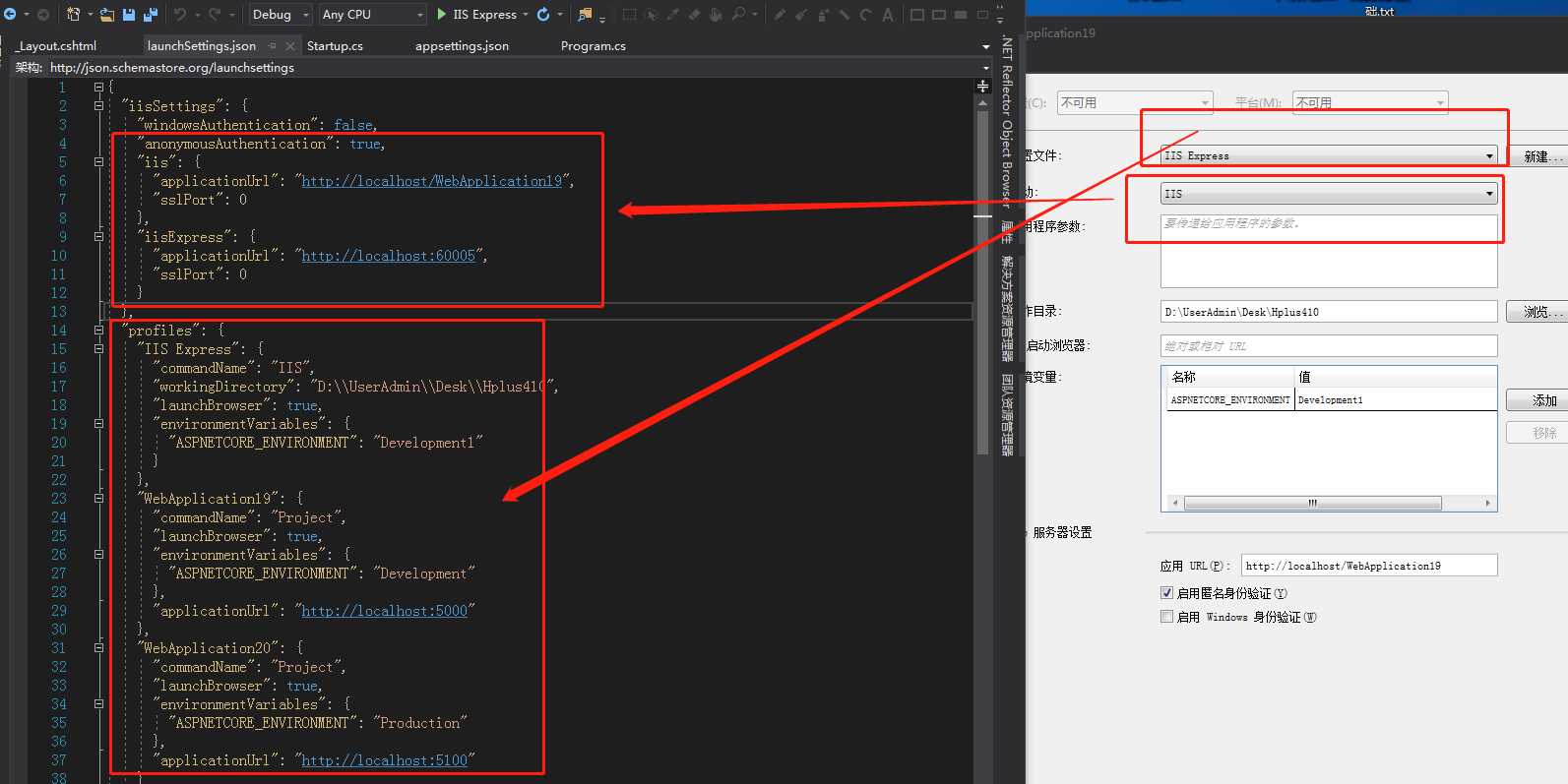
launchSettings.json
解决问题:快速的做环境切换,方便调试和开发。
目的:让你的程序在多环境一样保持稳定。
1. 直接修改文件。
2. 使用vs面板。
wwwroot
存放静态资源

ASP.NET Core四大部件的更多相关文章
- ASP.NET Core 中文文档 第四章 MVC(3.7 )局部视图(partial)
原文:Partial Views 作者:Steve Smith 翻译:张海龙(jiechen).刘怡(AlexLEWIS) 校对:许登洋(Seay).何镇汐.魏美娟(初见) ASP.NET Core ...
- ASP.NET Core: 全新的ASP.NET !
背景 最新版本的 ASP.NET 叫做 ASP.NET Core (也被称为 ASP.NET 5) 它颠覆了过去的 ASP.NET. 什么是 ASP.NET Core? ASP.NET Core ...
- ASP.NET Core重写个人博客站点小结
今天用ASP.NET Core重写了个人博客站点,原来是基于ASP.NET 4.5开发的.重写工作总体很顺利,最后成功发布到Ubunt+Nginx平台上.效果如下: 右边的Header信息里可以看到已 ...
- 【翻译】在Mac上使用VSCode创建你的第一个Asp.Net Core应用
Setting Up Your Development Environment 设置你的开发环境 To setup your development machine download and inst ...
- ubuntu下发布asp.net core并用nginx代理之旅
asp.net core 1.0.1发布已有些日子了,怀着好奇的心情体验了把ubuntu下的asp.net core 系统运行环境:ubuntu 16.0.4 for developer 首先搭建.n ...
- ASP.NET Core的身份认证框架IdentityServer4(9)-使用OpenID Connect添加用户认证
OpenID Connect OpenID Connect 1.0是OAuth 2.0协议之上的一个简单的身份层. 它允许客户端基于授权服务器执行的身份验证来验证最终用户的身份,以及以可互操作和类似R ...
- 向ASP.NET Core迁移
有人说.NET在国内的氛围越来越不行了,看博客园文章的浏览量也起不来.是不是要转Java呢? 没有必要扯起语言的纷争,Java也好C#都只是语言是工具,各有各的使用场景.以前是C#非开源以及不能在Li ...
- ASP.NET Core 认证与授权[6]:授权策略是怎么执行的?
在上一章中,详细介绍了 ASP.NET Core 中的授权策略,在需要授权时,只需要在对应的Controler或者Action上面打上[Authorize]特性,并指定要执行的策略名称即可,但是,授权 ...
- 【ASP.NET Core】JSON Patch 使用简述
JSON Patch 是啥玩意儿?不知道,直接翻译吧,就叫它“Json 补丁”吧.干吗用的呢?当然是用来修改 JSON 文档的了.那咋修改呢?比较常见有四大操作:AMRR. 咋解释呢? A—— Add ...
随机推荐
- C++标准库分析总结(八)——<仿函数、适配器、istream_iterator、ostream_iterator、bind>
一.仿函数定义 仿函数是STL中最简单的部分,存在的本质就是为STL算法部分服务的,一般不单独使用.仿函数(functors)又称为函数对象(function objects),虽然函数指针虽然也可以 ...
- 史上最全java pdf精品书籍整理
算法,多线程,spring,数据库,大数据,面试题等等.喜欢的小伙伴加群获取 QQ群号825199617 (非广告培训技术群,纯java知识交流,请自重)
- 常用spaceclaim脚本(二)
#创建一个草图 #第一个参数传入一个Frame对象 #通过一个点和两个向量创建Frame #Frame的类成员函数Create被重载 #重载函数1:Frame.Create(Point, Direct ...
- book-rev8
xv6 a simple, Unix-like teaching operating system 一个简易.类Unix教学操作系统 Russ Cox Frans Kaashoek Robert Mo ...
- Java垃圾回收(java GC)
一.GC的阶段 对每个对象而言,垃圾回收分为两个阶段:finalization和reclamation. finalization: 指运行这个对象的finalize的方法. reclamation: ...
- naxsi-waf-with-ui :dockerfile
scollazo/naxsi-waf-with-ui Dockerfile - Docker Hubhttps://hub.docker.com/r/scollazo/naxsi-waf-with-u ...
- Andorid SQLite数据库开发基础教程(2)
Andorid SQLite数据库开发基础教程(2) 数据库生成方式 数据库的生成有两种方式,一种是使用数据库管理工具生成的数据库,我们将此类数据库称为预设数据库,另一种是使用代码生成的数据库.
- Docs-.NET-C#-指南-语言参考-关键字-值类型:enum
ylbtech-Docs-.NET-C#-指南-语言参考-关键字-值类型:enum 1.返回顶部 1. enum(C# 参考) 2015/07/20 enum 关键字用于声明枚举,一种包含一组被称为枚 ...
- consul_nginx_uprsync动态负载均衡
consul_nginx_uprsync动态负载均衡 环境准备: 原理描述: 将Nginx的负载均衡后端服务器配置信息写入consul的接口中,upsync插件通过读取consul的配置,然后持久化到 ...
- IOS 根据数组的个数对UIButton进行重复或循环使用
//设置一个view view = [[UIView alloc] initWithFrame:CGRectMake(0, 38, 320, 30)]; view.backgroundColor = ...