
【Android Studio】Android实现跳转功能
最近在玩Esp32,需要APP,顺带学了下这方面的东西。
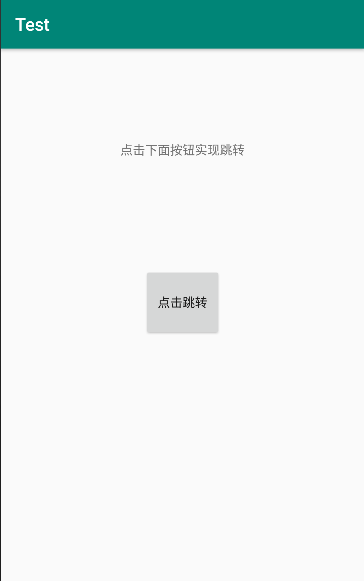
主要实现功能: 从主 mainActivity 跳转到otherActivity。
新建一个hello工程,添加 otherActivity 和 otherxml.xml;
mainActivity内容:
package com.example.xiaoyehack.test;

import android.support.v7.app.AppCompatActivity;

import android.os.Bundle;

import android.view.View;

import android.content.Intent;

public class MainActivity extends AppCompatActivity {

    @Override

    protected void onCreate(Bundle savedInstanceState) {

        super.onCreate(savedInstanceState);

        setContentView(R.layout.activity_main);

    }

    public void skip(View view){

        Intent intent = new Intent();

        intent.setClass(MainActivity.this,otherActivity.class);

        startActivity(intent);

    }

}
activity_main.xml
<?xml version="1.0" encoding="utf-8"?>

<android.support.constraint.ConstraintLayout xmlns:android="http://schemas.android.com/apk/res/android"

    xmlns:app="http://schemas.android.com/apk/res-auto"

    xmlns:tools="http://schemas.android.com/tools"

    android:layout_width="match_parent"

    android:layout_height="match_parent"

    tools:context=".MainActivity">

    <Button

        android:id="@+id/button"

        android:layout_width="wrap_content"

        android:layout_height="79dp"

        android:layout_marginStart="148dp"

        android:layout_marginTop="32dp"

        android:layout_marginEnd="148dp"

        android:layout_marginBottom="276dp"

        android:onClick="skip"

        android:text="点击跳转"

        app:layout_constraintBottom_toBottomOf="parent"

        app:layout_constraintEnd_toEndOf="parent"

        app:layout_constraintStart_toStartOf="parent"

        app:layout_constraintTop_toBottomOf="@+id/textView3" />

    <TextView

        android:id="@+id/textView3"

        android:layout_width="wrap_content"

        android:layout_height="wrap_content"

        android:layout_marginStart="122dp"

        android:layout_marginTop="105dp"

        android:layout_marginEnd="122dp"

        android:layout_marginBottom="92dp"

        android:text="点击下面按钮实现跳转"

        app:layout_constraintBottom_toTopOf="@+id/button"

        app:layout_constraintEnd_toEndOf="parent"

        app:layout_constraintStart_toStartOf="parent"

        app:layout_constraintTop_toTopOf="parent" />

</android.support.constraint.ConstraintLayout>
otherActivity内容:
package com.example.xiaoyehack.test;

import android.os.Bundle;

import android.support.v7.app.AppCompatActivity;

public class otherActivity extends AppCompatActivity {

    @Override

    protected void onCreate(Bundle savedInstanceState)

    {

        super.onCreate(savedInstanceState);

        setContentView(R.layout.otherxml);

    }

}
otherxml内容:
<?xml version="1.0" encoding="utf-8"?>

<android.support.constraint.ConstraintLayout

    xmlns:android="http://schemas.android.com/apk/res/android"

    xmlns:app="http://schemas.android.com/apk/res-auto"

    xmlns:tools="http://schemas.android.com/tools"

    android:layout_width="match_parent"

    android:layout_height="match_parent">

    <TextView

        android:id="@+id/textView"

        android:layout_width="wrap_content"

        android:layout_height="67dp"

        android:layout_marginStart="116dp"

        android:layout_marginTop="146dp"

        android:layout_marginEnd="100dp"

        android:layout_marginBottom="346dp"

        android:text="不要吹牛皮,就是一把梭!"

        app:layout_constraintBottom_toBottomOf="parent"

        app:layout_constraintEnd_toEndOf="parent"

        app:layout_constraintHorizontal_bias="0.0"

        app:layout_constraintStart_toStartOf="parent"

        app:layout_constraintTop_toTopOf="parent"

        app:layout_constraintVertical_bias="0.0" />

</android.support.constraint.ConstraintLayout>
赏币地址:
https://download.csdn.net/download/qq_18187161/10882442
无币地址:
链接:https://pan.baidu.com/s/1NWPNbkQxMgkGxpNPX9loLw
提取码:qhnx
提取码复制可见。
【Android Studio】Android实现跳转功能的更多相关文章
- [Android Studio] Android Studio常用快捷键
[Android Studio] Android Studio常用快捷键 (会持续更新)这边讲的常用快捷键是指做完Keymap到Eclipse后的,不是纯Android Studio的,这边主要讲 ...
- [Android Studio] Android studio 多渠道打包(超简洁版)
[Android Studio] Android studio 多渠道打包(超简洁版) 转载:http://xuyazhou.com/archives/461 http://relex.me/usin ...
- Android Studio 代码页跳界面 /java和XML快速切换技巧
https://www.cnblogs.com/simadi/p/6698666.html?utm_source=itdadao&utm_medium=referral 今天又发现了一个And ...
- [Android] android studio 2.0即时运行功能探秘
即时运行instant Run是android studio 2中,开发人员最关心的特性之一 在google发布studio 2.0之后,马上更新体验了一把,然而发现,并没快多少,说好的即时运行呢? ...
- [Android Studio] Android Studio快速定位当前打开的文件在哪个目录(package)下
转载自:http://blog.csdn.net/hyr83960944/article/details/38067499 在Eclipse中有一个很好的功能,就是比如我打开一个AActivity,左 ...
- [Android Studio] Android Studio中查看类的继承关系
转载自:http://blog.csdn.net/hyr83960944/article/details/38098091 查看类的继承关系的快捷键F4,在Android Studio常用快捷键这篇文 ...
- [Android Studio] Android Studio如何提示函数用法
Eclipse有一个很好的功能,就是当你代码调用某个android API时,鼠标移到对应的函数或者方法上,就会自动有一个悬 浮窗提示该函数的说明(所包含的参数含义,该方法功能).迁移到Android ...
- [Android Studio] Android Studio使用教程(一)
转载:http://blog.csdn.net/hyr83960944/article/details/37509113 今年的Google全球开发者 大会虽然没有新的Android系统和设备,但是还 ...
- [Android Studio] Android Studio快速定位当前打开的文件在哪个目录(package)下
转载自:http://blog.csdn.net/hyr83960944/article/details/38067499 在Eclipse中有一个很好的功能,就是比如我打开一个AActivity,左 ...
- [Android Studio] Android Studio如何快速生成get,set,tostring,构造函数
刚开始使用Android Studio时,在创建一个javabean时,很习惯的在JavaBean类中,右键去找生成get,set等选项.但是很遗憾,找不到. 那这边如何快速的set,get或者生成构 ...
随机推荐
- linux Crontab定时备份项目案例
首先先写好备份的脚本(拷贝的命令) #bash/bin cd /finance/tomcat8-finance/wtpwebapps tar -czf /finance/webapp_backup/* ...
- 【转】libgo
原文:https://blog.csdn.net/libaineu2004/article/details/80554870 ------------------------------------- ...
- Spring事务源码梳理
通过注解@EnableTransactionManagement中的@Import(TransactionManagementConfigurationSelector.class)给容器中导入了两个 ...
- django-用户浏览记录添加及商品详情页
视图函数views.py # /goods/商品id class DetailView(View): '''详情页''' def get(self, request, goods_id): '''显示 ...
- js form 表单使用
<!--表单所有标签--> <form action="" method="" name=""> 单行文本框:< ...
- Linux 系统管理——磁盘管理及文件系统实例
1.为主机新增两块30GB的SCSI硬盘 2.划分3个主分区,各5GB,剩余空间作为扩展分区 3.在扩展分区中建立2个逻辑分区,容量分别为2GB.10GB 4.将第一个逻辑分区的类型改为swap 5. ...
- vue-router 的两种模式的区别
Vue Router 是Vue官方的路由管理器.它和 Vue.js 的核心深度集成,让构建单页面应用变得易如反掌.vue-router 默认 hash 模式,还有一种是history模式. hash模 ...
- 洛谷 P2918 [USACO08NOV]买干草Buying Hay 题解
P2918 [USACO08NOV]买干草Buying Hay 题目描述 Farmer John is running out of supplies and needs to purchase H ...
- Codeforces & Atcoder神仙题做题记录
鉴于Codeforces和atcoder上有很多神题,即使发呆了一整节数学课也是肝不出来,所以就记录一下. AGC033B LRUD Game 只要横坐标或者纵坐标超出范围就可以,所以我们只用看其中一 ...
- java学习笔记(5) 控制语句、键盘输入
控制语句: java控制可以分为7种: *控制选择结构语句: *if if else *switch *控制循环结构语句: *for *while *do while *改变控制语句顺序: *bre ...