
RobotFramework与Jenkins集成后发送groovy报告(比别处多了用例作者信息)
https://www.cnblogs.com/gcgc/p/10037891.html
这篇文章中最终的发送报告是这个样子,每天大家看到这封邮件后也不知道是不是自己的用例错误了,导致大家不积极回复邮件说明失败原因,
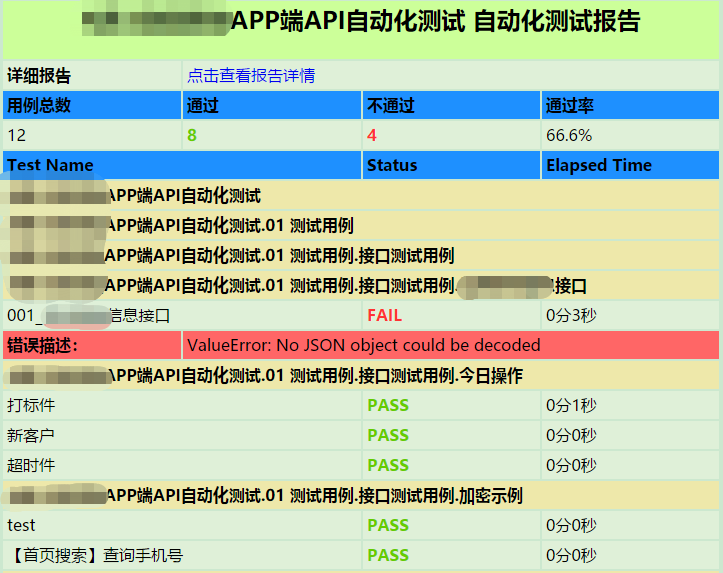
经过修改robot_results.groovy文件内容,将【Elapsed Time】列修改为【作者】
优化后如下:
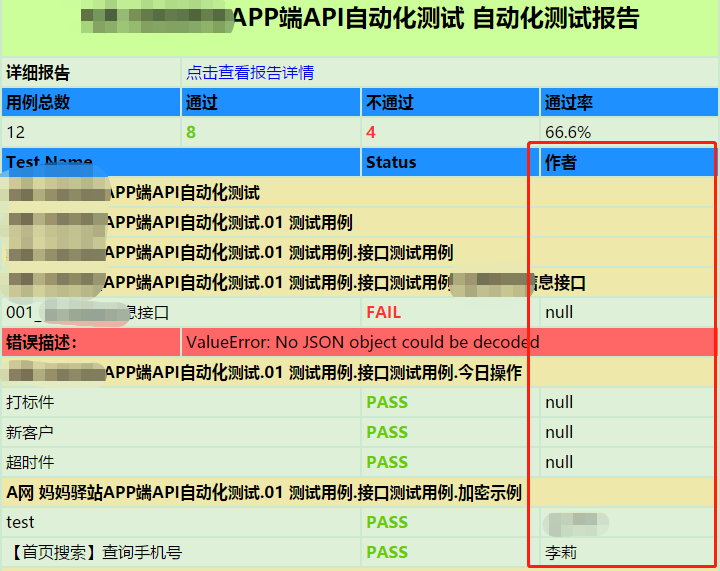
在写case时,只要约定每条用例的第一个tags写上作者的名字,同时略微修改robot_results.groovy文件,将显示时间的代码注释掉,换为获取tag的代码,
主要就是这行,<td class="case"><%= tc.tags[0] %></td>,用来获取用例的第一个tag
<%

 import java.text.DateFormat

 import java.text.SimpleDateFormat

%>

<!-- Robot Framework Results -->

<!DOCTYPE html>

<html>

<style type="text/css">

table {width:720px;table-layout:fixed;}

td {width:180px;}

td.title {

    background-color:#CCFF99;

    text-align: center;

}

td.suite{background-color:#EEE8AA;}

td.case{background-color:#dff0d8;}

td.head{background-color:#1E90FF;}

td.error {background-color:#FF6666;}

table thead tboday tr td {cellspacing:0px;border:1px;}

h2.span{color:white;}

span.pass{color:#66CC00;}

span.fail{color:#FF3333;}

</style>

<body>

<%

 def robotResults = false

 def actions = build.actions // List<hudson.model.Action>

 actions.each() { action ->

    if( action.class.simpleName.equals("RobotBuildAction") ) { // hudson.plugins.robot.RobotBuildAction

        robotResults = true

%>

        <div>

            <table cellpadding="4" align="left">

                <thead>

                    <tr>

                        <td class="title" colspan="4"><h2><span>${project.name}</span><span>  自动化测试报告</span></h2></td>

                    </tr>

                    <tr>

                        <td class="case"><b>详细报告</b></td>

                        <td colspan="3" class="case"><a href="${rooturl}${build.url}robot/report/report.html">点击查看报告详情</a></td>

                    </tr>

                    <tr>

                        <td class="head"><b>用例总数</b></td>

                        <td class="head"><b>通过</b></td>

                        <td class="head"><b>不通过</b></td>

                        <td class="head"><b>通过率</b></td>

                    </tr>

                    <tr>

                        <td class="case"><%= action.result.overallTotal %></td>

                        <td class="case"><b><span class="pass"><%= action.result.overallPassed %></span></b></td>

                        <td class="case"><b><span class="fail"><%= action.result.overallFailed %></span></b></td>

                        <td class="case"><%= action.overallPassPercentage %>%</td>

                    </tr>

                    <tr>

                        <td colspan="2" class="head"><b>Test Name</b></td>

                        <td class="head"><b>Status</b></td>

                        <!-- <td class="head"><b>Elapsed Time</b></td> -->

                        <!-- 将这里的运行持续时间修改为该用例的第一个tag,也就是作者 -->

                        <td class="head"><b>作者</b></td>

                    </tr>

                </thead>

                <tboday>

<%

 def suites = action.result.allSuites

 suites.each() { suite ->

    def currSuite = suite

    def suiteName = currSuite.displayName

    //忽略最上层结构两个占位的元素

    while (currSuite.parent != null && currSuite.parent.parent != null) {

        currSuite = currSuite.parent

        suiteName = currSuite.displayName + "." + suiteName

    }

%>

                    <tr>

                        <td colspan="4" class="suite"><b><%= suiteName %></b></td>

                    </tr>

<%

    DateFormat format = new SimpleDateFormat("yyyyMMdd HH:mm:ss")

    def execDateTcPairs = []

    suite.caseResults.each() { tc ->

        Date execDate = format.parse(tc.starttime)

        execDateTcPairs << [execDate, tc]

    }

    //按执行日期、显示名称进行排序

    execDateTcPairs = execDateTcPairs.sort{ a,b -> a[1].displayName <=> b[1].displayName }

    execDateTcPairs = execDateTcPairs.sort{ a,b -> a[0] <=> b[0] }

    execDateTcPairs.each() {

        def execDate = it[0]

        def tc = it[1]

%>

                    <tr>

                        <td colspan="2" class="case"><%= tc.displayName %></td>

                        <td class="case"><b><span style="color:<%= tc.isPassed() ? "#66CC00" : "#FF3333" %>"><%= tc.isPassed() ? "PASS" : "FAIL" %></span></b></td>

                        <!-- <td class="case"><%= tc.getDuration().intdiv(60000)+"分"+(tc.getDuration()-tc.getDuration().intdiv(60000)*60000).intdiv(1000)+"秒" %></td>  -->

                        <!-- 将这里的运行持续时间修改为该用例的第一个tag,也就是作者 -->

                        <td class="case"><%= tc.tags[0] %></td>

                    </tr>

<%

        if(tc.errorMsg != null) {

%>

                    <tr>

                        <td class="error"><b><span>错误描述:</span></b></td>

                        <td class="error" colspan="3"><span><%= tc.errorMsg%></span></td>

                    </tr>

<%                }%>

<%

            } // tests

        } // suites

%>

                </tboday>

            </table>

        </div>

<%

    } // robot results

}

    if (!robotResults){

%>

    <p>No Robot Framework test results found.</p>

<%}%>

</body>

</html>
RobotFramework与Jenkins集成后发送groovy报告(比别处多了用例作者信息)的更多相关文章
- RobotFramework与Jenkins集成后构建成功率高于设置阈值但总是显示失败
摘要:robot执行后总是失败 1.在配置jenkins的job时,添加构建步骤Execute Windows batch command,输入执行robotframework测试用例命令 2.然后j ...
- RobotFramework与Jenkins集成后失败用例重跑
Jenkins的执行Windows批处理命令填写如下: call pybot.bat -i 1adsInterface 01_测试用例\接口测试用例\adsInterface.txt call pyb ...
- RobotFramework与Jenkins集成发送邮件
转: A. 目标:实现RobotFramework的脚本定时自动执行,执行完后自动将结果发送到指定邮箱 B. 前提1. 配置好Robot Framework的环境,脚本可以正常运行 2. ...
- jenkins 构建后发送钉钉消息通知(插件)
钉钉,越来越多的公司采用,那么我们在持续集成中,也可以直接选择钉钉插件的,在之前的博客中 ,对发送的钉钉消息进行了定制,那样的话会开启一个新的任务, 其实今天呢,我们可以直接安装一个插件就可以发送了, ...
- Jmeter+Jenkins集成html报告显示问题
在J meter+Jenkins集成生成的html报告时,出现如下问题:无法正常显示表格,detail内容无法折叠和展开操作. 解决方法:执行下列脚本行 在Jenkins :系统管理--脚本命令行 S ...
- jenkins 分布式配置+allure集成+邮件发送
jenkins节点配置+allure集成+邮件发送这一套走下来感觉很麻烦,要配置的东西太多了,所以在此记录一下,防止以后忘了. 环境: 主机master:腾讯云服务器ubuntu18.04 执行机sl ...
- pytest系列(四)- pytest+allure+jenkins - 持续集成平台生成allure报告
pytest是什么 pytest是python的一款测试框架,拥有unittest的功能并比它更丰富. allure是什么 有非常多的优秀的测试框架,但却是有非常少优秀的报告工具可以展示非常清楚的用例 ...
- [原]Jenkins(八)---jenkins构建项目报错时发送错误报告邮件
/** * lihaibo * 文章内容都是根据自己工作情况实践得出. * 版权声明:本博客欢迎转发,但请保留原作者信息! http://www.cnblogs.com/horizonli/p/533 ...
- JMeter - 连续性能测试 - JMeter + ANT + Jenkins集成 - 第2部分
目标: 创建包含性能测试流程的持续交付管道,以尽早检测任何与性能相关的问题. 通常,全面的性能测试将在分段/预生产环境中完成,该环境可能与您的生产环境相同.在完成QA功能/回归验证后,将代码推送到分段 ...
随机推荐
- Kotlin调用Java程序重点分析
在上一次https://www.cnblogs.com/webor2006/p/11530801.html中学习了Kotlin调用Java的使用方式及一些注意点,这次继续其这个场景进一步学习. 数组( ...
- 项目Alpha冲刺——总结
作业描述 课程: 软件工程1916|W(福州大学) 作业要求: 项目Alpha冲刺(团队) 团队名称: 火鸡堂 作业目标: 完成项目Alpha冲刺 团队信息 队名:火鸡堂 队员学号 队员姓名 博客地址 ...
- javax validation--参数基础校验
Bean Validation 1.1当前实现是hibernate validator 5,且spring4才支持.接下来我们从以下几个方法讲解Bean Validation 1.1,当然不一定是新特 ...
- CORS 跨域 node |XMLHttpRequest 跨域提交数据 node
node服务端 app.post('/getdata',function(req,res,next){ req.setEncoding('utf8'); res.setHeader('Access-C ...
- Bias, Variance and the Trade-off
偏差,方差以及两者权衡 偏差是由模型简化的假设,使目标函数更容易学习. 一般来说,参数化算法有很高的偏差,使它们学习起来更快,更容易理解,但通常不那么灵活.反过来,它们在复杂问题上的预测性能更低,无法 ...
- LeetCode 685. Redundant Connection II
原题链接在这里:https://leetcode.com/problems/redundant-connection-ii/ 题目: In this problem, a rooted tree is ...
- jupyter Notebook 设置密码
由于服务器关闭了图形界面 所以在服务器上安装Jupyter Notebook 随后本机web访问,利用本机的显卡可以执行plt相关图形命令 本次介绍如何设置Jupyter Notebook的密码设定 ...
- 实训作业6 (数据I/O)
1. 文件输出流的应用. 定义如下字符串: String str = “12345abcdef@#%&*软件工程”; 编写程序将该字符串写入文件”data.txt”. import java. ...
- Windbg的命令
前面介绍了Windbg的UI功能,也基本上能完成基本的调试任务,但是WinDBG主要是以命令方式工作的,这些命令在Command Window里输入.WinDBG共支持三类命令:标准命令.元命令和扩展 ...
- Git常用命令及常见报错:You have not concluded your merge (MERGE_HEAD exists)、清理无效的远程追踪分支
一.常用命令 切换到master分支:git checkout master 查看已有本地及远程分支:git branch -a(先git pull拉下全部数据) 查看远程分支:git branch ...