
一张图带你看懂原始dao与SQL动态代理开发的区别-Mybatis
//转载请注明出处:https://www.cnblogs.com/nreg/p/11156167.html
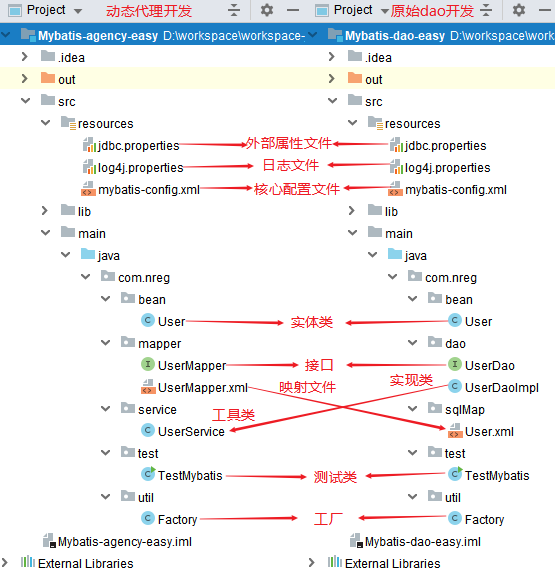
1.项目结构区别:
2.开发区别:

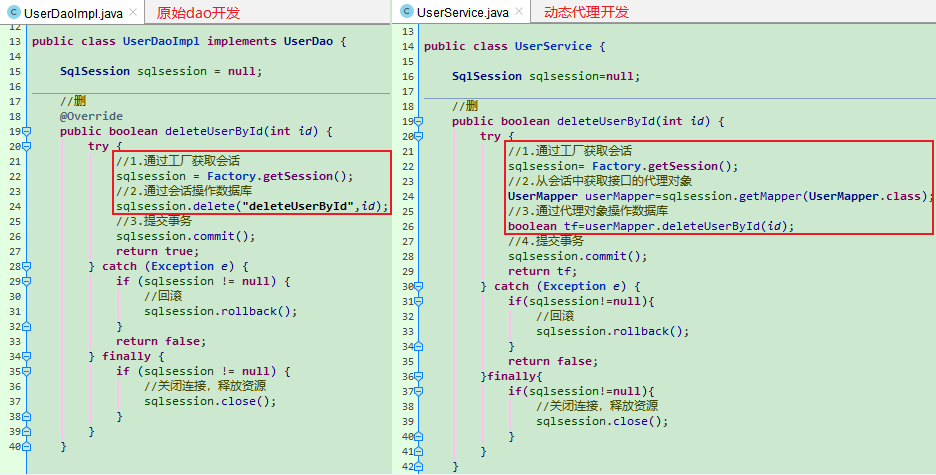
注:其中原始dao开发的实现类UserDaoImpl 与动态代理开发的工具类UserService的第16行-第27行代码可以提炼出来,
每个逻辑方法里都要注入这6行代码,会有些繁琐,因此需要提炼出来作为一个工厂类,对外提供Sqlsession会话。
3.工厂类:Factory
 public class Factory {

     private final static Class<Factory> lock = Factory.class;

     private static SqlSessionFactory sqlSessionFactory = null;

     private Factory() {}

     public static SqlSessionFactory getSqlSessionFactory() {

         synchronized (lock) {

             if (sqlSessionFactory != null) {

                 return sqlSessionFactory;

             }

             //加载核心配置文件

             String resource = "mybatis-config.xml";

             InputStream inputStream;

             try {

                 inputStream = Resources.getResourceAsStream(resource);

                 //创建SqlsessionFactory工厂

                 sqlSessionFactory = new SqlSessionFactoryBuilder().build(inputStream);

             } catch (IOException e) {

                 e.printStackTrace();

                 return null;

             }

             //对外提供一个工厂

             return sqlSessionFactory;

         }

     }

     //对外提供一个Sqlsession会话

     public static SqlSession getSession() {

         if (sqlSessionFactory == null) {

             getSqlSessionFactory();

         }

         return sqlSessionFactory.openSession();

     }

 }
工厂类使用示例:
4.Mybatis的核心配置文件:mybatis-config.xml
 <?xml version="1.0" encoding="UTF-8" ?>

 <!DOCTYPE configuration

         PUBLIC "-//mybatis.org//DTD Config 3.0//EN"

         "http://mybatis.org/dtd/mybatis-3-config.dtd">

 <configuration>

     <properties resource="jdbc.properties"></properties>

     <!--environments元素:配置Mybatis的运行环境-->

     <!--可配置多套运行环境,将SQL映射到多个不同的数据库上,但必须通过default属性指定默认运行环境-->

     <environments default="development"> <!--default属性指定默认运行环境的id-->

         <environment id="development">   <!-- 第一套运行环境的id-->

             <transactionManager type="JDBC"></transactionManager> <!--事务管理器配置-->

             <dataSource type="POOLED">   <!--数据源(连接池)配置-->

                 <property name="driver" value="${jdbc.driver}"/>

                 <property name="url" value="${jdbc.url}"/>

                 <property name="username" value="${jdbc.username}"/>

                 <property name="password" value="${jdbc.password}"/>

             </dataSource>

         </environment>

     </environments>

     <!--mappers元素:配置mapper映射器的xml映射文件 以动态代理开发为例,原始dao开发配置方法相同-->

     <mappers>

         <!--方式一:使用resource配置映射文件-->

         <mapper resource="com/nreg/mapper/UserMapper.xml"></mapper>

         <!--方式二:使用url配置映射文件-->

         <mapper url="D:\Mybatis-agency-easy\src\main\java\com\nreg\mapper\UserMapper.xml"></mapper>

         <!--方式三:多个映射器的使用:开启扫描-->

         <package name="com.nreg.mapper"/>

     </mappers>

 </configuration>
5.外部属性文件:jdbc
 jdbc.driver=com.mysql.jdbc.Driver

 jdbc.url=jdbc:mysql://localhost:3306/crud?useSSL=false&serverTimezone=UTC&characterEncoding=utf-8

 jdbc.username=root

 jdbc.password=123456
6.日志文件:log4j
 ### 设置Logger输出级别和输出目的地 ### debug更详细,如果把debug改为info,则打印出的表数据遇到字符串就不显示,此外还有log4j.log文件

 log4j.rootLogger=debug,stdout

 ### 把日志信息输出到控制台 ###

 log4j.appender.stdout=org.apache.log4j.ConsoleAppender

 #log4j.appender.stdout.Target=System.err

 log4j.appender.stdout.layout=org.apache.log4j.SimpleLayout

 ### 把日志信息输出到文件:log4j.log ###

 log4j.appender.logfile=org.apache.log4j.FileAppender

 log4j.appender.logfile.File=log4j.log

 log4j.appender.logfile.layout=org.apache.log4j.PatternLayout

 log4j.appender.logfile.layout.ConversionPattern=%d{yyyy-MM-dd HH:mm:ss} %F %p %m%n

 ###显示SQL语句部分 ###

 #第一行:xml映射文件所在包

 log4j.logger.com.nreg.sqlMap=DEBUG

 log4j.logger.java.sql.Connection=DEBUG

 log4j.logger.java.sql.Statement=DEBUG

 log4j.logger.java.sql.PreparedStatement=DEBUG

 log4j.logger.java.sql.ResultSet=DEBUG
7.开发用crud模板:
1).接口:
     //增

     boolean addUser(User user);

     //删

     boolean deleteUserById(int id);

     //改

     boolean updateUserById(User user);

     //查:按id查一个

     User getUserById(int id);

     //查:查所有

     List<User> getUser();
2).xml映射文件:
    <!--增-->

    <insert id="addUser" parameterType="com.nreg.bean.User" useGeneratedKeys="true" keyProperty="id">

        insert into user values(null,#{username},#{password})

    </insert>

    <!--删-->

    <delete id="deleteUserById" parameterType="int">

        delete from user where id = #{id}

    </delete>

    <!--改-->

    <update id="updateUserById" parameterType="com.nreg.bean.User">

        update user set username = #{username},password = #{password} where id=#{id}

    </update>

    <!--查:按id查-->

    <select id="getUserById" parameterType="int" resultType="com.nreg.bean.User">

        select * from user where 1=1 and id = #{id}<!--注:1=1 and:用于防止后面条件不成立造成SQL语句错误-->

    </select>

    <!--查:查所有-->

    <select id="getUser" resultType="com.nreg.bean.User">

        select * from user

    </select>
3).动态代理开发:UserService工具类:
 public class UserService {

     SqlSession sqlsession=null;

     //增

     public boolean addUser(User user) {

         try {

             //1.通过工厂获取会话

             sqlsession= Factory.getSession();

             //2.从会话中获取接口的代理对象

             UserMapper userMapper=sqlsession.getMapper(UserMapper.class);

             //3.通过代理对象操作数据库

             userMapper.addUser(user);

             //提交事务

             sqlsession.commit();

             return true;

         } catch (Exception e) {

             //回滚

             if(sqlsession !=null){

                 sqlsession.rollback();

             }

             return false;

         }finally{

             //关闭连接,释放资源

             if(sqlsession!=null){

                 sqlsession.close();

             }

         }

     }

     //删

     public boolean deleteUserById(int id) {

         try {

             sqlsession= Factory.getSession();

             UserMapper userMapper=sqlsession.getMapper(UserMapper.class);

             boolean tf=userMapper.deleteUserById(id);

             sqlsession.commit();

             return tf;

         } catch (Exception e) {

             if(sqlsession!=null){

                 sqlsession.rollback();

             }

             return false;

         }finally{

             if(sqlsession!=null){

                 sqlsession.close();

             }

         }

     }

     //改

     public boolean updateUserById(User user) {

         try {

             sqlsession= Factory.getSession();

             UserMapper userMapper=sqlsession.getMapper(UserMapper.class);

             userMapper.updateUserById(user);

             sqlsession.commit();

             return true;

         } catch (Exception e) {

             if(sqlsession !=null){

                 sqlsession.rollback();

             }

             return false;

         }finally{

             if(sqlsession !=null){

                 sqlsession.close();

             }

         }

     }

     //查:按id查一个

     public User getUserById(int id) {

         try {

             sqlsession= Factory.getSession();

             UserMapper userMapper=sqlsession.getMapper(UserMapper.class);

             User user = userMapper.getUserById(id);

             return user;

         } catch (Exception e) {

             if(sqlsession!=null){

                 sqlsession.rollback();

             }

             e.printStackTrace();

             return null;

         }finally{

             if(sqlsession !=null){

                 sqlsession.close();

             }

         }

     }

     //查:查所有

     public List<User> getUser() {

         try {

             sqlsession = Factory.getSession();

             List<User> list = null;

             UserMapper userMapper=sqlsession.getMapper(UserMapper.class);

             list = userMapper.getUser();

             return list;

         } catch (Exception e) {

             if(sqlsession!=null){

                 sqlsession.rollback();

             }

             return null;

         }finally{

             if(sqlsession !=null){

                 sqlsession.close();

             }

         }

     }

 }
4).原始dao开发:UserDaoImpl实现类:
 public class UserDaoImpl implements UserDao {

     SqlSession sqlsession = null;

     //增:

     @Override

     public boolean addUser(User user) {

         try {

             //1.通过工厂获取会话

             sqlsession = Factory.getSession();

             //2.通过会话操作数据库

             sqlsession.insert("addUser", user);

             //提交事务:增删改都需要提交事务

             sqlsession.commit();

             return true;

         } catch (Exception e) {

             //回滚

             if (sqlsession != null) {

                 sqlsession.rollback();

             }

             return false;

         } finally {

             //关闭连接,释放资源

             if (sqlsession != null) {

                 sqlsession.close();

             }

         }

     }

     //删

     @Override

     public boolean deleteUserById(int id) {

         try {

             //1.通过工厂获取会话

             sqlsession = Factory.getSession();

             //2.通过会话操作数据库

             sqlsession.delete("deleteUserById",id);

             //3.提交事务

             sqlsession.commit();

             return true;

         } catch (Exception e) {

             if (sqlsession != null) {

                 //回滚

                 sqlsession.rollback();

             }

             return false;

         } finally {

             if (sqlsession != null) {

                 //关闭连接,释放资源

                 sqlsession.close();

             }

         }

     }

     //改:

     @Override

     public boolean updateUserById(User user) {

         try {

             sqlsession = Factory.getSession();

             sqlsession.update("updateUserById", user);

             sqlsession.commit();

             return true;

         } catch (Exception e) {

             if (sqlsession != null) {

                 sqlsession.rollback();

             }

             return false;

         } finally {

             if (sqlsession != null) {

                 sqlsession.close();

             }

         }

     }

     //查:按id查

     @Override

     public User getUserById(int id) {

         try {

             sqlsession = Factory.getSession();

             User user = sqlsession.selectOne("getUserById",id);

             return user;

         } catch (Exception e) {

             if (sqlsession != null) {

                 sqlsession.rollback();

             }

             return null;

         } finally {

             if (sqlsession != null) {

                 sqlsession.close();

             }

         }

     }

     //查:查所有

     @Override

     public List<User> getUser() {

         try {

             sqlsession = Factory.getSession();

             List<User> list = sqlsession.selectList("getUser");

             return list;

         } catch (Exception e) {

             if (sqlsession != null) {

                 sqlsession.rollback();

             }

             return null;

         } finally {

             if (sqlsession != null) {

                 sqlsession.close();

             }

         }

     }

 }
结。
一张图带你看懂原始dao与SQL动态代理开发的区别-Mybatis的更多相关文章
- 二 Mybatis架构&MybatisDao的两种开发方式(原始Dao,接口动态代理)
MyBatis架构图 三个对象: SqlSessionFactoryBuilder.SqlSessionFactory.SqlSession SqlSessionFactoryBuilder:主要用来 ...
- SDWebImage实现原理--两张图带你看懂
SDWebImage底层实现有沙盒缓存机制,主要由三块组成:1.内存图片缓存,2.内存操作缓存,3.磁盘沙盒缓存 SDWebImage GitHub地址 版本4.0.0 一.SDWebImage时序图 ...
- 一张图带你看懂SpriteKit中Update Loop究竟做了神马!
1首先Scene中只有开始一点时间用来回调其中的update方法 ;] 2然后是Scene中所有动作的模拟 3接下来是上一步完成之后,给你一个机会执行一些代码 4然后是Scene模拟其中的物理世界 5 ...
- MyBatis开发Dao的原始Dao开发和Mapper动态代理开发
目录 咳咳...初学者看文字(Mapper接口开发四个规范)属实有点费劲,博主我就废了点劲做了如下图,方便理解: 原始Dao开发方式 1. 编写映射文件 3.编写Dao实现类 4.编写Dao测试 Ma ...
- Mybatis框架三:DAO层开发、Mapper动态代理开发
这里是最基本的搭建:http://www.cnblogs.com/xuyiqing/p/8600888.html 接下来做到了简单的增删改查:http://www.cnblogs.com/xuyiqi ...
- MyBatis使用Mapper动态代理开发Dao层
开发规范 Mapper接口开发方法只需要程序员编写Mapper接口(相当于Dao接口),由Mybatis框架根据接口定义创建接口的动态代理对象,代理对象的方法体同原始Dao接口实现类方法. Mappe ...
- 一张图带你搞懂Node事件循环
说一件重要的事儿:你还没关注公众号[前端印记],更多精彩内容等你探索-- 以下全文7000字,请在你思路清晰.精力充沛的时刻观看.保证你理解后很长时间忘不掉. Node事件循环 Node底层使用的语言 ...
- 看懂SqlServer查询计划 SQL语句优化分析
转自 http://www.cnblogs.com/fish-li/archive/2011/06/06/2073626.html 阅读目录 开始 SQL Server 查找记录的方法 SQL Ser ...
- mybatis开发Dao的Mapper动态代理方式
1. 开发规范Mapper接口开发方法只需要程序员编写Mapper接口(相当于Dao接口),由Mybatis框架根据接口定义创建接口的动态代理对象,代理对象的方法体跟Dao原始方法中接口实现类的方法相 ...
随机推荐
- Maven 项目中依赖的搜索顺序
Maven 项目中依赖的搜索顺序 http://www.manongjc.com/article/13422.html 执行过程中使用 -e -X 查看详细的搜索地址: 1,中央仓库,这是默认的仓库 ...
- vue动态绑定class的几种方式
对象方法 -最简单的绑定(这里的active加不加单引号都可以,以下也一样都能渲染) :class="{ 'active': isActive }" 判断是否绑定一个active ...
- [转]docx4j实现动态表格(模板式)
原文地址:https://chendd.cn/information/viewInformation/other/257.a 除了前篇文章中讲到的编程式创建表格外,基于模板实现的列表表格也是非常常用或 ...
- libFFM 与 python-libffm 安装遇到的一系列问题-解决方案
mac os x 环境下 libFFM 与 python-libffm的安装问题 Gcc 版本问题 : brew Clang 版本问题 : brew upgrade llvm 编译参数: 多核运行 o ...
- angular的路由例子
app.routing.module.ts里面,关键部分 const routes: Routes = [ { path: '', redirectTo : 'c3/c2/mmc', pathMatc ...
- ERROR: CAN'T FIND PYTHON EXECUTABLE "PYTHON", YOU CAN SET THE PYTHON ENV VARIABLE.解决办法
错误原因:Node.js 在安装模块的时候报错,缺少python环境. 解决办法: 第一种方式: 安装Python及环境变量配置 一定要安装python2.7的版本 环境变量安装可以参考:http:/ ...
- 研发团队是该制定OKR还是KPI?
绩效管理和OKR的目标管理,是前行的两条腿,缺谁都会寸步难行.正确的做法是把企业的使命和任务,转化为经营目标,然后再用KPI.OKR等绩效管理工具,分解.执行.考核.. KPI是一套绩效管理的方法.全 ...
- vbscript--FileSystemObject详解
https://blog.csdn.net/superbirds/article/details/6762748 FSO是FileSystemObject 或 Scripting.FileSystem ...
- url、href、src
一.URL的概念 统一资源定位符(或称统一资源定位器/定位地址.URL地址等,英语:Uniform Resource Locator,常缩写为URL),有时也被俗称为网页地址(网址).如同在网络上的门 ...
- 【miscellaneous】【C/C++语言】UTF8与GBK字符编码之间的相互转换
UTF8与GBK字符编码之间的相互转换 C++ UTF8编码转换 CChineseCode 一 预备知识 1,字符:字符是抽象的最小文本单位.它没有固定的形状(可能是一个字形),而且没有值." ...