
Spring boot项目分环境Maven打包,动态配置文件,动态配置项目
Spring boot Maven 项目打包
使用Maven 实现多环境 test dev prod 打包
项目的结构
在下图中可用看出,我们打包时各个环境需要分开,采用 application-环境.yml 的方式命名
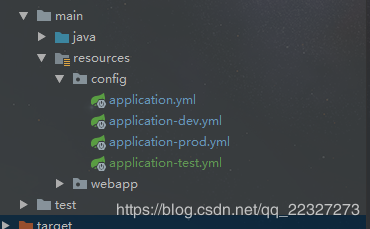
环境配置开始
首先我们需要在application.yml文件中配置 spring.profiles.active = @profileActive@这里的proofileAction 是我们下面要用到的变量
spring:

    profiles:

        active:  @profileActive@
pom.xml
我们需要在pom中指定finalname的名称,当然对于打包来说名称并不影响。
实际上 不配置 resources节点也是可以的,在pom添加只是为了在打包中少几个配置文件。
当然你可以通过include来选择需要导入哪个文件。
 <build>

        <plugins>

            <plugin>

                <groupId>org.springframework.boot</groupId>

                <artifactId>spring-boot-maven-plugin</artifactId>

            </plugin>

        </plugins>

        <!-- 打包后文件名称:项目名-环境-版本 -->

        <finalName>${project.artifactId}-${profileActive}-${project.version}</finalName>

        <resources>

            <resource>

                <directory>src/main/resources</directory>

                <!-- 开启过滤替换功能-->

                <filtering>true</filtering>

                <includes>

                    <!-- 项目打包完成的包中只包含当前环境文件 -->

                    <include>application.yml</include>

                    <include>application-${profileActive}.yml</include>

                </includes>

            </resource>

        </resources>

    </build>

    <!-- 多环境配置方案 -->

    <profiles>

        <profile>

            <id>dev</id>

            <properties>

                <profileActive>dev</profileActive>

            </properties>

            <activation>

                <!-- 默认情况下使用dev开发配置 如 打包时不包含 -p 参数-->

                <activeByDefault>true</activeByDefault>

            </activation>

        </profile>

        <!-- 打包命令package -P test -->

        <profile>

            <id>test</id>

            <properties>

                <profileActive>test</profileActive>

            </properties>

        </profile>

        <!-- 打包命令package -P prod -->

        <profile>

            <id>prod</id>

            <properties>

                <profileActive>prod</profileActive>

            </properties>

        </profile>

    </profiles>
在pom中profiles节点才是分项目打包的关键,通过profile节点可以在打包时动态的去更新我们在application.xml中的配置值

在编译项目时,可以使用 -P 参数指定需要使用的 profile 的 id,比如下面命令将会使用 dev profile:
mvn clean package -P dev
如果想使用test,只需要改为以下即可
mvn clean package -Ptest
假如不指定 -P 参数的话,则会使用 activeByDefault=true 的一项(即 dev)。
原文:https://blog.csdn.net/qq_22327273/article/details/83548138
参考文档:
LuckyZhouStar Maven中profile和filtering实现多个环境下的属性过滤
Spring boot项目分环境Maven打包,动态配置文件,动态配置项目的更多相关文章
- [DEBUG] spring boot在eclipse中用maven打包成jar访问templates报500错误
更新:打war包的话只要把html文件放在resources/templates下即可,根本不需要放外面. 配置application.yml和templates放外面这种做法,打war包确实不行. ...
- 部署项目问题(maven打包jar不对应,导致启动时一直找不到某个类)
项目是springboot+maven 打包用maven的插件package 下面是打包后的目录结构 project-1.0 和project-1.0.tar.gz是一样的 区别就是一个是压缩包 ...
- 快速搭建Spring Boot + Apache Shiro 环境
个人博客网:https://wushaopei.github.io/ (你想要这里多有) 一.Apache Shiro 介绍及概念 概念:Apache Shiro是一个强大且易用的Java安全框 ...
- 【转】Spring Boot干货系列:(二)配置文件解析
转自:Spring Boot干货系列:(二)配置文件解析 前言 上一篇介绍了Spring Boot的入门,知道了Spring Boot使用"习惯优于配置"(项目中存在大量的配置,此 ...
- Spring Boot干货系列:(二)配置文件解析
Spring Boot干货系列:(二)配置文件解析 2017-02-28 嘟嘟MD 嘟爷java超神学堂 前言 上一篇介绍了Spring Boot的入门,知道了Spring Boot使用“习惯优于 ...
- maven打包 tomcat运行pom配置 或 打成jar包
maven打包 tomcat运行pom配置,同时还需要配置org.apache.tomcat.maven插件,这里省略. <groupId>com.company</groupId& ...
- Spring Boot 揭秘与实战(四) 配置文件篇 - 有哪些很棒的特性
文章目录 1. 使用属性文件2. YAML文件 1.1. 自定义属性 1.2. 参数引用 1.3. 随机数属性 1.4. application-{profile}.properties参数加载 3. ...
- 【spring boot】12.spring boot对多种不同类型数据库,多数据源配置使用
2天时间,终于把spring boot下配置连接多种不同类型数据库,配置多数据源实现! ======================================================== ...
- Spring Boot中的缓存支持(一)注解配置与EhCache使用
Spring Boot中的缓存支持(一)注解配置与EhCache使用 随着时间的积累,应用的使用用户不断增加,数据规模也越来越大,往往数据库查询操作会成为影响用户使用体验的瓶颈,此时使用缓存往往是解决 ...
随机推荐
- 安装centos docker ce
安装centos docker ce 移除旧的版本: $ sudo yum remove docker \ docker-client \ docker-client-latest \ docker- ...
- 你该怎么学习C++——思想层面
Javascript是世界上最受误解的语言,其实C++何尝不是.坊间流传的错误的C++学习方法一抓就是一大把.我自己在学习C++的过程中也走了许多弯路,浪费了不少时间. 为什么会存在这么多错误认识?原 ...
- CentOS7 初始化硬盘分区、挂载、重启自动挂载
挂载硬盘设备到本地有一下步骤: 1.通过fdisk -l命令,查看硬盘信息 可以看到有两块磁盘/dev/vda和/dev/vdb vda是系统盘,vdb使我们新增的数据盘,在上图中其实已经挂载完成(设 ...
- Docker 容器内无法通过 HTTP 访问外网
现象 内/外网 IP 和 域名 可以 ping 通 容器内无法访问宿主机所在内网及外网的 Web 服务(404) 通过 curl 查看返回头信息感觉是所有 Web 请求被中转到一个固定的 Nginx ...
- PHP设计模式 - 备忘录模式
备忘录模式又叫做快照模式(Snapshot)或 Token 模式,备忘录模式的用意是在不破坏封装性的前提下,捕获一个对象的内部状态,并在该对象之外保存这个状态,这样就可以在合适的时候将该对象恢复到原先 ...
- netty中的channelPipeline在编程中的作用
在netty编程中我们绝大多数是要是用nio的,nio相比传统的io更加高效,而nio中核心概念离不开channel,buffer,selector三个重要的对象. 那么在netty中有一个chann ...
- Django框架之DRF APIView Serializer
一.APIView 我们在使用DjangoRestfulFramework的时候会将每个视图类继承APIView,取代原生Django的View类 APIView的流程分析: rest_framewo ...
- Windows10下QT5.13.2安装mingw64/MYSQL8.0驱动
开始之前,先将编译器的路径添加到系统环境变量. 我的QT所以sql驱动是在下面这个目录中(大家在自己Qt的安装目录找到对应的文件夹就行,下面的路径也是如此), E:\qt\5.13.2\mingw73 ...
- (十)pdf的构成之交叉引用表
交叉引用表(xref) 其中包含对文档中所有对象的引用.交叉引用表的目的是允许随机访问文件中的对象,因此我们不需要读取整个PDF文档来定位特定对象.每个对象由交叉引用表中的一个条目表示.(该表保存 ...
- 设置elasticsearch的默认分区数和副本数
日志是从logstash传输给ES的,但是logstash配置中只能配置host和index,所以只能在es中进行配置 但是在es配置文件中配置,也就是新增如下参数的话会报错:node setting ...