
springboot多环境下maven打包
前言:
最近在项目中使用springboot时发现,采用在pom中定义不同的profile,并且maven打包时
采用-P参数并不能替换我application.properties文件中指定占位符的问题。
配置文件布局:

在application.properties中定义整个项目中不同环境下共通的配置属性,并采用springboot针对配置文件的特性 - spring.profiles.active=dev或者test
来自动加载合并application-dev/test.properties中特有的配置的功能,开发,测试,生产环境配置文件命名方面需要遵守springboot的约束即可。
Maven pom 配置:


备注:实际上使用springboot,上述的<resources>标签,以及<outputDirectory>都是不需要的,其都已经定义过了。在这里写出来只是为了讲述maven打包的原理。
执行打包命令:
进入项目pom文件所在目录,执行
mvn clean package -P test
命令解释:
1:执行后会根据pom中定义的profiles标签寻找对应的profile id为test的,将其properties下的子标签获取到,拿到key = boot.profile,value = test。放入map中
2:根据 build中定义的resources标签,开始打包对应的资源文件,由于指定了filtering为true,故会将上一步中得到的map中的key拿去替换resource中指定的资源文件中的占位符${key},为value值。
遇到的问题:
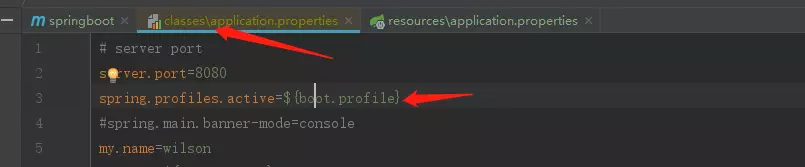
执行后查看classes文件下的资源文件,发现并没有替换掉
原因:
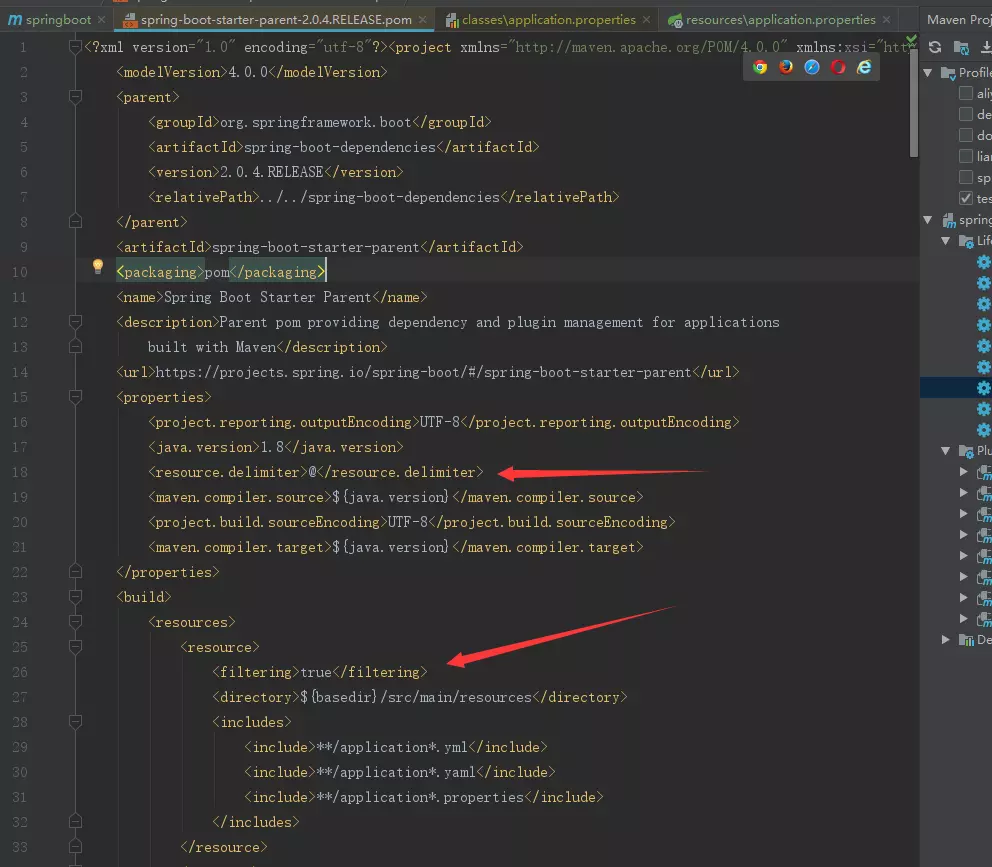
发现最终是因为springboot导致的,查看其pom继承,

进入后发现,springboot默认指定资源文件中的占位符为@@,并不是maven默认的 ${}

解决方案:
1:将application.properties中的占位符由${key} -> @key@
2:覆盖springboot的默认规则
     <build>

         <finalName>${project.artifactId}</finalName>

         <resources>

             <resource>

                 <filtering>true</filtering>

                 <directory>${basedir}/src/main/resources</directory>

                 <includes>

                     <include>**/application*.yml</include>

                     <include>**/application*.yaml</include>

                     <include>**/*.properties</include>

                 </includes>

             </resource>

             <resource>

                 <directory>${basedir}/src/main/resources</directory>

                 <excludes>

                     <exclude>**/application*.yml</exclude>

                     <exclude>**/application*.yaml</exclude>

                     <exclude>**/*.properties</exclude>

                 </excludes>

             </resource>

         </resources>

         <plugins>

             <plugin>

                 <groupId>org.springframework.boot</groupId>

                 <artifactId>spring-boot-maven-plugin</artifactId>

             </plugin>

             <plugin>

                 <artifactId>maven-resources-plugin</artifactId>

                 <configuration>

                     <encoding>utf-8</encoding>

                     <useDefaultDelimiters>true</useDefaultDelimiters>

                 </configuration>

             </plugin>

         </plugins>

     </build>
3:测试了再自己的pom中不增加resource配置,只是增加

也是可以的哦
建议:
既然已经使用了springboot,就不要再用回之前的写法了,平白增加配置。
附:pom的profile导入.properties
方法1:
   <profiles>

     <!--开发环境-->

     <profile>

       <id>dev</id>

       <activation>

         <activeByDefault>true</activeByDefault>

       </activation>

       <properties>

         <spring.profiles.active>dev</spring.profiles.active>

       </properties>

       <build>

         <filters>

           <filter>${basedir}/src/main/resources/application-dev.properties</filter>

         </filters>

       </build>

     </profile>

     <!--预发环境-->

     <profile>

       <id>pre</id>

       <activation>

         <activeByDefault>true</activeByDefault>

       </activation>

       <properties>

         <spring.profiles.active>pre</spring.profiles.active>

       </properties>

       <build>

         <filters>

           <filter>${basedir}/src/main/resources/application-pre.properties</filter>

         </filters>

       </build>

     </profile>

   </profiles>
方法2:
   <profiles>

     <!--开发环境-->

     <profile>

       <id>dev</id>

       <activation>

         <activeByDefault>true</activeByDefault>

       </activation>

       <properties>

         <spring.profiles.active>dev</spring.profiles.active>

       </properties>

     </profile>

     <!--预发环境-->

     <profile>

       <id>pre</id>

       <activation>

         <activeByDefault>true</activeByDefault>

       </activation>

       <properties>

         <spring.profiles.active>pre</spring.profiles.active>

       </properties>

     </profile>

   </profiles>

   <build>

     <filters>

          <filter>

 ${basedir}/src/main/resources/application-${spring.profiles.active}.properties

          </filter>

     </filters>

   </build>
springboot多环境下maven打包的更多相关文章
- eclipse使用profile完成不同环境的maven打包功能
原文:https://blog.csdn.net/duan9421/article/details/79086335 我们在日常开发工作中通常会根据不同的项目运行环境,添加不同的配置文件,例如 开发环 ...
- Windows环境下maven 安装与环境变量配置
Maven是一个项目管理的Java 工具,在JavaEE中,我们可以使用Maven方便地管理团队合作的项目,现在我们在学习JavaEE框架,使用Maven可以管理类库,有效方便地供团队中的其他人员使用 ...
- windows 环境下Maven私服搭建
使用Nexus.3.11在Windows环境上搭建1.下载nexus.3.11.zip包https://www.sonatype.com/download-oss-sonatype 下载下来之后,进行 ...
- linux环境下maven的安装配置
1.到官网下载maven,上传到服务器上 https://maven.apache.org/download.cgi 2.将压缩包上传服务器对应路径解压: tar -zxvf apache-maven ...
- Linux环境下Maven的.m2文件夹
aven中的.m2文件夹 安装完maven是没有.m2文件夹的.在linux中以.开头的文件夹都是隐藏的.当使用maven命令的时候,maven自动会创建.m2文件夹. 运行命令mvn help:sy ...
- windows下maven打包eclipse工程
打包过程中,可能出现的2个问题: ①.[WARNING] File encoding has not been set, using platform encoding GBK, i.e. build ...
- Video.js + HLS 在production环境下webpack打包后出错的解决方案
Video.js是一个非常强大的视频播放库,能在微信下完美提供inline小窗口播放模式,但当涉及到hls格式视频播放时就比较麻烦,出现的数种现象都不好解决. 错误现象: 1. PC Chrome ...
- win10环境下pyinstaller打包pytorch遇到的问题及解决方案
pytorch-python源码生成windows的应用程序(.exe),报错OSError: could not get source code Failed to execute script h ...
- maven插件 按配置加载不同环境配置文件进行打包(maven-war-plugin)
1.配置多种不同环境 如(本地local,开发dev,测试test 环境等) <profiles> <profile> <id>local</id> & ...
随机推荐
- Myeclipse安装Maven插件
Myeclipse安装Maven插件 一.下载Maven 官网下载maven插件 http://maven.apache.org/download.cgi 下载apache-maven-3.6.3- ...
- SNF快速开发平台2019-角色、权限、账户的概念理解-非常全的理论讲解权限控制
组织模型 资源模型 操作模型 谁能够执行哪些操作 执行资源的范围 资源概念资源就是想要的到的最终物质,我们可以给每一个资源定义一个权限,也可以给某一类资源定义一个权限 权限概念权限是对资源 ...
- 解决在SQLPLUS中无法使用方向键、退格键问题
1. wget ftp://ftp.pbone.net/mirror/ftp5.gwdg.de/pub/opensuse/repositories/home:/matthewdva:/build:/E ...
- 爬虫数据提取之JSON与JsonPATH
数据提取之JSON与JsonPATH JSON(JavaScript Object Notation) 是一种轻量级的数据交换格式,它使得人们很容易的进行阅读和编写.同时也方便了机器进行解析和生成.适 ...
- python 使用 elasticsearch 常用方法(检索)
#记录es查询等方法 #清楚数据 curl -XDELETE http://xx.xx.xx.xx:9200/test6 #初始化数据 curl -H "Content-Type: appl ...
- java https post请求并忽略证书,参数放在body中
1 新建java类,作用是绕过证书用 package cn.smartercampus.core.util; import java.security.cert.CertificateExceptio ...
- Java之布尔运算
对于布尔类型boolean,永远只有true和false两个值. 布尔运算是一种关系运算,包括以下几类 比较运算符:>,>=,<,<=,==,!= 与运算 && ...
- Eclipse 单个tomcat多个项目部署原理(tomcat配置的环境变量catalina.home和catalina.base)
一:概念 catalina.home(安装目录):指向公用信息的位置,就是bin和lib的父目录. catalina.base(工作目录):指向每个Tomcat目录私有信息的位置,就是conf.log ...
- QT+FFMPEG+SDL2.0实现视频播放
开发环境:MinGW+QT5.9+FFMPEG20190212+SDL2.0.9 一.开发环境搭建 (1)下载工具 在https://ffmpeg.zeranoe.com/builds/下载对应版本. ...
- DevOps-ISC,CSS,Prometheus,Ansible ,Terraform,zabbix
https://www.terraform.io/ Terraform Use Infrastructure as Code to provision and manage any cloud, in ...