
关闭 OSX 10.11 SIP (System Integrity Protection) 功能
关闭 OSX 10.11 SIP (System Integrity Protection) 功能
Apple 从 10.9 开始导入kext需要签名认证后,在10.10全面启用此功能,每项置入/System/Library/Extersions/中的kext必需要经过签名认证系统才会启用此功能,然而在10.11时另外追加了System Integrity Protection (SIP)功能来保护系统档案及kext驱动避免被修改,即使是root权限也无法更改已经被系统设定的项目。
要了解被锁定的项目可以查询:
cat /System/Library/Sandbox/rootless.conf
10.10只有少许的项目:
                /System

*               /System/Library/Caches

booter          /System/Library/CoreServices

*               /System/Library/Extensions

                /System/Library/Extensions/*

UpdateSettings  /System/Library/LaunchDaemons/com.apple.UpdateSettings.plist

*               /System/Library/User Template

                /bin

                /sbin

                /usr

*               /usr/local

# symlinks

                /etc

                /tmp

                /var
10.11已经加入更多root无法修改的项目:
                /Applications/App Store.app

                /Applications/Automator.app

                /Applications/Calculator.app

                /Applications/Calendar.app

                /Applications/Chess.app

                /Applications/Contacts.app

                /Applications/Dashboard.app

                /Applications/Dictionary.app

                /Applications/DVD Player.app

                /Applications/FaceTime.app

                /Applications/Font Book.app

                /Applications/Game Center.app

                /Applications/Image Capture.app

                /Applications/Launchpad.app

                /Applications/Mail.app

                /Applications/Maps.app

                /Applications/Messages.app

                /Applications/Mission Control.app

                /Applications/Notes.app

                /Applications/Photo Booth.app

                /Applications/Photos.app

                /Applications/Preview.app

                /Applications/QuickTime Player.app

                /Applications/Reminders.app

                /Applications/Safari.app

                /Applications/Stickies.app

                /Applications/System Preferences.app

                /Applications/TextEdit.app

                /Applications/Time Machine.app

                /Applications/Utilities/Activity Monitor.app

                /Applications/Utilities/AirPort Utility.app

                /Applications/Utilities/Audio MIDI Setup.app

                /Applications/Utilities/Bluetooth File Exchange.app

                /Applications/Utilities/Boot Camp Assistant.app

                /Applications/Utilities/ColorSync Utility.app

                /Applications/Utilities/Console.app

                /Applications/Utilities/Digital Color Meter.app

                /Applications/Utilities/Disk Utility.app

                /Applications/Utilities/Feedback Assistant.app

                /Applications/Utilities/Grab.app

                /Applications/Utilities/Grapher.app

                /Applications/Utilities/Keychain Access.app

                /Applications/Utilities/Migration Assistant.app

                /Applications/Utilities/Script Editor.app

                /Applications/Utilities/System Information.app

                /Applications/Utilities/Terminal.app

                /Applications/Utilities/VoiceOver Utility.app

                /Library/Preferences/SystemConfiguration/com.apple.Boot.plist

                /System

*               /System/Library/Caches

booter              /System/Library/CoreServices

*               /System/Library/CoreServices/Photo Library Migration Utility.app

                /System/Library/CoreServices/RawCamera.bundle

*               /System/Library/Extensions

                /System/Library/Extensions/*

UpdateSettings          /System/Library/LaunchDaemons/com.apple.UpdateSettings.plist

*               /System/Library/Speech

*               /System/Library/User Template

                /bin

dyld                /private/var/db/dyld

                /sbin

                /usr

*               /usr/libexec/cups

*               /usr/local

*               /usr/share/man

# symlinks

                /etc

                /tmp

                /var
因为启动SIP功能,rootless.conf在未关闭时是无法进行修改的。
RecoveryHD
在进行之前必需要确认你能进入Recovery OS,所以将你的系统重开机后按下Option(alt)键后进入选择启动磁碟:
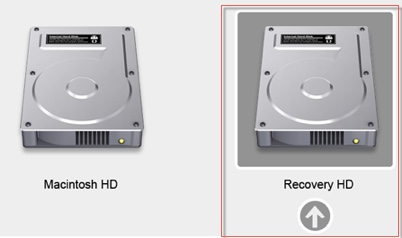
看到你的启动磁碟名称有Recovery HD代表你具有Recovery OS,如果你未包含此OS,在开机时按下Option(alt) + R进入网路开机连线至Apple伺服器进行Recovery OS的安装,详细说明传送门
csrutil
要进行SIP保护的变更需要透过csrutil工具程式进行修改,必需要经过Recovery OS开机后进入工具程式之终端机执行此命令才有权限进行修改。
此工具程式会将更变的值写入nvarm之csr-active-config中,键入csrutil会出现使用说明:
usage: csrutil <command>

Modify the System Integrity Protection configuration. All configuration changes apply to the entire machine.

Available commands:

    clear

        Clear the existing configuration. Only available in Recovery OS.

    disable

        Disable the protection on the machine. Only available in Recovery OS.

    enable

        Enable the protection on the machine. Only available in Recovery OS.

    status

        Display the current configuration.

    netboot

        add <address>

            Insert a new IPv4 address in the list of allowed NetBoot sources.

        list

            Print the list of allowed NetBoot sources.

        remove <address>

            Remove an IPv4 address from the list of allowed NetBoot sources.
查看状态执行csutil status:
System Integrity Protection status: enabled (Custom Configuration).
单单关闭SIP执行sudo csrutil enable --no-internal:
Successfully enabled System Integrity Protection. Please restart the machine for the changes to take effect.
如果你出现:
csrutil: failed to modify system integrity configuration. This tool needs to be executed from the Recovery OS.
代表你使用的并非Recovery OS开机,请确定从Recovery OS开机再执行。
csrutil 进阶指令
如果你只是要细部的关闭某个SIP功能例如关闭kext需要签章功能执行sudo csrutil enable --without kext:
csrutil: requesting an unsupported configuration. This is likely to break in the future and leave your machine in an unknown state.

Successfully enabled System Integrity Protection. Please restart the machine for the changes to take effect.
讯息告知已经将参数写入nvram中,必需要重新开机参数才会发生作用。
以上例子之外,还有其他设定都是经过enable与without功能来将功能启动与关闭,使用命令语法如下:
csrutil enable [--without kext|fs|debug|dtrace|nvram] [--no-internal]
举个例子:
sudo csrutil enable –without fs:Filesystem Protections disable
sudo csrutil enable –without kext:Kext Signing disable
sudo csrutil enable –without debug:Debugging Restrictions disable
sudo csrutil enable –without nvram:NVRAM Protections disable
sudo csrutil enable –without dtrace:DTrace Restrictions disable
当然也可以多组合:
- sudo csrutil enable –without kext –without fs:Filesystem Protections and Kext Signing are disabled
个人心得:
csrutil设定的结果会存入nvram中的键值csr-active-config,设定值内容为1byte的值,利用1byt=8bit的关系,将每个bit解释成每个功能的设值值:
| bit | function |
|---|---|
| B0 | kext |
| B1 | fs |
| B2 | debug |
| B3 | n/a |
| B4 | internal |
| B5 | dtrace |
| B6 | nvram |
| B7 | n/a |
其中n/a值不管设定多少都不会作用,所以有把握的勇者可以直接利用nvram命令去变更csr-active-config值就可以,像:
nvram csr-active-config=0x13
等同:
sudo csrutil enable --without kext --without fs
参考资料
SIP/Rootless Internal in El Capitan
================ End
关闭 OSX 10.11 SIP (System Integrity Protection) 功能的更多相关文章
- 如何关闭OSX 10.11 SIP (System Integrity Protection)
http://www.jianshu.com/p/0572336a0771 注意:SIP功能是Apple在OSX上推出的系统完整性保护功能,对于普通MAC用户来说是一项安全保护功能,如果不了解他的作用 ...
- mac 关闭系统完整性保护 SIP(System Integrity Protection)的方法
在 OS X El Capitan 中有一个跟安全相关的模式叫 SIP(System Integrity Protection ) ,它禁止让软件以 root 身份来在 mac 上运行,并且对于目录 ...
- Mac OS X El Capitan系统完整性保护System Integrity Protection (SIP)
http://blog.csdn.net/yulimin/article/details/49992031 引言:前段时间经历了XCode编译器代码被注入的事件后,这次 Mac OS X El Cap ...
- class-dump在osx 10.11以后安装方法
当Mac升级了OSX 10.11后,配置class-dump的时候,会发现逆向书上推荐的class-dump存放目录/usr/bin,class-dump存放不进去,尝试过用sudo 还是不被允许 ...
- How to Disable System Integrity Protection (rootless) in OS X El Capitan
mac在10.11之后增加了一个功能,号称"System Integrity Protection, often called rootless",有了这个功能,以下目录的东西都不 ...
- MacOS changed System Integrity Protection status
禁止 System Integrity Protection 按住 command + R 重启系统 进入单用户模式 启动bash工具: 输入: csrutil disable 输入:reboot 启 ...
- Windows环境下使用Clover四叶草引导双硬盘安装OSX 10.11.5原版镜像
作为一个穷逼大学生,想搞iOS开发 买不起Mac只能鼓捣鼓捣黑苹果啦........ 之前我的电脑通过变色龙引导的方式装了个OSX10.10和win8.1双系统,因为自学的是Swift语言之前装的OS ...
- osx 10.11.5 El Capitan U盘制作安装
osx 10.11.5 El Capitan U盘制作安装 1. 下载osx10.11.5 从mac的 appstore下载(官方原版) 2. U盘8G起(注意备份重要资料) 3. 下载完成之后在Fi ...
- Setup Tensorflow with GPU on Mac OSX 10.11
Setup Tensorflow with GPU on OSX 10.11 环境描述 电脑:MacBook Pro 15.6 CPU: 2.7GHz 显卡: GT 650m 系统:OSX 10.11 ...
随机推荐
- PostgreSQL中的表连接操作
- 如何通过配置tomcat或是web.xml让ie直接下载文件
web.xml(tomcat\conf\web.xml)中配置了 <mime-mapping> <extension>txt</extension> < ...
- java8 中 ImageIO 读取 tiff 格式的图片失败
在java8 及之前版本中,jdk 中的 ImageIO 读取图片内容会失败,解决办法使用 java9 或者使用第三方插件. 插件可以使用 TwelveMonkeys ImageIO,地址:https ...
- 013-在 Shell 脚本中调用另一个 Shell 脚本的三种方式
如下: fork: 如果脚本有执行权限的话,path/to/foo.sh.如果没有,sh path/to/foo.sh. exec: exec path/to/foo.sh source: sourc ...
- Docker安装ES和Kibana
1.ES安装 1.下载ES镜像问题 docker pull elasticsearch 2.运行ES docker run -it --name elasticsearch -d -p 9200:92 ...
- Linux 服务器CPU占用率100%,使用率高解决方案
机器高负载告警一般是CPU负载在99-100%,同时伴有大量的网络出包和入包量,常见的原因是机器在某个时段进行LOG,数据等备份操作,或者服务器被黑导致 输入top命令查看CPU使用情况 top 通过 ...
- k8s记录-pip源配置
#pip源# 清华大学https://pypi.tuna.tsinghua.edu.cn/simple/https://mirrors.tuna.tsinghua.edu.cn/pypi/web/si ...
- Node.js+Express框架+Mongo学习(一)第一个node.js实例
1.在桌面新建一个空的文件夹,比如叫node,当然也可以在其它地方新建. 2.命令行进入到所新建的文件夹的目录,下载Express框架,再在这个文件夹里新建一个叫final的项目 3.在项目(fina ...
- vagrant报错处理
vagrant up报错 Warning: Authentication failure. Retrying...解决方案 http://www.cnblogs.com/zqifa/p/vagrant ...
- V8世界探险 (1) - v8 API概览
版权声明:本文为博主原创文章,遵循 CC 4.0 by-sa 版权协议,转载请附上原文出处链接和本声明. 本文链接:https://blog.csdn.net/lusing/article/detai ...