
adb server is out of date. killing... ADB server didn't ACK * failed to start daemon *……
问题
使用 adb 命令的时候报错如下:
 adb server is out of date.  killing...

 ADB server didn't ACK

 * failed to start daemon *

 error:
问题原因
不同软件中的 adb.exe 版本冲突。调用的 adb 命令的版本 和 android_sdk/platform-tools 目录下的 adb 版本不一样导致的(即调用的可能不是 android_sdk/platform-tools 目录下的 adb)。
解决方法
以我之前的举例:
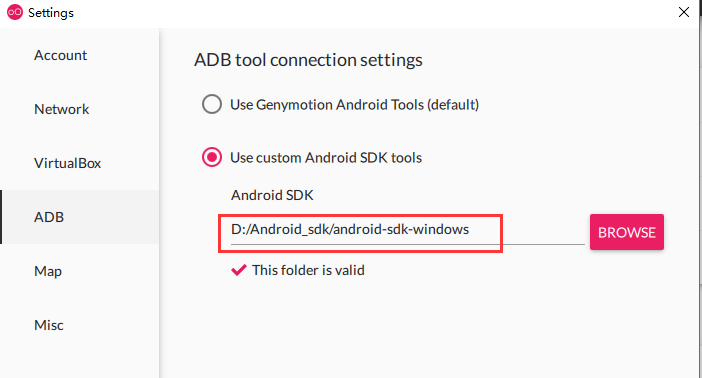
1. 首先查看 Genymotion 配置的 sdk 路径要保持和 Android_sdk 的 SDK 路径一致,如下图所示:
2. 查看环境变量是否配置了多个 adb 路径,导致命令行调用的时候调用了错误版本的 adb
(1)在此电脑中搜索 adb.exe,可以看到除了Android_sdk里有 adb.exe,Monkey中也有adb.exe,你的可能还有其他的。

3. 查看系统调用的是否是 Android_sdk 中的 adb.exe。
(1)打开 命令行,输入 adb version:
C:\WINDOWS\system32>adb version
结果如下:adb 的版本为 1.0.32
Android Debug Bridge version 1.0.
(2)进入到Android_sdk 配置的 sdk 路径,执行 adb.exe:
C:\WINDOWS\system32>cd /d D:\Android_sdk\android-sdk-windows\platform-tools\

D:\Android_sdk\android-sdk-windows\platform-tools>adb.exe version
结果如下:adb 的版本为 1.0.41
Android Debug Bridge version 1.0.

Version 29.0.-

Installed as D:\Android_sdk\android-sdk-windows\platform-tools\adb.exe
(3)对比:从上面我们可以看到两个 adb 的版本是不一致的,说明我们调用 adb 的时候并不是用的 Android_sdk 中的 adb.exe。查看之前第1步中查出的其他的 adb.exe 的版本,若有与第2步中的(1)步骤结果一样的版本号,则说明问题就出在它身上,我们在直接调用或开启adb的时候,可能就是调用的它,而不是Android_sdk 中的adb.exe。
(4)验证一下第 (3)步。转到 上面查到的其他的 adb.exe 目录下,执行 adb.exe version,以我的Monkey目录中的 adb.exe 为例:
D:\Android_sdk\android-sdk-windows\platform-tools>cd /d D:\Monkey\platform-tools_r22-windows\platform-tools

D:\Monkey\platform-tools_r22-windows\platform-tools>adb.exe version
结果如下:adb 的版本为 1.0.32
Android Debug Bridge version 1.0.
可以看到 这个版本和上面的一样,所以,问题就出在它的身上,我们只需要删除这个目录下的adb.exe即可,再去调用adb的时候你会发现问题已经解决了。
adb server is out of date. killing... ADB server didn't ACK * failed to start daemon *……的更多相关文章
- “adb server is out of date. killing.... ADB server didn't ACK * failed to start daemon * ”
草泥马的adb: “adb server is out of date. killing.... ADB server didn't ACK * failed to start daemon * ” ...
- adb server is out of date. killing... ADB server didn't ACK * failed to star
The connection to adb is down, and a severe error has occured. [-- :: - HelloOPone] You must restart ...
- adb server is out of date. killing... ADB server didn't ACK解决方法
在使用ADT Bundle进Android开发时,有时经常会碰到如下错误提示: adb server is out of date. killing... ADB server didn't ACK ...
- Android 解决adb server is out of date. killing... ADB server didn't ACK * failed to star
The connection to adb is down, and a severe error has occured. [-- :: - HelloOPone] You must restart ...
- adb 异常报错----adb server is out of date. killing... ADB server didn't ACK * failed to start daemon *
在Eclipse进行android开发的时候,由于要启动adb,但有时候其他的程序启动会占用adb程序的端口,这时候在对android程序进行调试的时候就会出现报错: 究其原因就是因为其他程序占用了a ...
- adb server is out of date. killing解决方法
adb server is out of date. killing完美解决 今天,久未出现的著名的“adb server is out of date. killing”又发生了,在此,将解决方 ...
- Android学习笔记1 android adb启动失败问题 adb server is out of date. killing...
下面是Android的学习笔记,原文地址. 我是使用adb devices出现如下红字错误, 使用第一种方法方法,结果关掉豌豆荚就可以了. android adb启动失败问题 adb server i ...
- adb server is out of date. killing... 解决方案
忘了原文从哪来的了,过后查到补上链接 今天调试android的时候发现一个诡异的问题 C:\Users\xxxx>adb start-server adb server is out of ...
- Android:ADB server didn't ACK或者adb server is out of date. killing解决办法
欢迎关注公众号,每天推送Android技术文章,二维码如下:(可扫描) 出现这个原因我个人感觉有两个.一.5037端口被别的程序或者进程占用:二.adb占用的不是5037端口.很多人仅仅知道第一种二忽 ...
随机推荐
- 【大数据】安装关系型数据库MySQL安装大数据处理框架Hadoop
作业来源于:https://edu.cnblogs.com/campus/gzcc/GZCC-16SE2/homework/3161 1. 简述Hadoop平台的起源.发展历史与应用现状. 列举发展过 ...
- 项目启动tomcat失败的几种可能原因和解决方法
传送门:https://blog.csdn.net/u010565910/article/details/80411468 总结一下tomcat启动问题,也给自己做个笔记 , 逐渐补充完善. 1.ja ...
- 浅谈SOA面向服务化编程架构(dubbo)
dubbo 是阿里系的技术.并非淘宝系的技术啦,淘宝系的分布式服务治理框架式HSF啦 ,只闻其声,不能见其物.而dubbo是阿里开源的一个SOA服务治理解决方案,dubbo本身 集成了监控中心,注 ...
- 006 vue监控
一:监视 1.使用keyup <!DOCTYPE html> <html lang="en"> <head> <meta charset= ...
- python基于redis实现分布式锁
阅读目录 什么事分布式锁 基于redis实现分布式锁 一.什么是分布式锁 我们在开发应用的时候,如果需要对某一个共享变量进行多线程同步访问的时候,可以使用我们学到的锁进行处理,并且可以完美的运行,毫无 ...
- Spark布隆过滤器(bloomFilter)
数据过滤在很多场景都会应用到,特别是在大数据环境下.在数据量很大的场景实现过滤或者全局去重,需要存储的数据量和计算代价是非常庞大的.很多小伙伴第一念头肯定会想到布隆过滤器,有一定的精度损失,但是存储性 ...
- cpu多级缓存
CPU cache: CPU的频率太快,主存跟不上,在处理器时钟周期内,CPU需要等待主存,浪费资源.cpu cache的出现,缓解了cpu与主存之间速度不匹配的问题. CPU cache的特性: 1 ...
- spring mvc 参数类型转换
实现方式以字符串转Date为例说明: 全局配置 第一种:实现 Converter 接口 实现类: public class StringToDateConveter implements Conver ...
- java的byte[]与String相互转换
String转byte[] byte[] sInput = new byte[0]; try { // 可以指定编码,默认也只UTF-8 sInput = "这是内容".getBy ...
- 安卓手机与iOS手机的区别
安卓手机与iOS手机的区别 1.操作系统不同 安卓手机都是安卓操作系统:IOS手机都是iOS操作系统. 目前安卓最新的系统是Android 8.1:iOS版本最新的是iOS 11. 2.操作方式不同 ...