
EF 的 霸气配置,秒杀一切
通过EF 作为操作数据库的工具有一段时间了,也做了几个相对不大的项目,慢慢的也对EF的使用摸索出来了一些规则,虽然说不是技术难点,但是,我说的是但是,能够提高我们开发效率的棉花糖有时我们还是必须要吃的,因为他确实很甜很甜。现在Ef已经更新到6.1.1了,从原来的5.0 到现在也不过是短短的一年多,所以说Ef的生命力还是很强的。什么 你要我对比一下EF和NHibernate的优缺点,这不是本文的重点,我只说一句,EF侧重代码配置,NHibernate 侧重配置文件配置,但是说哪种好,萝卜白菜 各有所爱吧。
刚开始使用EF操作数据表我们是这样使用的,通过在DBContext中添加Dbset<T> 这种形式的属性来实现,但是,我说的是但是,这种方式随着我们的实体Domain越来越多的时候我们不得不一个一个的添加到DbContext中,这不禁让我很苦恼,有没有更好的办法呢?
为了说明的方便,我建立了一个控制台的程序,毕竟EF和具体的项目类型无关。
  class Program

     {

         static void Main(string[] args)

         {

             TestContext testContext = new TestContext();

             ///获取数据库表Person中的所有数据 在查询的时候最好加上AsNoTracking 禁止EF跟踪

             var personList = testContext.Persons.AsNoTracking().ToList();

         }

     }

     public class TestContext : DbContext

     {

         private static TestContext _instance;

         public static TestContext Instance

         {

             get

             {

                 if (_instance == null)

                 {

                     _instance = new TestContext();

                 }

                 return _instance;

             }

         }

         private string _connectionString;

         public string ConnectionString

         {

             get

             {

                 if (string.IsNullOrWhiteSpace(_connectionString))

                 {

                     _connectionString = ConfigurationManager.ConnectionStrings["testConn"].ConnectionString;

                 }

                 return _connectionString;

             }

             set

             {

                 _connectionString = value;

             }

         }

         public TestContext()

             : base("name=testConn")

         {

             _connectionString = ConfigurationManager.ConnectionStrings["testConn"].ConnectionString;

         }

         public TestContext(string connectionString)

             : base(connectionString)

         {

         }

         /// <summary>

         /// 定义的实体

         /// </summary>

         public DbSet<Person> Persons { get; set; }

     }

     [Table("Person")]

     public class Person

     {

         public string Name { get; set; }

         public string Age { get; set; }

     }
每次添加实体Domain 都要在DbContext 中添加一个对应的属性,很令人苦恼,并且如果属性为string 类型,在数据库中创建的表的长度为max,当然我们可以修改EF的默认约定来让string 类型在数据表中具有一定的长度。我们有没有更好的方式来控制EF创建的数据表呢,并且要易于维护,让所有同事都可以很轻松的掌握。当然,有一个新大陆被发现了。
我们通过反射来找到所有继承自EntityTypeConfiguration的类,这些类就是EF的映射类,我们把这些映射类添加到EF configuration中就可以实现我们的功能,说太多,上代码。
  class Program

     {

         static void Main(string[] args)

         {

             TestContext testContext = new TestContext();

             ///获取数据库表Person中的所有数据 在查询的时候最好加上AsNoTracking 禁止EF跟踪

           //  var personList = testContext.Persons.AsNoTracking().ToList();

         }

     }

     public class TestContext : DbContext

     {

         private static TestContext _instance;

         public static TestContext Instance

         {

             get

             {

                 if (_instance == null)

                 {

                     _instance = new TestContext();

                 }

                 return _instance;

             }

         }

         private string _connectionString;

         public string ConnectionString

         {

             get

             {

                 if (string.IsNullOrWhiteSpace(_connectionString))

                 {

                     _connectionString = ConfigurationManager.ConnectionStrings["testConn"].ConnectionString;

                 }

                 return _connectionString;

             }

             set

             {

                 _connectionString = value;

             }

         }

         public TestContext()

             : base("name=testConn")

         {

             _connectionString = ConfigurationManager.ConnectionStrings["testConn"].ConnectionString;

         }

         public TestContext(string connectionString)

             : base(connectionString)

         {

         }

         protected override void OnModelCreating(DbModelBuilder modelBuilder)

         {

             ///DomainMapping  所在的程序集一定要写对,因为目前在当前项目所以是采用的当前正在运行的程序集 如果你的mapping在单独的项目中 记得要加载对应的assembly

             ///这是重点

             var typesToRegister = Assembly.GetExecutingAssembly().GetTypes()

           .Where(type => !String.IsNullOrEmpty(type.Namespace))

           .Where(type => type.BaseType != null && type.BaseType.BaseType != null && type.BaseType.BaseType.GetGenericTypeDefinition() == typeof(EntityTypeConfiguration<>));

             foreach (var type in typesToRegister)

             {

                 dynamic configurationInstance = Activator.CreateInstance(type);

                 modelBuilder.Configurations.Add(configurationInstance);

             }

             base.OnModelCreating(modelBuilder);

         }

     }

     public class BaseDomain

     {

     }

     [Table("Person")]

     public class Person

     {

         public string ID { get; set; }

         public string Name { get; set; }

         public string Age { get; set; }

     }

     public class PersonMapping : BaseDomainMapping<Person>

     {

         public override void Init()

         {

             this.ToTable("Person");

             this.HasKey(l => l.ID);

             this.Property(l => l.Name).HasMaxLength().IsRequired();//设置Name属性长度为200 并且是必填

             this.Property(l => l.Age).HasMaxLength().IsOptional(); //设置Age长度为200 并且可为空

         }

     }

     public abstract class BaseDomainMapping<T> : EntityTypeConfiguration<T>

        where T : BaseDomain, new()

     {

         public BaseDomainMapping()

         {

             Init();

         }

         /// <summary>

         /// 初始化代码

         /// </summary>

         public virtual void Init()

         {

             Console.WriteLine("Init");

         }

     }
这个其实用到了主要两个知识点,一个就是抽象类中定义的virtual方法,在抽象类中进行调用,在继承自抽象类的类中override这个方法,此文为Init,那么子类中的这个方法也会被调用,避免在每个子类中都要写调用Init的方法。
第二个就是,注意OnModelCreating 方法,他找到所有继承自
EntityTypeConfiguration的类,然后添加到Configuration中,也就是我们实现了多个配置,统一添加到EF的配置中,EF在执行的时候会执行所有的配置类,当然包括我们自己定义的映射Mapping。

大家可能要说了,这样是可以只写一个映射类就可以,但是我们怎么访问呢?没有了原来的通过属性
              TestContext testContext = new TestContext();

              ///获取数据库表Person中的所有数据 在查询的时候最好加上AsNoTracking 禁止EF跟踪

              var personList = testContext.Persons.AsNoTracking().ToList();  通过属性访问很简单方便
,我们需要想办法获取到DbSet 类通过EF访问数据库,现在我们的思路就是通过我们定义的TestContext ,找到我们通过反射注册的所有配置类。
  /// <summary>

     /// Entity Framework repository

     /// </summary>

     public partial class EfRepository<T> : IRepository<T> where T : BaseDomain

     {

         private readonly IDbContext _context; ///可以认为就是我们定义的TestContext

         private IDbSet<T> _entities;

         /// <summary>

         /// Ctor

         /// </summary>

         /// <param name="context">Object context</param>

         public EfRepository(IDbContext context)

         {

             this._context = context;

         }

         /// <summary>

         /// Get entity by identifier

         /// </summary>

         /// <param name="id">Identifier</param>

         /// <returns>Entity</returns>

         public virtual T GetById(object id)

         {

             //see some suggested performance optimization (not tested)

             //http://stackoverflow.com/questions/11686225/dbset-find-method-ridiculously-slow-compared-to-singleordefault-on-id/11688189#comment34876113_11688189

             return this.Entities.Find(id);

         }

         /// <summary>

         /// Insert entity

         /// </summary>

         /// <param name="entity">Entity</param>

         public virtual void Insert(T entity)

         {

             try

             {

                 if (entity == null)

                     throw new ArgumentNullException("entity");

                 this.Entities.Add(entity);

                 this._context.SaveChanges();

             }

             catch (DbEntityValidationException dbEx)

             {

                 var msg = string.Empty;

                 foreach (var validationErrors in dbEx.EntityValidationErrors)

                     foreach (var validationError in validationErrors.ValidationErrors)

                         msg += string.Format("Property: {0} Error: {1}", validationError.PropertyName, validationError.ErrorMessage) + Environment.NewLine;

                 var fail = new Exception(msg, dbEx);

                 //Debug.WriteLine(fail.Message, fail);

                 throw fail;

             }

         }

         /// <summary>

         /// Update entity

         /// </summary>

         /// <param name="entity">Entity</param>

         public virtual void Update(T entity)

         {

             try

             {

                 if (entity == null)

                     throw new ArgumentNullException("entity");

                 this._context.SaveChanges();

             }

             catch (DbEntityValidationException dbEx)

             {

                 var msg = string.Empty;

                 foreach (var validationErrors in dbEx.EntityValidationErrors)

                     foreach (var validationError in validationErrors.ValidationErrors)

                         msg += Environment.NewLine + string.Format("Property: {0} Error: {1}", validationError.PropertyName, validationError.ErrorMessage);

                 var fail = new Exception(msg, dbEx);

                 //Debug.WriteLine(fail.Message, fail);

                 throw fail;

             }

         }

         /// <summary>

         /// Delete entity

         /// </summary>

         /// <param name="entity">Entity</param>

         public virtual void Delete(T entity)

         {

             try

             {

                 if (entity == null)

                     throw new ArgumentNullException("entity");

                 this.Entities.Remove(entity);

                 this._context.SaveChanges();

             }

             catch (DbEntityValidationException dbEx)

             {

                 var msg = string.Empty;

                 foreach (var validationErrors in dbEx.EntityValidationErrors)

                     foreach (var validationError in validationErrors.ValidationErrors)

                         msg += Environment.NewLine + string.Format("Property: {0} Error: {1}", validationError.PropertyName, validationError.ErrorMessage);

                 var fail = new Exception(msg, dbEx);

                 //Debug.WriteLine(fail.Message, fail);

                 throw fail;

             }

         }

         /// <summary>

         /// Gets a table

         /// </summary>

         public virtual IQueryable<T> Table

         {

             get

             {

                 return this.Entities;

             }

         }

         /// <summary>

         /// Gets a table with "no tracking" enabled (EF feature) Use it only when you load record(s) only for read-only operations

         /// </summary>

         public virtual IQueryable<T> TableNoTracking

         {

             get

             {

                 return this.Entities.AsNoTracking();

             }

         }

         /// <summary>

         /// Entities

         /// </summary>

         protected virtual IDbSet<T> Entities

         {

             get

             {

                 if (_entities == null)

                     _entities = _context.Set<T>();

                 return _entities;

             }

         }

     }
接口类:
  /// <summary>

     /// Repository

     /// </summary>

     public partial interface IRepository<T> where T : BaseEntity

     {

         /// <summary>

         /// Get entity by identifier

         /// </summary>

         /// <param name="id">Identifier</param>

         /// <returns>Entity</returns>

         T GetById(object id);

         /// <summary>

         /// Insert entity

         /// </summary>

         /// <param name="entity">Entity</param>

         void Insert(T entity);

         /// <summary>

         /// Update entity

         /// </summary>

         /// <param name="entity">Entity</param>

         void Update(T entity);

         /// <summary>

         /// Delete entity

         /// </summary>

         /// <param name="entity">Entity</param>

         void Delete(T entity);

         /// <summary>

         /// Gets a table

         /// </summary>

         IQueryable<T> Table { get; }

         /// <summary>

         /// Gets a table with "no tracking" enabled (EF feature) Use it only when you load record(s) only for read-only operations

         /// </summary>

         IQueryable<T> TableNoTracking { get; }

     }
可以看到这个实现类很简单,就是通过传入我们定义的TestContext,然后通过
_context.Set<T>(); 可以获取到我们定义的DbSet,剩下的就是正常的属性定义一样了。

说了那么多,该歇歇了,总结一下思路,就是通过反射注册所有的实现EntityTypeConfiguration的类,(注意实现类 所在的assembly),然后通过context.set<T>()方法获取到我们定义的Domain,就可以进行增删改查等操作。另外还有一点就是,如果只是查询数据,我建议使用AsNoTracking ,禁止EF跟踪,提高一下性能,另外也可以禁止EF缓存查询的数据。
有图有真相。
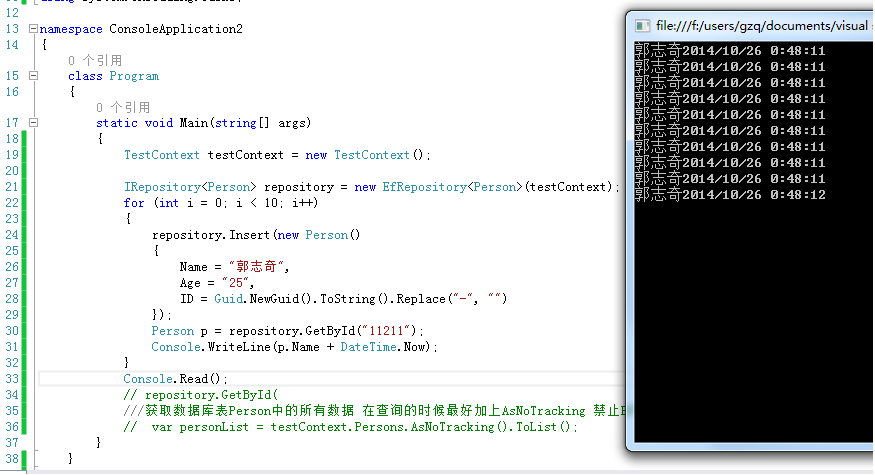
总结一下:这只是一个简单的实例,在实际的项目中肯定Domain和mapping是分开的,所以注册的时候我们一定要设定好注册的assembly。再次强调。
源代码下载:
源码
EF 的 霸气配置,秒杀一切的更多相关文章
- EF 的 霸气配置
通过EF 作为操作数据库的工具有一段时间了,也做了几个相对不大的项目,慢慢的也对EF的使用摸索出来了一些规则,虽然说不是技术难点,但是,我说的是但是,能够提高我们开发效率的棉花糖有时我们还是必须要吃的 ...
- 红星美凯龙CEO车建新的圆融和霸气
待人接物中车建新有许多习惯,与别人一起行走时,走在靠马路的一边:吃饭时最好的菜留给客人.他说,做人往往就在细节中,别小看一个举动,无意中就会感染别人.和别人在一起,你要时时刻刻先考虑对方. 细节上体察 ...
- 霸气側漏的HTML5--之--强大的form表单
今天学习了一下html5,发现他真的太强大了,暂不说新增的画布,通信,本地存储等的炸天功能,就连表单也是异常的好用.忍不住发一篇博客和大家分享一下.原谅我标题党了.以后的html5的学习记录博文就以& ...
- 解气!哈工大被禁用MATLAB后,国产工业软件霸气回击
提起哈尔滨工业大学,相信很多人都不会陌生. 它是中国顶级的C9院校之一,从1920年建校的百余年来,哈工大一直享誉"工科强校"的美称,因其在航天领域的不凡成就,更是被人们誉为&qu ...
- EF CodeFirst 如何通过配置自动创建数据库<当模型改变时>
最近悟出来一个道理,在这儿分享给大家:学历代表你的过去,能力代表你的现在,学习代表你的将来. 十年河东十年河西,莫欺少年穷 学无止境,精益求精 本篇为进阶篇,也是弥补自己之前没搞明白的地方,惭愧 ...
- EF Core 多对多配置
1.配置2个数据表 T_Authors ,T_Books 2.新建控制台项目,安装EF驱动 PM> Install-Package Pomelo.EntityFrameworkCore.Mysq ...
- 【译】第8节---EF Code First中配置类
原文:http://www.entityframeworktutorial.net/code-first/configure-classes-in-code-first.aspx 前面的章节中我们知道 ...
- NET EF 连接Oracle 的配置方法记录
主要记录下如何在EF 中连接Oracle s数据库,很傻瓜式,非常简单,但是不知道的童鞋,也会搞得很难受,我自己就是 1.创一个控制台程序,并且添加 Oracle.ManagedDataAccess ...
- C# 数据操作系列 - 7. EF Core 导航属性配置
在上一篇,大概介绍了Entity Framework Core关于关系映射的逻辑.在上一篇中留下了EF的外键映射没有说,也就是一对一,一对多,多对一,多对多的关系等.这一篇将为大家细细分析一下,如何设 ...
随机推荐
- python读取文本文件
1. 读取文本文件 代码: f = open('test.txt', 'r') print f.read() f.seek(0) print f.read(14) f.seek(0) print f. ...
- 通过Javascript得到URL中的参数(query string)
我们知道,"GET"请求中,通常把参数放在URL后面,比如这样http://www.cnblogs.com/season-huang/index?param=yes&art ...
- android-plugmgr源代码分析
android-plugmgr是一个Android插件加载框架,它最大的特点就是对插件不需要进行任何约束.关于这个类库的介绍见作者博客,市面上也有一些插件加载框架,但是感觉没有这个好.在这篇文章中,我 ...
- [备忘]Redis运行出现Client sent AUTH, but no password is set
原因:程序提供了密码,但是redis.conf中并没有设置密码. 附加问题:如果redis.conf中设置了密码,有可能会导致服务无法启动,报5013错误.可能是访问权限的问题.
- Eclipse启动参数
from 网络 eclipse 启动参数 -clean2013-- : eclipse 启动参数介绍(如添加插件时,如果不显示,则使用eclipse -clean启动) 其实,Eclipse是一个可以 ...
- Maven日常 —— 你应该知道的一二三
以前在日常工作中,使用Maven只是机械的执行Maven clean.Maven install,对其中的原理与过程并无了解,近期阅读了<Maven实战>,对Maven有了更深入的理解. ...
- 我所理解的Cocos2d-x
我所理解的Cocos2d-x(完全基于Cocos2d-x3.0,深度剖析计算机图形学,OpenGL ES及游戏引擎架构,全面提升游戏开发相关知识) 秦春林 著 ISBN 978-7-121-246 ...
- Hibernate增删查改语句
我用的数据库是MySQL,实体类叫Product create table Product ( proId integer not null auto_increment, proName varch ...
- dede在php7上空白
最近想看一本小说,想采集回来看,结果发现除了dedecms支持php7.0,其他主流cms基本上都不支持php7.0 在本地win7上调试了一遍,没有问题,放到linux服务器上的时候,发现打开任何页 ...
- iOS-大神们的博客收集
唐巧的技术博客 http://blog.devtang.comOneV's Den http://onevcat.com破船之家 http://beyondvincent.comNSHipster h ...