
ASP.NET SignalR 系列(八)之跨域推送
前面几章讲的都是同域下的推送和订阅。这种讲讲如何跨域
对于SignalR来说,默认是不允许跨域的,因为安全问题。虽如此,但同时提供了跨域方案。
两种跨域方式:
1:JSONP
2:CORS
JSONP的方式比Cors更不安全。下面分别讲讲怎么使用
一、JSONP方式
服务端设置:
Startup.cs文件
public partial class Startup

    {

        public void Configuration(IAppBuilder app)

        {

            //JSONP方式

            app.MapSignalR(new HubConfiguration() {EnableJSONP = true});

        }

    }
然后在全局文件中Global.cs注册,允许jsonp
    public class MvcApplication : System.Web.HttpApplication

    {

        protected void Application_Start()

        {

            AreaRegistration.RegisterAllAreas();

            RouteConfig.RegisterRoutes(RouteTable.Routes);

            //注册为允许跨域,JSONP模式需要

            var config = new HubConfiguration();

            config.EnableJSONP = true;

        }

    }
前端:在其他项目中新建一个html文件
<!DOCTYPE html>
<html>
<head>
<meta http-equiv="Content-Type" content="text/html; charset=utf-8" />
<title></title>
<link href="/Content/bootstrap.min.css" rel="stylesheet" />
<script src="/Scripts/jquery-1.10.2.min.js"></script>
<script src="http://localhost:59831/Scripts/jquery.signalR-2.3.0.min.js"></script>
<script src="http://localhost:59831/signalr/hub/hubs"></script> <!--指向集线器服务器-->
<meta charset="utf-8" />
<style type="text/css">
body {
margin: 20px;
} .input {
padding-left: 5px;
}
</style>
</head>
<body>
<div>
<h4>这是跨域的页面</h4>
<hr />
<p>
<input type="text" id="content" placeholder="发送内容" class="input" /> <input type="button" value="发送" class="btn btn-sm btn-info" id="btn_send" />
</p> <div>
<h4>接收到的信息:</h4>
<ul id="dataContainer"></ul>
</div>
</div> <script language="javascript">
$(function () {
$.connection.hub.url = 'http://localhost:59831/signalr'; //指定signalR服务器,这个是关键,signalR为固定,系统默认。除非集线器那边重定义。
var chat = $.connection.demoHub; //连接服务端集线器,demoHub为服务端集线器名称,js上首字母须改为小写(系统默认)
//定义客户端方法,此客户端方法必须与服务端集线器中的方法名称、参数均一致。
//实际上是服务端调用了前端的js方法(订阅)
chat.client.show = function (content) {
var html = '<li>' + htmlEncode(content) + "</li>";
$("#dataContainer").append(html);
} //定义推送,跨域启动时,必须指定 jsonp:true
$.connection.hub.start({ jsonp: true })
.done(function () {
$("#btn_send").click(function () {
chat.server.hello($("#content").val()); //将客户端的content内容发送到服务端
$("#content").val("");
});
});
});
//编码
function htmlEncode(value) {
var encodedValue = $('<div />').text(value).html();
return encodedValue;
}
</script>
</body>
</html>
上效果图:
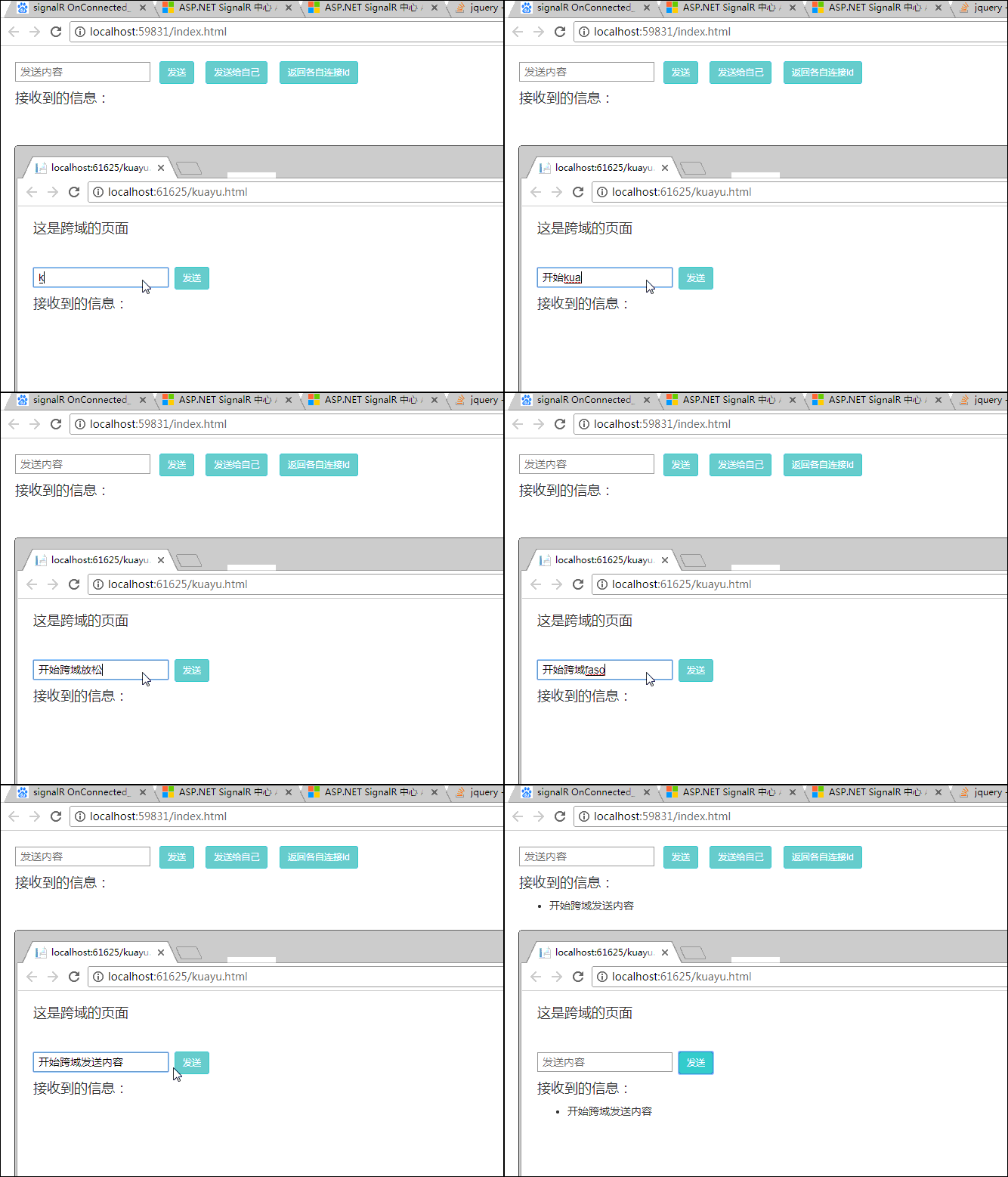
从上图可以看到,用到的域名不同,一个端口号59831 ,一个61625。实现了跨域
第二种:Cors 模式
该模式需要下载Microsoft.Owin.Cors组件,可从Nuget中获取

安装完成后,注册Strartup.cs文件
 public void Configuration(IAppBuilder app)

        {

            ////系统默认

            //app.MapSignalR();

            //JSONP方式

            //app.MapSignalR(new HubConfiguration() {EnableJSONP = true});

            //Cors跨域模式

            app.Map("/signalr", map =>

            {

                // Setup the CORS middleware to run before SignalR.

                // By default this will allow all origins. You can

                // configure the set of origins and/or http verbs by

                // providing a cors options with a different policy.

                map.UseCors(CorsOptions.AllowAll);

                var hubConfiguration = new HubConfiguration

                {

                    // You can enable JSONP by uncommenting line below.

                    // JSONP requests are insecure but some older browsers (and some

                    // versions of IE) require JSONP to work cross domain

                    // EnableJSONP = true

                };

                // Run the SignalR pipeline. We're not using MapSignalR

                // since this branch already runs under the "/signalr"

                // path.

                map.RunSignalR(hubConfiguration);

            });

        }
如果需要同时兼容 JSONP,那么将上面EnableJSONP = true 注释取消即可。
cors模式,不需要再global中注册了,如果要兼容JSONP,那么注册还是需要保留
下面上前端:
<!DOCTYPE html>
<html>
<head>
<meta http-equiv="Content-Type" content="text/html; charset=utf-8" />
<title></title>
<link href="/Content/bootstrap.min.css" rel="stylesheet" />
<script src="/Scripts/jquery-1.10.2.min.js"></script>
<script src="http://localhost:59831/Scripts/jquery.signalR-2.3.0.min.js"></script>
<script src="http://localhost:59831/signalr/hub/hubs"></script>
<meta charset="utf-8" />
<style type="text/css">
body {
margin: 20px;
} .input {
padding-left: 5px;
}
</style>
</head>
<body>
<div>
<h4>这是跨域的页面</h4>
<hr />
<p>
<input type="text" id="content" placeholder="发送内容" class="input" /> <input type="button" value="发送" class="btn btn-sm btn-info" id="btn_send" />
</p> <div>
<h4>接收到的信息:</h4>
<ul id="dataContainer"></ul>
</div>
</div> <script language="javascript">
$(function () {
$.connection.hub.url = 'http://localhost:59831/signalr'; //指定signalR服务器
jQuery.support.cors = true; //Cors模式必须设置
var chat = $.connection.demoHub; //连接服务端集线器,demoHub为服务端集线器名称,js上首字母须改为小写(系统默认)
//定义客户端方法,此客户端方法必须与服务端集线器中的方法名称、参数均一致。
//实际上是服务端调用了前端的js方法(订阅)
chat.client.show = function (content) {
var html = '<li>' + htmlEncode(content) + "</li>";
$("#dataContainer").append(html);
} //定义推送,启动时无需再设置jsonp:true
$.connection.hub.start()
.done(function () {
$("#btn_send").click(function () {
chat.server.hello($("#content").val()); //将客户端的content内容发送到服务端
$("#content").val("");
});
});
});
//编码
function htmlEncode(value) {
var encodedValue = $('<div />').text(value).html();
return encodedValue;
}
</script>
</body>
</html>
效果如下图:

至此,两种跨域模式均讲解完成。
cors相对来说安全性比较高,但是对客户端要求比较高,比如低版本的IE不支持。
JSONP的模式安全性较低,但是对低版本IE兼容比较好。
所以再使用的时候,根据实际情况做选择,或者同时兼容。
ASP.NET SignalR 系列(八)之跨域推送的更多相关文章
- Asp.net SignalR 实现服务端消息实时推送到所有Web端
ASP .NET SignalR是一个ASP .NET 下的类库,可以在ASP .NET 的Web项目中实现实时通信.实际上 Asp.net SignalR 2 实现 服务端消息推送到Web端, 更加 ...
- asp.net core 系列之允许跨域访问-1(Enable Cross-Origin Requests:CORS)
接上篇的允许跨域 4.CORS 策略(Policy)的选项 这里讲解Policy可以设置的选项: 设置允许的访问源 设置允许的HTTP methods 设置允许的请求头(request header) ...
- asp.net core 系列之允许跨域访问2之测试跨域(Enable Cross-Origin Requests:CORS)
这一节主要讲如何测试跨域问题 你可以直接在官网下载示例代码,也可以自己写,我这里直接使用官网样例进行演示 样例代码下载: Cors 一.提供服务方,这里使用的是API 1.创建一个API项目.或者直接 ...
- Signalr指定Websocket方式跨域数据传输
跨域通俗理解就是两个域名后面的web服务地址,即都是独立的网站.现实业务的情况会有很多需要跨域推送数据的情况, 比如类似饿了么商户后台会收到客户端确认订单后,后台服务会推送一条订单消息给商户前台. S ...
- 《ASP.NET SignalR系列》第四课 SignalR自托管(不用IIS)
从现在开始相关文章请到: http://lko2o.com/moon 接着上一篇:<ASP.NET SignalR系列>第三课 SignalR的支持平台 一.概述 SignalR常常依托于 ...
- 《ASP.NET SignalR系列》第一课 认识SignalR
从现在开始相关文章请到: http://lko2o.com/moon 一.概述 ASP.NET signalr对ASP.NET开发者来说是一个新的程序库,它能让我们更加容易便捷地开发实时通信功能; s ...
- 如何在ASP.NET Core中实现CORS跨域
注:下载本文的完整代码示例请访问 > How to enable CORS(Cross-origin resource sharing) in ASP.NET Core 如何在ASP.NET C ...
- 《ASP.NET SignalR系列》第五课 在MVC中使用SignalR
接着上一篇:<ASP.NET SignalR系列>第四课 SignalR自托管(不用IIS) 一.概述 本教程主要阐释了如何在MVC下使用ASP.NET SignalR. 添加Signal ...
- 《ASP.NET SignalR系列》第三课 SignalR的支持平台
从现在开始相关文章请到: http://lko2o.com/moon 接着第二课:<ASP.NET SignalR系列>第二课 SignalR的使用说明 一.服务器系统要求 SignalR ...
随机推荐
- istio部署-helm
参考 istio/istio istio/Kubernetes Customizable Install with Helm Istio安装参数介绍 1. Istio Chart 目录结构 PATH: ...
- php访问者模式(visitor design)
终于搞定,累成一滩,今晚不想说话. <?php /* The visitor design pattern is a way of separating an algorithm from an ...
- python爬取全站壁纸代码
#测试网址:https://www.ivsky.com/bizhi/ #需要安装的库:requests,bs4 #本人是个强迫症患者,为了美观添加数个print(),其并没有实际意义,若是不爽删去即可 ...
- wordpress列表页如果文章没有缩略图就显示默认图片
有时我们在设计wordpress模板时需要考虑是否有特色图,在分类页上如果一些文章有缩略图一些没有那就有点参差不齐不美观,有没办法设置如果没有文章缩略图则自动显示默认图呢?可以的,随ytkah一起来看 ...
- maven 配置参数详解
引自:搬砖工的奋斗史www.cnblogs.com/laobiao/p/5589025.html <project xmlns="http://maven.apache.org/POM ...
- Docker + Nginx + Tomcat 实现负载均衡简单演示
Docker + Nginx + Tomcat 实现负载均衡 环境 [root@pinyoyougou-docker ~]# docker -v Docker version 1.12.6, buil ...
- tomcat相关知识点
Tomcat 服务器是一个免费的开放源代码的Web 应用服务器,属于轻量级应用服务器,在中小型系统和并发访问用户不是很多的场合下被普遍使用. tomcat的文件结构: bin:用于存放启动和关闭tom ...
- OpenCV 学习笔记(13)图像转换成视频
关键 1参数里的分辨率是图像本身的分辨率,而不是指定生成的视频分辨率.如果要修改分辨率,要么后期软件处理,要么读图的时候resize 2要正常退出,不要强制退出. 3生成的只能是avi格式. #inc ...
- PATB1048数字加密
关于代码都是可以在PAT上跑通的 自己是在VS2017上写的,所以会有语句system("pause");,表示暂定方便查看结果. *在一个是VS2017中使用scanf会报错,所 ...
- 第02组Alpha冲刺(4/4)
队名:十一个憨批 组长博客 作业博客 组长黄智 过去两天完成的任务:了解整个游戏的流程 GitHub签入记录 接下来的计划:继续完成游戏 还剩下哪些任务:完成游戏 燃尽图 遇到的困难:没有美术比较好的 ...