
SpringBoot + CXF快速实现SOAP WebService(支持Basic Auth)
唠叨两句
讲真,SOAP跟现在流行的RESTful WebService比起来显得很难用。冗余的XML文本信息太多,可读性差,它的请求信息有时很难手动构造,不太好调试。不过说归说,对某些企业用户来说SOAP的使用率仍然是很高的。
需求背景
接手维护的一个项目,最近客户想开放项目中的功能给第三方调用,而且接入方指定必须是SOAP接口。这项目原来的代码我看着头疼,也不想再改了,除非推倒重写。客户的需求虽然不难但要的很急,为了尽快交付就使用SpringBoot快速搭一个微服务。
开始动手
.新建一个Spring Starter Project

.加入cxf的maven配置

    <dependency>

        <groupId>org.apache.cxf</groupId>

        <artifactId>cxf-spring-boot-starter-jaxws</artifactId>

        <version>3.1.</version>

    </dependency>
编写服务代码(示例代码)
@WebService(targetNamespace="http://demo.example.com/")

public interface IUserService {

    @WebMethod

    User getUserById(@WebParam(name = "id") int id);

    @WebMethod

    int addUser(@WebParam(name = "user") User user);

}
@InInterceptors(interceptors={"com.example.demo.auth.AuthInterceptor"})

@WebService(serviceName = "UserService", targetNamespace = "http://demo.example.com/", endpointInterface = "com.example.demo.soap.IUserService")

@Component

public class UserServiceImpl implements IUserService {

    private Logger logger = LoggerFactory.getLogger(UserServiceImpl.class);

    @Autowired

    private IUserDAO userDAO;

    @Override

    public User getUserById(int id) {

        return userDAO.getUserById(id);

    }

    @Override

    public int addUser(User user) {

        logger.info("save user [" + user.getId() + "]");

        userDAO.addUser(user);

        return 0;

    }

}
鉴权拦截器
public class AuthInterceptor extends AbstractSoapInterceptor {

    private static final String BASIC_PREFIX = "Basic ";

    private static final String USERNAME = "lichmama";

    private static final String PASSWORD = "123456";

    public AuthInterceptor() {

        super(Phase.PRE_INVOKE);

    }

    @Override

    public void handleMessage(SoapMessage message) throws Fault {

        HttpServletRequest request = (HttpServletRequest) message.get(AbstractHTTPDestination.HTTP_REQUEST);

        String auth = request.getHeader("Authorization");

        if (auth == null) {

            SOAPException exception = new SOAPException("auth failed, header [Authorization] not exists");

            throw new Fault(exception);

        }

        if (!auth.startsWith(BASIC_PREFIX)) {

            SOAPException exception = new SOAPException("auth failed, header [Authorization] is illegal");

            throw new Fault(exception);

        }

        String plaintext = new String(Base64.getDecoder().decode(auth.substring(BASIC_PREFIX.length())));

        if (StringUtils.isEmpty(plaintext) || !plaintext.contains(":")) {

            SOAPException exception = new SOAPException("auth failed, header [Authorization] is illegal");

            throw new Fault(exception);

        }

        String[] userAndPass = plaintext.split(":");

        String username = userAndPass[0];

        String password = userAndPass[1];

        if (!USERNAME.equals(username) || !PASSWORD.equals(password)) {

            SOAPException exception = new SOAPException("auth failed, username or password is incorrect");

            throw new Fault(exception);

        }

    }

}
编写配置类
@Configuration

public class SoapConfig {

    @Autowired

    private IUserService userService;

    @Autowired

    @Qualifier(Bus.DEFAULT_BUS_ID)

    private SpringBus bus;

    @Bean

    public Endpoint endpoint() {

        EndpointImpl endpoint = new EndpointImpl(bus, userService);

        endpoint.publish("/userService");

        return endpoint;

    }

}
修改CXF默认发布路径(application.properties)
server.port=8000

cxf.path=/soap
启动项目后访问http://localhost:8000/soap/userService?wsdl
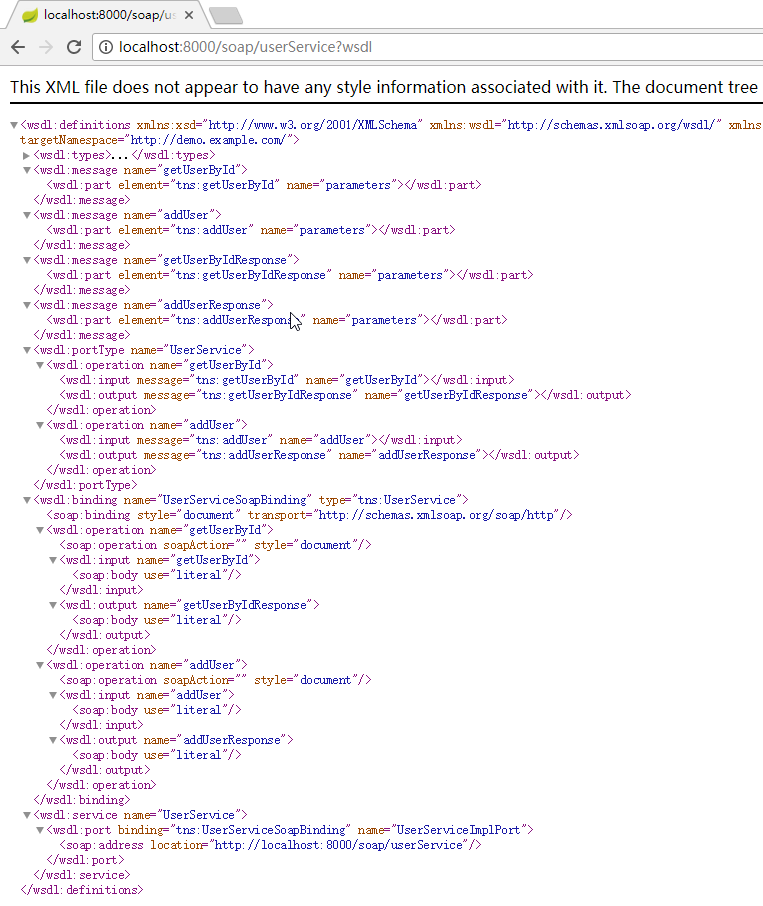
使用SoapUI测试一下,看上去没什么问题
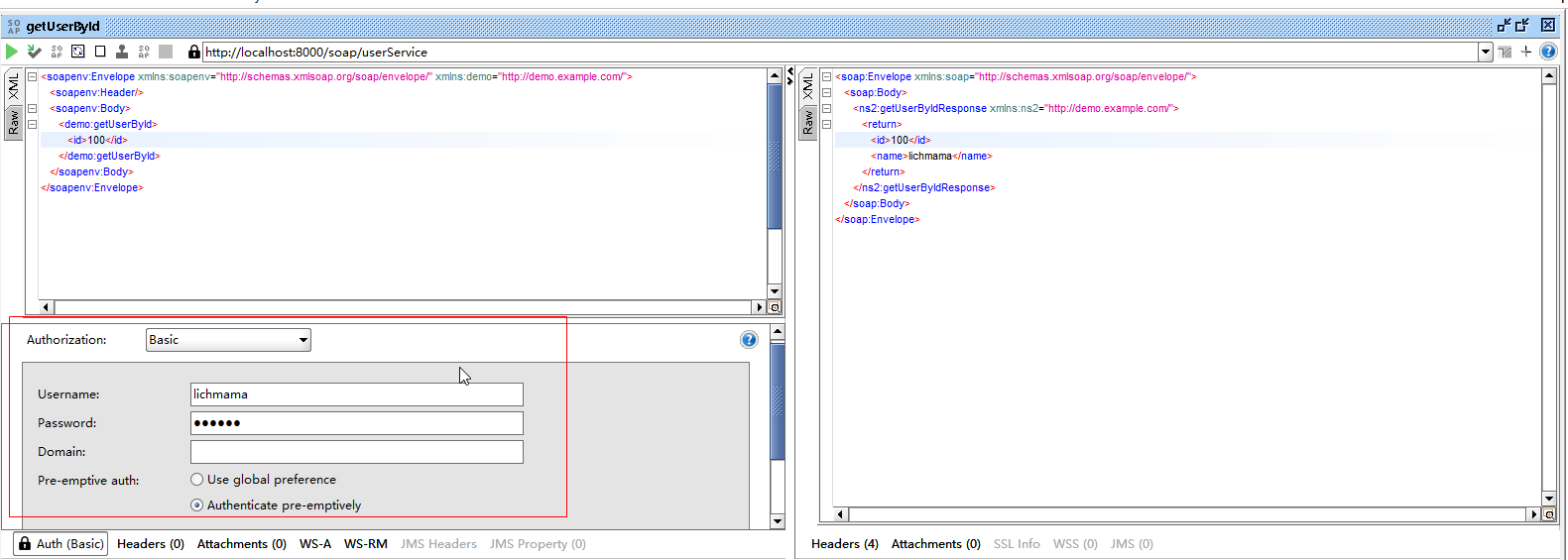
客户端增加对Basic Auth的支持:
/*

  使用Eclipse自动生成Web Service Client,在SoapBingdingStub的createCall()方法中加入一下代码:

*/

// basic auth

_call.setProperty("javax.xml.rpc.security.auth.username", "lichmama");

_call.setProperty("javax.xml.rpc.security.auth.password", "123456");
然后正常调用即可,这里提供一下自己写的SoapClient:
public class GeneralSoapClient {

    private String WSDL;

    private String namespaceURI;

    private String localPart;

    public GeneralSoapClient() {

    }

    public GeneralSoapClient(String WSDL, String namespaceURI, String localPart) {

        this.WSDL = WSDL;

        this.namespaceURI = namespaceURI;

        this.localPart = localPart;

    }

    public String getWSDL() {

        return WSDL;

    }

    public void setWSDL(String WSDL) {

        this.WSDL = WSDL;

    }

    public String getNamespaceURI() {

        return namespaceURI;

    }

    public void setNamespaceURI(String namespaceURI) {

        this.namespaceURI = namespaceURI;

    }

    public String getLocalPart() {

        return localPart;

    }

    public void setLocalPart(String localPart) {

        this.localPart = localPart;

    }

    private boolean requireAuth = false;

    private String username;

    private String password;

    public boolean isRequireAuth() {

        return requireAuth;

    }

    public void setRequireAuth(boolean requireAuth) {

        this.requireAuth = requireAuth;

    }

    public String getUsername() {

        return username;

    }

    public void setUsername(String username) {

        this.username = username;

    }

    public String getPassword() {

        return password;

    }

    public void setPassword(String password) {

        this.password = password;

    }

    /**

     * 创建Soap Service实例

     * @param serviceInterface

     * @return

     * @throws Exception

     */

    public <T> T create(Class<T> serviceInterface) throws Exception {

        URL url = new URL(WSDL);

        QName qname = new QName(namespaceURI, localPart);

        Service service = Service.create(url, qname);

        T port = service.getPort(serviceInterface);

        if (requireAuth) {

            BindingProvider prov = (BindingProvider) port;

            prov.getRequestContext().put(BindingProvider.USERNAME_PROPERTY, username);

            prov.getRequestContext().put(BindingProvider.PASSWORD_PROPERTY, password);

        }

        return port;

    }

}
public class TestSoap {

    public static void main(String[] args) throws Exception {

        String wsdl = "http://localhost:8080/soap/userService?wsdl";

        String namespaceURI = "http://demo.example.com/";

        String localPart = "UserService";

        GeneralSoapClient soapClient = new GeneralSoapClient(wsdl, namespaceURI, localPart);

        soapClient.setRequireAuth(true);

        soapClient.setUsername("lichmama");

        soapClient.setPassword("123456");

        IUserService service = soapClient.create(IUserService.class);

        User user = service.getUserById(101);

    }

}
最后交代一下开发环境
STS 3.7.3 + SpringBoot 2.0.1 + JDK1.8
收工下班了。
SpringBoot + CXF快速实现SOAP WebService(支持Basic Auth)的更多相关文章
- 时隔五年,Scrapyd 终于原生支持 basic auth
Issue in 2014 scrapy/scrapyd/issues/43 Pull request in 2019 scrapy/scrapyd/pull/326 试用 1. 安装: pip in ...
- Spring Boot SOAP Webservice例子
前言 本文将学习如何利用Spring boot快速创建SOAP webservice服务: 虽然目前REST和微服务越来越流行,但是SOAP在某些情况下,仍然有它的用武之地: 在本篇 spring b ...
- 使用crypt配置Basic Auth登录认证
简介 Basic Auth用于服务端简单的登录认证,通常使用服务器Nginx.Apache本身即可完成.比如我们要限定某个域名或者页面必须输入用户名.密码才能登录,但又不想使用后端开发语言,此时Bas ...
- Etcd安全配置之Basic Auth认证
<中小团队落地配置中心详解>文章中我们介绍了如何基于Etcd+Confd构建配置中心,最后提到Etcd的安全问题时说了可以使用账号密码认证以达到安全访问的目的,究竟该如何开启认证以及怎么设 ...
- 使用CXF实现基于Soap协议的WebService
本文介绍使用CXF实现基于Soap协议的WebService(CXF的版本是3.0.0) 一. 前言 Java有三种WebService规范:Jax-WS,Jax-RS,Jaxm 1. Jax-WS( ...
- CXF整合Spring发布WebService实例
一.说明: 上一篇简单介绍了CXF以及如何使用CXF来发布一个简单的WebService服务,并且介绍了客户端的调用. 这一篇介绍如何使用CXF与spring在Web项目中来发布WebService服 ...
- 通过CXF,开发soap协议接口
1. 引入cxf的jar包 pom文件里面直接增加依赖 < dependency> <groupId > junit</ groupId> <artifact ...
- Apache CXF使用Jetty发布WebService
一.概述 Apache CXF提供了用于方便地构建和开发WebService的可靠基础架构.它允许创建高性能和可扩展的服务,可以部署在Tomcat和基于Spring的轻量级容器中,也可以部署在更高级的 ...
- 使用CXF框架,发布webservice服务,并使用客户端远程访问webservice
使用CXF框架,发布webservice服务,并使用客户端远程访问webservice 1. CXF介绍 :soa的框架 * cxf 是 Celtrix (ESB框架)和 XFire(webs ...
随机推荐
- 几分钟打造超级好看又好用的zsh command line环境
source: https://www.pexels.com/photo/office-working-app-computer-97077/ 注:这篇适用于用MAC 开发的developer 身为程 ...
- 通过Nginx为网站配置二级域名
目录 配置域名解析 配置Nginx 重启Nginx 补充 需求:服务器上面运行多个项目:实现每个二级域名访问对应项目: 服务器:阿里云服务器:域名:阿里云注册: 配置域名解析 即配置DNS解析.一定要 ...
- 剑指前端(前端入门笔记系列)——DOM(元素节点)
DOM(元素节点) 本文介绍了元素节点的基本操作:增删改查 增 新增一个元素节点分为两步(二者缺一不可),第一步:创建元素节点,第二步:将创建的元素节点插入到指定元素节点中(也就是插入指定元素节点 ...
- 14、vue-cli脚手架搭建项目
1:全局安装vue-cli:npm install --global vue-cli2:进入你的项目目录:cd myProject3:初始化创建项目:vue init webpack vue-demo ...
- 数据结构与算法—Trie树
Trie,又经常叫前缀树,字典树等等.它有很多变种,如后缀树,Radix Tree/Trie,PATRICIA tree,以及bitwise版本的crit-bit tree.当然很多名字的意义其实有交 ...
- 单链表-Python实现-jupyter->markdown 格式测试
单链表引入 顺序表 理解Python变量的本质: 变量存储的不是值,是值的地址 理解Python的 "="表示的是指向关系 案例: 交换a,b的值, a=10, b=20 a, b ...
- 大数据:Hadoop(HDFS 的设计思路、设计目标、架构、副本机制、副本存放策略)
一.HDFS 的设计思路 1)思路 切分数据,并进行多副本存储: 2)如果文件只以多副本进行存储,而不进行切分,会有什么问题 缺点 不管文件多大,都存储在一个节点上,在进行数据处理的时候很难进行并行处 ...
- memcached的安装和学习
linux下安装memcached 第一首先要安装 libvevent ,用 rpm -qa | preg libevent ,用 which libevent 查看安装路径 以下图解: ...
- 利用Metasploit攻击Android
首先我在Kali下生成一个Android的应用程序,即apk格式的文件,用到的命令是: msfvenom -p android/meterpreter/reverse_tcp LHOST=本地ip L ...
- Ansible--Ansible之Roles
Ansible之Roles Roles介绍 ansible自1.2版本引入的新特性,用于层次性.结构化地组织playbook.roles能够根据层次型结构自动装载变量文件.tasks以及handler ...