
Houdini Python开发实战 课程笔记
P2 + P3 + P4 + P5 - 基础:
1. Houdini中使用Python的地方
2. Textport:可使用cd、ls等路径操作的命令(命令前加%,可在python中使用)
3. Source Editor
在Source Editor中定义函数
在其他地方调用
hou.session.getChildren(hou.node("/"))
4. Python Shell
示例
p2
obj = hou.node("/obj")
obj.createNode("geo")

hou.cd("/obj/geo")

# 返回当前路径

hou.pwd()

file1 = hou.node("./file1")

file1.destory()

hou.pwd().createNode("shpere")

shpere = hou.node("shpere1")

hou.pwd().createNode("box1")

box = hou.node("box")

hou.pwd().createNode("merge")

merge = hou.node("merge1")

# 将box和shpere联合起来

merge.setFirstInput(sphere, 0)

merge.setNextInput(box)
p3
# 返回merge联合的节点

merge.inputs()

# 将merge联合的box去除

merge.setInput(1,None)

# 返回父节点及子节点

merge.parent()

obj.children()

# 返回子节点元组的函数

def getChildren(node):

    childList = []

    for n in node.children():

         childList.append(n)

    return childList

# 调用函数

getChildren("/obj/geo1")

getChildren("/")

# 返回场景中所有节点的元组的函数

def getChildren(node):

    childList = []

    for n in node.children():

         childList.append(n)

         if n.children():

             childList += getChildren(n)

    return childList
p4
# 操作节点的参数

# 获得参数

parm = hou.parm("./shpere1/radx")

# 取参数值

parm.eval()

# 修改值

parm.set(5.0)

parmtuple = hou.parmTuple("./shpere1/rad")

parmtuple.eval()

parmtuple.set((5.0, 5.0, 5.0))
p5
可通过将界面元素(节点、参数、工具)拖进Python Shell获得其代码定义
# 取得节点的name

hou.pwd().name()

# 取得帮助

help(hou.pwd())
Python文档:Houdini - Help
# 将多个节点布局好

hou.pwd().layoutChildren()

sphere.setParms({"radx": 3.0 , "tx": 2.0})
P6 - 创建工具栏工具:
1. New Shelf
Name - 小写 加 下划线
Label - 首字母大写
2. New Tool
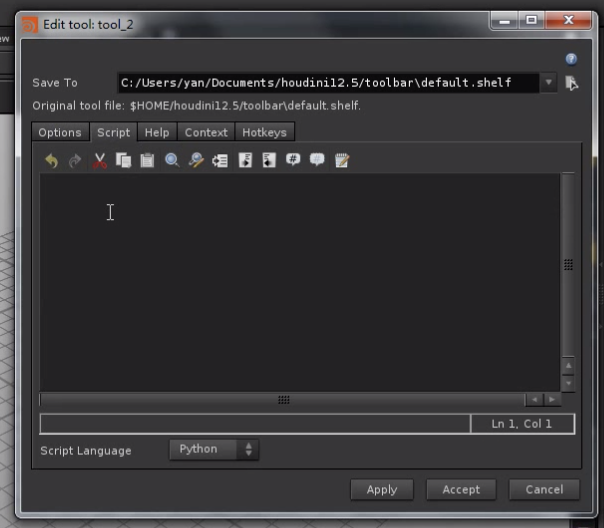
Options中指定Name和Label
Script中写代码
# 点击工具得到对话框

hou.ui.displayMessage("Hello Houdini !")

# box_tool 创建一个box节点

geoNet = hou.ui.paneTabOfType(hou.paneTabType.NetworkEditor)

position = geoNet.selectPosition()

box = geoNet.pwd().createNode("box")

box.setPosition(position)
P7 + P8 - 创建螺旋线工具:
1. 工具栏 kwargs参数(世界列表)
包含:按键信息、pane信息、View信息
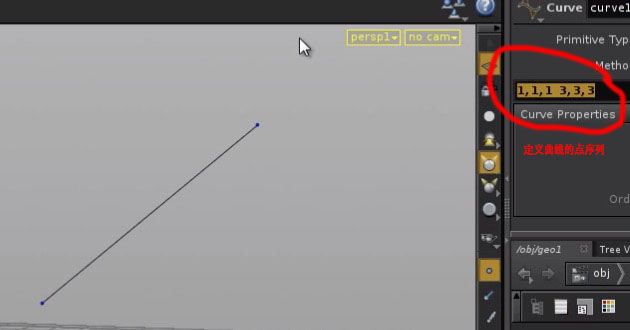
2. 自定义工具-螺旋线
from math import sin, cos

geoNet = hou.ui.paneTabOfType(hou.paneTabType.NetworkEditor)

spiral = geoNet.pwd().createNode("curve")

coordsParm = spiral.parm("coords")

inputParms = readMultiInput(message = "Enter parameters:" , input_labels = ["height", "lRadius", "uRadius", "frequency"], initial_contents = ["", "", "", ""])

height = float(inputParms[1][0])

lRadius = float(inputParms[1][1])

uRadius = float(inputParms[1][2])

frequency = float(inputParms[1][3])

coordsStr = ""

radius = lRadius

step = (lRadius - uRadius) / (height * frequency)

for i in range(int(height * frequency)):

    px = str(radius * sin(i))

    py = str(i / frequency)

    pz = str(radius * cos(i))

    coordsStr += px + ", " + py + ", " + pz + " "

    radius -= step

coordsParm.set(coordsStr)
P9 - P15 - 创建sop节点:
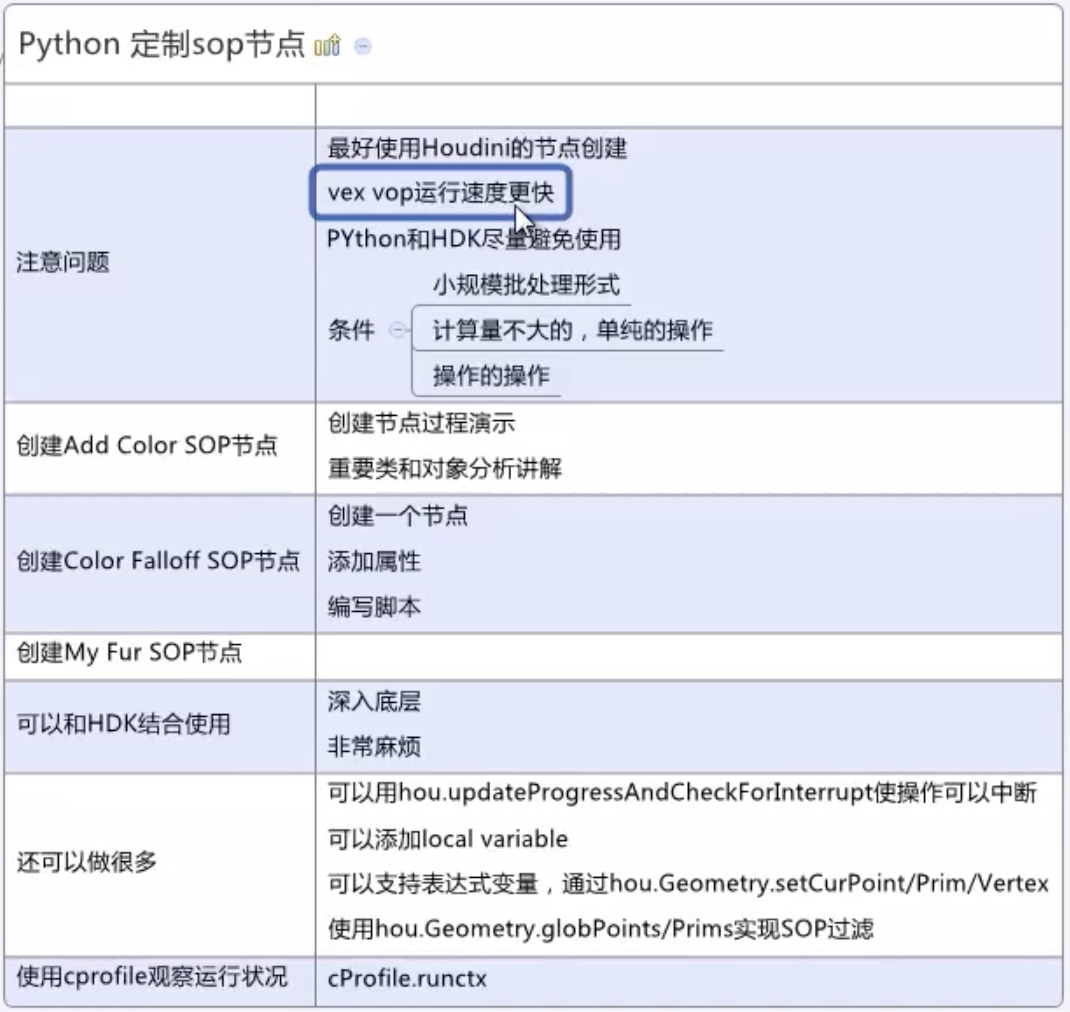
创建 “Add Color SOP” 节点
1. New Operator Type
2. 代码
import hou

import random

node = hou.pwd()

geo = node.geometry()

# 给定种子 保证每次运行otl得到的结果相同

random.seed(123)

colorAttrib = geo.addAttrib(hou.attribTypr.Point, "Cd", (1.0, 1.0, 1.0))

color = hou.Color()

pointsNum = len(geo.points())

for point in geo.points():

    pos = point.position()

    px = pos[0]

    py = pos[1] + random.random() * random.choice([-1,1])

    pz = pos[2]

    point.setPosition((px, py, pz))

    value = float(point.number()) / pointsNum

    color.setHSV((value * 255, 1.0, 1.0))

    point.setAttribValue(colorAttrib, color.rgb())
创建 “Color Falloff SOP” 节点
1. 添加节点,并为节点添加两个参数
2. Color Falloff 效果 - 代码
import hou

import random

node = hou.pwd()

geo = node.geometry()

# 给定种子 保证每次运行otl得到的结果相同

random.seed(123)

colorAttrib = geo.addAttrib(hou.attribTypr.Point, "Cd", (1.0, 1.0, 1.0))

color = hou.Color()

position = hou.Vector3(node.parmTuple("position").eval())

falloff = max( node.parm("falloff").eval(), 0.0001)

for point in geo.points():

    pos = point.position()

    px = pos[0]

    py = pos[1] # + random.random() * random.choice([-1,1])

    pz = pos[2]

    point.setPosition((px, py, pz))

    distance = (pos - position)

    value = min(distance / falloff , 1.0)

    color.setHSV((value * 255, 1.0, 1.0))

    point.setAttribValue(colorAttrib, color.rgb())
3. Color Wave 效果 - 代码
import hou

import random

node = hou.pwd()

geo = node.geometry()

# 给定种子 保证每次运行otl得到的结果相同

random.seed(123)

colorAttrib = geo.addAttrib(hou.attribTypr.Point, "Cd", (1.0, 1.0, 1.0))

color = hou.Color()

position = hou.Vector3(node.parmTuple("position").eval())

falloff = max( node.parm("falloff").eval(), 0.0001)

frequency = max( node.parm("frequency").eval(), 0.0001)

height =  node.parm("height").eval()

for point in geo.points():

    pos = point.position()

    distance = (pos - position)

    value = abs(sin( min(distance / falloff , 1.0) ) * frequency)

    color.setHSV((value * 255, 1.0, 1.0))

    point.setAttribValue(colorAttrib, color.rgb())

    px = pos[0]

    py = pos[1]  + height * color.rgb()[1]

    pz = pos[2]

    point.setPosition((px, py, pz))
P13 动画
4. Color Falloff基础上 添加 法线 - 代码
#primitive type : mesh || NURBS

import hou

import random

node = hou.pwd()

geo = node.geometry()

# 给定种子 保证每次运行otl得到的结果相同

random.seed(123)

colorAttrib = geo.addAttrib(hou.attribTypr.Point, "Cd", (1.0, 1.0, 1.0))

color = hou.Color()

position = hou.Vector3(node.parmTuple("position").eval())

falloff = max( node.parm("falloff").eval(), 0.0001)

u_div = hou.evalParm("u_div")

v_div = hou.evalParm("v_div")

threshHold = hou.evalParm("threshHold")

height = hou.evalParm("height")

surface = geo.iterPrims()[0]

for point in geo.iterPoints():

    pos = point.position()

    px = pos[0]

    py = pos[1]

    pz = pos[2]

    point.setPosition((px, py, pz))

    distance = (pos - position)

    value = min(distance / falloff , 1.0)

    color.setHSV((value * 255, 1.0, 1.0))

    point.setAttribValue(colorAttrib, color.rgb())

for uNum in xrange(u_div + 1):

    u = float(uNum) / u_div

    for vNum in xrange(v_div + 1):

        v = float(vNum) / v_div

        uvColor = surface.attribValueAt("Cd", u, v)

        pos0 = surface.positionAt(u, v)

        pos1 = pos0 + surface.normalAt(u, v) * height

        ploy = geo.createPolygon()

        poly.setIsClosed(false)

        if uvColor[2] > threshHold:    # 只给绿色的地方添加法线(0.9)

            for p in [pos0, pos10:

                point = geo.createPoint()

                point.setPosition(p)

                point.setAttribValue(colorAttrib, uvColor)

                poly.addVertex(point)
5. 将4完成的sop连接到 Add Color sop下
部分变量重复
修改4的代码为
#primitive type : mesh || NURBS

import hou

import random

node = hou.pwd()

geo = node.geometry()

# 给定种子 保证每次运行otl得到的结果相同

random.seed(123)

colorAttrib = geo.findPointAttrib("Cd")

position = hou.Vector3(node.parmTuple("position").eval())

falloff = max( node.parm("falloff").eval(), 0.0001)

u_div = hou.evalParm("u_div")

v_div = hou.evalParm("v_div")

threshHold = hou.evalParm("threshHold")

height = hou.evalParm("height")

surface = geo.iterPrims()[0]

for uNum in xrange(u_div + 1):

    u = float(uNum) / u_div

    for vNum in xrange(v_div + 1):

        v = float(vNum) / v_div

        uvColor = surface.attribValueAt("Cd", u, v)

        pos0 = surface.positionAt(u, v)

        pos1 = pos0 + surface.normalAt(u, v) * height

        ploy = geo.createPolygon()

        poly.setIsClosed(false)

        if uvColor[2] > threshHold:    # 只给绿色的地方添加法线(0.9)

            for p in [pos0, pos10:

                point = geo.createPoint()

                point.setPosition(p)

                point.setAttribValue(colorAttrib, uvColor)

                poly.addVertex(point)
再增加一个sop 来控制法线的粗细(width)
PS:
查看渲染过程中的点的信息 Details View(P12 19min)
可在Parameters中限制参数的取值范围 (P11 3min)
P16 - P19 - 表达式:
教程地址:https://www.bilibili.com/video/av33143116/?p=1
PS:程序员看这个教程代码的讲解过程,真的要急死。。。
Houdini Python开发实战 课程笔记的更多相关文章
- Python开发实战教程(8)-向网页提交获取数据
来这里找志同道合的小伙伴!↑↑↑ Python应用现在如火如荼,应用范围很广.因其效率高开发迅速的优势,快速进入编程语言排行榜前几名.本系列文章致力于可以全面系统的介绍Python语言开发知识和相关知 ...
- Python开发实战PDF
Python开发实战(高清版)PDF 百度网盘 链接:https://pan.baidu.com/s/1iP9VmwuzDMfdZTfpupR3CA 提取码:a523 复制这段内容后打开百度网盘手机A ...
- 《Python开发实战》
<Python开发实战> 基本信息 作者: (日)BePROUD股份有限公司 译者: 盛荣 丛书名: 图灵程序设计丛书 出版社:人民邮电出版社 ISBN:9787115320896 上架时 ...
- iPhone与iPad开发实战读书笔记
iPhone开发一些读书笔记 手机应用分类1.教育工具2.生活工具3.社交应用4.定位工具5.游戏6.报纸和杂志的阅读器7.移动办公应用8.财经工具9.手机购物应用10.风景区相关应用11.旅游相关的 ...
- Spring 3.x 实践 第一个例子(Spring 3.x 企业应用开发实战读书笔记第二章)
前言:工作之后一直在搞android,现在需要更多和后台的人员交涉,技术栈不一样,难免鸡同鸭讲,所以稍稍学习下. 这个例子取自于<Spring 3.x 企业应用开发实战>一书中的第二章,I ...
- 干货|Python基础入门 课程笔记(三)
目录 列表 元组 字典 三元表达式 一.列表 前面学习的字符串可以用来存储一串信息,那么想一想,如果现在有很多人,总不能每个人都起一个变量名把?那岂不得疯~ 咱们可以使用列表. (1)列表得格式和输出 ...
- Python开发【整理笔记】
回顾笔记 学python半年,新知识不断填充,之前学的东西也忘的差不多,整理下笔记,把重点再加深下印象,算是读书拾遗吧.... 1.类继承.新式类.经典类 首先,新式类.经典类的概念只存在于Pytho ...
- 学习 Laravel - Web 开发实战入门笔记(1)
本笔记根据 LearnKu 教程边学边记而成.该教程以搭建出一个类似微博的Web 应用为最终成果,在过程中学习 Laravel 的相关知识. 准备开发环境 原教程使用官方推荐的 Homestead 开 ...
- (3/18)重学Standford_iOS7开发_Objective-C_课程笔记
第三课: 本节课主要是游戏实现的demo,因此我将把课程中简单的几个编程技巧提取出来,重点介绍如何自己实现作业中的要求. 纸牌游戏实现: ①游戏的进行是模型的一部分(理解什么是模型:Model = W ...
随机推荐
- python中pop()与split()的用法
imglist = ['11.jpg','12.jpg','13.jpg','14.jpg','2.jpg','1.jpg',] print(str(imglist)) a = str(imglist ...
- httprunner学习15-运行用例命令行参数详解
前言 HttpRunner 在命令行中启动测试时,通过指定参数,可实现丰富的测试特性控制. 命令行参数CLI 使用 -h 查看相关命令行参数 hrun -h 参数名称 参数值 参数说明 -h, --h ...
- Java Spring Boot 一些调试技巧
配置文件的管理 有的时候我们希望开发环境和测试环境的配置文件放在一起可以快速切换 spring boot 为我们提供了很方便的的选项 在 application.properties 中只需要添加属性 ...
- python-uiautomator2
简单介绍 python-uiautomator2是一个自动化测试开源工具,仅支持Android平台的原生应用测试. 支持平台及语言 python-uiautomator2封装了谷歌自带的uiautom ...
- TabBar 设置可滚动:isScrollable: true
appBar: AppBar( bottom: TabBar( // 设置可滚动 isScrollable: true, controller: _tabController, tabs: tabs. ...
- 什么叫pure function(纯函数)
(来自:http://en.wikipedia.org/wiki/Pure_function) 在计算机编程中,假如满足下面这两个句子的约束,一个函数可能被描述为一个纯函数: 给出同样的参数值,该函数 ...
- 第4章 Spring的数据库开发
4.1 Spring JDBC Spring的JDBC模块负责数据库资源管理和错误处理,化简了开发者对数据库的操作. 4.11 Spring JdbcTemplate的解析 * JdbcTemplat ...
- 电商平台+keepalived高可用
192.168.189.131 电商平台 192.168.189.129 MySQL主192.168.189.130 MySQL备192.168.189.181 VIP 配置MySQL为互为主从并结合 ...
- Nginx+Php-fpm运行原理 代理与反向代理
一.代理与反向代理 现实生活中的例子 1.正向代理:访问google.com 如上图,因为google被墙,我们需要vpnFQ才能访问google.com.Virtual Private Networ ...
- 洛谷 p1968 美元汇率 题解
传送门 美元由马克转化,马克由美元转化 求最大美元 每一天只有2种选择 ①:不转化另一货币 ②:转化另一货币 典型01背包 可以开一个二维数组f[100][3] F[i][1]表示前i天获得最大美元 ...