
cratedb 做为prometheus 的后端存储
prometheus 提供了remote_write 以及remote_read 的数据存储方式,可以帮助我们进行数据的长时间存储、方便查询
cratedb 提供了对应的adapter,可以直接进行适配。
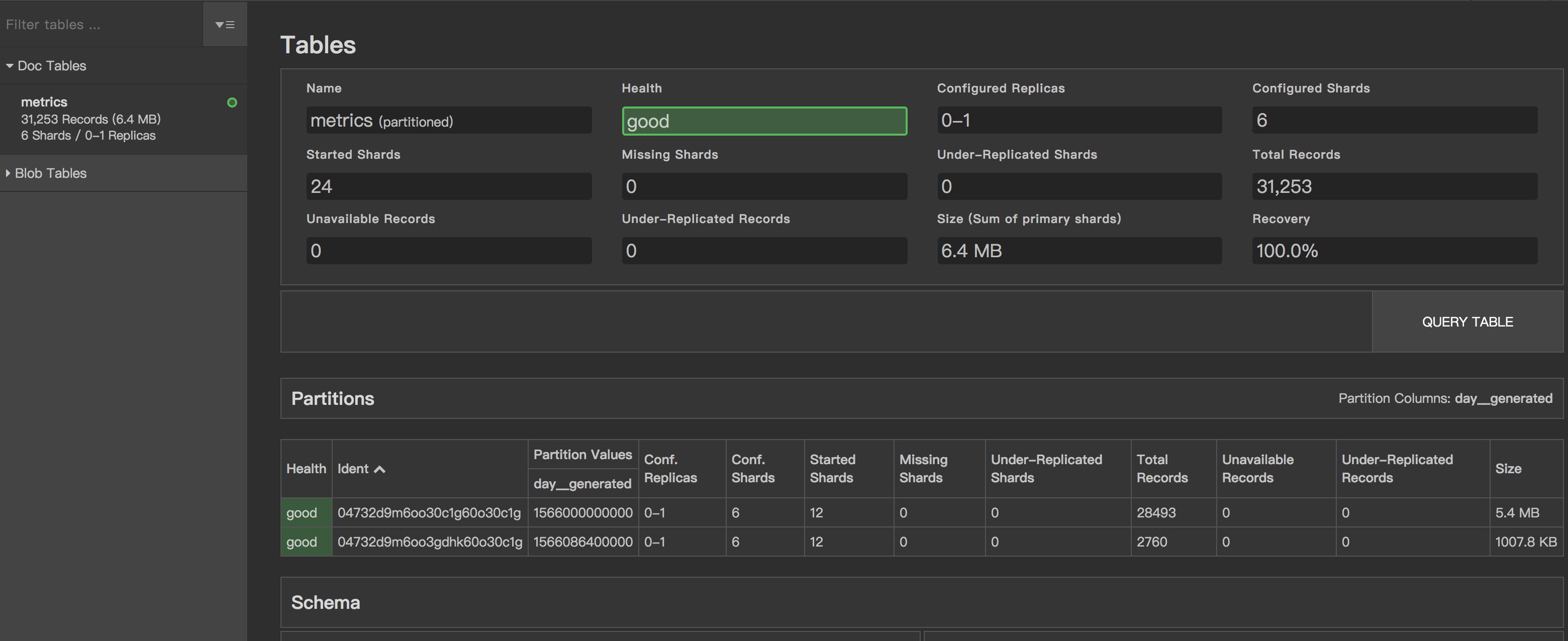
以下演示一个简单的cratedb 集群以及通过write 以及read 存储通过grok exporter 暴露的日记prometheus metrics
环境准备
- 数据请求流程
inputlog->grok exporter -> prometheus->cratedb adpater->cratedb cluster - docker-compose 文件
version: "3"
services:
grafana:
image: grafana/grafana
ports:
- "3000:3000"
prometheus:
image: prom/prometheus
volumes:
- "./prometheus.yml:/etc/prometheus/prometheus.yml"
ports:
- "9090:9090"
cratedb-adapter:
image: crate/crate_adapter
command: -config.file /opt/config/config.yml
ports:
- "9268:9268"
volumes:
- "./cratedb-adapter:/opt/config"
grok:
image: dalongrong/grok-exporter
volumes:
- "./grok/example:/opt/example"
- "./grok/grok.yaml:/grok/config.yml"
ports:
- "9144:9144"
crate1:
image: crate
volumes:
- "./cratedb/data1:/data"
- "./cratedb/1.yaml:/crate/config/crate.yml"
ports:
- "4200:4200"
- "4300:4300"
- "5432:5432"
crate2:
image: crate
volumes:
- "./cratedb/data2:/data"
- "./cratedb/2.yaml:/crate/config/crate.yml"
ports:
- "4201:4200"
- "4301:4300"
- "5433:5432"
crate3:
image: crate
volumes:
- "./cratedb/data3:/data"
- "./cratedb/3.yaml:/crate/config/crate.yml"
ports:
- "4202:4200"
- "4302:4300"
- "5434:5432"
- prometheus 配置
通过静态配置的方式添加target,统计配置了remote_write 以及remote_read
scrape_configs:
- job_name: grok
metrics_path: /metrics
scrape_interval: 10s
scrape_timeout: 10s
static_configs:
- targets: ['grok:9144']
- job_name: cratedb-adapter
metrics_path: /metrics
scrape_interval: 10s
scrape_timeout: 10s
static_configs:
- targets: ['cratedb-adapter:9268']
remote_write:
- url: http://cratedb-adapter:9268/write
remote_read:
- url: http://cratedb-adapter:9268/read
- cratedb 集群配置
当前使用的是社区版本,对于集群模式,最大支持的是3个节点的,但是一般场景也够用了
- node1 配置
cluster.name: cratecluster
node.name: crate1
node.master: true
node.data: true
http.port: 4200
psql.port: 5432
transport.tcp.port: 4300
discovery.seed_hosts: ["crate1"]
cluster.initial_master_nodes: ["crate1"]
http.cors.enabled: true
http.cors.allow-origin: "*"
gateway.expected_nodes: 3
gateway.recover_after_nodes: 2
gateway.recover_after_time: 5m
network.host: _local_,_site_
path.logs: /data/log
path.data: /data/data
blobs.path: /data/blobs
- node2 配置
cluster.name: cratecluster
node.name: crate2
node.master: false
node.data: true
http.port: 4200
psql.port: 5432
transport.tcp.port: 4300
discovery.seed_hosts: ["crate1"]
cluster.initial_master_nodes: ["crate1"]
http.cors.enabled: true
http.cors.allow-origin: "*"
gateway.expected_nodes: 3
gateway.recover_after_nodes: 2
gateway.recover_after_time: 5m
network.host: _local_,_site_
path.logs: /data/log
path.data: /data/data
blobs.path: /data/blobs
- node3 配置cluster.name: cratecluster
node.name: crate3
node.master: false
node.data: true
http.port: 4200
psql.port: 5432
transport.tcp.port: 4300
discovery.seed_hosts: ["crate1"]
cluster.initial_master_nodes: ["crate1"]
http.cors.enabled: true
http.cors.allow-origin: "*"
network.host: _local_,_site_
gateway.expected_nodes: 3
gateway.recover_after_nodes: 2
gateway.recover_after_time: 5m
path.logs: /data/log
path.data: /data/data
blobs.path: /data/blobs
- grok exporter配置
定义的日志匹配模式
global:
config_version: 2
input:
type: file
path: /opt/example/examples.log
readall: true
grok:
patterns_dir: ./patterns
metrics:
- type: counter
name: grok_example_lines_total
help: Counter metric example with labels.
match: '%{DATE} %{TIME} %{USER:user} %{NUMBER}'
labels:
user: '{{.user}}'
server:
port: 9144
- cratedb adapter 配置
暴露write 以及read 服务,因为使用集群模式,所以我 配置了多个节点
crate_endpoints:
- host: "crate1" # Host to connect to (default: "localhost").
port: 5432 # Port to connect to (default: 5432).
user: "crate" # Username to use (default: "crate")
password: "" # Password to use (default: "").
schema: "" # Schema to use (default: "").
max_connections: 5 # The maximum number of concurrent connections (default: 5).
enable_tls: false # Whether to connect using TLS (default: false).
allow_insecure_tls: false # Whether to allow insecure / invalid TLS certificates (default: false).
- host: "crate2" # Host to connect to (default: "localhost").
port: 5432 # Port to connect to (default: 5432).
user: "crate" # Username to use (default: "crate")
password: "" # Password to use (default: "").
schema: "" # Schema to use (default: "").
max_connections: 5 # The maximum number of concurrent connections (default: 5).
enable_tls: false # Whether to connect using TLS (default: false).
allow_insecure_tls: false # Whether to allow insecure / invalid TLS certificates (default: false).
- host: "crate3" # Host to connect to (default: "localhost").
port: 5432 # Port to connect to (default: 5432).
user: "crate" # Username to use (default: "crate")
password: "" # Password to use (default: "").
schema: "" # Schema to use (default: "").
max_connections: 5 # The maximum number of concurrent connections (default: 5).
enable_tls: false # Whether to connect using TLS (default: false).
allow_insecure_tls: false # Whether to allow insecure / invalid TLS certificates (default: false).
- metrics 的table
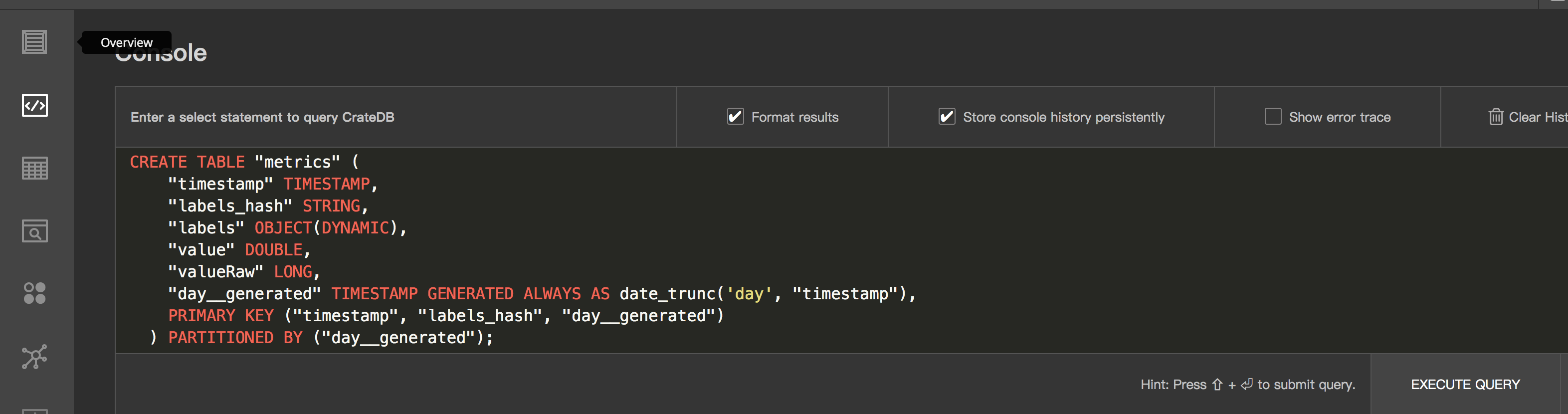
使用cratedb 我们需要先定义table,table 的schema 定义官方提供了模版
CREATE TABLE "metrics" (
"timestamp" TIMESTAMP,
"labels_hash" STRING,
"labels" OBJECT(DYNAMIC),
"value" DOUBLE,
"valueRaw" LONG,
"day__generated" TIMESTAMP GENERATED ALWAYS AS date_trunc('day', "timestamp"),
PRIMARY KEY ("timestamp", "labels_hash", "day__generated")
) PARTITIONED BY ("day__generated");
启动&&测试
- 启动集群
docker-compose up -d
- 效果

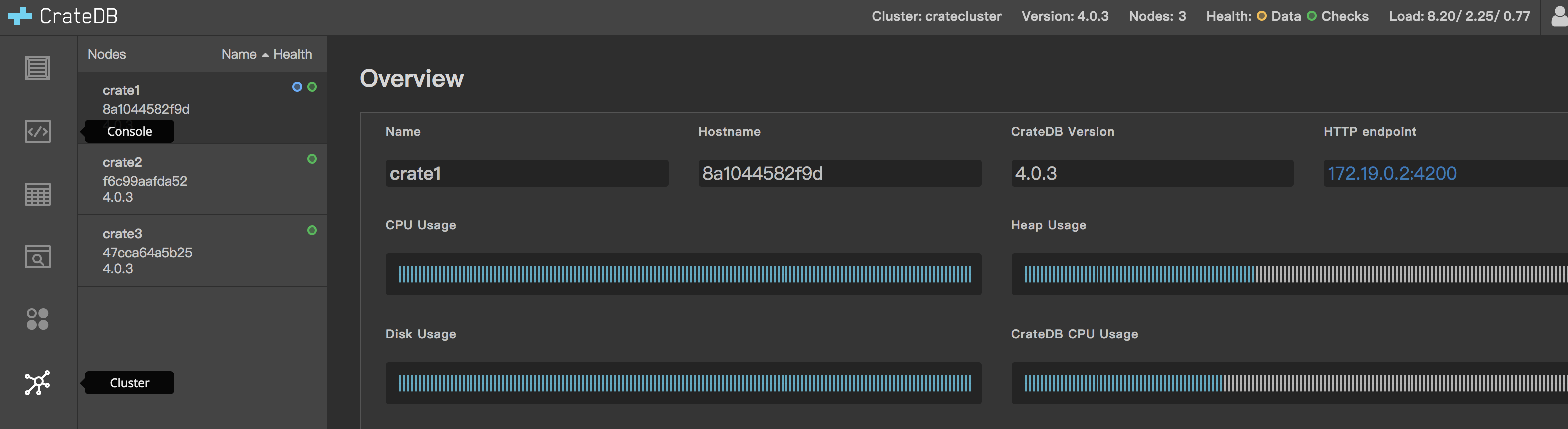
- 通过admin ui 创建table
- 写入数据统计
- 数据查询效果
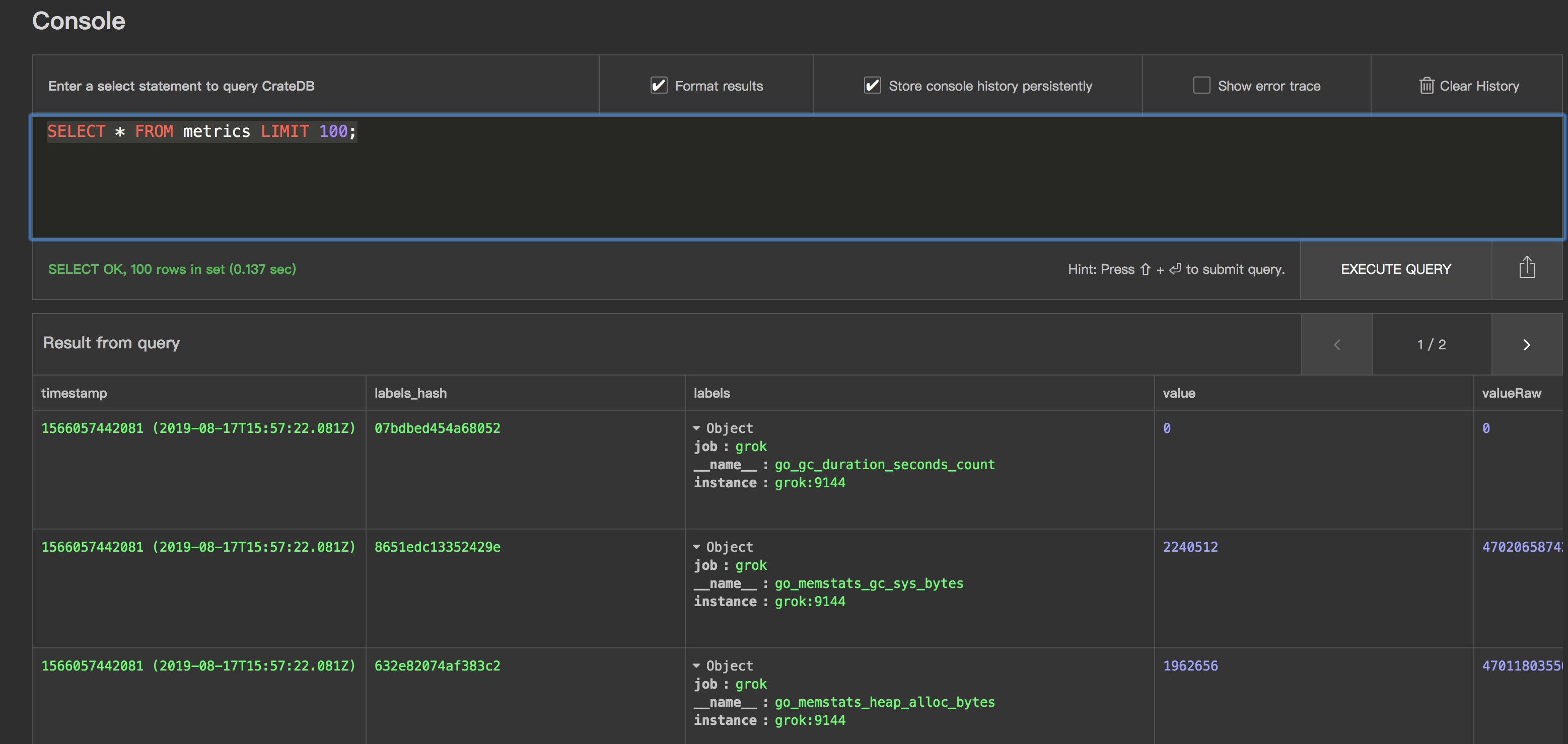
说明
使用crate adapter 进行mtrics 数据的持久化存储也是一个不错的选择,以上演示没有包含关于grafana与prometheus 的集成,可以参考github
的完整配置自己添加下,这样就相对完整了,同时因为暴露了pg 协议的数据,我们可以直接通过grafanna 进行数据查看,展示。
参考资料
https://github.com/crate/crate_adapter
https://github.com/crate/crate
https://crate.io/docs/crate/reference/en/latest/config/cluster.html
https://github.com/fstab/grok_exporter
https://github.com/rongfengliang/prometheus-cratedb-cluster-docker-compose
cratedb 做为prometheus 的后端存储的更多相关文章
- 使用 opendistro for elasticsearch 做为graylog的后端存储
graylog 是一个很不错的日志分析.收集.报警平台,包好了丰富的插件,同时内部的架构设计很不错 input 组件很多,使用stream.pipeline可以方便的进行数据处理,可以同时3.0 对于 ...
- jaeger使用yugabyte作为后端存储的尝试以及几个问题
前边写过使用scylladb 做为jaeger 的后端存储,还是一个不错选择的包括性能以及 兼容性,对于 yugabyte 当前存在兼容性的问题,需要版本的支持,或者尝试进行一些变动 create 语 ...
- Flocker 做为后端存储代理 docker volume-driver 支持
docker Flocker https://github.com/ClusterHQ/flocker/ 文档: https://docs.clusterhq.com/en/latest/docker ...
- Openstack_后端存储平台Ceph
框架图 介绍 一种为优秀的性能.可靠性和可扩展性而设计的统一的.分布式文件系统 特点 CRUSH算法 Crush算法是ceph的两大创新之一,简单来说,ceph摒弃了传统的集中式存储元数据寻址的方案, ...
- 9 云计算系列之Cinder的安装与NFS作为cinder后端存储
preface 在前面我们知道了如何搭建Openstack的keystone,glance,nova,neutron,horizon这几个服务,然而在这几个服务中唯独缺少存储服务,那么下面我们就学习块 ...
- OpenStack Cinder 与各种后端存储技术的集成叙述与实践
先说下下loop设备 loop设备及losetup命令介绍 1. loop设备介绍 在类 UNIX 系统里,loop 设备是一种伪设备(pseudo-device),或者也可以说是仿真设备.它能使我们 ...
- influxdb和boltDB简介——MVCC+B+树,Go写成,Bolt类似于LMDB,这个被认为是在现代kye/value存储中最好的,influxdb后端存储有LevelDB换成了BoltDB
influxdb influxdb是最新的一个时间序列数据库,最新一两年才产生,但已经拥有极高的人气.influxdb 是用Go写的,0.9版本的influxdb对于之前会有很大的改变,后端存储有Le ...
- Openstack使用NFS作为后端存储
续:Openstack块存储cinder安装配置 接上使用ISCSI作为后端存储,使用NFS作为后端存储配置 参考官方文档:https://wiki.openstack.org/wiki/How_to ...
- [转帖]influxdb和boltDB简介——MVCC+B+树,Go写成,Bolt类似于LMDB,这个被认为是在现代kye/value存储中最好的,influxdb后端存储有LevelDB换成了BoltDB
influxdb和boltDB简介——MVCC+B+树,Go写成,Bolt类似于LMDB,这个被认为是在现代kye/value存储中最好的,influxdb后端存储有LevelDB换成了BoltDB ...
随机推荐
- 『正睿OI 2019SC Day3』
容斥原理 容斥原理指的是一种排重,补漏的计算思想,形式化的来说,我们有如下公式: \[\left | \bigcup_{i=1}^nS_i \right |=\sum_{i}|S_i|-\sum_{i ...
- linux启动tomcat很久或者很慢Tomcat启动时卡在“INFO: Deploying web application directory ......”的解决方法
解决方案: 找到jdk1.x.x_xx/jre/lib/security/java.security文件,在文件中找到securerandom.source这个设置项,将其改为: securerand ...
- 整理:WPF中Xaml中绑定枚举的写法
原文:整理:WPF中Xaml中绑定枚举的写法 目的:在Combobox.ListBox中直接绑定枚举对象的方式,比如:直接绑定字体类型.所有颜色等枚举类型非常方便 一.首先用ObjectDataPro ...
- Quartz基础调度框架-第二篇服务
很多应用场景Quartz运行于Windows服务 Conf 在这个基本结构里 是用来存放配置 和上一篇 控制台运行的一样的结构 jobs.xml 的配置清单 <!-- 任务配置--> & ...
- 网络编程中用到的SOCKET是什么?
摘取网络上的一些内容: 什么是TCP/IP.UDP? Socket在哪里呢? Socket是什么呢? 什么是TCP/IP.UDP? TCP/IP(Transmission Control Protoc ...
- JQuery入门篇
JQuery入门篇 jQuery选择器 “$”表示JQuery对象 根据ID查找 $(‘#var’)表示将一个id值为var的DOM节点封装成一个jQuery对象,DOM节点必须以“#”开头. 例如: ...
- Mysql之索引(六)
1.思考 在图书馆是怎么找到一本书的? 一般的应用系统对比数据库的读写比例在10:1左右(即有10次查询有1次写操作),而且插入操作和更新操作很少出现性能问题. 遇到最多,最复杂的还是一些复杂的查询操 ...
- ERP会计科目表初始化
2019会计科目表 一.资产类 顺序号 编号 会计科目名称 会计科目适用范围 顺序号 编号 会计科目名称 会计科目适用范围 1 1001 库存现金 38 1431 周转材料 建造承包商专用 2 100 ...
- Ansible--Ansible之Playbook
Ansible之Playbook Playbook介绍 playbook参考文档 Playbook与ad-hoc相比,是一种完全不同的运用ansible的方式,类似与saltstack的state状态 ...
- NodeJS新建服务器以及CommonJS规范
1.什么是node.js?(1)Node.js 是一个基于 Chrome V8 引擎的 JavaScript 运行环境.Node.js 使用了一个事件驱动.非阻塞式 I/O 的模型,使其轻量又高效.( ...