
利用maven-assembly-plugin加载不同环境所需的配置文件及使用场景
背景:
如何加载不同环境的配置文件已经成了势在必行的,我们通常利用profile进行,详情参见我上篇博客 http://www.cnblogs.com/lianshan/p/7347890.html,但是单单的profile实在无法满足我们的需求,因为这实在是太简单太单一了,我们将它与maven-assembly-plugin,结合起来,来实现配置分离的问题。
profile不同环境参数设置
此参数的配置与上篇几乎相同,不过是在properties的属性声明将其与assembly结合起来,具体示例如下。
<profiles>

        <profile>

            <id>dev</id>

            <activation>

                <activeByDefault>true</activeByDefault>

            </activation>

            <properties>

                <env.devMode>dev</env.devMode>

                <skipAssemblyDEV>false</skipAssemblyDEV>

                <skipAssemblyUAT>true</skipAssemblyUAT>

                <skipAssemblyPROD>true</skipAssemblyPROD>

            </properties>

        </profile>

        <profile>

            <id>uat</id>

            <activation>

                <activeByDefault>false</activeByDefault>

            </activation>

            <properties>

                <env.devMode>uat</env.devMode>

                <skipAssemblyDEV>true</skipAssemblyDEV>

                <skipAssemblyUAT>false</skipAssemblyUAT>

                <skipAssemblyPROD>true</skipAssemblyPROD>

            </properties>

        </profile>

    </profiles>
我定义了三个环境的相同的四个变量,我在mvn clean package -P dev 时指定了环境信息,也就相对于制定了变量的值。
可以观察到 skipAssemblyDEV 、skipAssemblyUAT、 skipAssemblyPROD 这三个值都是排他的,聪明的小伙伴已经可能意识到了,一定有三个地方使用了这三个变量,并将他们指向了指定的配置文件。
好我们来观察assembly的相关配置。
<!--assembly test start-->

            <!--this  include  the xml  assembly-->

            <plugin>

                <groupId>org.apache.maven.plugins</groupId>

                <artifactId>maven-assembly-plugin</artifactId>

                <version>3.0.0</version>

                <executions>

                    <execution>

                        <id>make-assembly-dev</id>  <!--The identifier of this execution for labelling the goals during the build   标志-->

                        <phase>package</phase>      <!--The build lifecycle phase to bind the goals in this execution to  指定其编译阶段-->

                        <goals>

                            <goal>single</goal>     <!--The goals to execute with the given configuration-->

                        </goals>

                        <configuration>

                            <skipAssembly>${skipAssemblyDEV}</skipAssembly>   <!--profile声明参数调用-->

                            <descriptors>

                                <descriptor>src/main/assembly/dev/assembly.xml</descriptor>   <!--加载指定的assembly配置文件-->

                            </descriptors>

                        </configuration>

                    </execution>

                    <execution>

                        <id>make-assembly-uat</id>

                        <phase>package</phase>

                        <goals>

                            <goal>single</goal>

                        </goals>

                        <configuration>

                            <skipAssembly>${skipAssemblyUAT}</skipAssembly>

                            <descriptors>

                                <descriptor>src/main/assembly/uat/assembly.xml</descriptor>

                            </descriptors>

                        </configuration>

                    </execution>

                    <execution>

                        <id>make-assembly-prod</id>

                        <phase>package</phase>

                        <goals>

                            <goal>single</goal>

                        </goals>

                        <configuration>

                            <skipAssembly>${skipAssemblyPROD}</skipAssembly>

                            <descriptors>

                                <descriptor>src/main/assembly/prod/assembly.xml</descriptor>

                            </descriptors>

                        </configuration>

                    </execution>

                </executions>

            </plugin>

            <!--assembly test end-->
首先我们通过 profile声明了相应的参数。
skipAssembly 的解释如下,其声明值true和false 表明我们是否要执行下列声明的配置文件
Flag allowing one or more executions of the assembly plugin to be configured as skipped for a particular build.
This makes the assembly plugin more controllable from profiles.

此时我们再来观察下assembly.xml的相关配置文件。
<assembly>

    <id>assembly-${env.devMode}</id> <!--输出文件名-->

    <formats>

        <format>tar.gz</format> <!--打包文件结构-->

    </formats>

    <includeBaseDirectory>false</includeBaseDirectory>

    <fileSets>

        <fileSet>

            <directory>src/main/assembly/bin</directory>  <!-- 项目文件目录-->

            <outputDirectory>bin</outputDirectory> <!--生成bin目录-->

            <directoryMode>0755</directoryMode> <!--目录执行权限-->

            <fileMode>0755</fileMode><!--文件执行权限-->

        </fileSet>

        <fileSet>

            <directory>src/main/assembly/uat/conf</directory>

            <outputDirectory>conf</outputDirectory>

            <directoryMode>0744</directoryMode>

            <fileMode>0644</fileMode>

        </fileSet>

        <fileSet>

            <directory>lib</directory>

            <outputDirectory>lib</outputDirectory>

            <directoryMode>0744</directoryMode>

            <fileMode>0644</fileMode>

        </fileSet>

    </fileSets>

    <dependencySets>

        <dependencySet>

            <outputDirectory>lib</outputDirectory><!-- 依赖jar包放置目录-->

        </dependencySet>

    </dependencySets>

</assembly>
那么这就是一个完整的利用assembly加载不同环境所需配置文件。
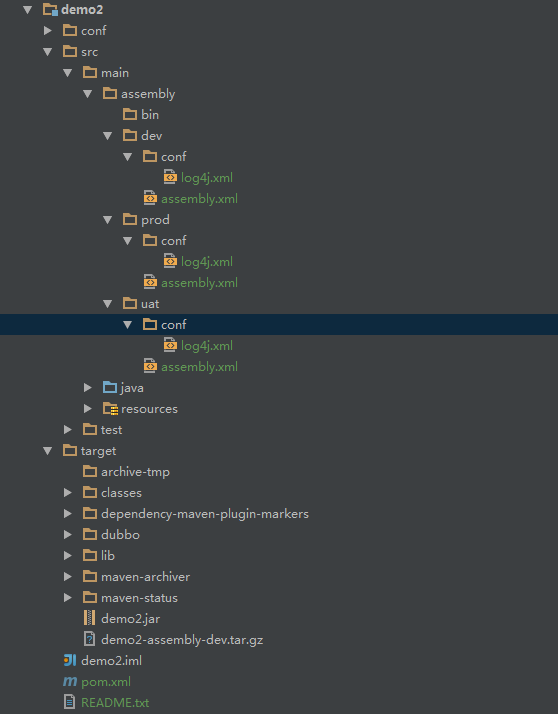
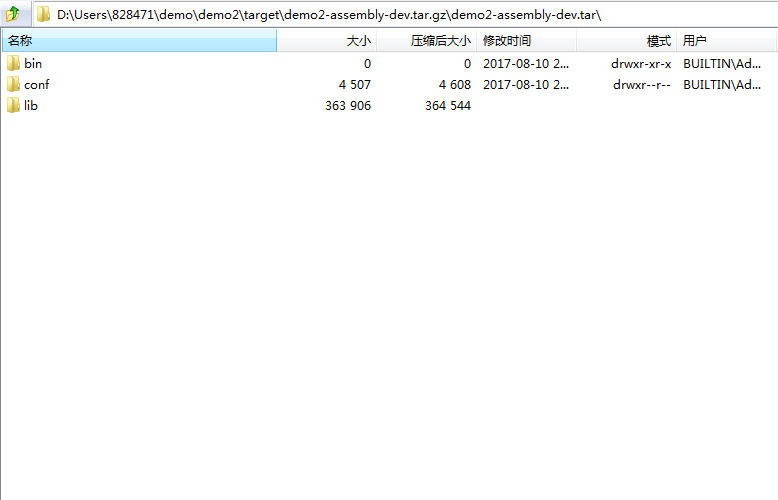
具体的构建完成包结构信息如下,关于target 此块只是tar.gz 与assembly有关,其余的为其他插件使用生成,生成的包结构亦如下:
最详细的信息请参考apache官网:https://maven.apache.org/plugins/maven-assembly-plugin/descriptor-refs.html
利用maven-assembly-plugin加载不同环境所需的配置文件及使用场景的更多相关文章
- maven (profiles)装载不同环境所需的配置文件
引子: maven与java的联系在今天的项目已经是不可分割的 ,但是不同的项目有各具特色的项目结构,不同的项目结构使用了不同的maven插件,想要了解一个项目的项目结构,或者自己构建一个具有成熟结构 ...
- 重温.NET下Assembly的加载过程
最近在工作中牵涉到了.NET下的一个古老的问题:Assembly的加载过程.虽然网上有很多文章介绍这部分内容,很多文章也是很久以前就已经出现了,但阅读之后发现,并没能解决我的问题,有些点写的不是特别详 ...
- 重温.NET下Assembly的加载过程 ASP.NET Core Web API下事件驱动型架构的实现(三):基于RabbitMQ的事件总线
重温.NET下Assembly的加载过程 最近在工作中牵涉到了.NET下的一个古老的问题:Assembly的加载过程.虽然网上有很多文章介绍这部分内容,很多文章也是很久以前就已经出现了,但阅读之后 ...
- NET下Assembly的加载过程
NET下Assembly的加载过程 最近在工作中牵涉到了.NET下的一个古老的问题:Assembly的加载过程.虽然网上有很多文章介绍这部分内容,很多文章也是很久以前就已经出现了,但阅读之后发现,并没 ...
- Django_在单独文件中加载Django环境临时调试
创建Django环境后,每次在打印调试都需要基于项目有些麻烦. 如何在项目外的文件中加载项目环境进行便携的调试? 创建一个新的 orm.py import os if __name__ == '__m ...
- 记录一次maven打包时将test目录下的类打包到jar中,Maven Assembly Plugin的使用
今天有人问我打包后找不到主类,运行的类写在test中.按照常规,test目录下的文件不会打包到jar包中.(但是我测试一个springboot工程就可以,这里之后再研究) 具体解决如下 第一步:在po ...
- Java日志组件logback使用:加载非类路径下的配置文件并设置定时更新
Java日志组件logback使用:加载非类路径下的配置文件并设置定时更新 摘自: https://blog.csdn.net/johnson_moon/article/details/7887449 ...
- maven pom.xml加载不同properties配置[转]
可以参考http://www.openwebx.org/docs/autoconfig.html 1.pom.xml =========================== <!-- 不同的打包 ...
- idea开发maven项目热加载
JavaWeb项目,尤其是一些大型项目,在开发过程中,启动项目耗费的时间就不短.大大的拖慢了开发速度!在这分享一种不需要插件就能实现热加载的方法! 默认已经创建好一个Maven项目 点击此按钮 点击 ...
随机推荐
- ubuntu 访问 共享 windows文件夹
sudo mount -o username=*******,password=******** //192.168.1.105/迅雷下载 /mnt/
- 转载:【原译】Erlang常见注意事项(Efficiency Guide)
转自:http://www.cnblogs.com/futuredo/archive/2012/10/17/2726416.html Common Caveats(常见注意事项) Erlang/OTP ...
- c++ 的vector、array和数组的比较
ref: http://blog.csdn.net/haust_wang/article/details/49848169
- 基础控制器MVC ,全局判断
public class BaseController : Controller { // // GET: /Base/ protected override voi ...
- c++ 转化
atof(将字符串转换成浮点型数)相关函数atoi,atol,strtod,strtol,strtoul表头文件#include定义函数double atof(const char *nptr);函数 ...
- yield的作用
执行程序遇到yield关键字会交出执行权,跳出协程方法,继续执行协程方法以外的其他代码逻辑,在约定的时间后,重新回到yield关键字处,继续执行yield语句后面的代码内容, yield return ...
- C# 哈希加密
1.方法一: [c-sharp] view plaincopy //适用于C#语言 //使用前需导入以下命名空间:using System.Web.Security; //第一个参数为需加密的字符串, ...
- BZOJ 1089 SCOI2003 严格n元树 动态规划+高精度
题目大意:定义一棵深度为d的严格n元树为根的深度为0,最深的节点深度为d,且每一个非叶节点都有恰好n个子节点的树 给定n和d,求深度为d的严格n元树一共同拥有多少种 此题的递推部分并不难 首先我们设深 ...
- centos 安装 phalcon
git clone --depth 1 --branch phalcon-v2.0.3 https://github.com/phalcon/cphalcon.git cd cphalcon/ext ...
- mybatis 返回值类型是Map
<select id="selectByMemberKey" resultType="java.util.HashMap"> SELECT memb ...