
PaaS平台– Google App Engine的开源实现AppScale环境搭建
搭建好开发环境介绍:
- 硬件平台:HP Z800 工作站 内存:24GB 硬盘:1TB
- 虚拟化环境:XenServer 6.2.0
- VM1:Ubuntu 12.04 amd64 server | IP:192.168.137.50
- VM2:Ubuntu 12.04 amd64 server | IP:192.168.137.51
- VM3:Ubuntu 12.04 amd64 server | IP:192.168.137.52
1、从Git安装Appscale
在Xen上安装好Ubuntu 12.04 server版本号后,使用root用户登录,然后执行:
wget -O – http://bootstrap.appscale.com | sh
然后会从git clone到本地。进行自己主动化安装。该命令会执行以下的操作:
安装git
apt-get install -y git-core
构建appscale
cd /root
git clone git://github.com/AppScale/appscale.git
cd appscale/debian
bash appscale_build.sh
构建appscale-tools
cd /root
git clone git://github.com/AppScale/appscale-tools.git
cd appscale-tools/debian
bash appscale_build.sh
不出意外,基本能够完毕自己主动化安装。假设报错,请Google。
2、VM准备
首先将上面安装的VM进行clone,这里使用,复制出VM1和VM2。
然后对每一个VM进行设置静态IP:改动每一个VM的/etc/network/interfaces文件
VM1:
1 |
auto eth0 |
2 |
iface eth0 inet static |
3 |
address 192.168.137.50 |
4 |
netmask 255.255.255.0 |
5 |
gateway 192.168.137.1 |
6 |
dns-nameservers 114.114.114.114 |
VM2:
1 |
auto eth0 |
2 |
iface eth0 inet static |
3 |
address 192.168.137.51 |
4 |
netmask 255.255.255.0 |
5 |
gateway 192.168.137.1 |
6 |
dns-nameservers 114.114.114.114 |
VM3:
1 |
auto eth0 |
2 |
iface eth0 inet static |
3 |
address 192.168.137.52 |
4 |
netmask 255.255.255.0 |
5 |
gateway 192.168.137.1 |
6 |
dns-nameservers 114.114.114.114 |
相应也改动每一个VM的主机名。(配置文件/etc/hostname)
3、准备启动
三个VM又一次启动后,在master上执行:
1 |
appscale init cluster |
初始化集群。
改动自己主动生成的配置文件:AppScalefile
1 |
ips_layout : |
2 |
master : 192.168.137.50 |
3 |
appengine : 192.168.137.50 |
4 |
database : 192.168.137.51 |
5 |
zookeeper : 192.168.137.52 |
4、启动集群
执行命令:
1 |
appscale up |
看到以下输出信息:
01 |
Starting AppScale 1.14.0 over a virtualized cluster. |
02 |
Log in to your head node: ssh -i /root/.appscale/appscale6099037d27e2439c8396c88148e5037b.key root@192.168.137.50 |
03 |
Head node successfully initialized at 192.168.137.50. It is now starting up cassandra. |
04 |
Copying over deployment credentials |
05 |
Starting AppController at 192.168.137.50 |
06 |
Please wait for the AppController to finish pre-processing tasks. |
07 |
08 |
Please wait for AppScale to prepare your machines for use. |
09 |
Copying over needed files and starting the AppController on the other VMs |
10 |
UserAppServer is at 192.168.137.51 |
11 |
Enter your desired admin e-mail address: admin@geekcome.com |
12 |
Enter new password: |
13 |
Confirm password: |
14 |
Creating new user account admin@geekcome.com |
15 |
Creating new user account admin@192.168.137.50 |
16 |
Your XMPP username is admin@192.168.137.50 |
17 |
Granting admin privileges to admin@geekcome.com |
18 |
AppScale successfully started! |
19 |
View status information about your AppScale deployment at http://192.168.137.50:1080/status |
这样就成功启动。
使用命令查看appscale status查看集群的状态:
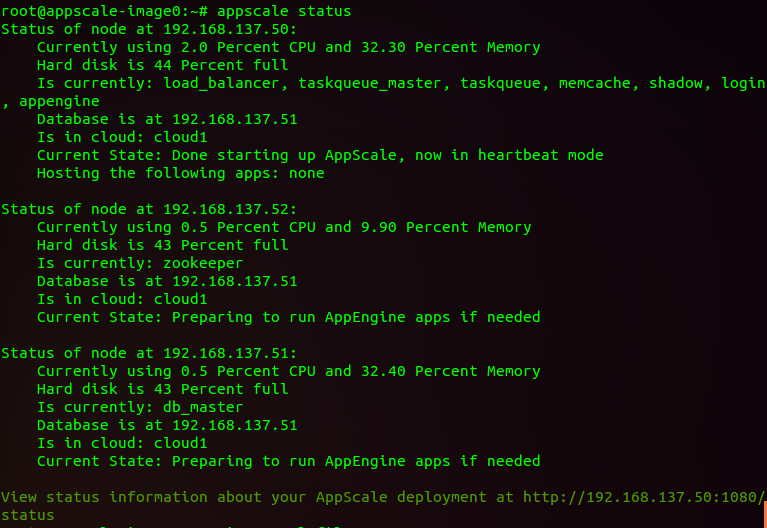
能够登录web管理端:https://192.168.137.50:1443/
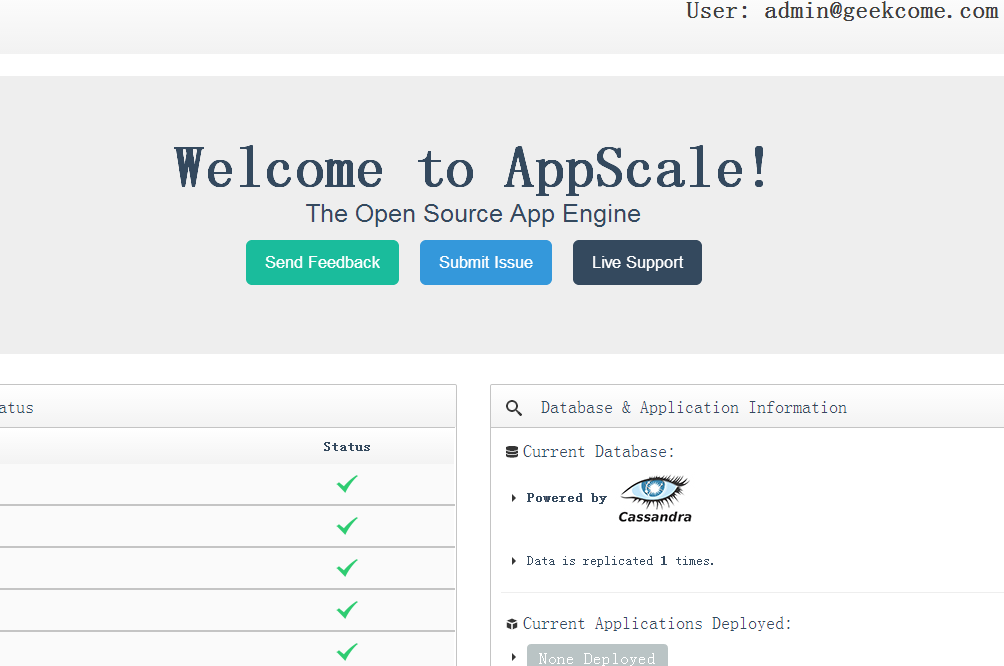
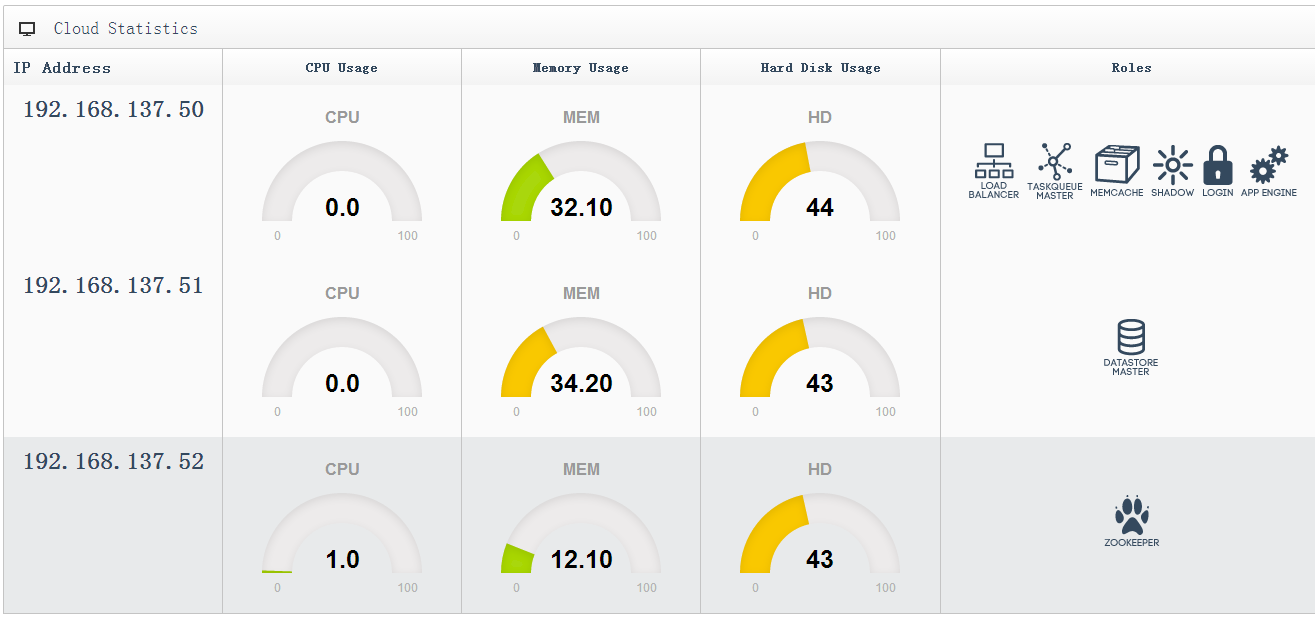
(完)
PaaS平台– Google App Engine的开源实现AppScale环境搭建的更多相关文章
- 如何架设部署V2EX社区/论坛(Google App Engine版)
1.What's V2EX? 关于这个问题,我们可以看看其作者Livid早期自己的V2EX社区的介绍: What's V2EX? 这是很多人都问过的问题,而我一直都没有做出一个明确的解答.因为我实在觉 ...
- Google App Engine, Python2.7的UnicodeDecodeError bug
在跟Web Development,要在Google App Engine上写作业,出师不利,遇到以下bug: 2014-05-06 16:14:17 Running command: "[ ...
- [Ubuntu] Linux下使用google app engine,无法打开https网站的解决方法
为什么这里写的是 google app engine?原因我就不解释了.步骤如下: 1)安装证书导入工具:$ sudo apt-get install libnss3-tools 2)导入CA.crt ...
- 介绍Google App Engine
Google App Engine是一个网络应用托管服务(web application hosting service).所谓网络应用(By web application),我们的意思的可以通过网 ...
- Google App Engine Deployment 相关问题
1.GAE instance上传成功之后可以正常运行的情况下.在Google账户中“关联的应用和网站”,撤销Google App Engine appcfg对Google账户的访问权限. 再次上传时, ...
- Google App Engine 学习和实践
这个周末玩了玩Google App Engine,随手写点东西,算是学习笔记吧.不当之处,请多多指正. 作者:liigo,2009/04/26夜,大连 原创链接:http://blog.csdn.ne ...
- 使用Google App Engine开始新的网站开发学习
继长时间的迷茫后,我发现还是回归php网站开发更适合我,或者没有那么深刻,但至少要做点事情.不知道以后将从事什么样的工作,但现在找点事情做还是很好的.所以,为了激发我学习的热情,我在网上搜了一下免费云 ...
- Google Web Toolkit(GWT) 在windows下环境搭建
1.什么是GWT? Google Web Toolkit(简称GWT,读作/ˈɡwɪt/),是一个前端使用JavaScript,后端使用Java的AJAX framework,以Apache许可证2. ...
- 给Eclipse安装Google app engine插件
1.一般的做法: 参考:https://developers.google.com/eclipse/docs/install-eclipse-4.3 2. 因为 上面的做法一直没有成功,改为下载离线包 ...
随机推荐
- [转]C#中Timer使用及解决重入问题
本文转自:http://www.cnblogs.com/hdkn235/archive/2014/12/27/4187925.html ★前言 打开久违的Live Writer,又已经好久没写博客了, ...
- [转]OData的初步认识 OData v4 Client Code Generator
本文转自:http://www.cnblogs.com/1zhk/p/5356053.html What – OData是什么? OData - Open Data Protocol,是一个设计和使用 ...
- [转]OData – the best way to REST–实例讲解ASP.NET WebAPI OData (V4) Service & Client
本文转自:http://www.cnblogs.com/bluedoctor/p/4384659.html 一.概念介绍 1.1,什么是OData? 还是看OData官网的简单说明: An open ...
- VS2013漂亮字体
使用字体:Fixedsys Excelsior 3.011.首先下载字体:http://www.fixedsysexcelsior.com/ 2.安装字体:控制面板 -> 字体,复制下载的文件进 ...
- Html.DropDownList传值
Html.DropDownList传值: 可以传入明确的IEnumerable<SelectListItem>,也可以通过ViewBag或者ViewData隐式地传入,前提是需要相同的名称 ...
- flask中的数据操作
flask中数据访问: pip install flask-sqlalemy 创建数据: 创建app的工厂 from flask import Flask from flask_sqlalchemy ...
- 记一次C#面试
最近参加了工作后的第一次面试,虽然最终没谈成,但是收获还是不少,不管是技术还是面试经验还是得多多积累呀. 这一次面试与在学校时候参加过的面试区别还是挺大的.校园招聘的面试问的问题似乎都比较具体,直接针 ...
- Guava限流工具RateLimiter使用
公司最近在推一个限流工具接入,提供的功能有单机限流.集群限流等.想了解一下限流的原理和设计,看了一下wiki里面有提到用了guava的ratelimiter工具,查了一些资料了解了一下 主要的限流算法 ...
- lvarchar类型对表结构变更影响
informix中lvarchar类型设计用于存储中度长度的字符数据(短的常用varchar类型.特别长的字符可用text类型).其默认长度2048byte,最大长度32739byte,是一种可变长度 ...
- springboot开篇 (一)简单邮件发送
上篇终结篇为spring 发送邮件,这次将使用springboot 发送邮件,同时本篇将作为springboot入门篇. 新建一个工程..工程目录结构如下,此次使用idea进行开发.对于一个长期使用e ...