
5、Web Service-整合CXF
1、工程准备
继续使用之前的服务端:https://www.cnblogs.com/Mrchengs/p/10562458.html
2、jar准备
前去apache官网下载响应的jar:http://cxf.apache.org/download.html
3、在原来的工程中导入jar文件
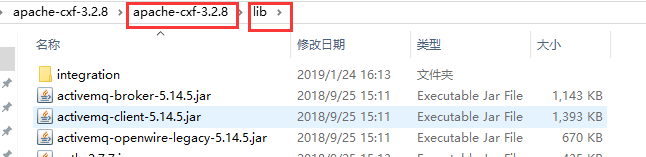
其中提供的jar相对比较多可以根据开发需求去导入相应的jar!
启动服务:

可以看到使用的是jetty服务的
4、查看wsdl
http://localhost:8081/webserviceserver/helloService?wsdl
<wsdl:definitions xmlns:xsd="http://www.w3.org/2001/XMLSchema" xmlns:wsdl="http://schemas.xmlsoap.org/wsdl/" xmlns:tns="http://impl.service.cr.com/" xmlns:soap="http://schemas.xmlsoap.org/wsdl/soap/" xmlns:ns2="http://schemas.xmlsoap.org/soap/http" xmlns:ns1="http://service.cr.com/" name="HelloServiceImplService" targetNamespace="http://impl.service.cr.com/">

<wsdl:import location="http://localhost:8081/webserviceserver/helloService?wsdl=HelloService.wsdl" namespace="http://service.cr.com/"> </wsdl:import>

<wsdl:binding name="HelloServiceImplServiceSoapBinding" type="ns1:HelloService">

<soap:binding style="document" transport="http://schemas.xmlsoap.org/soap/http"/>

<wsdl:operation name="sayHello">

<soap:operation soapAction="" style="document"/>

<wsdl:input name="sayHello">

<soap:body use="literal"/>

</wsdl:input>

<wsdl:output name="sayHelloResponse">

<soap:body use="literal"/>

</wsdl:output>

</wsdl:operation>

</wsdl:binding>

<wsdl:service name="HelloServiceImplService">

<wsdl:port binding="tns:HelloServiceImplServiceSoapBinding" name="HelloServiceImplPort">

<soap:address location="http://localhost:8081/webserviceserver/helloService"/>

</wsdl:port>

</wsdl:service>

</wsdl:definitions>
创建新的工程,将其拷贝到新的wsdl文件中进行编译

进行编译使用
环境变量的配置:https://www.cnblogs.com/ChrisMurphy/p/5224160.html
执行命令:

工程目录
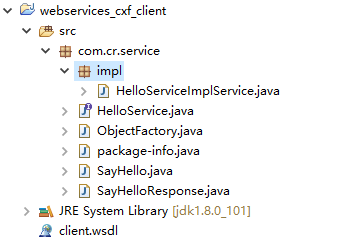
新建测试类:

5、测试类
package cn.com.client;

import com.cr.service.HelloService;

import com.cr.service.impl.HelloServiceImplService;

public class client {

     public static void main(String[] args){

        HelloServiceImplService factory = new HelloServiceImplService();

        HelloService hello = factory.getHelloServiceImplPort();

       String res = hello.sayHello("mr");

        System.out.println(res);

    }

}
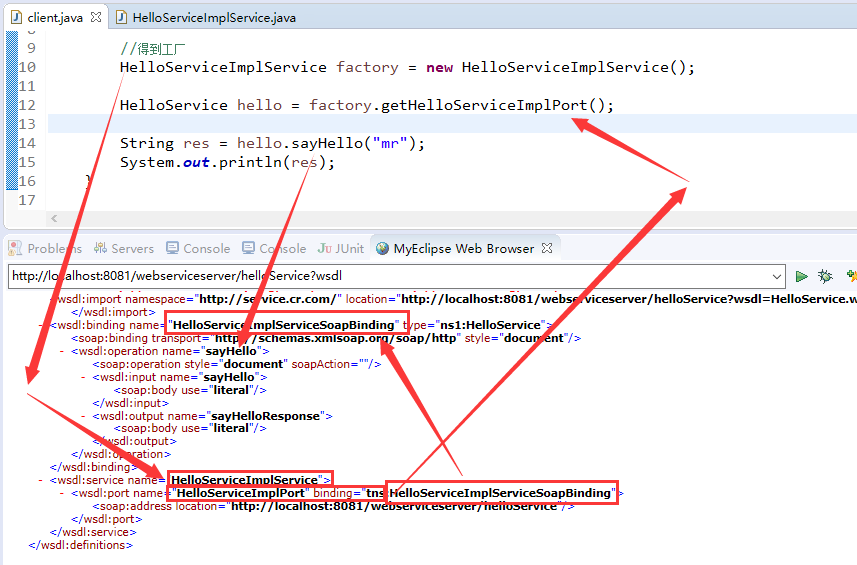
得到的结果如下:

6、分析请求和响应
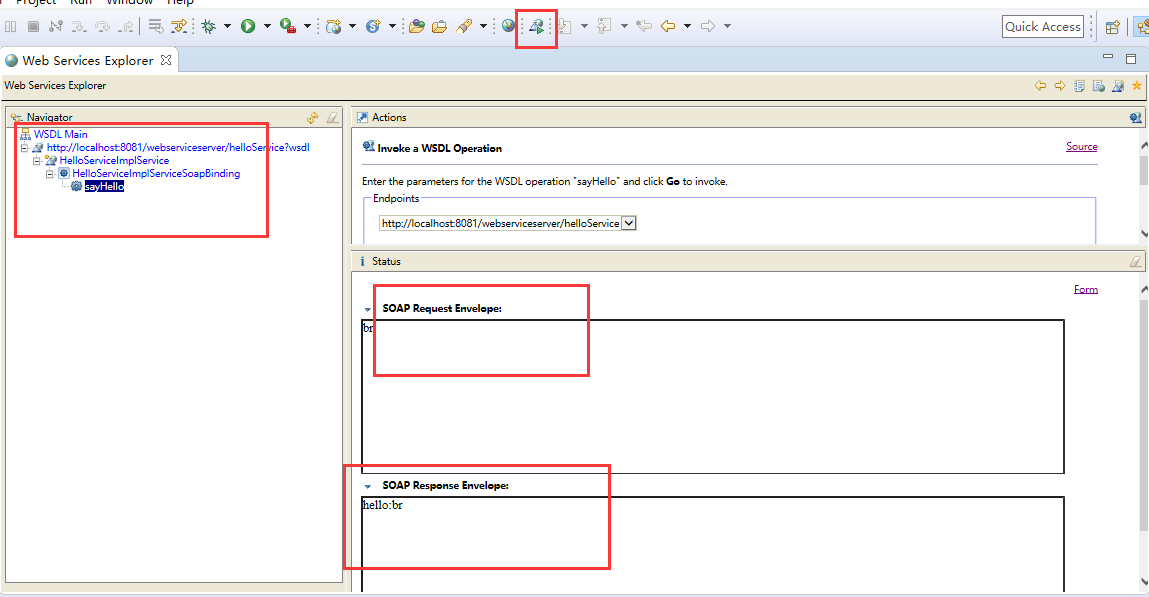
request
<soapenv:Envelope xmlns:soapenv="http://schemas.xmlsoap.org/soap/envelope/"
 xmlns:q0="http://service.cr.com/" xmlns:xsd="http://www.w3.org/2001/XMLSchema"
xmlns:xsi="http://www.w3.org/2001/XMLSchema-instance">

  <soapenv:Body>

    <q0:sayHello>

      <arg0>br</arg0>

    </q0:sayHello>

  </soapenv:Body>

</soapenv:Envelope>
response
<soap:Envelope xmlns:soap="http://schemas.xmlsoap.org/soap/envelope/">

  <soap:Body>

    <ns2:sayHelloResponse xmlns:ns2="http://service.cr.com/">

      <return>hello:br</return>

    </ns2:sayHelloResponse>

  </soap:Body>

</soap:Envelope>
分析:
<?xml version="1.0" encoding="UTF-8"?>

<definitions xmlns:wsu="http://docs.oasis-open.org/wss/2004/01/oasis-200401-wss-wssecurity-utility-1.0.xsd"

    xmlns:wsp="http://www.w3.org/ns/ws-policy"

    xmlns:wsp1_2="http://schemas.xmlsoap.org/ws/2004/09/policy"

    xmlns:wsam="http://www.w3.org/2007/05/addressing/metadata"

    xmlns:soap="http://schemas.xmlsoap.org/wsdl/soap/"

    xmlns:tns="http://impl.service.cr.com/"

    xmlns:xsd="http://www.w3.org/2001/XMLSchema"

    xmlns="http://schemas.xmlsoap.org/wsdl/"

    targetNamespace="http://impl.service.cr.com/"

    name="HelloServiceImplService">

    <!--

        types

        schema : 定义了一些标签结构

     -->

    <types>

        <xsd:schema>

        <xsd:import namespace="http://impl.service.cr.com/"

            schemaLocation="http://localhost:8081/webserviceserver/helloService?xsd=1"></xsd:import>

        </xsd:schema>

    </types>

    <!--

        message: 用来定义消息的结构   soap消息

        part : 指定引用types中定义的标签片断

     -->

    <message name="sayHello">

        <part name="parameters" element="tns:sayHello"></part>

    </message>

    <message name="sayHelloResponse">

        <part name="parameters" element="tns:sayHelloResponse"></part>

    </message>

     <!--

        portType: 用来定义服务器端的SEI

        operation : 用来指定SEI中的处理请求的方法

        input : 指定客户端应用传过来的数据, 会引用上面的定义的<message>

        output : 指定服务器端返回给客户端的数据, 会引用上面的定义的<message>

     -->

    <portType name="HelloServiceImpl">

        <operation name="sayHello">

            <input wsam:Action="http://impl.service.cr.com/HelloServiceImpl/sayHelloRequest" message="tns:sayHello"></input>

            <output wsam:Action="http://impl.service.cr.com/HelloServiceImpl/sayHelloResponse" message="tns:sayHelloResponse"></output>

        </operation>

    </portType>

    <!--

        binding : 用于定义SEI的实现类

        type属性: 引用上面的<portType>

        <soap:binding style="document"> : 绑定的数据是一个document(xml)

        operation : 用来定义实现的方法

        <soap:operation style="document" /> 传输的是document(xml)

        input: 指定客户端应用传过来的数据

        <soap:body use="literal" /> : 文本数据

        output : 指定服务器端返回给客户端的数据

        <soap:body use="literal" /> : 文本数据

     -->

    <binding name="HelloServiceImplPortBinding" type="tns:HelloServiceImpl">

        <soap:binding transport="http://schemas.xmlsoap.org/soap/http"

                    style="document"></soap:binding>

        <operation name="sayHello">

            <soap:operation soapAction=""></soap:operation>

            <input>

                <soap:body use="literal"></soap:body>

            </input>

            <output>

                <soap:body use="literal"></soap:body>

            </output>

        </operation>

    </binding>

    <!--

        service : 一个webservice的容器

        name属性: 它用一指定客户端容器类

        port : 用来指定一个服务器端处理请求的入口(就SEI的实现)

        binding属性: 引用上面定义的<binding>

        address : 当前webservice的请求地址

     -->

    <service name="HelloServiceImplService">

    <port name="HelloServiceImplPort" binding="tns:HelloServiceImplPortBinding">

    <soap:address location="http://localhost:8082/webserviceserver/helloService"></soap:address>

    </port>

    </service>

</definitions>
同时可以参考地址:https://www.cnblogs.com/yangh965/p/5046841.html
图解:
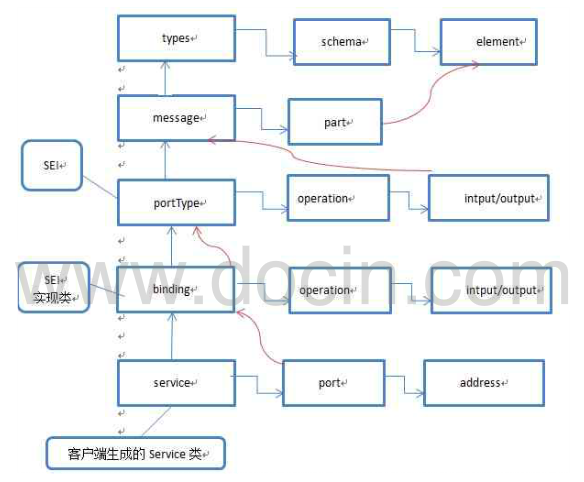
7、CXF支持的数据类型
1、基本数据类型:int、float、boolean等
2、引用类型
-String
-集合:数组、List、Set、Map
-自定义类型
1、工程目录

此时仅仅添加了3个类:DateTypeWs.java DateTypeWsImpl.java Student.java
2、类
Student.java
package com.cr.bean;

public class Student {

    private String name;

    private int price;

        //.....

 }
DateTypeWs.java
package com.cr.service;

import java.util.List;

import java.util.Map;

import javax.jws.WebMethod;

import javax.jws.WebService;

import com.cr.bean.Student;

@WebService

public interface DateTypeWs {

    @WebMethod

    public boolean addStudent(Student stu);

    @WebMethod

    public Student gatStuByPrice(int price);

    @WebMethod

    public List<Student> getStudentByprice(int price);

    @WebMethod

    public Map<Integer, Student> getAllStu();

}
DateTypeWsImpl.java
package com.cr.service.impl;

import java.util.ArrayList;

import java.util.HashMap;

import java.util.List;

import java.util.Map;

import javax.jws.WebService;

import com.cr.bean.Student;

import com.cr.service.DateTypeWs;

@WebService

public class DateTypeWsImpl implements DateTypeWs {

    @Override

    public boolean addStudent(Student stu) {

        // TODO Auto-generated method stub

        System.out.println("addStudent:" + stu);

        return true;

    }

    @Override

    public Student gatStuByPrice(int price) {

        System.out.println("gatStuByPrice:" + price);

        return new Student("Mr",);

    }

    @Override

    public List<Student> getStudentByprice(int price) {

        System.out.println("getStudentByprice:" + price);

        List<Student> list = new ArrayList<Student>();

        Student s1 = new Student("Mr1",);

        Student s2= new Student("Mr2",);

        list.add(s2);

        list.add(s1);

        return list;

    }

    @Override

    public Map<Integer, Student> getAllStu() {

        System.out.println("getAllStu:");

        Map<Integer, Student> map = new HashMap<Integer, Student>();

        map.put(, new Student("Mr11",));

        map.put(, new Student("Mr22",));

        return map;

    }

}
启动服务:
package com.cr.server;

import javax.xml.ws.Endpoint;

import com.cr.service.impl.DateTypeWsImpl;

import com.cr.service.impl.HelloServiceImpl;

//发布service

public class server {

      public static void main(String[] args){

        String address = "http://localhost:8081/webserviceserver/helloService";

        Endpoint.publish(address , new HelloServiceImpl());

        String address1 ="http://localhost:8081/webserviceserver/dateTypeWs" ;

        Endpoint.publish(address1  , new DateTypeWsImpl());

        System.out.println("发布成功....");

    }

}

两个wsdl文件:
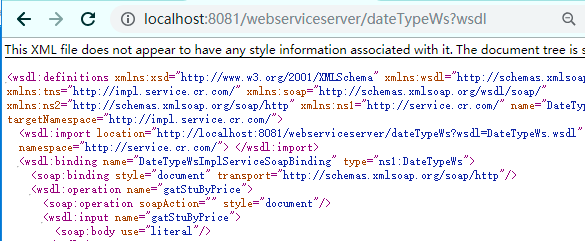
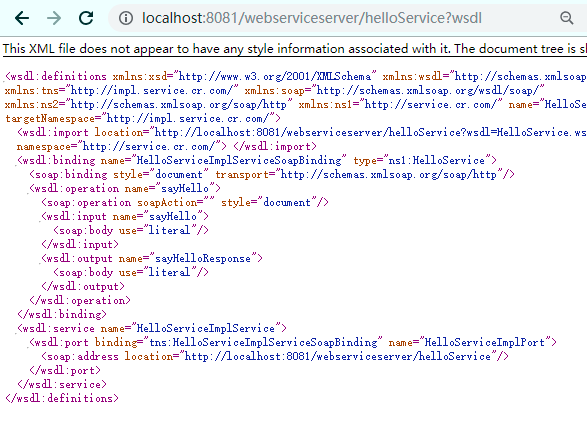
3、测试端:
将 保存为:
保存为:
cmd:
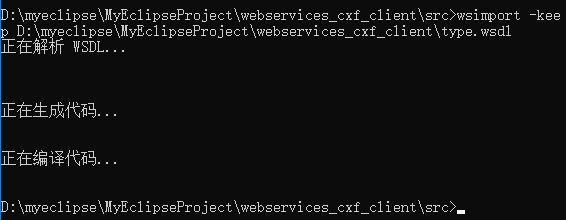
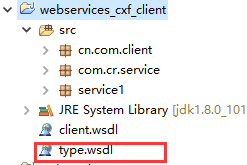
最终得到:
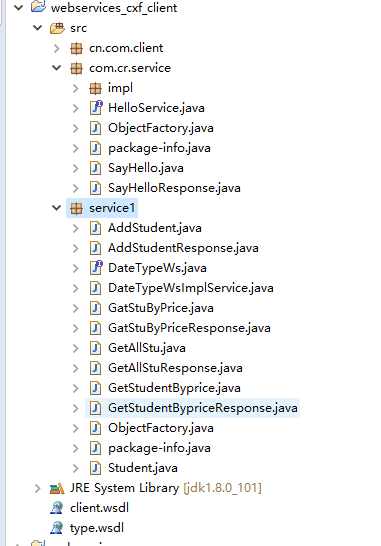
4、测试类:
package cn.com.client;

import java.util.List;

import service1.DateTypeWs;

import service1.DateTypeWsImplService;

import service1.Student;

public class client2 {

     public static void main(String[] args){

         DateTypeWsImplService factory = new DateTypeWsImplService();

         DateTypeWs ws = factory.getDateTypeWsImplPort();

         Student stu = new Student();

         stu.setName("mr");

         stu.setPrice();

         boolean sadd = ws.addStudent(stu);

         System.out.println("addStudent(stu):" + sadd);

         Student stu1 =  ws.gatStuByPrice();

         System.out.println(stu1);

         List<Student>  list = ws.getStudentByprice();

         System.out.println(list);

         System.out.println(ws.getAllStu());

    }

}
客户端的打印:

服务端的打印
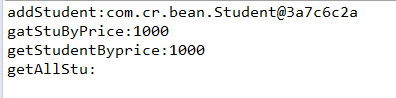
此时可以看出关于CXF支持的数据类型
这里只做了简单的测试
其中Map的使用会有点问题(JDK不支持)
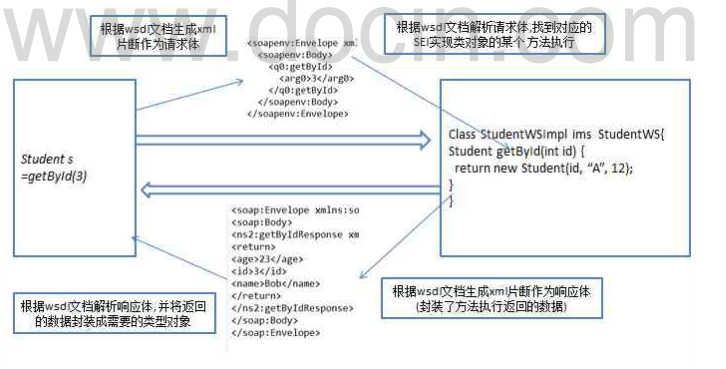
8、一次请求Web Service请求的流程
一次请求web Service请求的本质:
(1)、浏览器向服务器发送一个soap消息(http请求+xml片段)
(2)、服务器端处理晚请求之后,向客户端返回一个soap消息
流程:
5、Web Service-整合CXF的更多相关文章
- Web Service学习-CXF开发Web Service实例demo(一)
Web Service是什么? Web Service不是框架.更甚至不是一种技术. 而是一种跨平台,跨语言的规范 Web Service解决什么问题: 为了解决不同平台,不同语言所编写的应用之间怎样 ...
- Web Service学习-CXF开发Web Service的权限控制(二)
Web Service怎样进行权限控制? 解决思路:server端要求input消息总是携带实username.password信息,假设没实username和password信息.直接拒绝调用 解决 ...
- 【转】基于CXF Java 搭建Web Service (Restful Web Service与基于SOAP的Web Service混合方案)
转载:http://www.cnblogs.com/windwithlife/archive/2013/03/03/2942157.html 一,选择一个合适的,Web开发环境: 我选择的是Eclip ...
- Apache CXF实现Web Service(5)—— GZIP使用
Apache CXF实现Web Service(5)-- GZIP使用 参考来源: CXF WebService整合Spring Apache CXF实现Web Service(1)--不借助重量级W ...
- Apache CXF实战之四 构建RESTful Web Service
Apache CXF实战之一 Hello World Web Service Apache CXF实战之二 集成Sping与Web容器 Apache CXF实战之三 传输Java对象 这篇文章介绍一下 ...
- Web Service学习之一:Web Service原理
一.定义 Web Service 不是框架也不是技术 而是解决远程调用.跨平台调用.跨语言调用问题的一种规范. 二.应用1.同一个公司新.旧系统的整合:比如CRM系统与OA.客服系统相互调用2.不同公 ...
- Visual Studio 2010中创建ASP.Net Web Service
转自:http://blog.csdn.net/xinyaping/article/details/7331375 很多人在论坛里说,在Visual Studio 2010中不能创建“ASP.Net ...
- (转)在 Visual Studio 2010 中创建 ASP.Net Web Service
很多人在论坛里说,在Visual Studio 2010中不能创建“ASP.Net Web Service”这种project了,下面跟帖者云云,有的说这是因为微软已经将Web Service整合进W ...
- Web Service简单入门示例
Web Service简单入门示例 我们一般实现Web Service的方法有非常多种.当中我主要使用了CXF Apache插件和Axis 2两种. Web Service是应用服务商为了解决 ...
- Web Service(下)
4.WSDL文档 <?xml version='1.0' encoding='UTF-8'?> <wsdl:definitions xmlns:xsd="http://ww ...
随机推荐
- 九、sparkStream的scala示例
简介 sparkStream官网:http://spark.apache.org/docs/latest/streaming-programming-guide.html#overview spark ...
- windows emacs 中拷贝文件
cp d:/workspace/LoginWeb/target/LoginWeb.war D:/Program\ Files/apache-tomcat-7.0.78/webapps/LoginWeb ...
- C++11:实用特性
今天逛cplusplus.com发现C++还真多了不少方便使用的特性,先了解些最常用的 初始化列表 vector<,,,}); vector<pair<int, int> &g ...
- Aizu2292 Common Palindromes
题意 我也不知道哪里来的OJ \(vjudge\) 上的 给定两个字符串 \(S,T\) ,询问 \((i,j,k,l)\) 这样的四元组个数 使得 \(S[i,j],T[k,l]\) 是相等的回文串 ...
- 有关动态规划(主要是数位DP)的一点讨论
动态规划(dynamic programming)是运筹学的一个分支,是求解决策过程(decision process)最优化的数学方法.20世纪50年代初美国数学家在研究多阶段决策过程的优化问题时, ...
- 利用Swig转换C++代码为C#可用的代码
详细的文件路径为:http://user.qzone.qq.com/1259374136/blog/1432887689 Swig学习教程 1.Swig的基本介绍 SWIG(Simplified Wr ...
- 对WebSocket技术的学习与探索(一)
WebSocket 简要介绍 WebSocket protocol 是HTML5一种新的协议. 它实现了浏览器与服务器全双工通信(full-duple). 一开始的握手需要借助HTTP请求完成. We ...
- C#字节流通信格式
类似通信格式的实现关键点: byte数组转float的实现,BitConvetor.toSingle() float类型转by,BitConverter.GetBytes #客户端发送public b ...
- 从零开始——JSON ARRAY&JSON OBJECT
在学习“基于角色的权限”的例子中,遇到了json object和json array,因此在一番学习之后对此要点进行粗略整理. 参考: https://my.oschina.net/u/2601842 ...
- iOS8模糊效果UIVisualEffectView的使用
iOS8模糊效果UIVisualEffectView的使用 效果: 源码: // // ViewController.m // EffectView // // Created by XianMing ...