
【CentOS】安装Docker教程
前提条件
Docker 运行在 CentOS 7 上,要求系统为64位、系统内核版本为 3.10 以上。
Docker 运行在 CentOS-6.5 或更高的版本的 CentOS 上,要求系统为64位、系统内核版本为 2.6.32-431 或者更高版本。
首先, 查看系统是否支持:
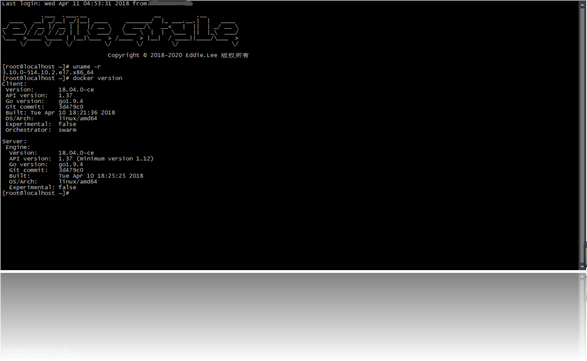
Docker有两种方式安装:
- 脚本安装
- Yum包安装
安装前注意:
- 本文针对CentOS 7 去安装
- 如果太久或者是特殊系统不要yum update
- 必需要root权限
一、Yum包安装
(1) 添加 docker,Yum源
[root@localhost ~]# sudo tee /etc/yum.repos.d/docker.repo <<-'EOF'

> [dockerrepo]

> name=Docker Repository

> baseurl=https://yum.dockerproject.org/repo/main/centos/$releasever/

> enabled=1

> gpgcheck=1

> gpgkey=https://yum.dockerproject.org/gpg

> EOF

[dockerrepo]

name=Docker Repository

baseurl=https://yum.dockerproject.org/repo/main/centos/$releasever/

enabled=1

gpgcheck=1

gpgkey=https://yum.dockerproject.org/gpg
(2) 安装 docker包
[root@localhost ~]# yum install docker-engine
(3) 启动守护 docker进程
[root@localhost ~]# service docker start

Redirecting to /bin/systemctl start  docker.service
(4) 测试
[root@localhost ~]# docker run hello-world

Unable to find image 'hello-world:latest' locally

latest: Pulling from library/hello-world

ca4f61b1923c: Pull complete

Digest: sha256:97ce6fa4b6cdc0790cda65fe7290b74cfebd9fa0c9b8c38e979330d547d22ce1

Status: Downloaded newer image for hello-world:latest

Hello from Docker!

This message shows that your installation appears to be working correctly.

To generate this message, Docker took the following steps:

 1. The Docker client contacted the Docker daemon.

 2. The Docker daemon pulled the "hello-world" image from the Docker Hub.

    (amd64)

 3. The Docker daemon created a new container from that image which runs the

    executable that produces the output you are currently reading.

 4. The Docker daemon streamed that output to the Docker client, which sent it

    to your terminal.

To try something more ambitious, you can run an Ubuntu container with:

 $ docker run -it ubuntu bash

Share images, automate workflows, and more with a free Docker ID:

 https://cloud.docker.com/

For more examples and ideas, visit:

 https://docs.docker.com/engine/userguide/
(5) 镜像加速 (可选)
 vim /etc/docker/daemon.json

{

  "registry-mirrors": ["http://hub-mirror.c.163.com"]

}
(6) 开机启动
[root@localhost ~]# systemctl enable docker.service
二、脚本安装 (感觉不太靠谱, 不推荐)
(1) yum update
(2) curl -sSL https://get.docker.com/ | sh
(3) service docker start
(4) docker run hello-world
启动时候会出现的错误:
Job for docker.service failed. See 'systemctl status docker.service' and 'journalctl -xn' for details.
1: 防火墙之类的,
2: yum -y install docker
推荐文档:
http://www.runoob.com/docker/centos-docker-install.html
http://www.docker.org.cn/book/install/supported-platform-17.html
【CentOS】安装Docker教程的更多相关文章
- Linux--CentOS 安装 Docker 教程
本文主要介绍 CentOS 系统安装 Docker 的流程. 前提条件 OS 要求 CentOS7: The centos-extras repository must be enabled. Thi ...
- 手把手教centos安装docker
目录 版本说明 官网安装教程 安装docker 现在网络上安装教程满天飞,很大一部分是别人的总结,可以说是成果,却没有介绍如何去实现这个成果方法.这篇就结合官网教程来聊聊如何在centos上安装doc ...
- centos安装docker容器
centos安装docker容器 系统环境需求 docker要运行在centos7系统中,系统为64位机器上,内核最小版本在3.10以上 如果系统为centos6,后面有附带的安装方法 uname - ...
- 【实战】Docker 入门实战一:ubuntu 和 centos 安装Docker
Docker是什么 Docker 是一个开源的应用容器引擎,基于 Go 语言 并遵从Apache2.0协议开源.Docker 可以让开发者打包他们的应用以及依赖包到一个轻量级.可移植的容器中,然后发布 ...
- ubuntu和centos安装docker
一. UBUNTU系统上 1. 卸载旧版本(新系统不用执行) sudo apt-get remove docker docker-engine docker.io 2. 安装docker st ...
- Centos安装smokeping教程
Centos安装smokeping教程 一 .安装基本依赖包 ntpdate time.windows.com #64bit rpm -Uhv http://apt.sw.be/redhat/el6/ ...
- CentOS安装docker,及其基本操作
CentOS安装docker,及其基本操作 一.安装docker Docker要求运行在Centos 7上,要求系统为64位,系统内核版本3.10以上 1.uname -an 查看当前系统版本 2.y ...
- CentOS安装docker ce的三种方式
参考文章: CentOS安装docker ce的三种方式: 1.环境 CentOS Linux release 7.6.1810 (Core) 2.卸载旧版本 sudo yum remove dock ...
- 5分钟安装docker教程
Centos安装docker需要操作系统是 CentOS 7 or 8,必须启用centos extras存储库.默认情况下,此存储库处于启用状态,但如果已禁用它,则需要重新启用它. 卸载旧版本 老版 ...
随机推荐
- 人人开源之renren-security
renren-security,从这周开始我将要对其比较详细的研究,之前的研究只不过是比较浅的.正如在这篇文章读读<编写高质量代码:改善Java程序的151条建议>中说过不要重复造轮子. ...
- python 装饰器 传递参数简单案例
def debug(func): def wrapper(*args, **kwargs): # 指定宇宙无敌参数 print "[DEBUG]: enter {}()".form ...
- 404 Note Found 队-Alpha 事后诸葛亮
目录 设想和目标 计划 资源 变更管理 设计/实现 测试/发布 团队的角色,管理,合作 总结: 本小组和其他组的评分 分工和贡献分 全组讨论的照片 问题 第一组提问回答:爸爸饿了队 第二组提问回答:拖 ...
- 404 Note Found 队 Alpha 6
目录 组员情况 组员1(组长):胡绪佩 组员2:胡青元 组员3:庄卉 组员4:家灿 组员5:凯琳 组员6:翟丹丹 组员7:何家伟 组员8:政演 组员9:黄鸿杰 组员10:刘一好 组员11:何宇恒 展示 ...
- LINUX升级PHP版本至5.4.26
参考网址:http://www.itbulu.com/wdcp-php54.html文件:链接:http://pan.baidu.com/s/1slbbNxr 密码:s0yb 1.运行下载PHP版本文 ...
- python散记
1.AOP 将不同的类的内部中雷同的代码和重复的功能,提取出来以重用. 装饰器是一个很著名的设计模式,经常被用于有切面需求的场景,较为经典的有插入日志.性能测试.事务处理等 2.新式类,经典类 新式类 ...
- Centos7下python3.7的pipSSLError问题
在Centos7下成功安装了python3.7, 但是在使用pip3的时候出现了以下错误 中间试过了网上大家给出的好多种办法,一开始我只是在编译的时候 ./configure --with-ssl(p ...
- select 宽度跟随option内容自适应
传统的select在没有设置固定宽度的情况,会因为自身的 option 选项的里,宽度最宽的option作为select本身的宽度 例如 可见效果为: select的宽度因为"宽度最宽的op ...
- MySQL+Service+Servlet+Jsp实现Table表格分页展示数据
下面以一个示例讲解如何使用MySQL+Service+Servlet+Jsp实现Table表格分页展示数据: eg:请假管理系统 要求如下: 一.打开首页页面, 访问查询请假记录的 servlet , ...
- css动画Demo---水波动画和边框动画
先上效果图: 水波动画: 边框动画: 1.水波动画 实现代码 <!DOCTYPE html> <html lang="en"> <head> & ...