
ExtJs 6.0+快速入门,ext-bootstrap.js文件的分析,各版本API下载(一)
ExtAPI 下载地址如下,包含各个版本
http://docs.sencha.com/misc/guides/offline_docs.html
1.使用工具HBuilder
2.java 版本 8.0
3.extjs 版本 6.2.0
注意顺序
        <!--

            描述:引入主题样式文件

        -->

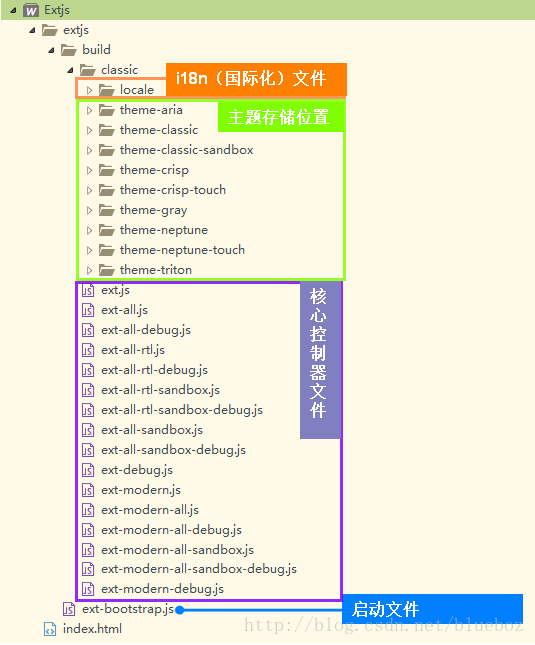
        <link rel="stylesheet" type="text/css" href="extjs\build\classic\theme-gray\resources\theme-gray-all.css"/>

        <!--

            描述:引入控制主题的js脚本

            -->

        <script src="extjs\build\classic\theme-gray\theme-gray.js" type="text/javascript" charset="utf-8"></script>

        <!--

            描述:引入ExtBootstrap文件,这个文件会默认加载

            build->ext-all-debug.js

        -->

        <script src="extjs/ext-bootstrap.js" type="text/javascript" charset="utf-8"></script>

        <!--

            描述:引入I18N 国际化文件

        -->

        <script src="extjs/build/classic/locale/locale-zh_CN.js" type="text/javascript" charset="utf-8"></script>
项目包结构
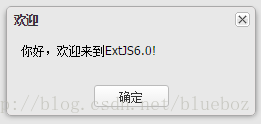
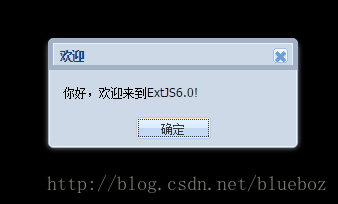
书写js代码绘制helloWorld项目
<script type="text/javascript">

    Ext.onReady(function(){

        Ext.MessageBox.alert("欢迎","你好,欢迎来到ExtJS6.0!");

    });

</script>
效果图
主题
更换其他主题的方法
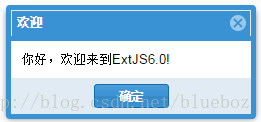
theme-neptune主题
使用方法
<link rel="stylesheet" type="text/css" href="extjs\build\classic\theme-neptune\resources\theme-neptune-all.css"/>效果图
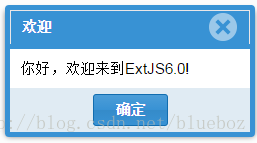
theme-neptune-touch主题
使用方法
<link rel="stylesheet" type="text/css" href="extjs\build\classic\theme-neptune-touch\resources\theme-neptune-touch-all.css"/>效果图
theme-triton主题
使用方法
<link rel="stylesheet" type="text/css" href="extjs\build\classic\theme-triton\resources\theme-triton-all.css"/>效果图
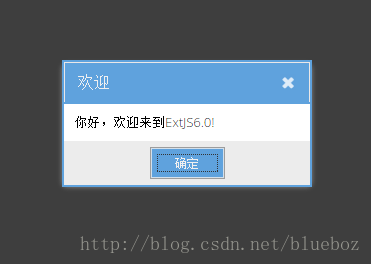
theme-gray主题
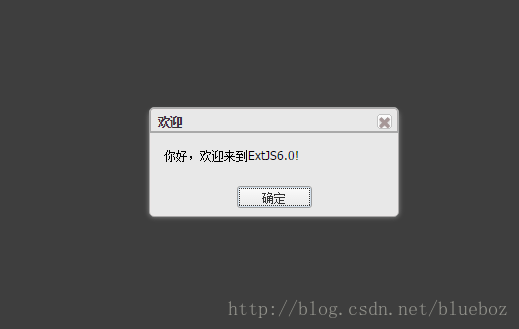
使用方法
<link rel="stylesheet" type="text/css" href="extjs\build\classic\theme-gray\resources\theme-gray-all.css"/>效果图
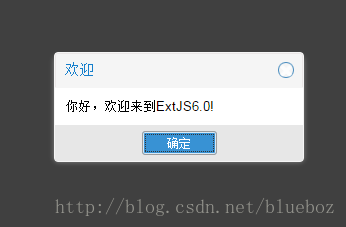
theme-crisp主题
使用方法
<link rel="stylesheet" type="text/css" href="extjs\build\classic\theme-crisp\resources\theme-crisp-all.css"/>效果图
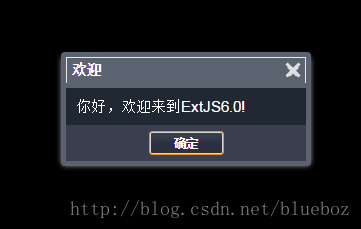
theme-aria主题
使用方法
<link rel="stylesheet" type="text/css" href="extjs\build\classic\theme-aria\resources\theme-aria-all.css"/>效果图
theme-classic
使用方法
<link rel="stylesheet" type="text/css" href="extjs\build\classic\theme-classic\resources\theme-classic-all.css"/>效果图
ext-bootstrap.js
这个文件源码如下
/**

 * Load the library located at the same path with this file

 * 此文件会默认自动加载ext-all-debug.js文件

 * 1.当主机名是localhost

 * 2.当主机名是ipv4地址

 * 3.协议是file协议

 * 4.带有debug参数的

 * 例如(http://foo/test.html?debug)

 *

 * 1.如果在url后加nodebug即可加载ext-all.js文件

 * 例如(http://foo/test.html?nodebug)

 */

(function() {

    var scripts = document.getElementsByTagName('script'),

        localhostTests = [

            /^localhost$/,

            /\b(25[0-5]|2[0-4][0-9]|[01]?[0-9][0-9]?)\.(25[0-5]|2[0-4][0-9]|[01]?[0-9][0-9]?)\.(25[0-5]|2[0-4][0-9]|[01]?[0-9][0-9]?)\.(25[0-5]|2[0-4][0-9]|[01]?[0-9][0-9]?)(:\d{1,5})?\b/ // IP v4

        ],

        host = window.location.hostname,

        isDevelopment = null,

        queryString = window.location.search,

        test, path, i, ln, scriptSrc, match;

    for (i = 0, ln = scripts.length; i < ln; i++) {

        scriptSrc = scripts[i].src;

        match = scriptSrc.match(/ext-bootstrap\.js$/);

        if (match) {

            /**

             * use a path without the ext-bootstrap.js file on it. http://path/to/ext/ext-bootstrap.js will become

             * http://path/to/ext/

             */

            path = scriptSrc.substring(0, scriptSrc.length - match[0].length);

            break;

        }

    }

    if (isDevelopment === null) {

        for (i = 0, ln = localhostTests.length; i < ln; i++) {

            test = localhostTests[i];

            if (host.search(test) !== -1) {

                //host is localhost or an IP address

                isDevelopment = true;

                break;

            }

        }

    }

    if (isDevelopment === null && window.location.protocol === 'file:') {

        isDevelopment = true;

    }

    if (!isDevelopment && queryString.match('(\\?|&)debug') !== null) {

        //debug is present in the query string

        isDevelopment = true;

    } else if (isDevelopment && queryString.match('(\\?|&)nodebug') !== null) {

        //nodebug is present in the query string

        isDevelopment = false;

    }

    document.write('<script type="text/javascript" charset="UTF-8" src="' +

        path + 'build/ext-all' + (isDevelopment ? '-debug' : '') + '.js"></script>');

})();
ExtJs 6.0+快速入门,ext-bootstrap.js文件的分析,各版本API下载(一)的更多相关文章
- ExtJs 6.0+快速入门,ext-bootstrap.js文件的分析,各版本API下载
ExtJS6.0+快速入门+API下载地址 ExtAPI 下载地址如下,包含各个版本 http://docs.sencha.com/misc/guides/offline_docs.html 1.使用 ...
- ExtJS 4.2 教程-02:bootstrap.js 工作方式
转载自起飞网,原文地址:http://www.qeefee.com/extjs-course-2-bootstrap-js ExtJS 4.2 教程-01:Hello ExtJS ExtJS 4.2 ...
- python3.5+django2.0快速入门(二)
昨天写了python3.5+django2.0快速入门(一)今天将讲解配置数据库,创建模型,还有admin的后台管理. 配置数据库 我们打开mysite/mysite/settings.py这个文件. ...
- python3.5+django2.0快速入门(一)
因为这篇教程需要用到anaconda的一些操作,如果还不懂anaconda的操作的同学可以看下这篇文章python 入门学习之anaconda篇. 创建python3+的开发环境 直接在终端输入:co ...
- TensorFlow 2.0 快速入门指南 | iBooker·ApacheCN
原文:TensorFlow 2.0 Quick Start Guide 协议:CC BY-NC-SA 4.0 自豪地采用谷歌翻译 不要担心自己的形象,只关心如何实现目标.--<原则>,生活 ...
- bootstrap.js 文件使用指南
介绍 使用 Bootstrap v3.3.7 时,需要引入三个脚本文件. https://maxcdn.bootstrapcdn.com/bootstrap/3.3.7/css/bootstrap.m ...
- vue cli3.0 封装组件全局引入js文件并发布到npm
首先用 vue create创建一个项目 当前的项目目录是这样的: 首先需要创建一个 packages 目录,用来存放组件 然后将 src 目录改为 examples 用作示例 二.修改配置 启动项目 ...
- extjs 4.0.7 Desktop 替换claaes.js
最近在学习Extjs 发现Demo 中有个Desktop的于是就尝试学习一下.结果发现怎么改都没效果后来偶然发现 默认采用的是classes.js 为压缩后的js 引入已经修改后的分开的js瞬间 一切 ...
- Thinkphp5.0快速入门笔记(2)
学习来源与说明 https://www.kancloud.cn/thinkphp/thinkphp5_quickstart 测试与部署均在windows10下进行学习. 示例建立新的模块和控制器 在a ...
随机推荐
- C# WinForm实现任务栏程序图标闪烁
相信大家在用QQ的时候都会知道,你打开了QQ聊天窗口,如果窗口不是当前激活的窗口的话,收到QQ消息时,任务栏(不是托盘图标)上的图标会闪一下变成黄色(Win7默认主题下),用以通知用户有消息进来了,之 ...
- 通过pd.to_sql()将DataFrame写入Mysql
循环创建表,并且创建主键.外键 import pandas as pd from sqlalchemy import create_engine from sqlalchemy.types impor ...
- Mysql中datetime和timestamp区别
DATETIME日期和时间的组合.支持的范围是'1000-01-01 00:00:00'到'9999-12-31 23:59:59'.MySQL以'YYYY-MM-DD HH:MM:SS'格式显示DA ...
- mysql int 整数类型 解释显示宽度 和 存储宽度
存储宽度 是实际存储记录宽度 存储宽度默认是写死的,就算修改宽度也改变不了,改变的是显示宽度 ============有符号和无符号int============= 创建一个 无符号的 int 整数类 ...
- mysql 数据操作 单表查询 where约束 工作模式
select name,age from employee where id >7; 1.首先先找到表 from employee 2.表存在 mysql拿着约束条件 去表里 看依次匹配数 ...
- 【开发者笔记】利用shp2pgsql将shape文件导入到postgresql中
导入shp文件到postgresql中 1.首先,你需要让shp2pgsql命令可用,百度下载,加入环境变量即可. 下载地址:https://download.osgeo.org/postgis/wi ...
- 优雅的使用Laravel之phpstorm配置
优雅的使用Laravel之phpstorm配置 先打开一个Laravel 项目,然后在project tool 窗口选择根节点.然后右键->Composer | Init composer . ...
- Learning Query and Document Similarities from Click-through Bipartite Graph with Metadata
读了一篇paper,MSRA的Wei Wu的一篇<Learning Query and Document Similarities from Click-through Bipartite Gr ...
- Java面向对象---重写(Override)与重载(Overload)
一.重写(Override) 重写是子类对父类的允许访问的方法的实现过程进行重新编写, 返回值和形参都不能改变.即外壳不变,核心重写! 重写的好处在于子类可以根据需要,定义特定于自己的行为. 也就是说 ...
- Android开发--取消AsyncTask
在Android应用开发过程中,为了防止UI线程堵塞,耗时的工作都应该另起一个后台线程来完成,其中AsyncTask就是其中的一种方式.最近在案子中需要“停止/取消”某个AsyncTask,在网上查了 ...