
sharepoint 搜索报错
配置sharepoint 拓扑架构,将两台服务器一起来爬网。
配置如下:
$hostA = Get-SPEnterpriseSearchServiceInstance -Identity "SP-Search-01"

$hostB = Get-SPEnterpriseSearchServiceInstance -Identity "SP-Search-02"

Start-SPEnterpriseSearchServiceInstance -Identity $hostA

Start-SPEnterpriseSearchServiceInstance -Identity $hostB

Get-SPEnterpriseSearchServiceInstance -Identity $hostA

Get-SPEnterpriseSearchServiceInstance -Identity $hostB

$ssa = Get-SPEnterpriseSearchServiceApplication

$active = Get-SPEnterpriseSearchTopology -Active -SearchApplication $ssa

$active

$ssa = Get-SPEnterpriseSearchServiceApplication

$active = Get-SPEnterpriseSearchTopology -SearchApplication $ssa -Active

Get-SPEnterpriseSearchComponent -SearchTopology $active

$ssa = Get-SPEnterpriseSearchServiceApplication

$active = Get-SPEnterpriseSearchTopology -SearchApplication $ssa -Active

$clone = New-SPEnterpriseSearchTopology -SearchApplication $ssa -Clone -SearchTopology $active

$ssa = Get-SPEnterpriseSearchServiceApplication

$newTopology = New-SPEnterpriseSearchTopology -SearchApplication $ssa

New-SPEnterpriseSearchAdminComponent -SearchTopology $newTopology -SearchServiceInstance $hostA

New-SPEnterpriseSearchCrawlComponent -SearchTopology $newTopology -SearchServiceInstance $hostA

New-SPEnterpriseSearchContentProcessingComponent -SearchTopology $newTopology -SearchServiceInstance $hostA

New-SPEnterpriseSearchAnalyticsProcessingComponent -SearchTopology $newTopology -SearchServiceInstance $hostA

New-SPEnterpriseSearchQueryProcessingComponent -SearchTopology $newTopology -SearchServiceInstance $hostA

New-SPEnterpriseSearchIndexComponent -SearchTopology $newTopology -SearchServiceInstance $hostA -IndexPartition 0

New-SPEnterpriseSearchAdminComponent -SearchTopology $newTopology -SearchServiceInstance $hostB

New-SPEnterpriseSearchCrawlComponent -SearchTopology $newTopology -SearchServiceInstance $hostB

New-SPEnterpriseSearchContentProcessingComponent -SearchTopology $newTopology -SearchServiceInstance $hostB

New-SPEnterpriseSearchAnalyticsProcessingComponent -SearchTopology $newTopology -SearchServiceInstance $hostB

New-SPEnterpriseSearchQueryProcessingComponent -SearchTopology $newTopology -SearchServiceInstance $hostB

New-SPEnterpriseSearchIndexComponent -SearchTopology $newTopology -SearchServiceInstance $hostB -IndexPartition 1

Set-SPEnterpriseSearchTopology -Identity $newTopology
这样能用两台服务器一起去爬网,且爬网的数据是自动分配的,当数据量非常大的时候,分段爬网很有必要。

但配置完后报错了,经查询,解决方案如下:
Restart Timer service on WFE.
Disabled Loopbackcheck. [1 question is disable loopbackcheck is recommended way]
Now search is working.
SharePoint FoxHole
DisableLoopbackCheck. Lets do it the right way
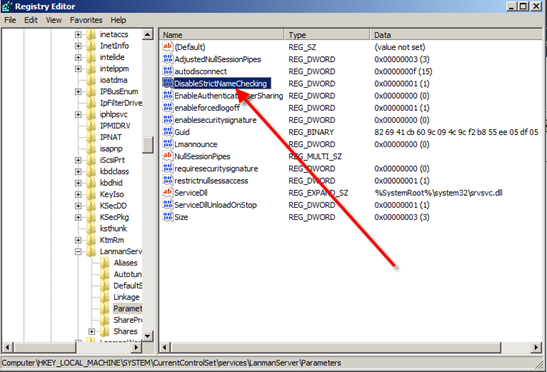
In the screenshot above under HKEY_LM\system\CCS\Services\Lanmanserver\param we will create a dword DisableStrictNameChecking. Add a value of 1 to this new entry,
Exit Registry and reboot your box
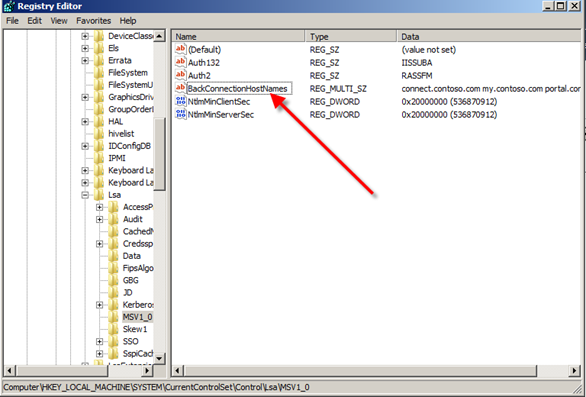
Reopen Registry and nav to HKEY_LM\System\CCS\Control\LSA\MSV1.0 and create the following key as shown below
Once there simply open this Multi-String Value and enter the sites you want included… ie your SharePoint sites J
No need for URLs here.. simply type in (for this example) connect.contoso.com on a separate line your next site and on and on down the line.
The beauty of this method is that once you add this key you wont have to reboot your box after adding these entries.
So hope this post along with Spences stops the silly questions and even more so… wrong answers folks are following
sharepoint 搜索报错的更多相关文章
- SharePoint 2013 搜索报错"Unable to retrieve topology component health. This may be because the admin component is not up and running"
环境描述 Windows 2012 R2,SharePoint 2013(没有sp1补丁),sql server 2012 错误描述 搜索服务正常,但是爬网一直在Crawling Full,但是爬不到 ...
- SharePoint Iframe 报错“此内容不能显示在一个框架中”
问题描述 我们SharePoint站点用Excel Service发布的Excel,需要Iframe到其他系统中,但是,Iframe的时候发现报错“此内容不能显示在一个框架中”. 后来,尝试在其他系统 ...
- SharePoint Iframe 报错“此内容不能显示在一个框架中”<续>
在之前的SharePoint站点iframe引用中,我们遇到过下面的问题,就是其它系统或者不通环境的SharePoint站点,引用SharePoint页面会报错“此内容不能显示在一个框架中”,之前我们 ...
- SharePoint 2013报错之“指定的文件不是有效的电子表格或者没有包含要导入的数据”
当你尝试用SharePoint 2013中的“导入电子表格”功能时,可能会遇到报错“指定的文件不是有效的电子表格或者没有包含要导入的数据” 解决方法:只需要将你的SharePoint网址添加到浏览器的 ...
- hive搜索报错
在自己搭建的集群上执行hive搜索语句 select count(*) from ods_event_log where dt='2019-12-14' group by dt; 报错如下: Stat ...
- SharePoint 2013 报错 异常来自 HRESULT:0X80131904
直接上传文件,报错:该Url xxxx无效.它可能指向不存在的文件或文件夹,或者是执行不再当前网站中的有效文件或文件夹. 直接新建文件夹,报错:异常来自 HRESULT:0X80131904 以系统账 ...
- O365(世纪互联)SharePoint 之使用Designer报错
前言 在SharePoint Online中使用Designer报错,错误为:This Feature has been disabled by your administrator.找了好久发现原因 ...
- Oracle Online Patching报错"This is not a RAC setup. OPatch cannot determine the local node name"
Oracle Online Patching报错"This is not a RAC setup. OPatch cannot determine the local node name&q ...
- SharePoint 2013 PowerShell命令备份还原报错
错误截图: 文字描述: Restore-SPSite : <nativehr>0x80070003</nativehr><nativestack></nati ...
随机推荐
- html中的行内元素和块级元素小结
一.首先我们总结下行内元素和块级元素有哪些: 行内元素: <a>标签可定义锚<abbr>表示一个缩写形式<acronym>定义只取首字母缩写<b>字体加 ...
- 初始react native遇到的问题
转载自Andriod 使用react native时遇到的问题 打开现有项目报错: 从第一行Error可以知道是一个zip的压缩文件打不开,往下看应该是下载的Gradle文件有问题,提示也是让 ...
- Android架构设计之插件化、组件化
如今移动app市场已经是百花齐放,其中有不乏有很多大型公司.巨型公司都是通过app创业发展起来的:app类型更加丰富,有电子商务.有视频.有社交.有工具等等,基本上涵盖了各行各业每个角落,为了更加具有 ...
- 1 win10双系统安装ubuntu16.04和18.04(问题详细记录)
我从来不想在琐事上花功夫.就拿装系统来说,我感觉拿过来一个完全陌生的项目源码,看起来,都比装系统爽.我属于典型的逻辑思考男.喜欢畅游程序的海洋. 一直windows跑深度学习和tensorflow,有 ...
- GitHub初步探索-1-使用本地代码管理工具,简化上传的过程
使用GitHub对于我们写Java的同志们来说是一个非常好的代码存储的方式,但是因为是全英文的,操作起来有一点复杂,所以我不是经常使用 ,但是最近代码越敲越多,再加上老师要求,希望使用比较简单的方法来 ...
- js:自动亮起100盏灯
1) 使用js在页面上显示100盏灯,并标记从1到100的编号2) 页面加载后3秒,从编号是1的灯依次自动亮起.3) 每过0.5秒亮下一盏灯(10分)4) 所有灯亮起后,弹出确 ...
- cache2go开源项目的回调方法使用
https://github.com/muesli/cache2go 结构体 type CacheTable struct { sync.RWMutex . name string items map ...
- .net core系列之《对AOP思想的理解及使用AspectCore实现自定义日志拦截》
对于AOP这个名词,相信对于搞过MVC开发的人来说,都很熟悉,里面各种各样的Filter简直是将AOP体现到了极致. 那么什么是AOP呢? AOP(Aspect Oriented Programmin ...
- Ionic微信开发之环境配置
在开发微信版的H5页面时,如果需要正常调用微信公众号的开放接口(测试或者发布情况),根据官方要求需要保证网页域名和后端维护的一致.因此,进行真服测试就显得很有必要.WebStorm提供了实时远程部署的 ...
- EasingAnimation
EasingAnimation https://github.com/YouXianMing/EasingAnimation This class is used for Easing animati ...