
.net core 实践笔记(二)--EF连接Azure Sql
** 温馨提示:如需转载本文,请注明内容出处。**
本文链接:https://www.cnblogs.com/grom/p/9902098.html
笔者使用了常见的三层架构,Api展示层注入了Swagger,作为开发测试使用的文档界面,具体搭建教程网上资料很全,不在赘述。
数据库目前使用了SqlServer,建了几张表和测试数据后放到了Azure云服务器上,值得一提的是,不同于其他云服务器,Azure对于数据库进行了优化和精简(毕竟自己微软自己家的东西,权利就是大),优缺点清参照官网文档。
笔者体验下来的感觉就是使用门槛要比其他的家的云服务器大的多,用户的账号和Token等信息需要在Azure上配置,数据库上的权限比精简前可以说是小的多,但也安全。
ORM使用的是Entity Framework和Dapper,执行命令都是使用Dapper,毕竟比EF轻的多,EF是用来映射数据库实体类的,在.Net Core下,少了T4模板,我们就需要使用命令手动映射了。
安装EF的包
Install-Package Microsoft.EntityframeworkCore.SqlServer

Install-Package Microsoft.EntityframeworkCore.Tools

Install-Package Microsoft.VisualStudio.Web.CodeGeneration.Design

Install-Package Microsoft.EntityFrameworkCore
映射模型
Scaffold-DbContext -Force “Data Source=(local); Initial Catalog=Nagrand; Pooling=True; UID=sa;PWD=;connect Timeout=” Microsoft.EntityFrameworkCore.SqlServer -OutputDir Models
据说能去的空格都要去掉,不然可能会拉取失败。
改装成拉Azure上的语句
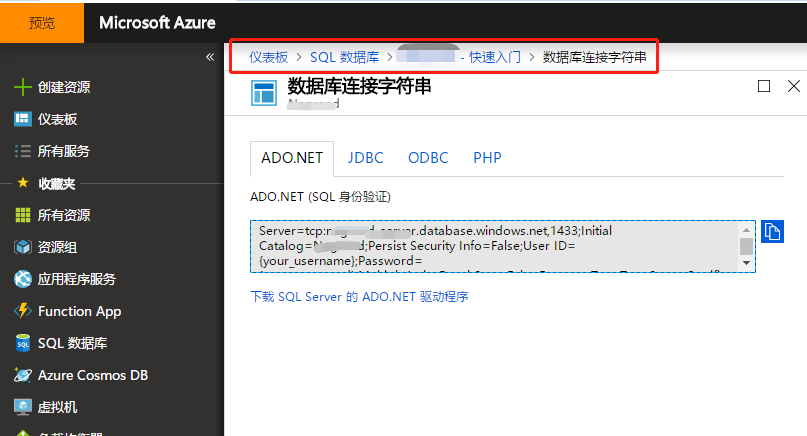
Scaffold-DbContext -Force “Data Source=tcp:test-server.database.windows.net,; Initial Catalog=DBName; Pooling=True;Persist Security Info=False; UID=sa;PWD=;TrustServerCertificate=False;connect Timeout=” Microsoft.EntityFrameworkCore.SqlServer -OutputDir Models
填坑:
- 如出现错误,请检查拉去的项目(类库)里是否都前面提到的几个包。
- 注意符号,博主把这个命令放到了OneNote里了,结果第二天就不能用了,试了好多遍发现引号莫名其妙变成中文的了,并且没有语法的错误提示!!
- 用到的账号和密码一定拿到SSMS里登录一下试试
- 博主使用命令安装包的时候发现项目下有分析器是异常状态,查看是引用了C盘的文件,这个要注意,迁移的时候如果没有这些文件可能会出异常,可以从Nugit包里找到这些包一个个手动安装,就不会有异常了。
Dapper
附上一个DapperHelper,用于与数据库的交互
public static class DapperHelper

    {

        #region 连接字符串

        public static string CONN_STRING = "";

        #endregion

        #region SELECT

        /// <summary>

        /// 获取数据集合

        /// </summary>

        /// <typeparam name="T"></typeparam>

        /// <param name="sqlString"></param>

        /// <param name="param"></param>

        /// <param name="commandType"></param>

        /// <param name="commandTimeout"></param>

        /// <returns></returns>

        public static List<T> GetList<T>(this string sqlString, object param = null, CommandType? commandType = CommandType.Text, int? commandTimeout = )

        {

            var list = new List<T>();

            using (var db = new SqlConnection(CONN_STRING))

            {

                IEnumerable<T> ts = null;

                if (null == param)

                {

                    ts = db.Query<T>(sqlString, null, null, true, commandTimeout, commandType);

                }

                else

                {

                    ts = db.Query<T>(sqlString, param, null, true, commandTimeout, commandType);

                }

                if (null != ts)

                {

                    list = ts.AsList();

                }

            }

            return list;

        }

        public static List<T> GetList<T>(this string sqlString)

        {

            return GetList<T>(sqlString, null, CommandType.Text);

        }

        public static List<T> GetList<T>(this string sqlString, object param)

        {

            if (null == param)

            {

                return GetList<T>(sqlString);

            }

            return GetList<T>(sqlString, param);

        }

        #endregion

        #region INSERT

        /// <summary>

        /// 单条数据写入 动态模板模式/T

        /// </summary>

        /// <param name="sqlString"></param>

        /// <param name="param"></param>

        /// <param name="commandType"></param>

        /// <param name="commandTimeOut"></param>

        /// <returns></returns>

        public static bool Insert(this string sqlString, object param = null, CommandType commandType = CommandType.Text, int? commandTimeOut = )

        {

            return ExecuteNonQuery(sqlString, param, commandType, commandTimeOut);

        }

        /// <summary>

        /// 批量写入

        /// </summary>

        /// <typeparam name="T"></typeparam>

        /// <param name="sqlString"></param>

        /// <param name="list"></param>

        /// <param name="commandType"></param>

        /// <param name="commandTimeOut"></param>

        /// <returns></returns>

        public static bool Insert<T>(this string sqlString, List<T> list, CommandType commandType = CommandType.Text, int? commandTimeOut = )

        {

            var intResult = ;

            if (null != list &&  < list.Count)

            {

                using (var db = new SqlConnection(CONN_STRING))

                {

                    intResult = db.Execute(sqlString, list, null, commandTimeOut, commandType);

                }

            }

            return intResult > ;

        }

        #endregion

        #region UPDATE

        public static bool Update(this string sqlString, object param, CommandType commandType = CommandType.Text, int? commandTimeOut = )

        {

            return ExecuteNonQuery(sqlString, param, commandType, commandTimeOut);

        }

        #endregion

        #region DELETE

        public static bool Delete(this string sqlString, object param, CommandType commandType = CommandType.Text, int? commandTimeOut = )

        {

            return ExecuteNonQuery(sqlString, param, commandType, commandTimeOut);

        }

        #endregion

        #region Private Methods

        private static bool ExecuteNonQuery(this string sqlString, object param, CommandType commandType = CommandType.Text, int? commandTimeOut = )

        {

            var intResult = ;

            using (var db = new SqlConnection(CONN_STRING))

            {

                if (null == param)

                {

                    intResult = db.Execute(sqlString, null, null, commandTimeOut, commandType);

                }

                else

                {

                    intResult = db.Execute(sqlString, param, null, commandTimeOut, commandType);

                }

            }

            return intResult > ;

        }

        #endregion

    }
一般数据库连接字符串需要放入配置文件,可以写入自带的appsetting.xml里或者新建其他的。
{

  "ConnectionStrings": {

    "DBConnection": "Data Source={Address};Initial Catalog={DBName};Pooling=True;Persist Security Info=False;UID={Account};PWD={Password};TrustServerCertificate=False;connect Timeout=10"

  },

  "Logging": {

    "LogLevel": {

      "Default": "Warning"

    }

  },

  "AllowedHosts": "*"

}
然后在Setup中获取节点并复制到连接字符串
DapperHelper.CONN_STRING = Configuration.GetConnectionString("DBConnection");
整个架子基本搞定,下面就可以写业务接口了。
.net core 实践笔记(二)--EF连接Azure Sql的更多相关文章
- pymssql连接Azure SQL Database
使用pymssql访问Azure SQL Database时遇到"DB-Lib error message 20002, severity 9:\nAdaptive Server conne ...
- 一起学ASP.NET Core 2.0学习笔记(二): ef core2.0 及mysql provider 、Fluent API相关配置及迁移
不得不说微软的技术迭代还是很快的,上了微软的船就得跟着她走下去,前文一起学ASP.NET Core 2.0学习笔记(一): CentOS下 .net core2 sdk nginx.superviso ...
- 《python编程从入门到实践》读书实践笔记(二)
本文是<python编程从入门到实践>读书实践笔记11章的内容,主要包含测试,为体现测试的重要性,独立成文. 11 测试代码 写在前面的话,以下是我这些年开发中和测试相关的血泪史. 对于一 ...
- Java连接Azure SQL Database
Azure SQL Database是Azure上的数据库PAAS服务,让用户可以快速的创建和使用SQL数据库而不用担心底层的备份,安全,运维,恢复等繁琐的工作,本文简单介绍如何使用Java程序连接到 ...
- 用SSMS连接Azure Sql Database 与连接本地库的一些操作区别
背景 我们知道Azure Sql Database 可以降低运维成本.是一种Pass模式,有资源弹性设置,可以自由调整资源自动对应不同业务高峰(当然也可以降低费用成本),也方便项目后期的资源扩展,以及 ...
- .NET Core 学习笔记3——EF Core
EF Core (EntityFramework Core)是实体关系映射(O/RM)数据库访问框架.这个模式的好处就是让开发人员可以用对象模型来操作数据库,这是一种对开发人员较为友好的方式. O/R ...
- .net core 实践笔记(三)--封装底层
前言: 有了前面的工作,简单的架子基本搭建起来了,因为条件有限,只能先测试SqlServer的了,源码放出来,也希望有兴趣的伙伴可以一起改善,相信可以成为未来进阶架构师的第一步,自己有小项目的时候可以 ...
- .net core 实践笔记(一)--开篇
** 温馨提示:如需转载本文,请注明内容出处.** 本文链接:https://www.cnblogs.com/grom/p/9902000.html 最近无聊自己设计了一个小项目,基本都使用想用没用 ...
- ASP.NET Core 折腾笔记二:自己写个完整的Cache缓存类来支持.NET Core
背景: 1:.NET Core 已经没System.Web,也木有了HttpRuntime.Cache,因此,该空间下Cache也木有了. 2:.NET Core 有新的Memory Cache提供, ...
随机推荐
- 地图的平移、缩放的实现(android版)
一.平移地图 移动地图的原理是利用手指在屏幕上拖动的距离,转换为在地图上距离,把地图坐标加上偏移的距离实现地图移动. 由于地图是绘制到Bitmap上的,所以地图移动和缩放的过程只要改变Bitmap的矩 ...
- GetModuleFileName
原文:http://www.cnblogs.com/dongzhiquan/archive/2009/07/28/1994776.html GetModuleFileName HMODULE hMod ...
- org.apache.ibatis.binding.BindingException: Invalid bound statement (not found): cn.gaiay.business.helper.dao.LiveRegenrationRecordMapper.insert
原因分析: 字段名称.报名.类名 对应不上 ,比如colomn和property属性 反了.. 按以下步骤一一执行: 1:检查xml文件所在的package名称是否和interface对应的packa ...
- YII+DWZ三级城市联动挂件
挂件PHP文件 class CountryCityCombox extends RXWidget { public $provinceId = 2; public $cityId = 3687; pu ...
- Azure 中快速搭建 FTPS 服务
FTP,FTPS 与 SFTP 的区别 FTP (File Transfer Protocol)是一种常用的文件传输协议,在日常工作中被广泛应用.不过,FTP 协议使用明文传输.如果文件传输发生在公网 ...
- leetcode Ch6-Data Structure
1. Sliding Window Maximum class Solution { public: vector<int> maxSlidingWindow(vector<int& ...
- 将csv导出json格式
将csv导出json格式 import os,csv,json cf = open('D:\OneDrive\\Tech\\Script\\Powershell_Script\\Uxin_work\\ ...
- Python实例---抽屉后台框架分析
1.1. 抽屉框架分析 --登陆注册分析 1.2. 前台获取form表单补充知识: <!DOCTYPE html> <html lang="en"> < ...
- Kendo 计算字段
var Product = kendo.data.Model.define({ fields: { "quantity": { type: "number" } ...
- IOS XMPP(即时通讯的框架)
#import "AppDelegate.h" #import "XMPPFramework.h" /* * 在AppDelegate实现登录 1. 初始化XM ...