
一款javascript实现的超炫的下拉选择框
今天为给大家带来一款javascript实现的超炫的下拉选择框。下拉的列表由半用透明的幽灵按钮组成。显示下拉的时候,列表项由左右两侧飞入。消息时飞向左右两侧。一起看下效果图
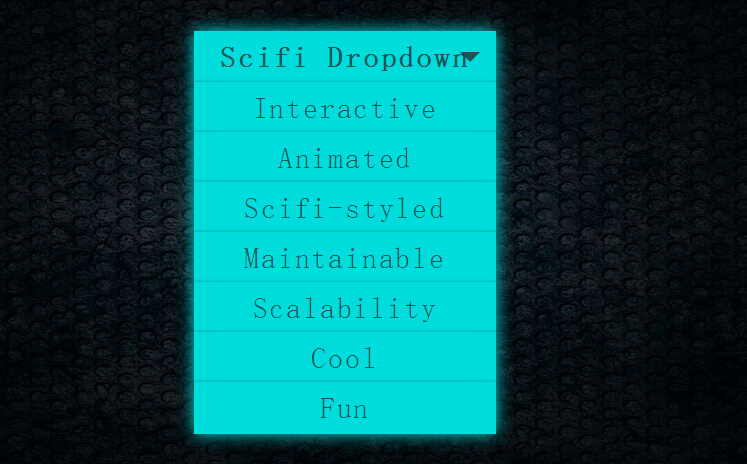
实现的代码。
html代码:
 <div class="scifiUI">

        <h1>

            Scifi Dropdown</h1>

        <ul>

            <li>Interactive</li>

            <li>Animated</li>

            <li>Scifi-styled</li>

            <li>Maintainable</li>

            <li>Scalability</li>

            <li>Cool</li>

            <li>Fun</li>

        </ul>

    </div>
css代码:
  html, body

        {

            overflow: hidden;

            background: url(ironwall.jpg) #000 top center no-repeat;

            background-size: 100% 100%;

            width: 100%;

            height: 100%;

            font-family: 'Rajdhani' , sans-serif;

            font-size: 18px;

            letter-spacing: .1em;

        }

        .glow, .scifiUI:hover h1, .scifiUI:hover ul li

        {

            box-shadow: 0 0 25px #00dcdc, 0 1px 5px #212121;

            border-color: #00dcdc;

            background: #00dcdc;

            color: rgba(33, 33, 33, 0.7);

        }

        .scifiUI

        {

            width: 300px;

            margin: 100px auto;

        }

        .scifiUI:hover h1:after

        {

            border-top-color: rgba(33, 33, 33, 0.7);

        }

        .scifiUI:hover ul li

        {

            -ms-transform: skew(0);

            -webkit-transform: skew(0);

            transform: skew(0);

            width: 300px;

            height: 50px;

        }

        .scifiUI:hover ul li:nth-child(1)

        {

            left:;

        }

        .scifiUI:hover ul li:nth-child(2)

        {

            left:;

        }

        .scifiUI:hover ul li:nth-child(3)

        {

            left:;

        }

        .scifiUI:hover ul li:nth-child(4)

        {

            left:;

        }

        .scifiUI:hover ul li:nth-child(5)

        {

            left:;

        }

        .scifiUI:hover ul li:nth-child(6)

        {

            left:;

        }

        .scifiUI:hover ul li:nth-child(7)

        {

            left:;

        }

        .scifiUI *

        {

            -webkit-transition: all 300ms ease-in-out;

            transition: all 300ms ease-in-out;

        }

        .scifiUI h1

        {

            position: relative;

            display: block;

            width: 300px;

            height: 50px;

            line-height: 50px;

            border: 1px solid #00bebe;

            background: rgba(0, 190, 190, 0.2);

            color: #00bebe;

            font-size: 1.6em;

            text-align: center;

            cursor: pointer;

        }

        .scifiUI h1:after

        {

            content: '';

            display: block;

            position: absolute;

            top: 20px;

            right: 15px;

            border-top: 10px solid #00bebe;

            border-left: 10px solid transparent;

            border-right: 10px solid transparent;

            border-bottom:;

        }

        .scifiUI ul

        {

            list-style: none;

            position: relative;

            top: -20px;

        }

        .scifiUI ul li

        {

            -webkit-transform: skew(45deg) scaleY(-3);

            -ms-transform: skew(45deg) scaleY(-3);

            transform: skew(45deg) scaleY(-3);

            box-shadow: 0 3px 0 5px #212121 inset;

            position: absolute;

            display: block;

            width: 200px;

            height: 50px;

            line-height: 50px;

            border: 1px solid #00bebe;

            background: #00dcdc;

            text-align: center;

            font-size: 1.6em;

            cursor: pointer;

        }

        .scifiUI ul li:nth-child(1)

        {

            top: 0px;

            left: -500%;

        }

        .scifiUI ul li:nth-child(2)

        {

            top: 50px;

            left: 500%;

        }

        .scifiUI ul li:nth-child(3)

        {

            top: 100px;

            left: -500%;

        }

        .scifiUI ul li:nth-child(4)

        {

            top: 150px;

            left: 500%;

        }

        .scifiUI ul li:nth-child(5)

        {

            top: 200px;

            left: -500%;

        }

        .scifiUI ul li:nth-child(6)

        {

            top: 250px;

            left: 500%;

        }

        .scifiUI ul li:nth-child(7)

        {

            top: 300px;

            left: -500%;

        }

        .scifiUI ul li:hover

        {

            -webkit-transform: scale(1.08);

            -ms-transform: scale(1.08);

            transform: scale(1.08);

            font-size: 1.8em;

        }
js这里引用的是angular.min.js
注:本文爱编程原创文章,转载请注明原文地址:http://www.w2bc.com/Article/7325
一款javascript实现的超炫的下拉选择框的更多相关文章
- 【JavaScript&jQuery】单选框radio,复选框checkbox,下拉选择框select
HTML: <!DOCTYPE html> <html> <head> <title></title> <meta charset=& ...
- JavaScript学习笔记之下拉选择框的操作
对于下拉框的操作十分繁多,这几天项目须要就总结一下 一.动态构建option 有时候我们须要动态构建下拉选择框里面的值,这里我们就要用到 var varItem = new Option(" ...
- css3 炫酷下拉菜单
<!doctype html> <html> <head> <meta charset="UTF-8"> <title> ...
- 揭秘Amazon反应速度超快的下拉菜单
揭秘Amazon反应速度超快的下拉菜单 如果你以前觉得Amazon这家公司不太在用户体验上下功夫,这篇文章可能会改变你的看法. Amazon主页的左上角有一个商品分类浏览的下拉菜单.当鼠标从菜单中的选 ...
- 第一百四十六节,JavaScript,百度分享保持居中--下拉菜单
JavaScript,百度分享保持居中--下拉菜单 百度分享保持居中 效果图 html代码 <div id="share"> <h2>分享到</h2& ...
- Javascript -- 示例:多选下拉选框
1. 示例:多选下拉选框 <html> <head> <meta http-equiv="Content-Type" content="te ...
- android仿微信红包动画、Kotlin综合应用、Xposed模块、炫酷下拉视觉、UC浏览器滑动动画等源码
Android精选源码 仿微信打开红包旋转动画 使用Kotlin编写的Android应用,内容你想象不到 Android手机上的免Root Android系统日志Viewer 一个能让微信 Mater ...
- 二、JavaScript语言--事件处理--DOM事件探秘--下拉菜单
<!DOCTYPE html> <html lang="en"> <head> <meta charset="UTF-8&quo ...
- 原生JavaScript写select下拉选择后跳转页面
<select name="molsel_oprate" onchange="javascript:var obj = event.target; var inde ...
随机推荐
- MyEclipse下的Debug调试技巧汇总
首先以debug模式启动tomcat,并文件中设断点,然后运行,当程序走到断点处就会转到debug视图下 [1]快捷键(F8)直接执行程序. [2]快捷键(F5)单步执行程序,遇到方法时进入. [3] ...
- memcached 下载安装
wget http://memcached.org/latest tar -zxvf memcached-1.x.x.tar.gz cd memcached-1.x.x ./configure &am ...
- 用javascript写一个emoji表情插件
概述 以我们写的这个emoji插件为例,网上已经有一些相关的插件了,但你总感觉有些部分的需求不能被满足(如:可以自行添加新的表情包而不用去改源代码等等) 详细 代码下载:http://www.demo ...
- 转:PHP关于反斜杠处理函数addslashes()和stripslashes()的用法
1.php处理\函数:addslashes()和stripslashes()函数 addslashes():对输入字符串中的某些预定义字符前添加反斜杠,这样处理是为了数据库查询语句等的需要.这些预定义 ...
- Windows下面安装和配置MySQL(5.6.20)
1.首先到http://dev.mysql.com/ 上下载windows版mysql5.6免安装zip包.然后将zip包解压到D:\mysql-5.6.20-winx64下. 2.复制mysql下的 ...
- 非IE内核浏览器如何支持activex插件
原文地址:https://blog.csdn.net/johnson2008t/article/details/46126605 之前在一个B/S项目中遇到一个需求,就是客户需要在页面上对报表的布局以 ...
- POSIX 共享内存和 系列函数
在前面介绍了system v 共享内存的相关知识,现在来稍微看看posix 共享内存 和系列函数. 共享内存简单来说就是一块真正的物理内存区域,可以使用一些函数将这块区域映射到进程的地址空间进行读写, ...
- Android ListView动画特效实现原理及源代码
Android 动画分三种,当中属性动画为我们最经常使用动画,且能满足项目中开发差点儿所有需求,google官方包支持3.0+.我们能够引用三方包nineoldandroids来失陪到低版本号.本样例 ...
- mysql 一对多 group查询
场景:查询所有A表的数据,并且关联B表,再数据集中插入一个COUNT列.该列的数据是B表的COUNT 扩展:假设join的表数据为空,但我任然要把所有表A的数据取出来,那就用LEFT JOIN SEL ...
- nginx https ssl 设置受信任证书[转然哥]
nginx https ssl 设置受信任证书[原创] 1. 安装nginx 支持ssl模块 http://nginx.org/en/docs/configure.html yum -y instal ...