
vue2 使用 element-ui
看了 http://element.eleme.io/#/zh-CN/component/installation 一些组件和样式够用了 , 试了下 element-ui ,配合到vue中
1. 安装
npm i element-ui -S
看快速上手 http://element.eleme.io/#/zh-CN/component/quickstart
2. 引入 element-ui
a .引入完整Element
在 main.js 中写入以下内容:

import Vue from 'vue'

import ElementUI from 'element-ui'

import 'element-ui/lib/theme-default/index.css'

import App from './App.vue'

Vue.use(ElementUI)

new Vue({

  el: '#app',

  render: h => h(App)

})

以上代码便完成了 Element 的引入。需要注意的是,样式文件需要单独引入。
这个照着来下,写个页面,用下样式或组件, 可以展示.......
b. 按需引入
借助 babel-plugin-component,我们可以只引入需要的组件,以达到减小项目体积的目的。
npm install babel-plugin-component -D
然后,将 .babelrc 修改为:
{

  "presets": [

    ["es2015", { "modules": false }]

  ],

  "plugins": [["component", [

    {

      "libraryName": "element-ui",

      "styleLibraryName": "theme-default"

    }

  ]]]

}
这些写, 上面 presets 不知道家 es2015 做的什么? 下面的 plugins 中加入
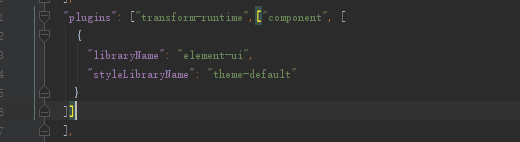
我的用的官网的默认脚手架, 增加component
把介绍中的
完整组件列表和引入方式(完整组件列表以 components.json 为准)
import Vue from 'vue'

import {

  Pagination,

  Dialog,

  Autocomplete,

  Dropdown,

  DropdownMenu,

  DropdownItem,

  Menu,

  Submenu,

  MenuItem,

  MenuItemGroup,

  Input,

  InputNumber,

  Radio,

  RadioGroup,

  RadioButton,

  Checkbox,

  CheckboxGroup,

  Switch,

  Select,

  Option,

  OptionGroup,

  Button,

  ButtonGroup,

  Table,

  TableColumn,

  DatePicker,

  TimeSelect,

  TimePicker,

  Popover,

  Tooltip,

  Breadcrumb,

  BreadcrumbItem,

  Form,

  FormItem,

  Tabs,

  TabPane,

  Tag,

  Tree,

  Alert,

  Slider,

  Icon,

  Row,

  Col,

  Upload,

  Progress,

  Spinner,

  Badge,

  Card,

  Rate,

  Steps,

  Step,

  Carousel,

  Scrollbar,

  CarouselItem,

  Collapse,

  CollapseItem,

  Cascader,

  ColorPicker,

  Loading,

  MessageBox,

  Message,

  Notification

} from 'element-ui'

Vue.use(Pagination)

Vue.use(Dialog)

Vue.use(Autocomplete)

Vue.use(Dropdown)

Vue.use(DropdownMenu)

Vue.use(DropdownItem)

Vue.use(Menu)

Vue.use(Submenu)

Vue.use(MenuItem)

Vue.use(MenuItemGroup)

Vue.use(Input)

Vue.use(InputNumber)

Vue.use(Radio)

Vue.use(RadioGroup)

Vue.use(RadioButton)

Vue.use(Checkbox)

Vue.use(CheckboxGroup)

Vue.use(Switch)

Vue.use(Select)

Vue.use(Option)

Vue.use(OptionGroup)

Vue.use(Button)

Vue.use(ButtonGroup)

Vue.use(Table)

Vue.use(TableColumn)

Vue.use(DatePicker)

Vue.use(TimeSelect)

Vue.use(TimePicker)

Vue.use(Popover)

Vue.use(Tooltip)

Vue.use(Breadcrumb)

Vue.use(BreadcrumbItem)

Vue.use(Form)

Vue.use(FormItem)

Vue.use(Tabs)

Vue.use(TabPane)

Vue.use(Tag)

Vue.use(Tree)

Vue.use(Alert)

Vue.use(Slider)

Vue.use(Icon)

Vue.use(Row)

Vue.use(Col)

Vue.use(Upload)

Vue.use(Progress)

Vue.use(Spinner)

Vue.use(Badge)

Vue.use(Card)

Vue.use(Rate)

Vue.use(Steps)

Vue.use(Step)

Vue.use(Carousel)

Vue.use(Scrollbar)

Vue.use(CarouselItem)

Vue.use(Collapse)

Vue.use(CollapseItem)

Vue.use(Cascader)

Vue.use(ColorPicker)

Vue.use(Loading.directive)

Vue.prototype.$loading = Loading.service

Vue.prototype.$msgbox = MessageBox

Vue.prototype.$alert = MessageBox.alert

Vue.prototype.$confirm = MessageBox.confirm

Vue.prototype.$prompt = MessageBox.prompt

Vue.prototype.$notify = Notification

Vue.prototype.$message = Message
vue2 使用 element-ui的更多相关文章
- vue2.0 + Element UI + axios实现表格分页
注:本文分页组件用原生 html + css 实现,element-ui里有专门的分页组件可以不用自己写,详情见另一篇博客:https://www.cnblogs.com/zdd2017/p/1115 ...
- vue2.0 + element ui 实现表格穿梭框
element ui 官网里介绍了穿梭框(Transfer),但在实际使用过程中,会出现一些问题: 1.穿梭框里能放置的内容太少,不能满足复杂的业务需求. 2.当选项过多时,穿梭框很难实现分页,左右两 ...
- vue2.0+Element UI 表格前端分页和后端分页
之前写过一篇博客,当时对element ui框架还不太了解,分页组件用 html + css 自己写的,比较麻烦,而且只提到了后端分页 (见 https://www.cnblogs.com/zdd20 ...
- vue2.0+Element UI 实现动态表单(点击按钮增删一排输入框)
对于动态增减表单项,Element UI 官方文档表单那一节已经介绍得很清楚了,我之前没有看见,绕了很多弯路,这里针对点击按钮增删一排输入框的问题做一个总结. 效果图如下 存在一排必填的姓名与手机号, ...
- vue2.5 + element UI el-table 导出Excel
安装依赖 npm install --save xlsx file-saver 新建excelHelper.js \src\utils\目录下新建excelHelper.js文件 import Vue ...
- element ui table 导出excel表格
https://blog.csdn.net/u010427666/article/details/79208145 vue2.0 + element UI 中 el-table 数据导出Excel1. ...
- Vue+element ui table 导出到excel
需求: Vue+element UI table下的根据搜索条件导出当前所有数据 参考: https://blog.csdn.net/u010427666/article/details/792081 ...
- [坑况]饿了么你是这样的前端——vue+element ui 【this dependency was not found:'element-ui/lib/theme-chalk/index.css'】
element ui 坑况:今日pull代码,潇洒npm run dev ,被告知:this dependency was not found:'element-ui/lib/theme-chalk/ ...
- Vue + Element UI项目初始化
1.安装相关组件 1.1安装Node 检查本地是否安装node node -v 如果没有安装,从Node官网下载 1.2安装npm npm -v 如果没有安装:使用该指令安装: npm install ...
- 分享一个自搭的框架,使用Spring boot+Vue+Element UI
废弃,新的:https://www.cnblogs.com/hackyo/p/10453243.html 特点:前后端分离,可遵循restful 框架:后端使用Spring boot,整合了aop.a ...
随机推荐
- 使用Chrome-headless模式下,截屏不全屏的问题
在headless模式下,是没有打开浏览器窗口的,那么driver.maximize_window(),找不到目标也打不开. 我们可以换一种方式,去在无头模式下,指定浏览器的窗口大小运行即可. __o ...
- Visual Studio进行负载测试,RIG和负载测试术语- Part II
对于一个多用户的应用程序,性能是非常重要的.性能不仅是执行的速度,它包括负载和并发方面.Visual Studio是可以用于性能测试的工具之一.Visual Studio Test版或Visual S ...
- 可以修改类不用重启Tomcat加载整个项目
修改类不重启Tomcat(不用手动重启) 修改tomcat conf目录下的server.xml <Context path="/struts2" docBase=&quo ...
- Angular Material 按钮图标系列
工做中经常用到Angular Material 中的好多按钮素材,奈何官网经常上不去,所以只能自己把这些常用的按钮扒下来了,留给自己同时也留给大家方便查看. Angular material mat- ...
- numpy.argmax()
numpy.argmax(a, axis=None, out=None) 返回沿轴axis最大值的索引 Parameters: a : array_like ...
- java中的POJO、PO、VO分别是什么?
1.PO:persistant object 持久对象 可以看成是与数据库中的表相映射的java对象.使用Hibernate来生成PO是不错的选择. 2. VO:value object值对象. 通常 ...
- java_Proxy动态代理_AOP
讲了JDK里使用Proxy动态代理的机制,详细过程. 切面类TransactionHandler需要实现InvocationHaandler接口,实现它的invoke方法. 项目目录: User类代码 ...
- nginx安装及其配置详细教程
1 nginx 介绍 1 什么是nginx Nginx是一款高性能的http 服务器/反向代理服务器及电子邮件(IMAP/POP3)代理服务器. 由俄罗斯的程序设计师Igor Sysoev所开发,官方 ...
- 3D效果
3D transform:rotate3d(x,y,z,a) (0.6,1,0.5,45deg) transform-origin 允许改变转换元素的位置,(中心点) transform-style ...
- 微服务Kong(六)——配置参考
1. 配置加载 如果您通过其中一个官方软件包安装了Kong,Kong会附带默认配置文件,该文件可以在/etc/kong/kong.conf.default中找到.要开始配置Kong,您可以复制此文件: ...