
matplotlib.pyplot 导引
matplotlib.pyplot 是采用 python 语言和使用数值数学库 numpy 数组数据的绘图库.其主要目标是用于数据的可视化显示.
输出图形组成
matplotlib.pyplot 模块中,其绘制的输出图形 (Figure) 的各组成部分,如下图所示
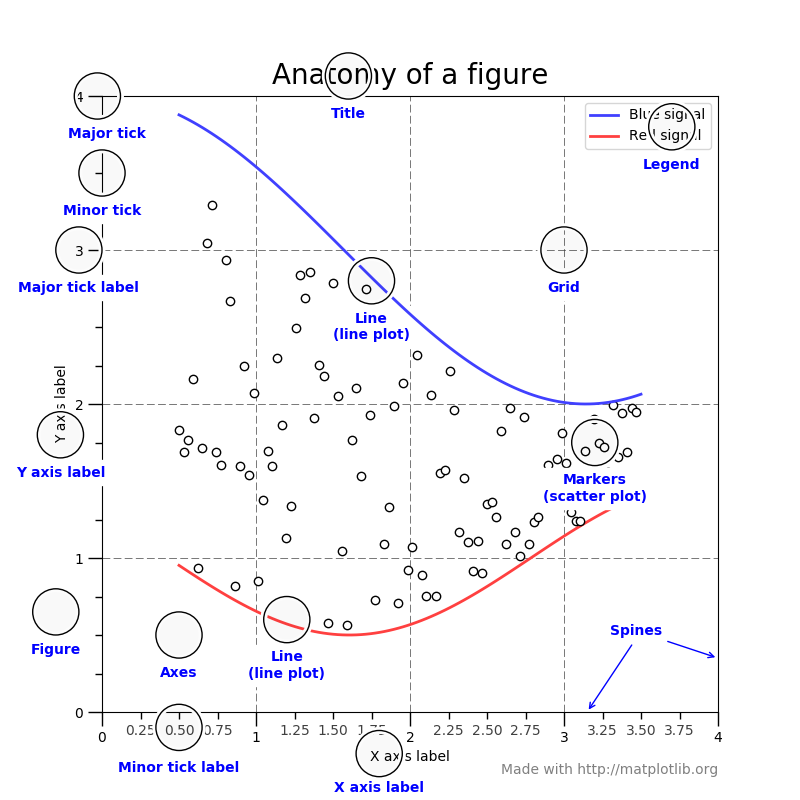
其中
Figure 是整个输出图形,记录了所有子 Axes 对象,一些特殊的 artists (如标题,图例等) 和画布 (canvas).画布 (canvas) 对用户是不可见的.
Axes 是含有数据空间的图像区域.一个 figure 可以包含多个 Axes,但一个给定的 Axes 只能在一个 Figure 中.注意 Axes 与 Axis 的区别,Axis是指数学上的坐标轴,Axes可以包含 2 个 (二维) 或 3 个坐标轴 (三维).在 matplotlib 模块中,matplotlib.axes.Axes类,包含大多数的图形元素,如坐标轴 (matplotlib.axis.Axis), 刻度 (matplotlib.axis.Tick), 二维线段 (matplotlib.lines.Line2D), 文本 (matplotlib.text.Text), 多边形 (matplotlib.patches.Polygon),并设置坐标系统;matplotlib.pyplot.axes(arg=None, **kwargs) 函数向当前的图形 (current figure) 中,增加一个 Axes 对象,并设置其为当前的 Axes 对象;matplotlib.pyplot.axis(*v, **kwargs) 函数用于获取或设置坐标轴属性.
在 Figure 上的任何对象,基本都是 Artist.当渲染图形时,所有的 Artists 都会画到画布 (canvas) 上.大多数 Artists 都绑定到一个 Axes 上,不能被多个 Axes 共享,或从一个 Axes 移动到另一个.
编码风格
使用 matplotlib.pyplot 模块,通常有两种编码风格,一种是采用面向对象接口 (object-oriented interface) 的编码风格,另一种是类似 MATLAB (MATLAB-like) 的编码风格.对于复杂的图形绘制,推荐采用面向对象接口的编码风格.
- 面向对象编码风格的示例代码,如下所示.
import matplotlib.pyplot as plt

import numpy as np

x = np.arange(0, 10, 0.2)

y = np.sin(x)

fig = plt.figure()

ax = fig.add_subplot(111)

ax.plot(x, y)

plt.show()
上述代码中,使用 pyplot 创建和显示图形,剩下的使用对象方法实现,其中 ax 对象是 Axes 类的对象.对于 matplotlib.pyplot 模块,Axes 类和它的成员函数使用面向对象接口的主要入口点.
- 类似 MATLAB 的编码风格的示例代码,如下所示
import matplotlib.pyplot as plt

import numpy as np

x = np.arange(0, 10, 0.2)

y = np.sin(x)

plt.figure()

plt.subplot(111)

plt.plot(x, y)

plt.show()
pylab 和 pyplot 关系
matplotlib.pyplot 是 matplotlib 模块中的一个模块;pylab 是安装 matplotlib 模块时附带安装的模块.
pylab 是一个带来便利的模块,其可以在单一的命名空间 (pylab namespace) 下导入用于绘图的 matplotlib.pyplot 模块和用于数值数学和操作数组的 numpy 模块.虽然有许多例子使用 pylab,但不再推荐使用.其示例代码,如下所示:
import pylab

x = pylab.arange(0, 10, 0.2)

y = pylab.sin(x)

fig = pylab.figure()

ax = fig.add_subplot(111)

ax.plot(x,y)

pylab.show()
参考资料
1. Usage - The Matplotlib FAQ. https://matplotlib.org/faq/usage_faq.html.
2. matplotlib.pyplot - The Matplotlib API. https://matplotlib.org/api/_as_gen/matplotlib.pyplot.html.
3. pyplot summary - The Matplotlib API. https://matplotlib.org/api/pyplot_summary.html.
4. Axes class - The Matplotlib API. https://matplotlib.org/api/axes_api.html#matplotlib.axes.Axes
5. matplotlib.pyplot.axes - matplotlib.pyplot. https://matplotlib.org/api/_as_gen/matplotlib.pyplot.axes.html#matplotlib.pyplot.axes
6. matplotlib.pyplot.axis - matplotlib.pyplot. https://matplotlib.org/api/_as_gen/matplotlib.pyplot.axis.html#matplotlib.pyplot.axis
7. Pyplot tutorials - Tutorials. https://matplotlib.org/tutorials/introductory/pyplot.html.
matplotlib.pyplot 导引的更多相关文章
- matplotlib.pyplot 绘图详解 matplotlib 安装
apt-get install python-matplotlib 转载自: http://www.cnblogs.com/qianlifeng/archive/2012/02/13/2350086. ...
- matplotlib.pyplot.hist
**n, bins, patches = plt.hist(datasets, bins, normed=False, facecolor=None, alpha=None)** ## 函数说明 用于 ...
- 数据分析之matplotlib.pyplot模块
首先都得导模块. import numpy as np import pandas as pd import matplotlib.pyplot as plt from pandas import S ...
- Python Matplotlib.pyplot plt 中文显示
话不多说,上代码 # -*- coding: UTF-8 -*- import matplotlib.pyplot as plt from matplotlib.font_manager import ...
- 在绘图的时候import matplotlib.pyplot as plt报错:ImportError: No module named '_tkinter', please install the python-tk package
在绘图的时候import matplotlib.pyplot as plt报错:ImportError: No module named '_tkinter', please install the ...
- Matplotlib.pyplot 把画图保存为图片
在plt.show()之前执行plt.savefig()函数即可. 简单例子: import matplotlib.pyplot as plt x=[1,2,3,4,5] y=[10,5,15,10, ...
- 使用numpy与matplotlib.pyplot画图
使用numpy与matplotlib.pyplot画图 1. 折线图 1 # -*- enccoding:utf-8 -*- 2 import numpy as np 3 import matplot ...
- 用matplotlib.pyplot画简单的折线图,直方图,散点图
#coding=utf-8 """ 用matplotlib.pyplot画简单的折线图,直方图,散点图 """ import matplot ...
- matplotlib.pyplot展示MNIST图片
import torch import torch.utils.data as Data import torchvision import torchvision.transforms as tra ...
随机推荐
- C# TCPClient简单示例
示例使用方法参考 示例 以下一个简单的异步事件TCP客户端实现 using Newtonsoft.Json; using Newtonsoft.Json.Linq; using System; usi ...
- ZendStudio操作技巧
1.恢复窗口默认布局 点开菜单栏上的“windows”,出来的菜单中有个“Reset Perspective...”,点这个就行了
- java io 处理流,BufferdInputStream、BufferedWriter、BufferedReader
BufferdInputStream:读取helloworld.java helloworld.java: package io; public class HelloWorld { public s ...
- HDU 5444 Elven Postman (2015 ACM/ICPC Asia Regional Changchun Online)
Elven Postman Elves are very peculiar creatures. As we all know, they can live for a very long time ...
- 入门系列之使用fail2ban防御SSH服务器的暴力破解攻击
欢迎大家前往腾讯云+社区,获取更多腾讯海量技术实践干货哦~ 本文由SQL GM发表于云+社区专栏 介绍 对于SSH服务的常见的攻击就是暴力破解攻击--远程攻击者通过不同的密码来无限次地进行登录尝试.当 ...
- IntelliJ IDEA 转移 C盘.IntelliJIdea 索引目录
IntelliJ IDEA 索引目录默认路径是 C:\Users\用户\.IntelliJIdea 转移步骤 1. 将 C:\Users\用户\.IntelliJIdea 索引目录剪切到要移动到的 ...
- Prinzipien der Computer Zusammensetzung
1.Die Einfuerung der Computer System 1.1 Computer Zusammensetzung und Computer Architektur Unter Com ...
- WCF WCF的宿主
一.WCF服务应用程序与WCF服务库 我们在平时开发的过程中常用的项目类型有“WCF 服务应用程序”和“WCF服务库”. WCF服务应用程序,是一个可以执行的程序,它有独立的进程,WCF服务类契约的定 ...
- 利用三层判断sql数据库中编码是否已经存在(个人拙作,不喜勿喷)
本人.Net新手,初学三层便想记录写笔记,以供像自己一样的新人去学习,大神就不用看啦 Dal层: /// 判断编码是否存在 /// </summary> /// <param nam ...
- Chrome , Firfox 不支持fireEvent的方法
转自:http://bossdai.iteye.com/blog/2111458 Chrome , Firfox 不支持fireEvent的方法 可以使用dispatchEvent的方法替代, 直接给 ...