
基于 hugging face 预训练模型的实体识别智能标注方案:生成doccano要求json格式
强烈推荐:数据标注平台doccano----简介、安装、使用、踩坑记录_汀、的博客-CSDN博客_doccano
参考:数据标注平台doccano----简介、安装、使用、踩坑记录
1.hugging face
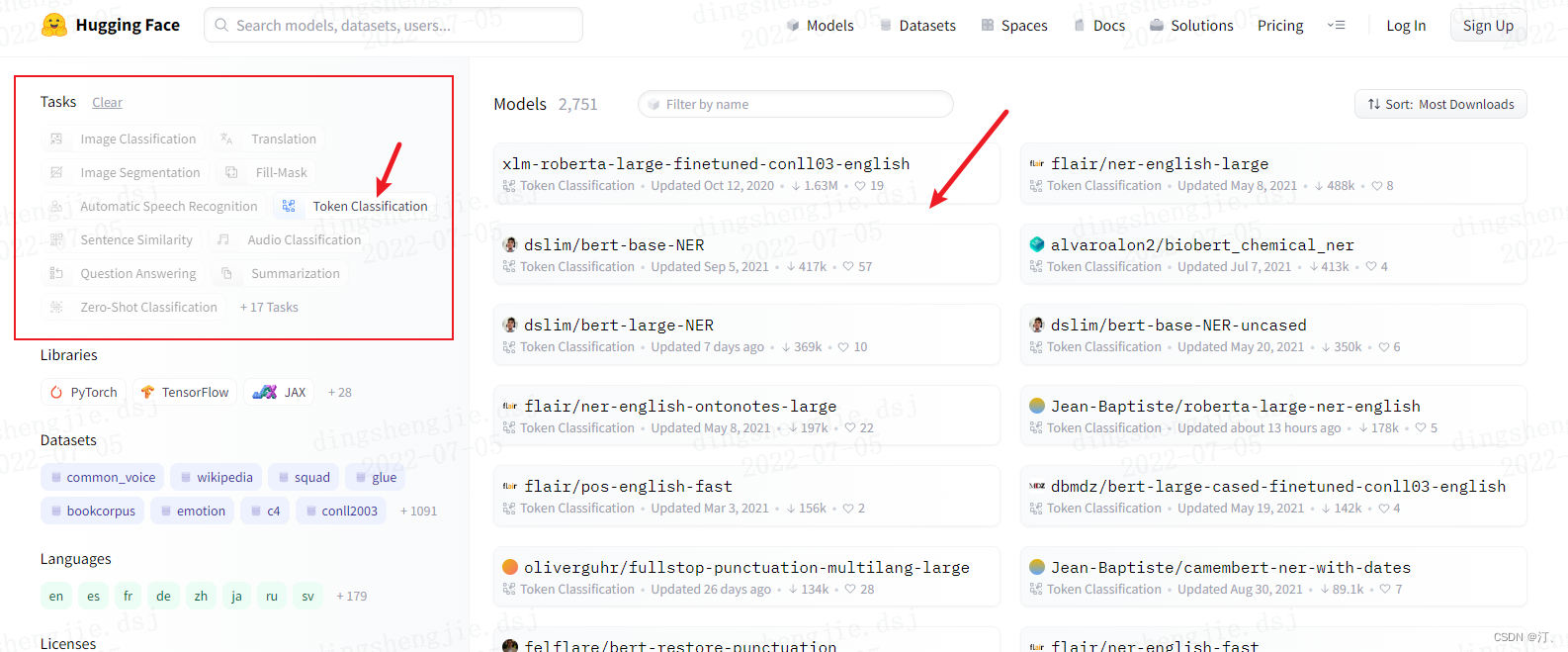
相关教程直接参考别人的:与训练模型
【Huggingface Transformers】保姆级使用教程—上 - 知乎
【Huggingface Transformers】保姆级使用教程02—微调预训练模型 Fine-tuning - 知乎
huggingface transformers的trainer使用指南 - 知乎
2.doccano标注平台格式要求
doccano平台操作参考文章开头链接:
json格式导入数据格式要求: 实体;包含关系样式展示

{

    "text": "Google was founded on September 4, 1998, by Larry Page and Sergey Brin.",

    "entities": [

        {

            "id": 0,

            "start_offset": 0,

            "end_offset": 6,

            "label": "ORG"

        },

        {

            "id": 1,

            "start_offset": 22,

            "end_offset": 39,

            "label": "DATE"

        },

        {

            "id": 2,

            "start_offset": 44,

            "end_offset": 54,

            "label": "PERSON"

        },

        {

            "id": 3,

            "start_offset": 59,

            "end_offset": 70,

            "label": "PERSON"

        }

    ],

    "relations": [

        {

            "from_id": 0,

            "to_id": 1,

            "type": "foundedAt"

        },

        {

            "from_id": 0,

            "to_id": 2,

            "type": "foundedBy"

        },

        {

            "from_id": 0,

            "to_id": 3,

            "type": "foundedBy"

        }

    ]

}
3. 实体智能标注+格式转换
3.1 长文本(一个txt长篇)
注释部分包含预训练模型识别实体;以及精灵标注助手格式要求
from transformers import pipeline

import os

from tqdm import tqdm

import pandas as pd

from time import time

import json

def return_single_entity(name, start, end):

    return [int(start), int(end), name]

# def return_single_entity(name, word, start, end, id, attributes=[]):

#     entity = {}

#     entity['type'] = 'T'

#     entity['name'] = name

#     entity['value'] = word

#     entity['start'] = int(start)

#     entity['end'] = int(end)

#     entity['attributes'] = attributes

#     entity['id'] = int(id)

#     return entity

# input_dir = 'E:/datasets/myUIE/inputs'

input_dir = 'C:/Users/admin/Desktop//test_input.txt'

output_dir = 'C:/Users/admin/Desktop//outputs'

tagger = pipeline(task='ner', model='xlm-roberta-large-finetuned-conll03-english',

                  aggregation_strategy='simple')

keywords = {'PER': '人', 'ORG': '机构'}  # loc 地理位置 misc 其他类型实体

# for filename in tqdm(input_dir):

#     # 读取数据并自动打标

# json_list = []

with open(input_dir, 'r', encoding='utf8') as f:

    text = f.readlines()

json_list = [0 for i in range(len(text))]

for t in text:

    i = t.strip("\n").strip("'").strip('"')

    named_ents = tagger(i)  # 预训练模型

    # named_ents = tagger(text)

    df = pd.DataFrame(named_ents)

    """ 标注结果:entity_group     score                    word  start  end

0          ORG  0.999997  National Science Board     18   40

1          ORG  0.999997                     NSB     42   45

2          ORG  0.999997                     NSF     71   74"""

    # 放在循环里面,那每次开始新的循环就会重新定义一次,上一次定义的内容就丢了

    # json_list = [0 for i in range(len(text))]

    entity_list=[]

    # entity_list2=[]

    for index, elem in df.iterrows():

        if not elem.entity_group in keywords:

            continue

        if elem.end - elem.start <= 1:

            continue

        entity = return_single_entity(

            keywords[elem.entity_group], elem.start, elem.end)

        entity_list.append(entity)

        # entity_list2.append(entity_list)

    json_obj = {"text": text[index], "label": entity_list}

    json_list[index] = json.dumps(json_obj)

    # entity_list.append(entity)

# data = json.dumps(json_list)

# json_list.append(data)

with open(f'{output_dir}/data_2.json', 'w', encoding='utf8') as f:

    for line in json_list:

        f.write(line+"\n")

    # f.write('\n'.join(data))

    # f.write(str(data))

print('done!')

    # 转化为精灵标注助手导入格式(但是精灵标注助手的nlp标注模块有编码的问题,部分utf8字符不能正常显示,会影响标注结果)

    # id = 1

    # entity_list = ['']

    # for index, elem in df.iterrows():

    #     if not elem.entity_group in keywords:

    #         continue

    #     entity = return_single_entity(keywords[elem.entity_group], elem.word, elem.start, elem.end, id)

    #     id += 1

    #     entity_list.append(entity)

    # python_obj = {'path': f'{input_dir}/{filename}',

    #               'outputs': {'annotation': {'T': entity_list, "E": [""], "R": [""], "A": [""]}},

    #               'time_labeled': int(1000 * time()), 'labeled': True, 'content': text}

    # data = json.dumps(python_obj)

    # with open(f'{output_dir}/{filename.rstrip(".txt")}.json', 'w', encoding='utf8') as f:

    #     f.write(data)
识别结果:
{"text": "The company was founded in 1852 by Jacob Estey\n", "label": [[35, 46, "\u4eba"]]}

{"text": "The company was founded in 1852 by Jacob Estey, who bought out another Brattleboro manufacturing business.", "label": [[35, 46, "\u4eba"], [71, 82, "\u673a\u6784"]]}
可以看到label标签是乱码的,不用在意导入到doccano平台后会显示正常

3.2 短文本多个(txt文件)
from transformers import pipeline

import os

from tqdm import tqdm

import pandas as pd

import json

def return_single_entity(name, start, end):

    return [int(start), int(end), name]

input_dir = 'C:/Users/admin/Desktop/inputs_test'

output_dir = 'C:/Users/admin/Desktop//outputs'

tagger = pipeline(task='ner', model='xlm-roberta-large-finetuned-conll03-english', aggregation_strategy='simple')

json_list = []

keywords = {'PER': '人', 'ORG': '机构'}

for filename in tqdm(os.listdir(input_dir)[:3]):

    # 读取数据并自动打标

    with open(f'{input_dir}/{filename}', 'r', encoding='utf8') as f:

        text = f.read()

    named_ents = tagger(text)

    df = pd.DataFrame(named_ents)

    # 转化为doccano的导入格式

    entity_list = []

    for index, elem in df.iterrows():

        if not elem.entity_group in keywords:

            continue

        if elem.end - elem.start <= 1:

            continue

        entity = return_single_entity(keywords[elem.entity_group], elem.start, elem.end)

        entity_list.append(entity)

    file_obj = {'text': text, 'label': entity_list}

    json_obj = json.dumps(file_obj)

    json_list.append(json_obj)

with open(f'{output_dir}/data3.json', 'w', encoding='utf8') as f:

    f.write('\n'.join(json_list))

print('done!')
3.3 含标注精灵格式要求转换
from transformers import pipeline

import os

from tqdm import tqdm

import pandas as pd

from time import time

import json

def return_single_entity(name, word, start, end, id, attributes=[]):

    entity = {}

    entity['type'] = 'T'

    entity['name'] = name

    entity['value'] = word

    entity['start'] = int(start)

    entity['end'] = int(end)

    entity['attributes'] = attributes

    entity['id'] = int(id)

    return entity

input_dir = 'E:/datasets/myUIE/inputs'

output_dir = 'E:/datasets/myUIE/outputs'

tagger = pipeline(task='ner', model='xlm-roberta-large-finetuned-conll03-english', aggregation_strategy='simple')

keywords = {'PER': '人', 'ORG': '机构'}

for filename in tqdm(os.listdir(input_dir)):

    # 读取数据并自动打标

    with open(f'{input_dir}/{filename}', 'r', encoding='utf8') as f:

        text = f.read()

    named_ents = tagger(text)

    df = pd.DataFrame(named_ents)

    # 转化为精灵标注助手导入格式(但是精灵标注助手的nlp标注模块有编码的问题,部分utf8字符不能正常显示,会影响标注结果)

    id = 1

    entity_list = ['']

    for index, elem in df.iterrows():

        if not elem.entity_group in keywords:

            continue

        entity = return_single_entity(keywords[elem.entity_group], elem.word, elem.start, elem.end, id)

        id += 1

        entity_list.append(entity)

    python_obj = {'path': f'{input_dir}/{filename}',

                  'outputs': {'annotation': {'T': entity_list, "E": [""], "R": [""], "A": [""]}},

                  'time_labeled': int(1000 * time()), 'labeled': True, 'content': text}

    data = json.dumps(python_obj)

    with open(f'{output_dir}/{filename.rstrip(".txt")}.json', 'w', encoding='utf8') as f:

        f.write(data)

print('done!')
4.提高标注质量
4.1.人工复核
不多说就是一条一条检查过去,智能标注后已经省事很多了
对已标注数据进行
4.2 删除无效标注
import json

dir_path = r'C:/Users/admin/Desktop/光合项目/自动标注'  # 这里改文件地址

with open(f'{dir_path}/pre_data.jsonl', 'r',encoding='utf8')as f:  # 文件命名

    text = f.readlines()

content = [json.loads(elem.strip('\n')) for elem in text]

content = [json.dumps(cont) for cont in content if cont['entities'] != []]

with open(f'{dir_path}/remove_empty_data.jsonl', 'w',encoding='utf8')as f:  # 文件命名

    f.write('\n'.join(content))

print("输出数据")
基于 hugging face 预训练模型的实体识别智能标注方案:生成doccano要求json格式的更多相关文章
- 基于Labelstudio的UIE半监督智能标注方案(本地版)
基于Labelstudio的UIE半监督智能标注方案(本地版) 更多技术细节参考上一篇项目,本篇主要侧重本地端链路走通教学,提速提效: 基于Labelstudio的UIE半监督深度学习的智能标注方案( ...
- 基于Label studio实现UIE信息抽取智能标注方案,提升标注效率!
基于Label studio实现UIE信息抽取智能标注方案,提升标注效率! 项目链接见文末 人工标注的缺点主要有以下几点: 产能低:人工标注需要大量的人力物力投入,且标注速度慢,产能低,无法满足大规模 ...
- C#中的深度学习(五):在ML.NET中使用预训练模型进行硬币识别
在本系列的最后,我们将介绍另一种方法,即利用一个预先训练好的CNN来解决我们一直在研究的硬币识别问题. 在这里,我们看一下转移学习,调整预定义的CNN,并使用Model Builder训练我们的硬币识 ...
- 基于分布式的短文本命题实体识别之----人名识别(python实现)
目前对中文分词精度影响最大的主要是两方面:未登录词的识别和歧义切分. 据统计:未登录词中中文姓人名在文本中一般只占2%左右,但这其中高达50%以上的人名会产生切分错误.在所有的分词错误中,与人名有关的 ...
- 基于tensorflow的bilstm_crf的命名实体识别(数据集是msra命名实体识别数据集)
github地址:https://github.com/taishan1994/tensorflow-bilstm-crf 1.熟悉数据 msra数据集总共有三个文件: train.txt:部分数据 ...
- 使用基于Android网络通信的OkHttp库实现Get和Post方式简单操作服务器JSON格式数据
目录 前言 1 Get方式和Post方式接口说明 2 OkHttp库简单介绍及环境配置 3 具体实现 前言 本文具体实现思路和大部分代码参考自<第一行代码>第2版,作者:郭霖:但是文中讲 ...
- DL4NLP —— 序列标注:BiLSTM-CRF模型做基于字的中文命名实体识别
三个月之前 NLP 课程结课,我们做的是命名实体识别的实验.在MSRA的简体中文NER语料(我是从这里下载的,非官方出品,可能不是SIGHAN 2006 Bakeoff-3评测所使用的原版语料)上训练 ...
- 基于keras实现的中文实体识别
1.简介 NER(Named Entity Recognition,命名实体识别)又称作专名识别,是自然语言处理中常见的一项任务,使用的范围非常广.命名实体通常指的是文本中具有特别意义或者指代性非常强 ...
- 文本分类实战(十)—— BERT 预训练模型
1 大纲概述 文本分类这个系列将会有十篇左右,包括基于word2vec预训练的文本分类,与及基于最新的预训练模型(ELMo,BERT等)的文本分类.总共有以下系列: word2vec预训练词向量 te ...
- 文本分类实战(九)—— ELMO 预训练模型
1 大纲概述 文本分类这个系列将会有十篇左右,包括基于word2vec预训练的文本分类,与及基于最新的预训练模型(ELMo,BERT等)的文本分类.总共有以下系列: word2vec预训练词向量 te ...
随机推荐
- c中常用的字符串操作
c中常用的字符串操作 头文件:<string.h> 1.strchr()查找某字符在字符串中首次出现的位置 strchr() 用来查找某字符在字符串中首次出现的位置,其原型为: char ...
- 面试官:请聊一聊String、StringBuilder、StringBuffer三者的区别
面试官:"小伙子,在日常的写代码过程中,使用过String,StringBuilder和StringBuffer没?" 我:"用过的呀!" 面试官:" ...
- SpringBoot 学习笔记:运维篇
SpringBoot程序的打包和运行 开发部门使用Git.SVN等版本控制工具上传工程到版本服务器 服务器使用版本控制工具下载工程 服务器上使用Maven工具在当前真机环境下重新构建项目 启动服务 程 ...
- S3C2440移植linux3.4.2内核之修改分区以及制作根文件系统
上一节S3C2440移植linux3.4.2内核之内核框架介绍及简单修改我们简单配置了内核,这节来根据继续修改内核. 启动内核 内核启动的打印信息如下图所示 可以看到内核有8个分区,而我们的u ...
- Canal使用和安装总结
转载请注明出处: 1.定义 Canal 组件是一个基于 MySQL 数据库增量日志解析,提供增量数据订阅和消费,支持将增量数据投递到下游消费者(如 Kafka.RocketMQ 等)或者存储(如 El ...
- SoC scan implementation
scan chain产生之前需要进行scan drc的过程,判断cell是不是能够串到scan chain上去 mux-d scan cell(是最常用的scan cell),还有其他的scan ce ...
- css - 使用 " dl、dt、dd " 描述列表的形式 , 实现 【图片加下方文字】 的快速布局
上效果图 : 上代码 : <!DOCTYPE html> <html lang="en"> <head> <meta charset=&q ...
- java - classpath 的配置
classpath C:\Program Files\Java\jdk\jre\lib\rt.jar
- 百度网盘(百度云)SVIP超级会员共享账号每日更新(2024.01.05)
一.百度网盘SVIP超级会员共享账号 可能很多人不懂这个共享账号是什么意思,小编在这里给大家做一下解答. 我们多知道百度网盘很大的用处就是类似U盘,不同的人把文件上传到百度网盘,别人可以直接下载,避免 ...
- 神通数据库的varchar和nvarchar的验证
神通数据库的varchar和nvarchar的验证 登录神通数据库 isql 注意 神通数据库的默认密码是 szoscar55 Welcome to isql 2.0.56 interactive t ...