
Java文件与IO流
首先我们要清楚什么是流,正如其名,很形象,流就是像水一样的东西,具有方向性,在java中
,流大概就是类
接下来,我们要对输入输出流有一个基本认识,什么是输入输出流呢?
输入输出明显需要一个参照,而这个参照就是主存。
清楚了上面的概念,我们接着看下去吧。
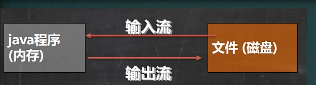
文件
文件的创建
文件创建共有三种方式
1、
File file = new File(文件的路径);
file.createNewFile();
2、
File file = new File(文件的父目录, 文件名);
3、
File file = new File(文件的父目录, 文件的子目录);
package file;

import org.junit.jupiter.api.Test;

import java.awt.*;

import java.io.File;

import java.io.IOException;

public class FileCreate {

    public static void main(String[] args) {

    }

    //@Test

    public void create01() throws IOException {

        String filePath = "E:\\new1.txt";

        File file = new File(filePath);

        file.createNewFile();

        System.out.println("文件创建成功");

    }

    //@Test

    public void create02() throws IOException {

        File file1 = new File("E:\\");

        String fileName = "new2.txt";

        File file = new File(file1, fileName);

        file.createNewFile();

        System.out.println("文件创建成功2");

    }

    @Test

    public void create03()

    {

        String FilePath = "E:\\";

        String FileName = "new3.txt";

        File file = new File(FilePath, FileName);

        try {

            file.createNewFile();

            System.out.println("文件创建成功3");

        } catch (IOException e) {

            throw new RuntimeException(e);

        }

    }

}
文件信息的获取
package file;

import java.io.File;

public class FileInformation {

    public static void main(String[] args) {

        FileInformation fileInformation = new FileInformation();

        fileInformation.info();

    }

    public void info()

    {

        File file = new File("E:\\new1.txt");

        System.out.println("文件名=" + file.getName());

        System.out.println("文件的句=绝对路径" + file.getAbsoluteFile());

        System.out.println("文件的父目录" + file.getParentFile());

        System.out.println("文件的大小" + file.length());

        System.out.println("文件是否存在" + file.exists());

        System.out.println("是否是一个文件" + file.isFile());

        System.out.println("是否是一个目录" + file.isDirectory());

    }

}
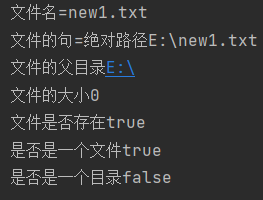
目录文件的创建和删除
删除
package file;

import com.sun.javafx.image.BytePixelSetter;

import org.junit.jupiter.api.Test;

import java.io.File;

public class Directory_ {

    public static void main(String[] args) {

    }

    @Test

    public void f1()

    {

        String filePath = "E:\\new1.txt";

        File file = new File(filePath);

        if(file.exists())

        {

            if(file.delete()) System.out.println("删除成功");

            else System.out.println("删除成功");

        }else{

            System.out.println("该文件不存在");

        }

    }

}
目录创建
mkdir创建一级目录、mkdirs创建多级目录
@Test

    public void f3()

    {

        String filePath = "D:\\demo\\a\\b\\c";

        File file = new File(filePath);

        if(file.exists())

        {

            System.out.println("目录存在");

        }else {

            if(file.mkdirs()) System.out.println("该目录创建成功");

            else System.out.println("该目录创建失败");

        }

    }
IO流
流的分类
1、按照数据单位不同分为字节流(操作二进制的文件)和字符流(一个字符占多少个字节是不确定的这和编码有点关系,操作文本文件)
2、按流向单位不同分为输入流和输出流。
3、按流的角色分:节点流和处理流(这里角色改没有引入下面会介绍)
InputStream和OutStream、Reader、Writer是四个个抽象类,其他类均是实现的这四个Abstract类,均以他们作为后缀名
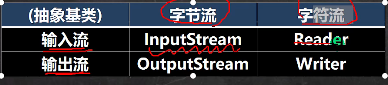
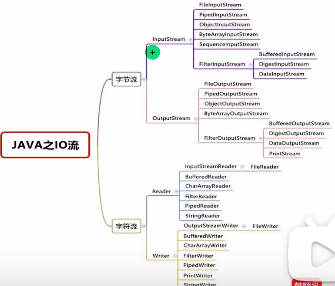
输入流
字节输入流
package inputstream;

import org.junit.jupiter.api.Test;

import java.io.FileInputStream;

import java.io.FileNotFoundException;

import java.io.IOException;

public class FileInputStream_ {

    public static void main(String[] args) {

    }

    //@Test

    public void readFile01() throws IOException {

        String filePath = "D:\\hello.txt";

        FileInputStream fileInputStream = null;

        int readdata = 0;

        try {

            fileInputStream = new FileInputStream(filePath);

           //返回-1表示文件读完了

            while((readdata = fileInputStream.read()) != -1){

                System.out.print((char) readdata);

            }

        } catch (IOException e) {

            throw new RuntimeException(e);

        }finally {

            //关闭文件流

            fileInputStream.close();

        }

    }

    @Test

    public void readFile02() throws IOException {

        String filePath = "D:\\hello.txt";

        byte[] buf = new byte[8];

        FileInputStream fileInputStream = null;

        int readlen = 0;

        try {

            fileInputStream = new FileInputStream(filePath);

            //返回-1表示文件读完了

            while((readlen = fileInputStream.read(buf)) != -1){

                System.out.print(new String(buf, 0, readlen));

            }

        } catch (IOException e) {

            throw new RuntimeException(e);

        }finally {

            //关闭文件流

            fileInputStream.close();

        }

    }

}
字节输出流
package outputstream_;

import org.junit.jupiter.api.Test;

import java.io.FileInputStream;

import java.io.FileNotFoundException;

import java.io.FileOutputStream;

import java.io.IOException;

public class FileOutputStream01 {

    public static void main(String[] args) {

    }

    @Test

    public void writeFile() throws IOException {

        String filePath = "D:\\a.txt";

        FileOutputStream fileOutputStream = null;

        try {

            String str = "Hello World";

            fileOutputStream = new FileOutputStream(filePath);

           //写一个字符

            // fileOutputStream.write('C');

            //写一个字符串

             fileOutputStream.write(str.getBytes());

        } catch (IOException e) {

            throw new RuntimeException(e);

        }finally {

            fileOutputStream.close();

        }

    }

}
fileOutputStream = new FileOutputStream(filePath);是覆盖
fileOutputStream = new FileOutputStream(filePath, true);是追加到源文件后
应用
package outputstream_;

import java.io.FileInputStream;

import java.io.FileNotFoundException;

import java.io.FileOutputStream;

import java.io.IOException;

public class FileCopy {

    public static void main(String[] args) throws IOException {

        //文件拷贝,将D:\\1.png拷贝到C:\\

        //1、创建文件的输入流,将文件读入程序

        //2、创建文件的输出流,将程序中的内容写入文件

        String filePath = "D:\\1.jpg";

        FileInputStream fileInputStream = null;

        FileOutputStream fileOutputStream = null;

        byte[] buf = new byte[1024];

        int readlen = 0;

        fileInputStream = new FileInputStream(filePath);

        fileOutputStream = new FileOutputStream("E:\\1.jpg");

        while((readlen = fileInputStream.read()) != -1)

        {

            //读取后写入文件,边读边写

            fileOutputStream.write(buf, 0, readlen);

        }

        fileOutputStream.close();

        fileInputStream.close();

    }

}
FileReader
package filereader;

import java.io.FileNotFoundException;

import java.io.FileReader;

import java.io.IOException;

public class FileReader_ {

    public static void main(String[] args) throws IOException {

        String filePath = "D:\\a.txt";

        FileReader fileReader = null;

        int data = 0;

        try {

            fileReader = new FileReader(filePath);

            while((data = fileReader.read()) != -1)

            {

                System.out.print((char) data);

            }

        } catch (FileNotFoundException e) {

            throw new RuntimeException(e);

        } catch (IOException e) {

            throw new RuntimeException(e);

        } finally {

            fileReader.close();

        }

    }

}
用字符数组来读
package filereader;

import org.junit.jupiter.api.Test;

import java.io.FileNotFoundException;

import java.io.FileReader;

import java.io.IOException;

public class FileReader_ {

    public static void main(String[] args){

    }

    @Test

    public void readFile01() throws IOException {

        String filePath = "D:\\a.txt";

        int readlen = 0;

        FileReader fileReader = null;

        char [] buf = new char[8];

        try {

            fileReader = new FileReader(filePath);

            while((readlen = fileReader.read(buf)) != -1)

            {

                System.out.print(new String(buf, 0, readlen));

            }

        } catch (FileNotFoundException e) {

            throw new RuntimeException(e);

        } catch (IOException e) {

            throw new RuntimeException(e);

        } finally {

            fileReader.close();

        }

    }

}
FileWriter
写入数据之后一定要关流或者刷新数据才能被写入
package filewrite;

import java.io.FileWriter;

import java.io.IOException;

public class FileWriter_ {

    public static void main(String[] args) {

        String path = "D:\\a.txt";

        FileWriter fileWriter = null;

        try {

            fileWriter = new FileWriter(path, true);

            fileWriter.write("aaaa");

        } catch (IOException e) {

            throw new RuntimeException(e);

        }finally {

            try {

                fileWriter.close();

            } catch (IOException e) {

                throw new RuntimeException(e);

            }

        }

    }

}
节点流和处理流
处理流是连接在已存在的流之上为程序提供更强大的读写功能,包装流更加形象
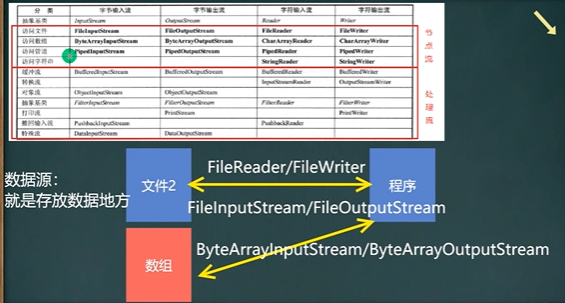
BufferedReader & BufferedWriter
package BufferedReader_;

import javax.swing.text.Style;

import java.io.BufferedReader;

import java.io.FileNotFoundException;

import java.io.FileReader;

import java.io.IOException;

public class BufferedReader_ {

    public static void main(String[] args) throws IOException {

        String path = "D:\\a.txt";

        BufferedReader bufferedReader = new BufferedReader(new FileReader(path));

        String line;

        try {

            //bufferedReader.readLine();按行读取,当读取到空时,表示读取结束

            while((line = bufferedReader.readLine()) != null) System.out.println(line);;

        } catch (FileNotFoundException e) {

            throw new RuntimeException(e);

        } catch (IOException e) {

            throw new RuntimeException(e);

        }finally {

            bufferedReader.close();

        }

    }

}
package bufferedreader;

import java.io.*;

public class BufferedReader_ {

    public static void main(String[] args) throws IOException {

        String path = "D:\\a.txt";

        BufferedWriter bufferedWriter = new BufferedWriter(new FileWriter(path, true));

        try {

            bufferedWriter.write("阿杜吃饱饱");

        } catch (IOException e) {

            throw new RuntimeException(e);

        }finally {

            bufferedWriter.flush();

        }

    }

}
视频、图片等是二进制文件用字节流更方便
对象流
使用细节
1、读写顺序要一致
2、要求实现序列化或反序列化对象,需要实现Serializable
3、序列化默认是将所有属性都序列化,但是static和transient不序列化
4、序列化里面的属性也要是现实Serializable接口
标准输入输出流
转换流
转换流应用的情况:
因为字符流不能指定编码格式,而字节流可以指定编码格式,可以先按字节流读入,再用转换流转化,这样就不会乱码了
Java文件与IO流的更多相关文章
- java中的IO流
Java中的IO流 在之前的时候我已经接触过C#中的IO流,也就是说集中数据固化的方式之一,那么我们今天来说一下java中的IO流. 首先,我们学习IO流就是要对文件或目录进行一系列的操作,那么怎样操 ...
- 文件和IO流
摘要:本文主要介绍了Java的文件处理以及常用的IO流操作. 文件操作 概念 File是数据源(保存数据的地方)的一种,可以表示一个文件,也可以表示一个文件目录. File类只能对文件和文件夹进行创建 ...
- 第55节:Java当中的IO流-时间api(下)-上
Java当中的IO流(下)-上 日期和时间 日期类:java.util.Date 系统时间: long time = System.currentTimeMillis(); public class ...
- 第54节:Java当中的IO流(中)
Java当中的IO流(中) 删除目录 // 简书作者:达叔小生 import java.io.File; public class Demo{ public static void main(Stri ...
- 第53节:Java当中的IO流(上)
Java当中的IO流 在Java中,字符串string可以用来操作文本数据内容,字符串缓冲区是什么呢?其实就是个容器,也是用来存储很多的数据类型的字符串,基本数据类型包装类的出现可以用来解决字符串和基 ...
- Java中的IO流总结
Java中的IO流总结 1. 流的继承关系,以及字节流和字符流. 2. 节点流FileOutputStream和FileInputStream和处理流BufferedInputStream和Buffe ...
- Java中的IO流大体介绍
由于Java中的IO流是在是知识点繁多,所以我大约花了1周的时间将其整理起来.但是整理起来后并不是将完事了,我还是要分字节流和字符流来讲述.然后字节流和字符流中还有是否带有缓冲流. 讲述完IO流后我将 ...
- Java中的IO流,Input和Output的用法,字节流和字符流的区别
Java中的IO流:就是内存与设备之间的输入和输出操作就成为IO操作,也就是IO流.内存中的数据持久化到设备上-------->输出(Output).把 硬盘上的数据读取到内存中,这种操作 成为 ...
- Java中的IO流(五)
上一篇<Java中的IO流(四)>记录了一下Properties类,此类不属于IO流,它属于集合框架.接下来说一下IO流中的其它流 一,打印流PrintStream PrintStream ...
- Java中的IO流(六)
上一篇<Java中的IO流(五)>把流中的打印流PrintStream,PrintWriter,序列流SequenceInputStream以及结合之前所记录的知识点完成了文件的切割与文件 ...
随机推荐
- Centos安装ELK
目录 安装Elastic Search 安装 Java 安装Elastic Search 修改配置 开放端口 访问地址 相关命令 安装elasticsearch-head插件 安装Git 安装node ...
- ZEGO自研RTC+直播系统架构,如何支撑一场高质量直播
近年来得益于网络基础设施的进步,实时音视频(Real-Time Communication,以下简称 RTC)和直播(采用 CDN 进行内容分发)在各行业迅速落地,在疫情的催化下更是推动传统的教育.会 ...
- 如何修改NuGet默认全局包文件夹的位置?
由于一些历史原因,重装系统成为Windows用户解决疑难杂症的祖传手艺.受此影响,给硬盘分盘几乎成为了一种执念,少则C.D两个盘,夸张一点的5~6个盘的也不是没有. PS:macOS和Linux一直都 ...
- Java Maven Settings配置参考
介绍 快速概览 settings.xml文件中的 settings 元素包含用于定义以各种方式配置Maven执行的值的元素,如pom.xml,但不应绑定到任何特定项目或分发给受众.这些值包括本地仓库位 ...
- zabbix 使用监控项原型(自动发现规则)
以kafka为例,需要先对 topic-parttion 做发现,脚本如下 cat topic_parttion_discovery.py #!/usr/bin/env python import j ...
- Bootstrap使用方法
中文文档:https://www.bootcss.com/ 使用方式: 1.选择对应的文档: 2.网站会自动跳转,一般选择Bootstrap3中文文档: 3.点击入门,下拉找到基础模板,复制代码到 ...
- 论文解读(DWL)《Dynamic Weighted Learning for Unsupervised Domain Adaptation》
[ Wechat:Y466551 | 付费咨询,非诚勿扰 ] 论文信息 论文标题:Dynamic Weighted Learning for Unsupervised Domain Adaptatio ...
- 深入浅出 Typescript
TypeScript 是 JavaScript 的一个超集,支持 ECMAScript 6 标准(ES6 教程). TypeScript 由微软开发的自由和开源的编程语言. TypeScript 设计 ...
- docker service 与 docker stack
转载请注明出处: 1. Docker Service Docker Service(服务)是用于定义和管理单个容器服务的概念.它是在Docker Swarm集群中运行的容器实例,可以使用docker ...
- *CTF和nssctf#16的wp
*ctf2023 fcalc 分析程序 本题存在漏洞,是生活中很容易犯的错误,就是循环或者判断的时候没有注意多一还是少一,这种会发生很严重的问题.比如这个题在过滤数字的时候没有过滤掉0,所以输入0的时 ...