
C# NLog 配置
首先用NuGet安装NLog依赖DLL
NLog
NLog.Config
NLog.Schema
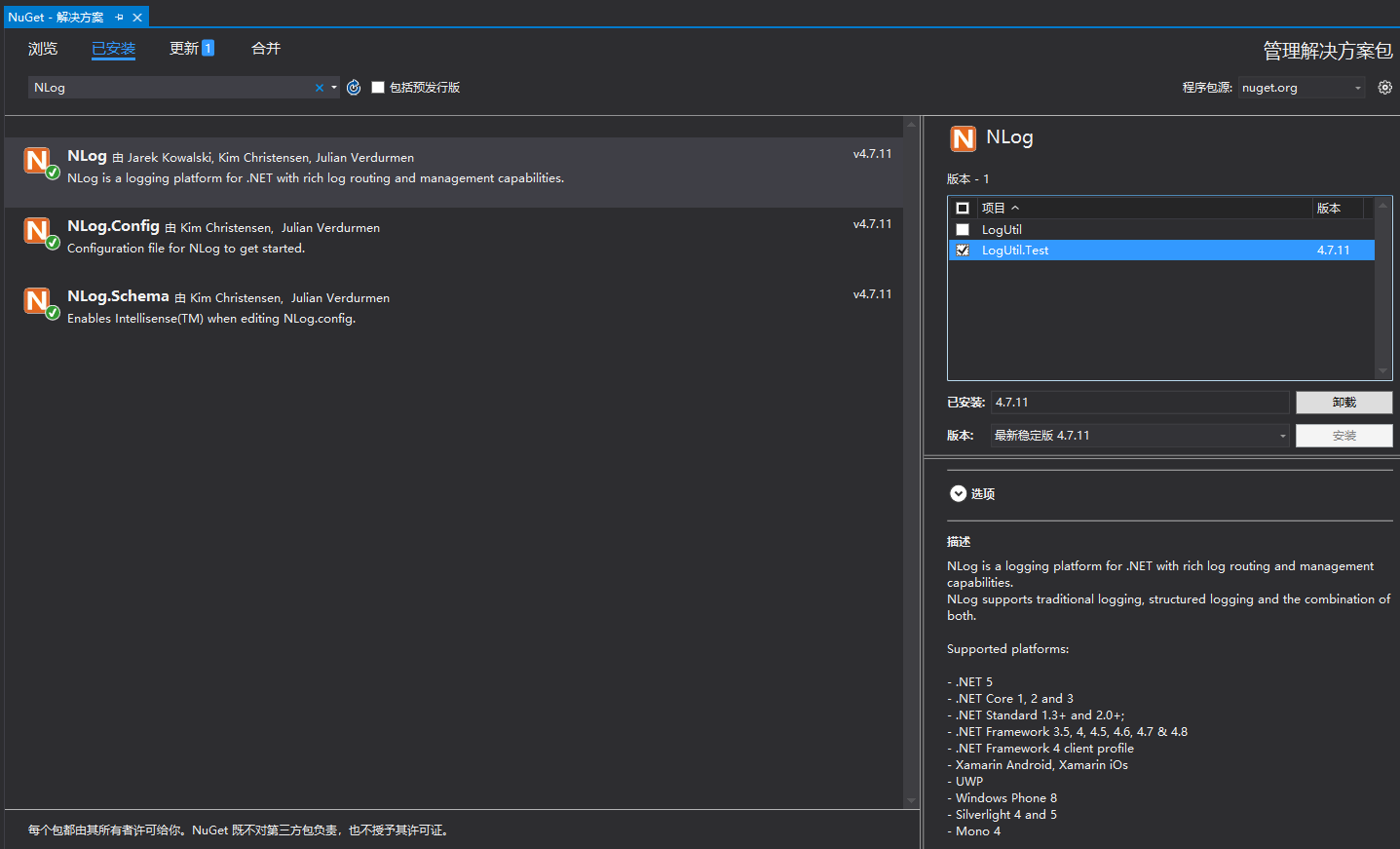
NLog配置文件NLog.config:


<?xml version="1.0" encoding="utf-8" ?>

<nlog xmlns="http://www.nlog-project.org/schemas/NLog.xsd"

      xmlns:xsi="http://www.w3.org/2001/XMLSchema-instance"

      xsi:schemaLocation="http://www.nlog-project.org/schemas/NLog.xsd NLog.xsd"

      autoReload="true"

      throwExceptions="false"

      internalLogLevel="Off"

      internalLogFile="${basedir}/Log/nlog-internal.log">

  <!-- optional, add some variables

  https://github.com/nlog/NLog/wiki/Configuration-file#variables

  -->

  <!--<variable name="myvar" value="myvalue"/>-->

  <variable name="logDir" value="${basedir}/Log"/>

  <variable name="logFileName" value="${date:format=yyyyMMdd}.txt"/>

  <variable name="logArchiveFileName" value="${date:format=yyyyMMdd}_{#}.txt"/>

  <variable name="logLayout" value="${date:format=yyyy-MM-dd HH\:mm\:ss.fff} [${level}] ${message}"/>

  <!--

  See https://github.com/nlog/nlog/wiki/Configuration-file

  for information on customizing logging rules and outputs.

   -->

  <targets>

    <!--

    add your targets here

    See https://github.com/nlog/NLog/wiki/Targets for possible targets.

    See https://github.com/nlog/NLog/wiki/Layout-Renderers for the possible layout renderers.

    -->

    <!--

    Write events to a file with the date in the filename.

    <target xsi:type="File" name="f" fileName="${basedir}/logs/${shortdate}.log"

            layout="${longdate} ${uppercase:${level}} ${message}" />

    -->

    <target xsi:type="File" name="debug"

        layout="${logLayout}"

        fileName="${logDir}/Debug/${logFileName}"

        archiveFileName="${logDir}/Debug/${logArchiveFileName}"

        archiveAboveSize="10485760"

        archiveNumbering="Sequence"

        maxArchiveFiles="10000"

        concurrentWrites="true"

        keepFileOpen="true"

        openFileCacheTimeout="30"

        encoding="UTF-8" />

    <target xsi:type="File" name="info"

            layout="${logLayout}"

            fileName="${logDir}/Info/${logFileName}"

            archiveFileName="${logDir}/Info/${logArchiveFileName}"

            archiveAboveSize="10485760"

            archiveNumbering="Sequence"

            maxArchiveFiles="10000"

            concurrentWrites="true"

            keepFileOpen="true"

            openFileCacheTimeout="30"

            encoding="UTF-8" />

    <target xsi:type="File" name="error"

            layout="${logLayout}"

            fileName="${logDir}/Error/${logFileName}"

            archiveFileName="${logDir}/Error/${logArchiveFileName}"

            archiveAboveSize="10485760"

            archiveNumbering="Sequence"

            maxArchiveFiles="10000"

            concurrentWrites="true"

            keepFileOpen="true"

            openFileCacheTimeout="30"

            encoding="UTF-8" />

  </targets>

  <rules>

    <!-- add your logging rules here -->

    <!--

    Write all events with minimal level of Debug (So Debug, Info, Warn, Error and Fatal, but not Trace)  to "f"

    <logger name="*" minlevel="Debug" writeTo="f" />

    -->

    <!-- 不打印Quartz组件的日志 -->

    <logger name="Quartz.*" maxlevel="Info" final="true" />

    <logger name="*" minlevel="Debug" maxlevel="Debug" writeTo="debug" />

    <logger name="*" minlevel="Info" maxlevel="Error" writeTo="info" />

    <logger name="*" minlevel="Error" maxlevel="Error" writeTo="error" />

  </rules>

</nlog>
变量定义:
private Logger _log = NLog.LogManager.GetLogger("NLogTest");
或者:
private Logger _log = NLog.LogManager.GetCurrentClassLogger();
写日志示例:
private void button4_Click(object sender, EventArgs e)

{

    Task.Run(() =>

    {

        Log("==== 开始 ========");

        Stopwatch stopwatch = new Stopwatch();

        stopwatch.Start();

        List<Task> taskList = new List<Task>();

        Task tsk = null;

        int taskCount = 0;

        tsk = Task.Run(() =>

        {

            for (int i = 0; i < n; i++)

            {

                _log.Info("测试日志 " + i.ToString("000000"));

                Interlocked.Increment(ref taskCount);

            }

        });

        taskList.Add(tsk);

        tsk = Task.Run(() =>

        {

            for (int i = 0; i < n; i++)

            {

                _log.Debug("测试日志 " + i.ToString("000000"));

                Interlocked.Increment(ref taskCount);

            }

        });

        taskList.Add(tsk);

        tsk = Task.Run(() =>

        {

            for (int i = 0; i < n; i++)

            {

                _log.Error("测试日志 " + i.ToString("000000"));

                Interlocked.Increment(ref taskCount);

            }

        });

        taskList.Add(tsk);

        Task.WaitAll(taskList.ToArray());

        Log("Task Count=" + taskCount);

        Log("==== 结束 " + ",耗时:" + stopwatch.Elapsed.TotalSeconds.ToString("0.000") + " 秒 ========");

        stopwatch.Stop();

    });

}
C# NLog 配置的更多相关文章
- ASP.NET Core根据环境切换NLog配置
1.新建NLog配置文件,名称分别为nlog.config和nlog.debug.config <?xml version="1.0"?> <nlog xmlns ...
- Nlog配置
初次使用nlog,里里外外找了好久,终于搞会了. 使用nlog建日志输出到txt文件.数据库.邮件 nlog配置,如图 码云dome
- NLog 配置
之前我介绍过如何使用log4net来记录日志,但最近喜欢上了另一个简单好用的日志框架NLog. 关于NLog和log4net的比较这里就不多讨论了,感兴趣的朋友可以参看.NET日志工具介绍和log4n ...
- NLog 配置与使用
有段时间没写博客了,过年放假,一直在弄CMS.什么都自己写了一遍,今天写写NLog,之前一用的log4net,感觉配置起来还是有些麻烦. NuGet 添加组件 配置 NLog.config <? ...
- Nlog配置实例
彩色Console target <?xml version="1.0" encoding="utf-8" ?> <nlog xmlns= ...
- Nlog 配置总结
Writes log messages to one or more files. Since NLog 4.3 the ${basedir} isn't needed anymore for rel ...
- NLog配置分享
新建一个文件命名为NLog.Config,然后添加如下代码 <?xml version="1.0" encoding="utf-8" ?> < ...
- NLog配置JsonLayout中文输出为unicode问题
日志输出现要改为json格式,网上查询layout配置为JsonLayout就可以了,结果发现输出中文为unicode编码,看很多文章说配置encode="false"就可以了,结 ...
- 常用NLog配置
<?xml version="1.0" encoding="utf-8" ?> <configuration> <configSe ...
- .net core webapi +ddd(领域驱动)+nlog配置+swagger配置 学习笔记(1)
搭建一个.net core webapi项目 在开始之前,请先安装最新版本的VS2017,以及最新的.net core 2.1. 首先创建一个Asp.Net Core Web应用程序 这个应用程序是 ...
随机推荐
- Codeforces Round #696 (Div. 2) (A~C题解)
写在前边 链接:Codeforces Round #696 (Div. 2) A. Puzzle From the Future 链接:A题链接 题目大意: 给定一个\(a\),\(b\),\(d = ...
- 反转字符串里的单词(leetcode 4.10每日打卡)
给定一个字符串,逐个翻转字符串中的每个单词. 示例 1: 输入: "the sky is blue"输出: "blue is sky the" 示例 2: ...
- #ifndef、#define、#ifdef等命令在C#中的应用
1.#ifndef指令的理解 #ifndef是一个预处理指令,用于判断一个表示符是否被定义.如果该标识符未被定义,则执行条件编译中的代码块.否则,将跳过该代码块.下面是一个简单的粒子. 1 #ifnd ...
- 初探webpack之单应用多端构建
初探webpack之单应用多端构建 在现代化前端开发中,我们可以借助构建工具来简化很多工作,单应用多端构建就是其中应用比较广泛的方案,webpack中提供了loader与plugin来给予开发者非常大 ...
- .NET Conf 2023 Chengdu - 成都站圆满结束!
今年的.NET Conf 2023,中国区首次有两个会场举办Local Event,成都会场已于上周六12月9日圆满结束. 本次成都会场共计100+余名.NET开发者报名参与,共计10+名志愿者参与筹 ...
- [CF1854E] Game Bundles
题目描述 Rishi is developing games in the 2D metaverse and wants to offer game bundles to his customers. ...
- [CF1599A] Weights
题目描述 You are given an array $ A $ of length $ N $ weights of masses $ A_1 $ , $ A_2 $ ... $ A_N $ . ...
- StarBlog - 2023年底更新内容一览
前言 先说一下我对 StarBlog 这个系列的文章的规划吧,在 StarBlog 的 1.x 版本,我会同步更新两个系列的文章 博客前台+接口开发笔记 (即当前已发布的这一系列文章) 博客Vue后台 ...
- django+drf开发一些个人的标准化
最近在改造一下个人的开发风格.特分享一下. 子应用我一般放在apps中,每个不同模块的子应用起不同的名字.startapp后自己移动一下,记得修改一下Appconfig中的name即可. 子应用中创建 ...
- IPv6实现内网穿透,极低成本保姆级教程
摘要 一直想实现内网穿透从而达到随时随地可以连接到自己电脑的目的.尝试过使用一些付费的现成方案,但是价格偏高,而流量少得可怜,只能开放几个固定端口. 实现内网穿透的最大难点就在于拥有一个公网IP,但是 ...