
shell脚本中$0 $1 $# $@ $* $? $$ 的各种符号意义详解
一、概述
shell中有两类字符:普通字符、元字符。
1. 普通字符
在Shell中除了本身的字面意思外没有其他特殊意义,即普通纯文本;
2. 元字符
是Shell的保留字符,在Shell中有着特殊的含义。
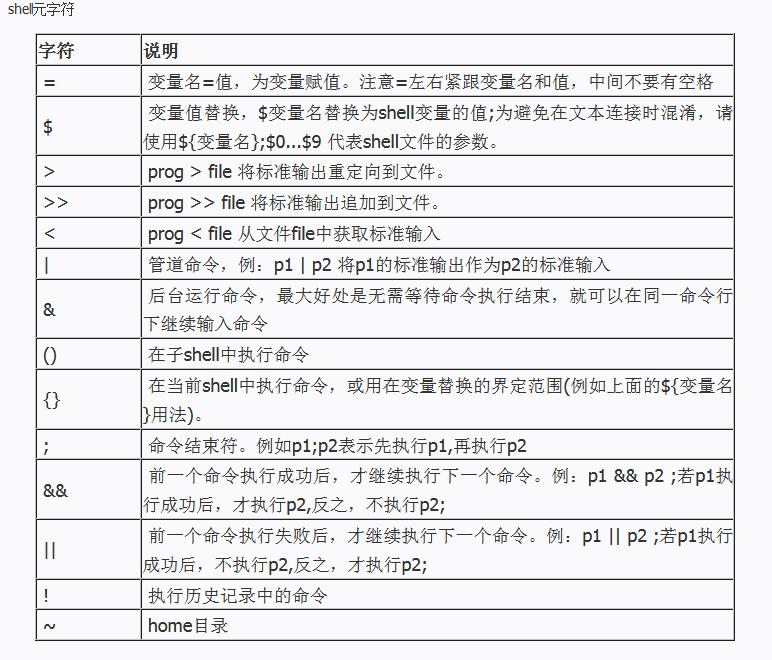
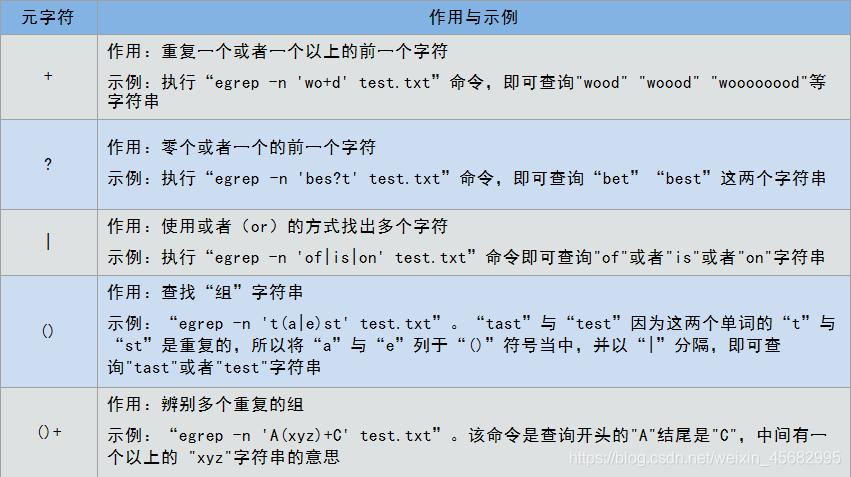
今天主要介绍一下shell中字符$的各种用法。
二、转义字符$
在linux shell脚本中经常用到字符$,下面是$的一些常见用法
| 名称 | 含义 |
|---|---|
| $# | 传给脚本的参数个数 |
| $0 | 脚本本身的名字 |
| $1 | 传递给该shell脚本的第一个参数 |
| $2 | 传递给该shell脚本的第二个参数 |
| $@ | 传给脚本的所有参数的列表 |
| $* | 以一个单字符串显示所有向脚本传递的参数,与位置变量不同,参数可超过9个 |
| $$ | 脚本运行的当前进程ID号 |
| $? | 显示最后命令的退出状态,0表示没有错误,其他表示有错误 |
实例1
建立脚本peng.sh如下:
#/bin/bash

total=$[ $1 * $2 + $3 ]

echo "$1 * $2 + $3 = $total"
运行如下:
./peng.sh 4 5 6
结果如下:

实例2
当把字符串输入给shell脚本的时候,注意是以空格作为分隔符,如果字符串本身就有空格的话,那么用双引号或者单引号,比如
#/bin/bash

echo "$1 is pretty nice!"
运行如下:
./peng.sh 一口Linux
结果如下:

实例3
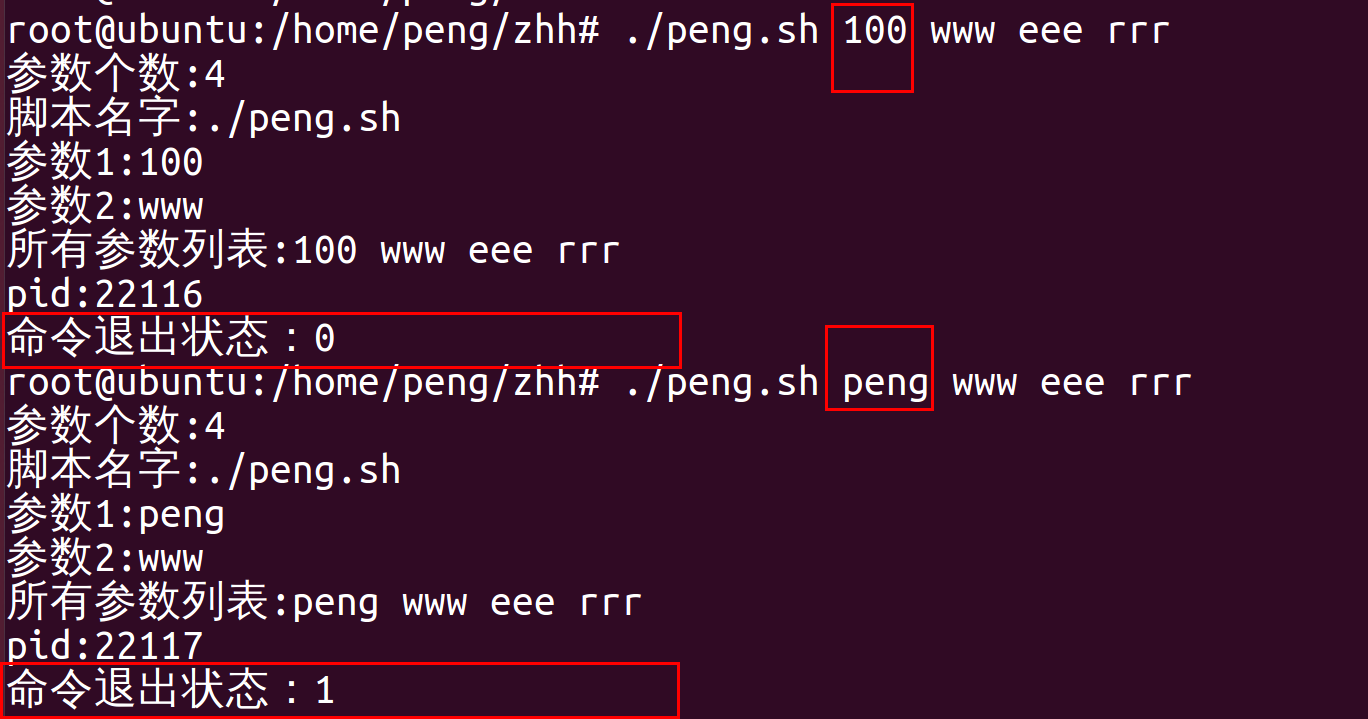
#!/bin/sh

echo "参数个数:$#"

echo "脚本名字:$0"

echo "参数1:$1"

echo "参数2:$2"

echo "所有参数列表:$@"

echo "pid:$$"

if [ $1 = 100 ]

then

 echo "命令退出状态:$?"

 exit 0 #参数正确,退出状态为0

else

 echo "命令退出状态:$?"

 exit 1 #参数错误,退出状态1

fi
执行结果:
实例4
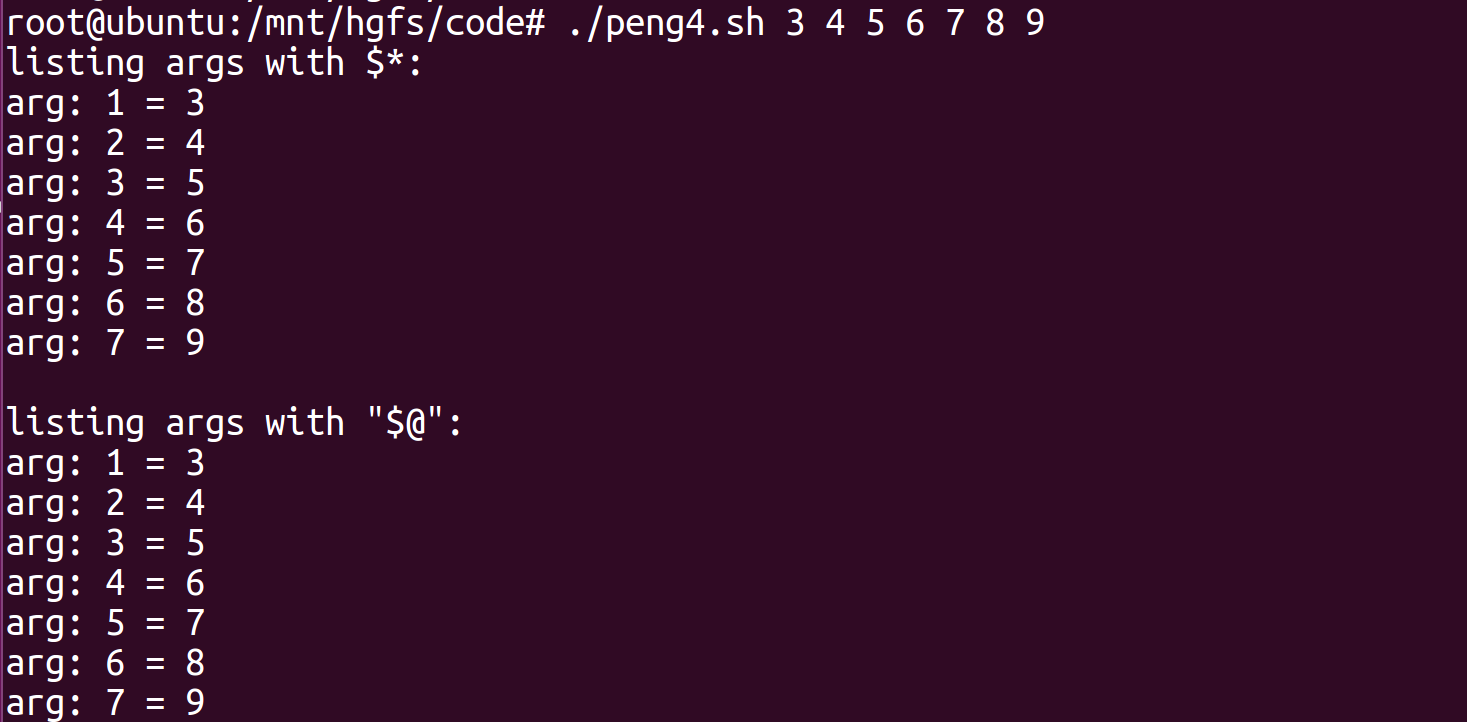
使用for循环进行参数遍历
示例:
#!/bin/bash

number=65             #定义一个退出值

index=1               #定义一个计数器

if [ -z "$1" ];then   #对用户输入的参数做判断,如果未输入参数则返回脚本的用法并退出,退出值65

   echo "Usage:$0 + 参数"

   exit $number

fi

echo "listing args with \$*:"    #在屏幕输入,在$*中遍历参数

for arg in $*

do

   echo "arg: $index = $arg"

   let index+=1

done

echo

index=1                         #将计数器重新设置为1

echo "listing args with \"\$@\":"    #在"$@"中遍历参数

for arg in "$@"

do

   echo "arg: $index = $arg"

   let index+=1

done

实例5
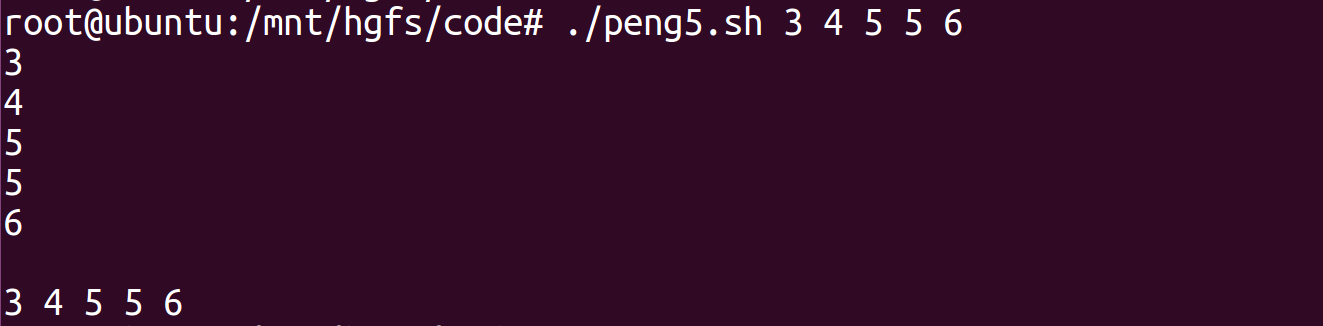
小技巧1:在"$"和$中遍历参数的区别
示例:
#!/bin/bash

number=11

if [ $# -eq 0 ];then

   echo "Usage: $0 + 参数"

   exit $number

fi

for i in $*               #在$*中遍历参数,此时每个参数都是独立的,会遍历$#次

do

   echo $i

done

echo

for i in "$*"            #在"$*"中遍历参数,此时"$*"被扩展为包含所有位置参数的单个字符串,只遍历一次

do

   echo $i

done
三、linux命令执行返回值$?说明
在 Linux 下,不管你是启动一个桌面程序也好,还是在控制台下运行命令,所有的程序在结束时,都会返回一个数字值,这个值叫做返回值,或者称为错误号 ( Error Number )。
1. 在控制台下,有一个特殊的环境变量 $?,保存着前一个程序的返回值,我们可以试试:

先随便执行个命令,比如像上面的 ls 某些文件,然后通过 echo $?,打印 $? 的值~
我们发现返回值是 0,这是什么意思呢?
只要返回值是 0,就代表程序执行成功了~
也就是说,如果 $? 变量的值不是 0 的话,就表示上一个命令在执行的过程中出错了。
2. 我们可以试着 ls 一个不存在的文件:

这样,对于某些打印出一堆不熟悉的英文信息的命令,可以方便的看出它是否成功执行结束。
不过,每次都 echo $? 一下太累了,没关系,你可以把 $? 放在提示符里去:
3. 将上次命令执行是否成功的返回值放到提示符里面去:export PS1="[\$?]${PS1}"
root@ubuntu:/home/peng/zhh# export PS1="[\$?]${PS1}"

[0]root@ubuntu:/home/peng/zhh# ls
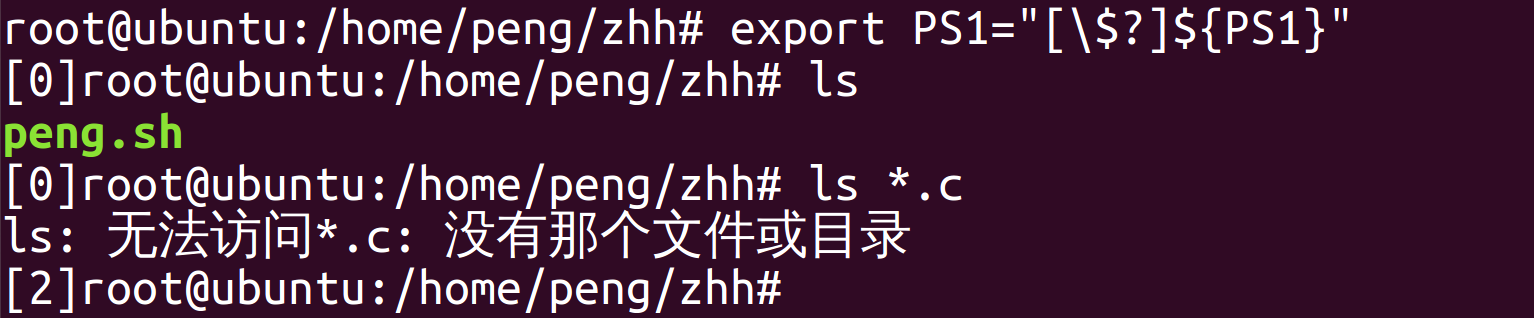
export PS1="[\$?]${PS1}" 这个命令把 $? 的值放在的提示符的最前面,这样每次执行完命令,这个值都会自动更新,这下就一目了然了~
4. 用perror查看错误提示
那么如果返回的值不是 0,我们要怎么知道是那里出错了呢?
大多数的程序出错都会给出提示,如果没有提示的话,可以用 perror 这个程序来查看错误的信息,比如返回值是 2,我们可以运行下面命令:
$ perror 2

OS error code   2:  No such file or directory
这样就清楚了,原来是文件不存在~
该命令需要安装
apt-get install perror
5. 给出错误代码及其具体原因对照表:
"OS error code   1:  Operation not permitted"

"OS error code   2:  No such file or directory"

"OS error code   3:  No such process"

"OS error code   4:  Interrupted system call"

"OS error code   5:  Input/output error"

"OS error code   6:  No such device or address"

"OS error code   7:  Argument list too long"

"OS error code   8:  Exec format error"

"OS error code   9:  Bad file descriptor"

"OS error code  10:  No child processes"

"OS error code  11:  Resource temporarily unavailable"

"OS error code  12:  Cannot allocate memory"

"OS error code  13:  Permission denied"

"OS error code  14:  Bad address"

"OS error code  15:  Block device required"

"OS error code  16:  Device or resource busy"

"OS error code  17:  File exists"

"OS error code  18:  Invalid cross-device link"

"OS error code  19:  No such device"

"OS error code  20:  Not a directory"

"OS error code  21:  Is a directory"

"OS error code  22:  Invalid argument"

"OS error code  23:  Too many open files in system"

"OS error code  24:  Too many open files"

"OS error code  25:  Inappropriate ioctl for device"

"OS error code  26:  Text file busy"

"OS error code  27:  File too large"

"OS error code  28:  No space left on device"

"OS error code  29:  Illegal seek"

"OS error code  30:  Read-only file system"

"OS error code  31:  Too many links"

"OS error code  32:  Broken pipe"

"OS error code  33:  Numerical argument out of domain"

"OS error code  34:  Numerical result out of range"

"OS error code  35:  Resource deadlock avoided"

"OS error code  36:  File name too long"

"OS error code  37:  No locks available"

"OS error code  38:  Function not implemented"

"OS error code  39:  Directory not empty"

"OS error code  40:  Too many levels of symbolic links"

"OS error code  42:  No message of desired type"

"OS error code  43:  Identifier removed"

"OS error code  44:  Channel number out of range"

"OS error code  45:  Level 2 not synchronized"

"OS error code  46:  Level 3 halted"

"OS error code  47:  Level 3 reset"

"OS error code  48:  Link number out of range"

"OS error code  49:  Protocol driver not attached"

"OS error code  50:  No CSI structure available"

"OS error code  51:  Level 2 halted"

"OS error code  52:  Invalid exchange"

"OS error code  53:  Invalid request descriptor"

"OS error code  54:  Exchange full"

"OS error code  55:  No anode"

"OS error code  56:  Invalid request code"

"OS error code  57:  Invalid slot"

"OS error code  59:  Bad font file format"

"OS error code  60:  Device not a stream"

"OS error code  61:  No data available"

"OS error code  62:  Timer expired"

"OS error code  63:  Out of streams resources"

"OS error code  64:  Machine is not on the network"

"OS error code  65:  Package not installed"

"OS error code  66:  Object is remote"

"OS error code  67:  Link has been severed"

"OS error code  68:  Advertise error"

"OS error code  69:  Srmount error"

"OS error code  70:  Communication error on send"

"OS error code  71:  Protocol error"

"OS error code  72:  Multihop attempted"

"OS error code  73:  RFS specific error"

"OS error code  74:  Bad message"

"OS error code  75:  Value too large for defined data type"

"OS error code  76:  Name not unique on network"

"OS error code  77:  File descriptor in bad state"

"OS error code  78:  Remote address changed"

"OS error code  79:  Can not access a needed shared library"

"OS error code  80:  Accessing a corrupted shared library"

"OS error code  81:  .lib section in a.out corrupted"

"OS error code  82:  Attempting to link in too many shared libraries"

"OS error code  83:  Cannot exec a shared library directly"

"OS error code  84:  Invalid or incomplete multibyte or wide character"

"OS error code  85:  Interrupted system call should be restarted"

"OS error code  86:  Streams pipe error"

"OS error code  87:  Too many users"

"OS error code  88:  Socket operation on non-socket"

"OS error code  89:  Destination address required"

"OS error code  90:  Message too long"

"OS error code  91:  Protocol wrong type for socket"

"OS error code  92:  Protocol not available"

"OS error code  93:  Protocol not supported"

"OS error code  94:  Socket type not supported"

"OS error code  95:  Operation not supported"

"OS error code  96:  Protocol family not supported"

"OS error code  97:  Address family not supported by protocol"

"OS error code  98:  Address already in use"

"OS error code  99:  Cannot assign requested address"

"OS error code 100:  Network is down"

"OS error code 101:  Network is unreachable"

"OS error code 102:  Network dropped connection on reset"

"OS error code 103:  Software caused connection abort"

"OS error code 104:  Connection reset by peer"

"OS error code 105:  No buffer space available"

"OS error code 106:  Transport endpoint is already connected"

"OS error code 107:  Transport endpoint is not connected"

"OS error code 108:  Cannot send after transport endpoint shutdown"

"OS error code 109:  Too many references: cannot splice"

"OS error code 110:  Connection timed out"

"OS error code 111:  Connection refused"

"OS error code 112:  Host is down"

"OS error code 113:  No route to host"

"OS error code 114:  Operation already in progress"

"OS error code 115:  Operation now in progress"

"OS error code 116:  Stale NFS file handle"

"OS error code 117:  Structure needs cleaning"

"OS error code 118:  Not a XENIX named type file"

"OS error code 119:  No XENIX semaphores available"

"OS error code 120:  Is a named type file"

"OS error code 121:  Remote I/O error"

"OS error code 122:  Disk quota exceeded"

"OS error code 123:  No medium found"

"OS error code 124:  Wrong medium type"

"OS error code 125:  Operation canceled"

"OS error code 126:  Required key not available"

"OS error code 127:  Key has expired"

"OS error code 128:  Key has been revoked"

"OS error code 129:  Key was rejected by service"

"OS error code 130:  Owner died"

"OS error code 131:  State not recoverable"

"MySQL error code 132: Old database file"

"MySQL error code 133: No record read before update"

"MySQL error code 134: Record was already deleted (or record file crashed)"

"MySQL error code 135: No more room in record file"

"MySQL error code 136: No more room in index file"

"MySQL error code 137: No more records (read after end of file)"

"MySQL error code 138: Unsupported extension used for table"

"MySQL error code 139: Too big row"

"MySQL error code 140: Wrong create options"

"MySQL error code 141: Duplicate unique key or constraint on write or update"

"MySQL error code 142: Unknown character set used"

"MySQL error code 143: Conflicting table definitions in sub-tables of MERGE table"

"MySQL error code 144: Table is crashed and last repair failed"

"MySQL error code 145: Table was marked as crashed and should be repaired"

"MySQL error code 146: Lock timed out; Retry transaction"

"MySQL error code 147: Lock table is full;  Restart program with a larger locktable"

"MySQL error code 148: Updates are not allowed under a read only transactions"

"MySQL error code 149: Lock deadlock; Retry transaction"

"MySQL error code 150: Foreign key constraint is incorrectly formed"

"MySQL error code 151: Cannot add a child row"

"MySQL error code 152: Cannot delete a parent row"
随机推荐
- lumen、laravel 环境问题汇总
框架报500 1.chmod 777 -R storage 将日志目录权限设置下. 2.修改fastcgi,将代码目录包含进去. fastcgi_param PHP_ADMIN_VALUE " ...
- Ubuntu下的NVIDIA显卡【驱动&CUDA 安装与卸载】
碎碎念:主要是把显卡相关的整合出来,基础知识后面再放上来 显卡安装后可以有效降低电脑开太多界面卡顿hhh现象,不过如果显卡不好的话或者是独显的话 问题也不大,主要是学习 learning 使用 参考资 ...
- power bi权限控制笔记
power bi权限控制:power bi权限控制角色目前只能在desktop 客户端进行创建.报表进行权限控制后,用于行级别安全,需注意:a.对数据集做行级别安全性的角色分配 b.需要进行报表的共享 ...
- weui weui-switch 开关取值,设置默认状态
html <div class="weui-cell__ft"> <input class="weui-switch" type=" ...
- react-devtools安装以及使用中的问题
使用react框架开发的小伙伴肯定都想使用想vue-devtools开发工具一样,可以看见组件的状态,和当前组件里的props,data等等. 当然react也有一个开发者工具,现在废话少说,开始安装 ...
- 10 pdf分享失败
PC端分享pdf,复制粘贴pdf链接后跳转搜索首页
- CPU的保护模式
保护模式是为了克服实模式低劣的内存管理方式,物理内存地址不能直接被程序访问,程序内部的地址需要被转化为物理地址后再去访问.实模式CPU运行环境16位,保护模式32位. 寄存器扩展: 由于CPU发展到3 ...
- [oeasy]python0105_七段数码管_7_SEGMENT_数码管驱动_4511
七位数码管 回忆上次内容 上次回顾了 指示灯 辉光管 并了解了 驱动(driver) 驱动 就是 控制设备 工作的人(模块) 辉光管离我们的生活很远了 添加图片注释,不超过 140 ...
- 题解:P10722 [GESP202406 六级] 二叉树
题意 一颗 \(n\) 节点的二叉树,每个节点非黑即白,给你 \(Q\) 次操作,每次给你一个 \(u\),把 \(u\) 的子树内所有节点颜色反转,问最终每个节点的颜色. 分析 看到数据范围,首先把 ...
- MiniAuth 一个轻量 ASP.NET Core Identity Web 后台管理中间插件
MiniAuth 一个轻量 ASP.NET Core Identity Web 后台管理中间插件 「一行代码」为「新.旧项目」 添加 Identity 系统跟用户.权限管理网页后台系统 开箱即用,避免 ...