
【Centos】RPM安装Mysql8
先去官网下载RPM包,没想到RPM包是红帽发行版
https://dev.mysql.com/downloads/mysql/
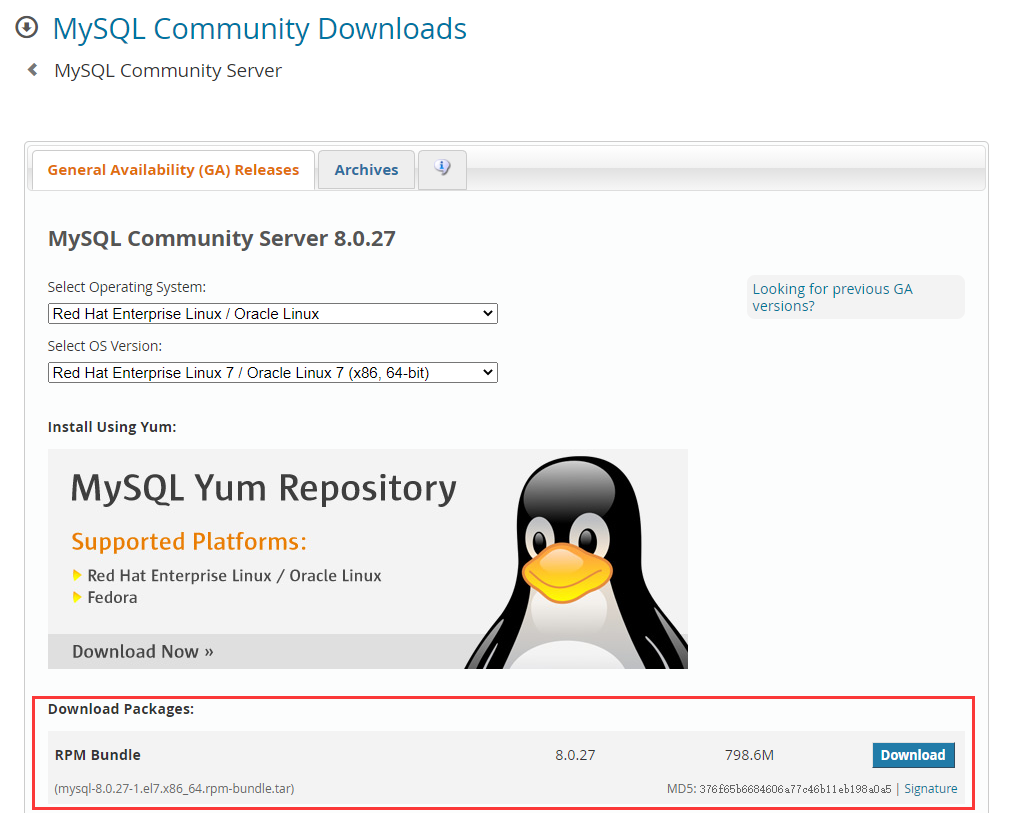
使用wget直接下载到Centos里面:
wget https://cdn.mysql.com//Downloads/MySQL-8.0/mysql-8.0.27-1.el7.x86_64.rpm-bundle.tar
解压Tar包:
[root@localhost ~]# tar -xvf mysql-8.0.27-1.el7.x86_64.rpm-bundle.tar

mysql-community-client-8.0.27-1.el7.x86_64.rpm

mysql-community-client-plugins-8.0.27-1.el7.x86_64.rpm

mysql-community-common-8.0.27-1.el7.x86_64.rpm

mysql-community-devel-8.0.27-1.el7.x86_64.rpm

mysql-community-embedded-compat-8.0.27-1.el7.x86_64.rpm

mysql-community-libs-8.0.27-1.el7.x86_64.rpm

mysql-community-libs-compat-8.0.27-1.el7.x86_64.rpm

mysql-community-server-8.0.27-1.el7.x86_64.rpm

mysql-community-test-8.0.27-1.el7.x86_64.rpm

[root@localhost ~]#
删除残留的MariaDB
[root@localhost ~]# rpm -qa|grep mariadb

mariadb-libs-5.5.68-1.el7.x86_64

[root@localhost ~]# rpm -e --nodeps mariadb-libs-5.5.68-1.el7.x86_64

[root@localhost ~]#
二次检查:
[root@localhost ~]# rpm -qa|grep mariadb

[root@localhost ~]#
开始安装:
rpm -ivh --nodeps --force mysql-community-common-8.0.27-1.el7.x86_64.rpm

rpm -ivh --nodeps --force mysql-community-libs-8.0.27-1.el7.x86_64.rpm

rpm -ivh --nodeps --force mysql-community-libs-compat-8.0.27-1.el7.x86_64.rpm

rpm -ivh --nodeps --force mysql-community-client-8.0.27-1.el7.x86_64.rpm

rpm -ivh --nodeps --force mysql-community-client-plugins-8.0.27-1.el7.x86_64.rpm

rpm -ivh --nodeps --force mysql-community-embedded-compat-8.0.27-1.el7.x86_64.rpm

rpm -ivh --nodeps --force mysql-community-server-8.0.27-1.el7.x86_64.rpm
查看我们安装的内容:
[root@localhost ~]# rpm -qa | grep mysql

mysql-community-libs-8.0.27-1.el7.x86_64

mysql-community-server-8.0.27-1.el7.x86_64

mysql-community-client-plugins-8.0.27-1.el7.x86_64

mysql-community-libs-compat-8.0.27-1.el7.x86_64

mysql-community-embedded-compat-8.0.27-1.el7.x86_64

mysql-community-common-8.0.27-1.el7.x86_64

mysql-community-client-8.0.27-1.el7.x86_64

[root@localhost ~]#
查看当前MySQL服务状态:
[root@localhost ~]# systemctl status mysqld

● mysqld.service - MySQL Server

   Loaded: loaded (/usr/lib/systemd/system/mysqld.service; enabled; vendor preset: disabled)

   Active: inactive (dead)

     Docs: man:mysqld(8)

           http://dev.mysql.com/doc/refman/en/using-systemd.html

[root@localhost ~]#
不管MySQL是否运行还是不运行,都执行服务停止命令
[root@localhost ~]# service mysqld stop

Redirecting to /bin/systemctl stop mysqld.service

[root@localhost ~]#
执行初始化:
[root@localhost ~]# mysqld --initialize --console

[root@localhost ~]#
目录可写权限赋予:
[root@localhost ~]# chown -R mysql:mysql /var/lib/mysql/

[root@localhost ~]#
启动MySQL:
[root@localhost ~]# systemctl start mysqld

[root@localhost ~]#
查看服务状态:
[root@localhost ~]# systemctl status mysqld

● mysqld.service - MySQL Server

   Loaded: loaded (/usr/lib/systemd/system/mysqld.service; enabled; vendor preset: disabled)

   Active: active (running) since 日 2021-10-24 09:31:18 CST; 3s ago

     Docs: man:mysqld(8)

           http://dev.mysql.com/doc/refman/en/using-systemd.html

  Process: 9201 ExecStartPre=/usr/bin/mysqld_pre_systemd (code=exited, status=0/SUCCESS)

 Main PID: 9241 (mysqld)

   Status: "Server is operational"

   CGroup: /system.slice/mysqld.service

           └─9241 /usr/sbin/mysqld

10月 24 09:31:04 localhost.localdomain systemd[1]: Starting MySQL Server...

10月 24 09:31:18 localhost.localdomain systemd[1]: Started MySQL Server.

[root@localhost ~]#
翻看日志文件,找到初始化的密码:
[root@localhost ~]# cat /var/log/mysqld.log

2021-10-24T01:29:47.674319Z 0 [System] [MY-013169] [Server] /usr/sbin/mysqld (mysqld 8.0.27) initializing of server in progress as process 8984

2021-10-24T01:29:47.888787Z 1 [System] [MY-013576] [InnoDB] InnoDB initialization has started.

2021-10-24T01:29:50.370284Z 1 [System] [MY-013577] [InnoDB] InnoDB initialization has ended.

2021-10-24T01:29:54.018924Z 0 [Warning] [MY-013746] [Server] A deprecated TLS version TLSv1 is enabled for channel mysql_main

2021-10-24T01:29:54.022463Z 0 [Warning] [MY-013746] [Server] A deprecated TLS version TLSv1.1 is enabled for channel mysql_main

2021-10-24T01:29:54.293689Z 6 [Note] [MY-010454] [Server] A temporary password is generated for root@localhost: SoOu?/jep09>

2021-10-24T01:31:13.997176Z 0 [System] [MY-010116] [Server] /usr/sbin/mysqld (mysqld 8.0.27) starting as process 9241

2021-10-24T01:31:14.148958Z 1 [System] [MY-013576] [InnoDB] InnoDB initialization has started.

2021-10-24T01:31:15.775588Z 1 [System] [MY-013577] [InnoDB] InnoDB initialization has ended.

2021-10-24T01:31:18.363257Z 0 [Warning] [MY-013746] [Server] A deprecated TLS version TLSv1 is enabled for channel mysql_main

2021-10-24T01:31:18.381048Z 0 [Warning] [MY-013746] [Server] A deprecated TLS version TLSv1.1 is enabled for channel mysql_main

2021-10-24T01:31:18.383717Z 0 [Warning] [MY-010068] [Server] CA certificate ca.pem is self signed.

2021-10-24T01:31:18.383752Z 0 [System] [MY-013602] [Server] Channel mysql_main configured to support TLS. Encrypted connections are now supported for this channel.

2021-10-24T01:31:18.586545Z 0 [System] [MY-010931] [Server] /usr/sbin/mysqld: ready for connections. Version: '8.0.27'  socket: '/var/lib/mysql/mysql.sock'  port: 3306  MySQL Community Server - GPL.

2021-10-24T01:31:18.586771Z 0 [System] [MY-011323] [Server] X Plugin ready for connections. Bind-address: '::' port: 33060, socket: /var/run/mysqld/mysqlx.sock

[root@localhost ~]#
登陆MySQL,输入随机生成的密码:【SoOu?/jep09>】
[root@localhost ~]# mysql -u root -p

Enter password:

Welcome to the MySQL monitor.  Commands end with ; or \g.

Your MySQL connection id is 8

Server version: 8.0.27

Copyright (c) 2000, 2021, Oracle and/or its affiliates.

Oracle is a registered trademark of Oracle Corporation and/or its

affiliates. Other names may be trademarks of their respective

owners.

Type 'help;' or '\h' for help. Type '\c' to clear the current input statement.

mysql>
设置root用户密码永不过期:
ALTER USER 'root'@'localhost' IDENTIFIED BY 'password' PASSWORD EXPIRE NEVER;
更改root密码为123456:
ALTER USER 'root'@'localhost' IDENTIFIED WITH mysql_native_password BY '123456';
设置root账户允许被外部访问:
UPDATE mysql.`user` SET host = "%" WHERE user = "root";
刷新权限:
FLUSH PRIVILEGES;
退出:
QUIT;
防火墙拦截处理:
先查看防火墙状态:
[root@localhost ~]#  systemctl status firewalld

● firewalld.service - firewalld - dynamic firewall daemon

   Loaded: loaded (/usr/lib/systemd/system/firewalld.service; disabled; vendor preset: enabled)

   Active: active (running) since 日 2021-10-24 09:55:25 CST; 5s ago

     Docs: man:firewalld(1)

 Main PID: 12734 (firewalld)

   CGroup: /system.slice/firewalld.service

           └─12734 /usr/bin/python2 -Es /usr/sbin/firewalld --nofork --nopid

10月 24 09:55:23 localhost.localdomain systemd[1]: Starting firewalld - dynamic firewall daemon...

10月 24 09:55:25 localhost.localdomain systemd[1]: Started firewalld - dynamic firewall daemon.

10月 24 09:55:26 localhost.localdomain firewalld[12734]: WARNING: AllowZoneDrifting is enabled. This is considered an insecure configuration option. It will be removed in a future release. Please consider disabling it now.

[root@localhost ~]#
防火墙开启,没开放端口,会被拦截下来:

查看开放的端口列表:
[root@localhost ~]# firewall-cmd --zone=public --list-ports

[root@localhost ~]#
开放3306端口:
[root@localhost ~]# firewall-cmd --zone=public --add-port=3306/tcp --permanent

success

[root@localhost ~]#
重新加载防火墙:
[root@localhost ~]# firewall-cmd --reload

success

[root@localhost ~]#
【Centos】RPM安装Mysql8的更多相关文章
- Linux(CentOS7)下rpm安装MySQL8.0.16
记录一下自己在 CentOS7 下 rpm 安装 MySQL8.0.16 的过程. 一.准备工作 1. 下载MySQL所需要的安装包 从 MySQL官网 下载,上传至 CentOS 系统 /usr/l ...
- CentOS下安装MYSQL8.X并设置忽略大小写
安装 在官网上下载:mysql80-community-release-el7-2.noarch.rpm.安装方式与5.7基本相同.详细安装过程见:CentOS下安装mysql5.7和mysql8.x ...
- Centos 7 安装Mysql8 主从同步复制
环境:Centos 7 软件:Mysql8 安装方式:Yum 1.从官网下载最新yum 源对应Cenots 7 版本安装: [root@DataNode-03 ~]# yum -y localinst ...
- 【Linux系列】Centos 7安装 Mysql8.0(五)
目的 本文主要介绍以下两点: 一. 如何安装Mysql8.0 二. Navicat连接Mysql 一. 如何安装Mysql8.0 安装Mysql有两种方式: 直接下载官方的源(比较慢) https:/ ...
- CentOS 7 安装MySQL8
安装 下载Linux对应的MySQL https://dev.mysql.com/downloads/mysql/ CentOS选择Red Hat Enterprise Linux 在/usr/loc ...
- CentOS RPM安装MySQL-5.6
1.检查是否有安装 安装之前应该先查询系统是否自在了mysql的软件包 rpm -qa|grep -i mysql 如果有的话需要先删除 rpm -e 软件名 --nodeps 2.下载安装包 cd/ ...
- CentOS RPM 安装 MySQL5.7
环境 CentOS 7 64位 MySQL 5.7 64位 1.卸载系统自带的 mariadb [root@localhost /]# rpm -qa|grep mariadb mariadb-lib ...
- CentOS 7 安装 MySql8.0
1-配置 Yum 库 rpm -Uvh https://repo.mysql.com/mysql80-community-release-el7-3.noarch.rpm 2-安装 MySql 2.1 ...
- CentOS如何安装MySQL8.0、创建用户并授权的详细步骤
# 安装相关软件 yum install -y gcc gcc-c++ openssl openssl-devel ncurses ncurses-devel make cmake # 获取MySQL ...
- centos rpm安装jdk1.8
1.官网下载jdk的rpm文件(http://www.oracle.com/technetwork/java/javase/downloads/jdk8-downloads-2133151.html) ...
随机推荐
- js数组操作——对象数组根据某个相同的字段分组
先说点废话 最近在实际业务中,需要编写一个方法根据数组中每一个对象的一个相同字段,来将该字段值相等的对象重新编入一个数组,返回一个嵌套的数组对象,特地来做个总结. 当然需要注意的是,在开发过程这种数组 ...
- 一文了解 - -> SpringMVC
一.SpringMVC概述 Spring MVC 是由Spring官方提供的基于MVC设计理念的web框架. SpringMVC是基于Servlet封装的用于实现MVC控制的框架,实现前端和服务端的交 ...
- journalctl 命令使用总结
转载请注明出处: journalctl 命令是 Linux 系统中一个用于查询和管理系统日志的命令行工具,它基于 systemd 的日志守护进程 systemd-journald 的功能. 1. 介绍 ...
- 前端开发环境配置 nvm | npm 镜像 | git
安装 nvm nvm 是一个node版本管理工具,它可以让我们安装多个node版本并在需要的时候切换 # nvm 下载地址 https://github.com/coreybutler/nvm-win ...
- C++面向对象多级菜单向Arduino的移植
前段时间写了一篇文章<C++面向对象语言自制多级菜单>,文中指出了可以将HeleMenu库进行移植,现已完成技术思路,特此记录. 一.特性 基本与上一篇文章指出的一致,只是将菜单显示和响应 ...
- Redis八股文(大厂面试真题)
号:tutou123com我是小宋编码,Java程序员 ,只熬夜但不秃头. 关注我,带你轻松过面试.提升简历亮点如果你觉得对你有帮助,欢迎关注[1] 内容目录 1.说说redis,了解redis源码 ...
- 算法金 | A - Z,115 个数据科学 机器学习 江湖黑话(全面)
大侠幸会,在下全网同名「算法金」 0 基础转 AI 上岸,多个算法赛 Top 「日更万日,让更多人享受智能乐趣」 机器学习本质上和数据科学一样都是依赖概率统计,今天整整那些听起来让人头大的机器学习江湖 ...
- MySQL自定义函数(User Define Function)开发实例——发送TCP/UDP消息
开发背景 当数据库中某个字段的值改为特定值时,实时发送消息通知到其他系统. 实现思路 监控数据库中特定字段值的变化可以用数据库触发器实现.还需要实现一个自定义的函数,接收一个字符串参数,然后将这个字符 ...
- python提取特定格式的数据
Excel Grid Data Converter 知识点总结 本文档总结了 ExcelGridConverter.py 脚本所涉及的关键 Python 知识点.该脚本用于从多个 Excel 文件中提 ...
- 3562-Qt工程编译说明