
windows nexus-3.20安装
1.Nexus官网:https://www.sonatype.com/download-oss-sonatype
2.环境变量
NEXUS_HOME = D:\nexus-3.20.1-01-win64\nexus-3.20.1-01
path = %NEXUS_HOME%\bin
3.修改配置文件
-Xms256m
-Xmx256m
-XX:MaxDirectMemorySize=512m
D:\nexus-3.20.1-01-win64\nexus-3.20.1-01\bin\nexus.vmoptions
4.nexus-3.16.2-01 cmd启动报错“Could not start service. Error code: 1060”
解决方案: 进入到nexus的bin目录 “nexus /start” 执行会出现“Could not start service. Error code: 1060”,这是因为nexus版本造成的启动命令不一样,改为“nexus /run”就可以正常启动了
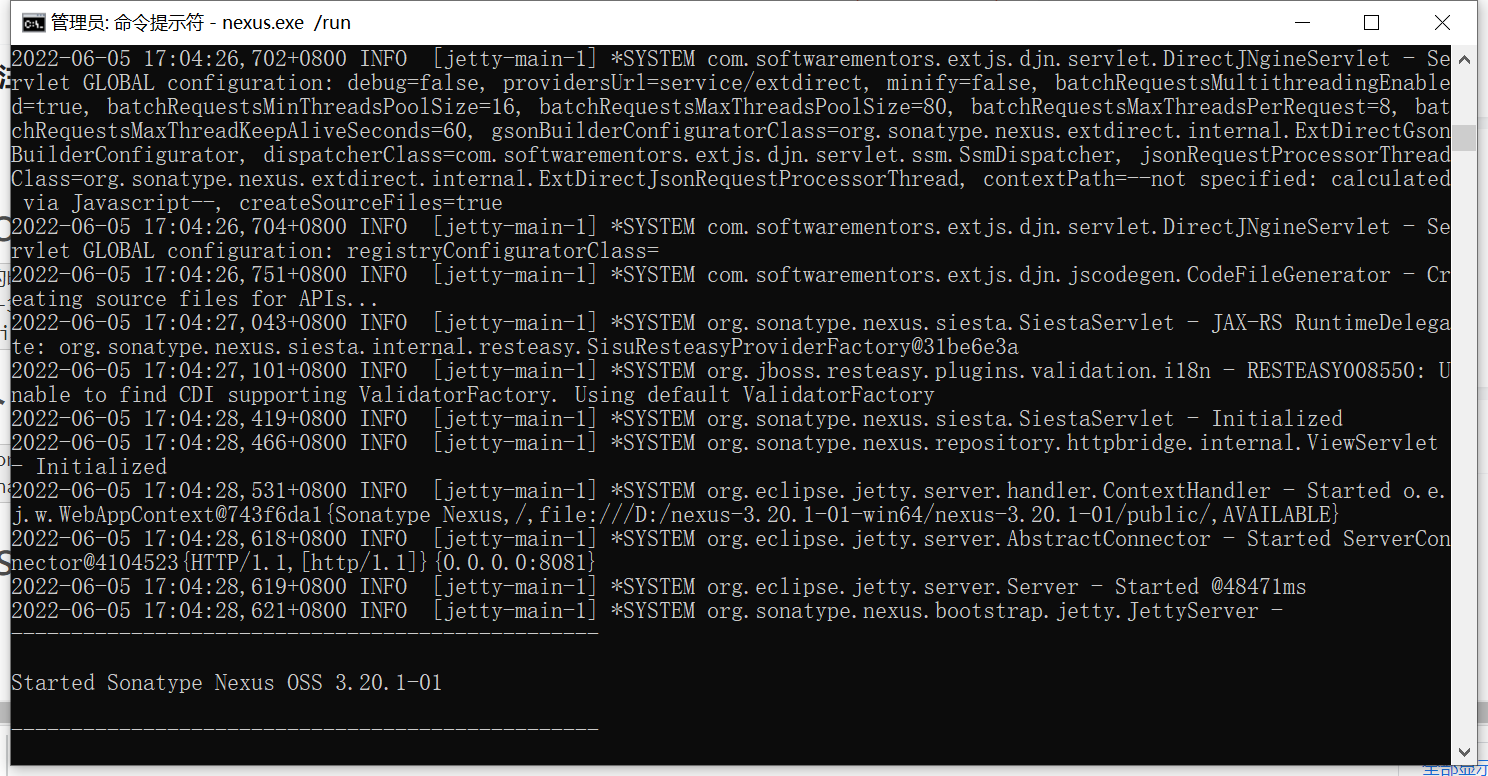
5.访问地址:http://127.0.0.1:8081/
修改为:admin/admin123
安装后的默认密码:D:\nexus-3.20.1-01-win64\sonatype-work\nexus3\admin.password
登录后提示修改密码,该文件消失了。
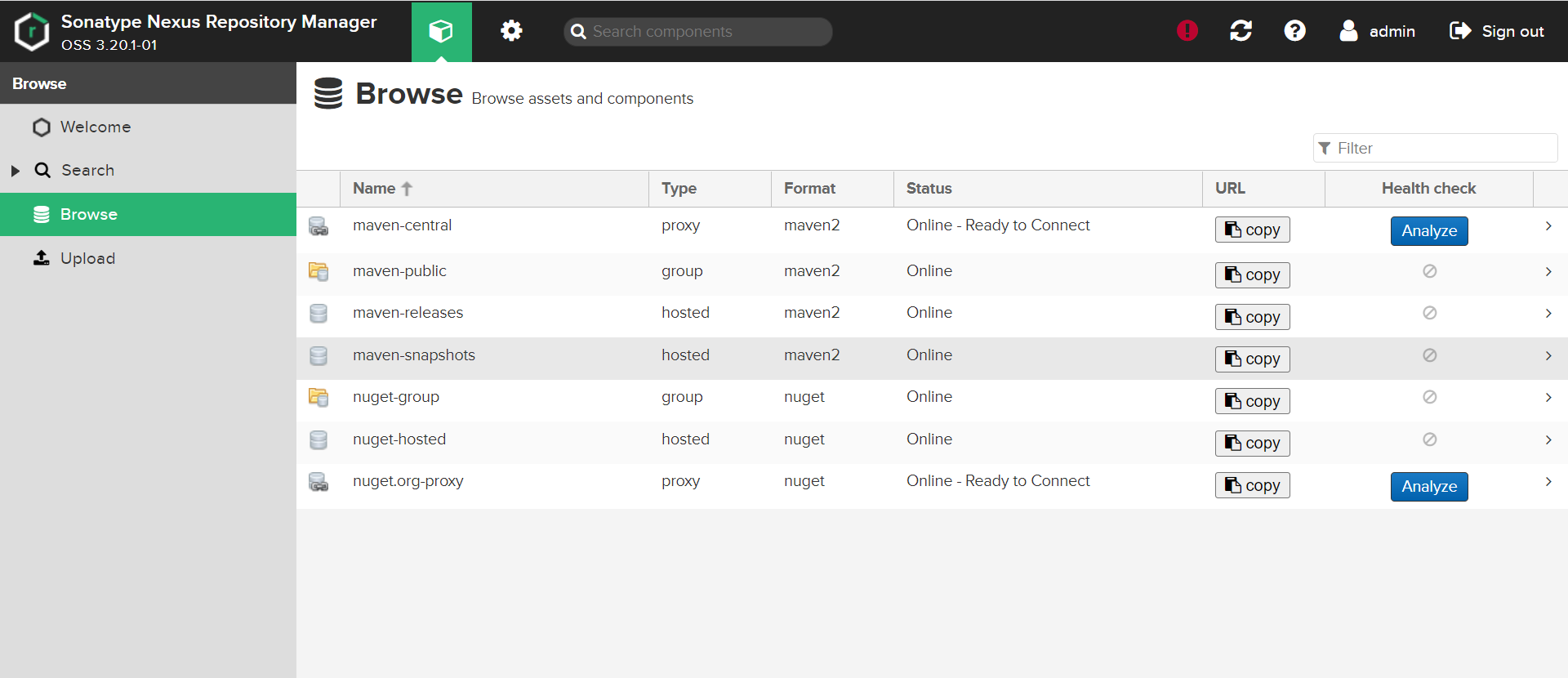
6.本地仓库地址:
http://127.0.0.1:8081/repository/maven-public/
http://127.0.0.1:8081/repository/maven-central/
7.maven配置文件 D:\apache-maven-3.2.3\conf\settings.xml 最终更新如下:
<profile>

      <id>nexus</id>

      <activation>

        <jdk>1.8</jdk>

      </activation>

      <repositories>

        <repository>

          <id>nexus</id>

          <name>LAN nexus</name>

          <url>http://127.0.0.1:8081/repository/maven-public/</url>

		  <releases>

            <enabled>true</enabled>

          </releases>

          <snapshots>

            <enabled>false</enabled>

          </snapshots>

        </repository>

      </repositories>

	  <pluginRepositories>

		<pluginRepository>

			<id>nexus central</id>

			<name>LAN nexus central</name>

			<url>http://127.0.0.1:8081/repository/maven-central/</url>

			<releases>

				<enabled>true</enabled>

			</releases>

			<snapshots>

				<enabled>false</enabled>

			</snapshots>

		</pluginRepository>

	  </pluginRepositories>

    </profile>
windows nexus-3.20安装的更多相关文章
- Windows 下 MySql 5.7.20安装及data和my.ini文件的配置(转)
Windows 下 MySql 5.7.20安装及data和my.ini文件的配置 本文通过图文并茂的形式给大家介绍了MySql 5.7.20安装及data和my.ini文件的配置方法. my ...
- MySQL 8.0.20 安装教程图文详解(windows 64位)
MySQL 8.0.20 安装教程图文详解(windows 64位) 更新时间:2020年05月09日 15:09:04 转载 作者:瘦肉粥不加糖 这篇文章主要介绍了MySQL 8.0. ...
- Windows下的Memcache安装 linux下的Memcache安装
linux下的Memcache安装: 1. 下载 memcache的linux版本,注意 memcached 用 libevent 来作事件驱动,所以要先安装有 libevent. 官方网址:http ...
- Windows平台配置免安装的MySQL
1.下载 官网下载免安装文件(本文使用的是mysql-5.6.33-win32.zip)解压到E:\MySQL\mysql-5.6.33打开E:\MySQL\mysql-5.6.33\my-defau ...
- DEDECMS最新5.7版在Windows下的Memcache安装
一,织梦后台后台设置进入系统后台,在[系统基本参数]下面的"性能选项"卡当中,关于memcache进行如下配置: cfg_memcache_enable : 是否启用memcach ...
- 分布式进阶(一)Windows 7下硬盘安装Ubuntu 14.04图文教程
Windows 7下硬盘安装Ubuntu 14.04图文教程 本人下载的是ubuntu-14.04.2-desktop-amd64.iso,经本人亲自测试的,折腾了一天的时间. 1)首先还是分区,在计 ...
- Windows下SQLMAP的安装图解
第一步:BurpSuite扫描工具安装 //来源:http://www.mamicode.com/info-detail-563355.html Burp Suite 是用于渗透测试web 应用程序的 ...
- Windows+Python+anaconda机器学习安装及环境配置步骤
Windows+Python+anaconda机器学习安装及环境配置步骤 1. 下载安装python3.6以上版本(包含pip,不用自己安装)2. 直接下载安装pycharm安装包(用于编写pytho ...
- windows+nexus+maven环境搭建(转)
windows nexus环境搭建 1.下载nexus 版本为 nexus-2.11.4-01-bundle 下载地址 这里写链接内容 2.将下载好的文件放到D盘进行解压 3.解压后目录结构 nexu ...
- tensor搭建--windows 10 64bit下安装Tensorflow+Keras+VS2015+CUDA8.0 GPU加速
windows 10 64bit下安装Tensorflow+Keras+VS2015+CUDA8.0 GPU加速 原文见于:http://www.jianshu.com/p/c245d46d43f0 ...
随机推荐
- 同程旅行基于 RocketMQ 高可用架构实践
简介: 我们在几年前决定引入 MQ 时,市场上已经有不少成熟的解决方案,比如 RabbitMQ , ActiveMQ,NSQ,Kafka 等.考虑到稳定性.维护成本.公司技术栈等因素,我们选择了 R ...
- 解密万亿参数M6模型预训练背后的分布式框架Whale
简介: 最近,阿里云PAI团队和达摩院智能计算实验室一起发布"低碳版"巨模型M6,大幅降低万亿参数超大模型训练能耗.借助我们自研的Whale框架仅使用480卡GPU,即训练出了规 ...
- [FAQ] PHP+Nginx 架构网站 502 和 504 问题
502 Bad Gateway:作为网关或者代理工作的服务器尝试执行请求时,从上游服务器接收到无效的响应.504 Gateway Time-out:作为网关或者代理工作的服务器尝试执行请求时,未能及时 ...
- js的几个截取
jsfun(){ let str = '01234567' let str1 str1 = str.slice(2,5) ...
- 网站访问速度优化实战:CDN源/Nginx压缩/全站CDN加速
前言 接触到CDN的起因: 我自己搭建的网站https://price.monitor4all.cn/网页打开的速度一直比较慢,经查证是我的网站有很多静态js大文件,通过浏览器读取这些js比较耗时间. ...
- 大模型_2.1:Prompt进阶
目录: 1.Prompt frameWork 2.Prompt 结构化格式 3.如何写好结构化 Prompt ? 4.Zero-Shot Prompts 5.Few-Shot Prompting 6. ...
- 关于ITIL的习惯性误解
关于ITIL的习惯性误解 1. ITIL是标准?不是!ITIL本质是一套适合西方社会信息化阶段的 模板原版教材 最佳实践(Best Practice),不是标准. 大量的培训师和咨询顾问将其包装成&q ...
- anaconda3部署以及使用详解
Anaconda3-2019.10-Linux-x86_64.sh 某次执行Python程序,其中两个错误信息如下: ImportError: libcblas.so.3: cannot open s ...
- python小功能
django实现将linux目录和文件名列出来 def index(request): obj=models.USER.objects.all() fileroot = 'd:\machangwei' ...
- Linux搭建ESP-IDF开发环境
下载esp-gitee-tools git clone git@gitee.com:EspressifSystems/esp-gitee-tools.git 替换github网址 cd esp-git ...